Bat: How to configure bat to clean screen after showing a man page
I've configured bat to be man pager(export MANPAGER="sh -c 'col -bx | bat -l man -p'").
It works perfectly but when I press q the content of the man page is still shown in the terminal.
The default man pagers like less or more remove the page from the terminal.
Is there any way to configure bat to have the same behavior?
 f-squirrel
All 4 comments
Thank you for your report. That is not the case for me.
Can you please post the output of the script at https://github.com/sharkdp/bat/blob/master/diagnostics/info.sh in order for us to get more information about your system?
 sharkdp
on 4 Oct 2020
sharkdp
on 4 Oct 2020
@sharkdp , thank you for quick reply, please see the results below:
zsh ./info.sh
system
------

**$ uname -srm**
Darwin 19.5.0 x86_64

**$ sw_vers**
ProductName:    Mac OS X
ProductVersion: 10.15.5
BuildVersion:   19F101

bat
---

**$ bat --version**
bat 0.15.4

**$ env**
PAGER=less

bat_config
----------

bat_wrapper
-----------

No wrapper script for 'bat'.

bat_wrapper_function
--------------------

No wrapper function for 'bat'.

No wrapper function for 'cat'.

tool
----

**$ less --version**
less 487 (POSIX regular expressions)
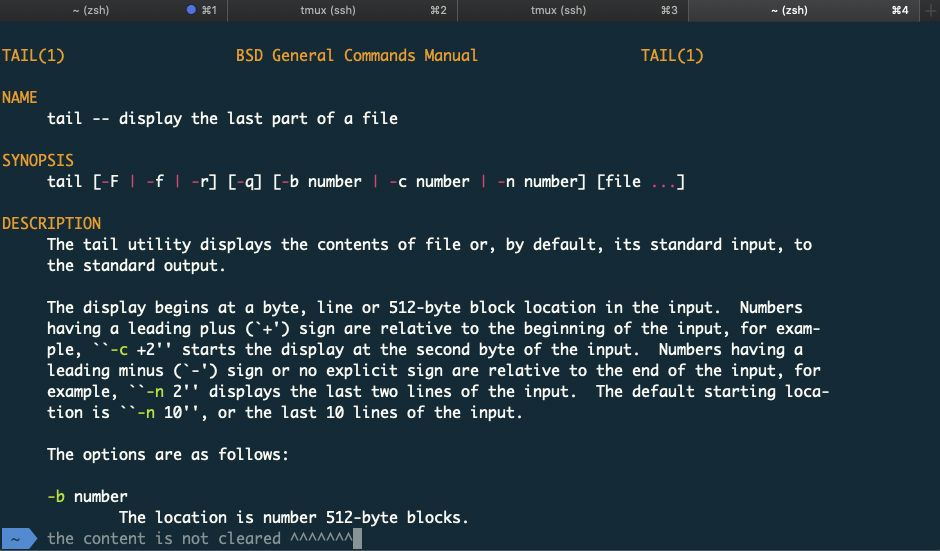
f-squirrel
on 5 Oct 2020
Ok, I can actually reproduce it with this version of less (487 is quite old).
You can try to set
export MANPAGER="sh -c 'col -bx | bat -l man -p --pager=\"less -FR\"'"
without the -X option for less.
sharkdp
on 5 Oct 2020
@sharkdp , it works like a charm!
Thank you!
f-squirrel
on 5 Oct 2020
Related issues
sharkdp
·
45Comments
 ghost
·
21Comments
ghost
·
21Comments
 LunarLambda
·
23Comments
LunarLambda
·
23Comments
 tbrodbeck
·
30Comments
tbrodbeck
·
30Comments
 Aankhen
·
17Comments
Aankhen
·
17Comments
Most helpful comment
Ok, I can actually reproduce it with this version of
less(487 is quite old).You can try to set
without the
-Xoption forless.