Bat: `man` syntax doesn't highlight bold functions correctly
Terminals tested: alacritty, mate-terminal, urxvt
bat --version: 0.12.0 (Installed via cargo install bat)
$MANPAGER: bat --paging=never -pl man 1
Output with MANPAGER='bat -pl man'

Output with MANPAGER='' or MANPAGER='less'

The issue seems to be with highlighting functions / page references (foo(...)) when bold output is used.
When using col -b as suggested, it becomes even worse:
Output with MANPAGER='sh -c "col -b | bat -pl man"'
 LunarLambda
All 23 comments
Thank you for the detailed bug report!
I'm going to assume that you are using man sprintf in your examples(?).
To figure out what's going on in detail, we can actually use bat -A to show what exactly man outputs:
MANPAGER="bat -A" man sprintf
After finding the corresponding section, we can take a look at how man prints bold text. It is both fascinating and infuriating. Instead of using ANSI escape sequences, it prints
p␈pr␈ri␈in␈nt␈tf␈f
for a bold printf (bat -A shows ␈ instead of the \b backspace character). I believe this is how "bold" was done in the times of typewriters. You would hit backspace and then just re-type the same character to give it more weight.
On todays terminal emulators, that doesn't actually work. If you use MANPAGER="" or MANPAGER="cat", no bold text will be shown. To make sure, we can also call
printf "p\bpr\bri\bin\bnt\btf\bf\n"
which will just print printf on the terminal.
Interestingly, less has a special feature that shows such sequences in bold. Quoting from man less: "Also, backspaces which appear between two identical characters are treated specially: the overstruck text is printed using the terminal's hardware boldface capability. Other backspaces are deleted, along with the preceding character". This is why we see a bold face printf, when we call
printf "p\bpr\bri\bin\bnt\btf\bf\n" | less
There is also a similar feature for underlined text:
printf "p\b_r\b_i\b_n\b_t\b_f\b_\n" | less
Back to bat. When I initially played with this, I noticed that these backspace characters were causing problems when intermixed with bats syntax highlighting. Imagine we have
int printf(const char* format, ...);
in a man page and the whole line is printed in bold (beginning of man sprintf). The syntax highlighter will try to highlight certain special characters like the opening parenthesis (. However, that breaks the backspace-for-bold-font-trick and actual backspace characters will start appearing in your output.
For this reason, I originally used col -b (col --no-backspaces), which turns something like "p\bpr\bri\bin\bnt\btf\bf into printf:
▶ printf "p\bpr\bri\bin\bnt\btf\bf\n" | bat -Ap
p␈pr␈ri␈in␈nt␈tf␈f␊

▶ printf "p\bpr\bri\bin\bnt\btf\bf\n" | col -b | bat -Ap
printf␊
Unfortunately, I missed that col -b "also replaces any whitespace characters with tabs where possible". This is what breaks the table layout in the above example. Fortunately, we can switch this off via cols -x/--spaces option.
The following works for me:
MANPAGER="sh -c 'col -bx | bat -p -lman'" man sprintf

I think we should update the instructions in the README to suggest col -bx.
Unfortunately, it looks like your col command does things a little differently. I couldn't exactly reproduce your screenshots above. My version is:
▶ col --version
col from util-linux 2.34
 sharkdp
on 6 Sep 2019
sharkdp
on 6 Sep 2019
I have col from util-linux 2.33.2.
Unfortunately MANPAGER='sh -c "col -bx | bat -plman"' man sprintf yields the following

LunarLambda
on 6 Sep 2019
In this case, it does not seem like col is the problem. Could you please post the output of alias bat and the output of the following bash script?
set -x

bat --version
bat --config-file
bat --cache-dir
less --version

bat "$(bat --config-file)"
ls "$(bat --cache-dir)"

set +x

echo "BAT_PAGER = '$BAT_PAGER'"
echo "BAT_CONFIG_PATH = '$BAT_CONFIG_PATH'"
echo "BAT_STYLE = '$BAT_STYLE'"
echo "BAT_THEME = '$BAT_THEME'"
echo "BAT_TABS = '$BAT_TABS'"
echo "PAGER = '$PAGER'"
echo "LESS = '$LESS'"
++ alias bat
bash: alias: bat: not found
++ bat --version
bat 0.11.0
++ bat --config-file
/home/luna/.config/bat/config
++ bat --cache-dir
/home/luna/.cache/bat
++ less --version
less 551 (POSIX regular expressions)
Copyright (C) 1984-2019  Mark Nudelman

less comes with NO WARRANTY, to the extent permitted by law.
For information about the terms of redistribution,
see the file named README in the less distribution.
Home page: http://www.greenwoodsoftware.com/less
+++ bat --config-file
++ bat /home/luna/.config/bat/config
[bat error]: '/home/luna/.config/bat/config': No such file or directory (os error 2)
+++ bat --cache-dir
++ ls --color=auto /home/luna/.cache/bat
ls: cannot access '/home/luna/.cache/bat': No such file or directory
++ set +x
BAT_PAGER = ''
BAT_CONFIG_PATH = ''
BAT_STYLE = ''
BAT_THEME = ''
BAT_TABS = ''
PAGER = ''
LESS = ''
Hm, nothing unusual there.
It would be great if you could show two other screenshots:
One for:
MANPAGER='sh -c "col -bx | bat -plman --color=never"' man sprintf
and one for
MANPAGER='sh -c "col -bx | bat -Ap"' man sprintf
1:

2:

These are once again using alacritty, but I got the same results with various vte-based terminals (gnome-terminal, etc), and urxvt.
LunarLambda
on 6 Sep 2019
I've got an idea. What does type man or which man say for you? Is it calling /usr/bin/man or is it some shell function wrapping the real man (and possibly trying to add some colors itself)?
sharkdp
on 6 Sep 2019
/usr/bin/man, nothing special here.
I'm using Zsh, but little to no configuration (no oh-my-zsh, any aliases replacing commands, etc...)
file $(which man) reports a ELF exe, so no wrapper script there either.
LunarLambda
on 6 Sep 2019
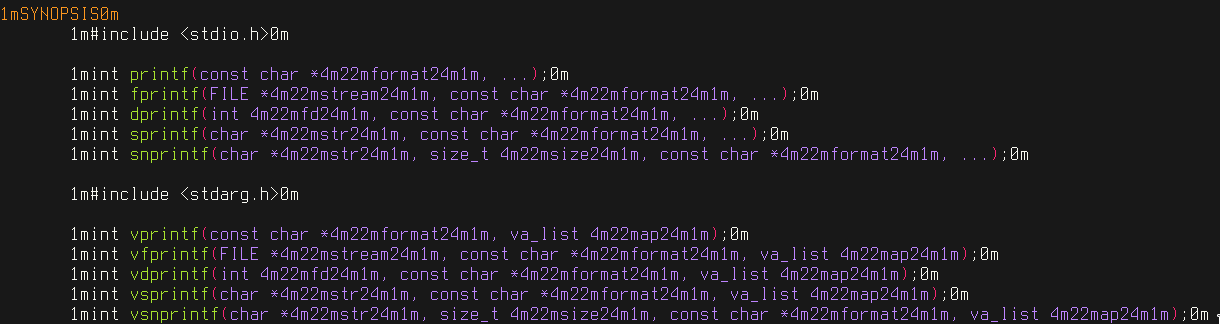
Okay. So the output is definitely already messed up when it reaches bat (messed up = contains parts of ANSI escape sequences like 1m, 24m etc.). It could be either man itself (does MANPAGER="" man sprintf show colors for you?) or col -bx.
If col is the problem, you could check the output of
MANPAGER="bat -Ap" man sprintf
directly. It should contain plenty of backspace characters, but no ANSI escape sequences.
Thank you very much for following along!
sharkdp
on 6 Sep 2019
MANPAGER="" man sprintf shows bold and underline text (no pager though)
MANPAGER="bat -Ap" man sprintf shows this...

Oh thank you for taking on the issue, bat has become an inexpendable tool for me (so much so I have an alias b='bat -pn', haha)
LunarLambda
on 6 Sep 2019
I also ran it with MANPAGER="cat -A"
Plenty of ansi sequences, but no backspaces, very weird...
^[[1m -> bold on
^[[0m -> bold off
^[[4m -> underline on
^[[24m -> underline off
^[[22m -> color off/bold off

LunarLambda
on 6 Sep 2019
Ok. It looks like your version of man actually uses ANSI escape sequences already.
It might be worth going through man man or man --help to see if there is anything to turn this off. Might also be worth to check the values of man-related environment variables (eg MANOPT).
sharkdp
on 6 Sep 2019
man itself has no such option.
Using a very hacky strace oneliner I got the execution chain for a man invocation. One of these programs will probably have an option for it, however I can't actually find anything right now...

LunarLambda
on 6 Sep 2019
grotty can use the old format (using backspaces) by passing the -c option or setting GROFF_NO_SGR
grotty -c -b -u would use the old format (no SGR sequences), and supresses overstriking and underlining for bold/italic respectively. However, I have no clue how to propagate that option through the entire chain short of writing a wrapper script around grotty...
Perhaps just being able to pass -c would be enough.
LunarLambda
on 7 Sep 2019
Hm. We could try to remove ANSI codes from the output (instead of using col -bx). See this page, for example. It won't be pretty :smile:
Might make sense to move this to a separate script that can be used as MANPAGER.
In the future, we could potentially also try to find a proper/better solution by pre-processing within bat.
sharkdp
on 7 Sep 2019
Well.
MANROFFOPT="-c" MANPAGER="sh -c 'col -bx | bat -plman'" man sprintf Finally worked. No bold or underlined text, but it finally displays correctly :D
While this presents a working solution for now, I'd suggest either keeping this issue open, or opening a new one, as this is rather hacky. (although it was fun learning experience about the joys of old unix tech!)

LunarLambda
on 7 Sep 2019
I'd like to close this. It is now described in the README, and I currently don't see a better solution.
sharkdp
on 15 Oct 2019
Understandable ^^
LunarLambda
on 16 Oct 2019
You should mention in the README that bold highlighting is unsupported - I was quite confused, and this issue doesn't really go into that.
 xerus2000
on 21 Jun 2020
xerus2000
on 21 Jun 2020
Seriously? This issue "doesn't really go into that"? We have spent hours to debug this and have written extremely detailed comments that document everything.
You should mention in the README that bold highlighting is unsupported
Nobody "should" do anything here, but I agree that it's probably a good idea to add that. Contributions to the documentation are always welcome.
sharkdp
on 22 Jun 2020
Hey, sorry if that was phrased unappreciative. I did read the comments and it was quite informative, but to me seemed mostly concerned with the problems of the control characters used for boldness messing up the output.
What I was wondering is whether this could actually be changed to interpret boldness. I am writing a man page myself and would like to see it as the end users see it, so I currently have to use less, but much prefer the overall look of bat :)
xerus2000
on 23 Jun 2020
I'm going to reopen this, as there might actually be a way to solve this, if we write a man preprocessor within bat.
sharkdp
on 25 Jul 2020
I ran into this as well using Windows Terminal with bat as a man pager. The settings recommended by @LunarLambda in https://github.com/sharkdp/bat/issues/652#issuecomment-529032263 resolved my problem. 👍
 damien
on 19 Nov 2020
damien
on 19 Nov 2020
Related issues
 joeycozza
·
20Comments
joeycozza
·
20Comments
 hoffa
·
18Comments
hoffa
·
18Comments
 rgwood
·
24Comments
rgwood
·
24Comments
 itkovian
·
31Comments
itkovian
·
31Comments
 andreyorst
·
17Comments
andreyorst
·
17Comments
Most helpful comment
Well.
MANROFFOPT="-c" MANPAGER="sh -c 'col -bx | bat -plman'" man sprintfFinally worked. No bold or underlined text, but it finally displays correctly :DWhile this presents a working solution for now, I'd suggest either keeping this issue open, or opening a new one, as this is rather hacky. (although it was fun learning experience about the joys of old unix tech!)