Bat: Complete collection of syntax highlighting test files
With all the recent news about Hacktoberfest I thought it would be a good idea to point out good beginner issues that would be actually helpful for bat. In the past years, I have actually experienced Hacktoberfest as a really great event - both as a contributor as well as a maintainer.
As of recently, bat has a set of syntax highlighting regression tests (see #1124 for more details). The main idea is that we have a large collection of test files for each and every language that bat can highlight. This way, we can make sure that we do not run into issues we had in the past where either (1) syntax highlighting for some language is suddenly not working anymore or (2) bat suddenly crashes/panics for some input (due to incompatibilities in the regex flavors in syntect and Sublime Text).
In order to add a new test file, you can follow these steps (let's take "Ruby" as an example):
- Make sure that you are running the latest version of
bat(masterorbat0.16) and thatbatis available on the path. - Find an example Ruby source file or write one yourself. If possible, the file should aim to be "comprehensive" (i.e. include a lot of the possible syntax), but this is not strictly necessary. A simple file is better than none at all. Also, the files shouldn't be gigantic.
- Save the file in
tests/syntax-tests/source/Ruby(adapt for your language). The file name could betest.rb(adapt extension) but can also be adapted if that is necessary in order forbatto highlight it correctly (e.g.Makefile). If you have copied the file from somewhere else, please make sure that the file may be copied under the respective license and that the license is compatible with
bats license. If it requires attribution, please add aLICENSE.mdin the same folder with a text like this:The `test.rb` file has been added from [enter source here] under the following license: [add license text here]- Go to
tests/syntax-testsand run theupdate.shBash script. A new file should be generated in thehighlightedfolder (e.g.highlighted/Ruby/test.rb). - Use
catorbat --language=txtto display the content of this file and make sure that the syntax highlighting looks correct. git addthe new files in thesourcefolder as well as the autogenerated files in thehighlightedfolder.- Commit and submit a PR! Please reference this issue (#1213).
List of languages / syntaxes:
- [x] ActionScript
- [x] Apache Conf
- [ ] AppleScript
- [x] ARM Assembly
- [x] AsciiDoc (Asciidoctor)
- [ ] ASP
- [x] Assembly (x86_64)
- [x] AWK
- [x] Batch File
- [x] BibTeX
- [x] Bourne Again Shell (bash)
- [x] C
- [x] C#
- [x] C++
- [ ] Cabal
- [x] Clojure
- [x] CMake
- [ ] CoffeeScript
- [x] CpuInfo (
/proc/cpuinfo) - [x] Crystal
- [x] CSS
- [x] CSV
- [x] D
- [x] Dart
- [x] Diff
- [x] Dockerfile
- [x] DotENV
- [x] Elixir
- [x] Elm
- [x] Email
- [x] Erlang
- [ ] F#
- [ ] Fortran
- [ ] Friendly Interactive Shell (fish)
- [x] fstab
- [x] Git Attributes
- [x] Git Config
- [x] Git Ignore
- [x] GLSL
- [x] Go
- [x] GraphQL
- [x] Graphviz (DOT)
- [x] Groovy
- [x]
/etc/group - [x] Haskell
- [x] Highlight non-printables (
--show-all) - [x]
/etc/hosts - [x] HTML
- [x] INI
- [x] Java
- [ ] Java Server Page (JSP)
- [x] JavaScript
- [x] Jinja2
- [x] JSON
- [ ] jsonnet
- [x] Julia
- [x] Kotlin
- [x] LaTeX
- [x] Less
- [x] Lisp
- [ ] Literate Haskell
- [x] Lua
- [x] Makefile
- [x] Manpage
- [x] Markdown
- [x] MATLAB
- [x] MemInfo (
/proc/meminfo) - [ ] NAnt Build File
- [x] nginx
- [x] Nim
- [x] Nix
- [ ] Objective-C
- [ ] Objective-C++
- [x] OCaml
- [x] orgmode
- [x] Pascal
- [x]
/etc/passwd - [x] Perl
- [x] PHP
- [x] Plain Text
- [x] PowerShell
- [x] Protocol Buffer
- [ ] Puppet
- [x] PureScript
- [x] Python
- [x] QML
- [x] R
- [ ] Rego
- [ ] Regular Expression
- [x]
requirements.txt - [ ] resolv (
/etc/resolv.conf) - [x] reStructuredText
- [ ] Robot Framework.
- [x] Ruby
- [ ] Ruby Haml
- [ ] Ruby on Rails
- [x] Rust
- [x] Salt State (SLS)
- [x] Sass
- [x] Scala
- [x] SCSS
- [x] SML
- [x] SQL
- [x] SSH Config
- [x] SSHD Config
- [ ] Strace
- [ ] Stylus
- [x] Swift
- [ ] syslog
- [ ] Tcl
- [x] Terraform
- [x] TeX
- [ ] Textile
- [x] TOML
- [x] TypeScript
- [ ] TypeScriptReact
- [ ] varlink
- [ ] Verilog
- [ ] VimL
- [x] Vue Component
- [x] XML
- [x] YAML
It would be great if we could focus on the syntaxes in sublimehq/Packages first (marked in bold) as this would allow us to merge #1174 without having to worry (too much) about syntax highlighting regressions. Also, most of these are really popular languages, so it makes sense to have them in the test suite.
 sharkdp
All 45 comments
Can I submit a python file for this issue?
 adgai19
on 3 Oct 2020
adgai19
on 3 Oct 2020
Can I submit a python file for this issue?
yes :+1:
sharkdp
on 3 Oct 2020
I will submit a elixir file soon :)
 uduDudu
on 3 Oct 2020
uduDudu
on 3 Oct 2020
i am not able to run bash update.sh it gives me error :
File "/usr/lib/python3.8/subprocess.py", line 1702, in _execute_child
raise child_exception_type(errno_num, err_msg, err_filename)
FileNotFoundError: [Errno 2] No such file or directory: 'bat'
 AkshatGadhwal
on 4 Oct 2020
AkshatGadhwal
on 4 Oct 2020
@AkshatGadhwal @sharkdp I was also thinking about it. I think the script should first try to run a _locally_ built binary from target/ if one is available. I'm not very familiar with Rust workflows yet though.
 dmbaturin
on 4 Oct 2020
dmbaturin
on 4 Oct 2020
I'm also getting an error
Traceback (most recent call last):
  File "create_highlighted_versions.py", line 85, in <module>
    create_highlighted_versions(output_basepath=args.output)
  File "create_highlighted_versions.py", line 35, in create_highlighted_versions
    ["bat"] + BAT_OPTIONS + [source], stderr=subprocess.PIPE, env=env,
  File "/usr/lib/python3.6/subprocess.py", line 356, in check_output
    **kwargs).stdout
  File "/usr/lib/python3.6/subprocess.py", line 423, in run
    with Popen(*popenargs, **kwargs) as process:
  File "/usr/lib/python3.6/subprocess.py", line 729, in __init__
    restore_signals, start_new_session)
  File "/usr/lib/python3.6/subprocess.py", line 1364, in _execute_child
    raise child_exception_type(errno_num, err_msg, err_filename)
FileNotFoundError: [Errno 2] No such file or directory: 'bat': 'bat'
 CCreativeCND
on 4 Oct 2020
CCreativeCND
on 4 Oct 2020
@CCreativeCND The solution is to add the target/debug/ dir to your $PATH, or copy the binary target/debug/bat to somewhere in your $PATH. That's assuming you run cargo build wihout changing any build options (else the target may be something else than debug).
dmbaturin
on 4 Oct 2020
FileNotFoundError: [Errno 2] No such file or directory: 'bat': 'bat'
See step 1 of the instructions above: "Make sure that you are running the latest version of bat (preferably master, but the latest release should also work) and that bat is available on the path."
We could probably improve the error message in the Python script.
sharkdp
on 4 Oct 2020
Hey @sharkdp :wave:
We could probably improve the error message in the Python script.
This looks like a simple try catch statement. I'll be happy to submit a PR to add this if it helps :)
 Mithil467
on 5 Oct 2020
Mithil467
on 5 Oct 2020
which files are supposed to be changed??
by running bash update.sh all the files in the 'highlights' folder are modified.
AkshatGadhwal
on 5 Oct 2020
which files are supposed to be changed??
by runningbash update.shall the files in the 'highlights' folder are modified.
Please make sure that you are running the latest version of bat. Only one new file should be generated.
sharkdp
on 5 Oct 2020
which files are supposed to be changed??
by runningbash update.shall the files in the 'highlights' folder are modified.Please make sure that you are running the latest version of bat. Only one new file should be generated.
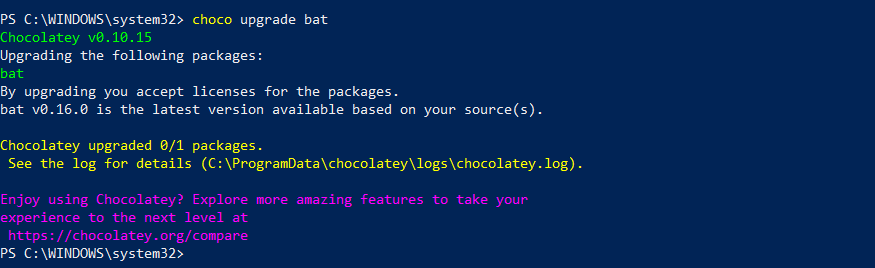
i run choco upgrade bat but it is showing that you have the latest version v0.16.0
AkshatGadhwal
on 5 Oct 2020
@AkshatGadhwal What is the output for bat -V? Must be 0.16.0. Otherwise you may have conflicting installations.
Mithil467
on 5 Oct 2020
@Mithil467 yes it is 0.16.0
AkshatGadhwal
on 5 Oct 2020
@Mithil467 yes it is 0.16.0
should I discard the changes in other files?
AkshatGadhwal
on 5 Oct 2020
No, do not run chocho upgrade, but just bat -V. That should give you the version for the bat that is installe and detected on path.
Mithil467
on 5 Oct 2020
No, do not run chocho upgrade, but just
bat -V. That should give you the version for the bat that is installe and detected on path.
I did that too.

AkshatGadhwal
on 5 Oct 2020
I did that too.
Hm... I see that you opened a PR now anyway. Did it work for you? Or did you simply exclude all other files?
Maybe there is an incompatibility problem when running these scripts in Windows? Has someone else used Windows to make their change?
sharkdp
on 5 Oct 2020
I pulled your branch locally and did ./update.sh. And I do see some changes in highlighted test.dart.
Diff shows -
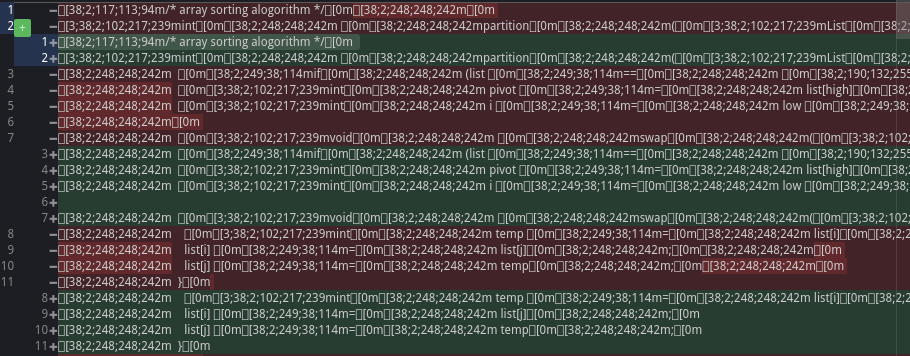
Also, the dart file has ^M characters (\r) in it, which might be an issue?
Mithil467
on 5 Oct 2020
I did that too.
Hm... I see that you opened a PR now anyway. Did it work for you? Or did you simply exclude all other files?
Maybe there is an incompatibility problem when running these scripts in Windows? Has someone else used Windows to make their change?
I discarded other changes
AkshatGadhwal
on 5 Oct 2020
I pulled your branch locally and did ./update.sh. And I do see some changes in highlighted test.dart.
Diff shows -
Also, the dart file has ^M characters (\r) in it, which might be an issue?
yes, you are right \r is creating an issue.
to run bash update.sh I had to run dos2unix update.sh
AkshatGadhwal
on 5 Oct 2020
Not the update.sh file, but your test.dart file.
Mithil467
on 5 Oct 2020
Ok, this looks like a line ending problem indeed. I just opened https://github.com/sharkdp/bat/pull/1254 which might fix this (after it is merged and after you re-cloned the repository).
sharkdp
on 5 Oct 2020
Not the update.sh file, but your test.dart file.
so what I supposed to do now,
when I committed two files were created
- test.dart in highlighted/Dart folder
- test.dart in source/Dart folder
AkshatGadhwal
on 5 Oct 2020
After #1254 is merged into master, you may pull the branch and update your fork's branch as well. Then rerun the changes.
Alternatively an easier way would be to run-
git remote add upstream http://github.com/sharkdp/bat
git fetch upstream
git checkout your_test_feature_branch
git reset upstream/master
This would update your local branch with the main repo's master.
Then you may re run the update.sh script and redo the process. You'll need to force push finally.
Mithil467
on 5 Oct 2020
After #1254 is merged into master
it has been merged by now.
sharkdp
on 5 Oct 2020
Edit: Moving this comment to the topmost post.
sharkdp
on 5 Oct 2020
@sharkdp What do you think about taking example files from learn x in y minutes? We would still need to make them manually from their repo but it would be faster.
 henil
on 5 Oct 2020
henil
on 5 Oct 2020
I'm not an expert on open source licenses, but it seems like the CC BY-SA 3.0 license is not a really great fit for us:
ShareAlike — If you remix, transform, or build upon the material, you must distribute your contributions under the same license as the original.
It's not completely clear what this means for bat as a project if we were to modify the files.
sharkdp
on 5 Oct 2020
@sharkdp It's like GPL. You need to distribute modified versions of that file under the same license, CC-BY-SA. It only applies to that exact file in this case, since it's not a part of a larger work really and remains independent (by analogy, incorporating a CC-BY-SA song into a soundtrack of a CC-BY-NC-ND movie would be against the "share-alike" clause, but distributing songs under CC-BY-SA and other licenses on the same CD wouldn't).
dmbaturin
on 5 Oct 2020
@dmbaturin If that is the case, I'm also fine with adding files from this source. We should still check if they are really suited for our goal here. The large amount of comments in between is not too helpful, for example.
sharkdp
on 5 Oct 2020
@sharkdp Yeah, that's a much bigger obstacle. Examples from http://rosettacode.org (GFDL-licensed) can make much better placeholders until a comprehensive syntax test file can be found or made.
In fact, maybe a collection of _comprehensive_ syntax sample files should be a project of its own.
dmbaturin
on 5 Oct 2020
In fact, maybe a collection of _comprehensive_ syntax sample files should be a project of its own.
That would be really helpful, yes :smile:
sharkdp
on 5 Oct 2020
@sharkdp removing comments shouldn't be that hard. Maybe I can strip all the comments out and make a new project as @dmbaturin mentioned. As learn x in y minutes seems to cover all syntax of a particular language.
Let me know if you find it interesting.
EDIT: Just seen your comment. Will do it.
henil
on 5 Oct 2020
Ok, but maybe it should be discussed in a bit more detail before you spend too much time on this.
sharkdp
on 5 Oct 2020
Sure
henil
on 5 Oct 2020
@sharkdp I managed to hack around learnxinyminutes's repo repo to extract needed part with my dirty python script. Here syntax-samples.
I have also cleaned up the posts that where derivative of other languages. Or just explaination posts(like set theory...).
If we plan to go forward with it, It is a good starting point as it needs further processing. And I could use some help with that :)
henil
on 6 Oct 2020
Hi there!
This project seems pretty good, I would like to contribute by adding a Dockerfile sample file. I will open a Pull Request as soon as possible.
 grg121
on 10 Oct 2020
grg121
on 10 Oct 2020
Can I submit a perl file for this issue?
 Saul-BT
on 11 Oct 2020
Saul-BT
on 11 Oct 2020
Can I submit a perl file for this issue?
That would be great! :+1:
sharkdp
on 11 Oct 2020
Can I submit a Java file for this issue?
 IsuruAriyarathne
on 15 Oct 2020
IsuruAriyarathne
on 15 Oct 2020
Thanks, but we already have a Java test file
sharkdp
on 15 Oct 2020
@sharkdp Do you have any thoughts about how you would add one of these for Regular Expressions? I tried writing a regular expression literal in JS and that gets highlighted well.
 zjr
on 17 Oct 2020
zjr
on 17 Oct 2020
@sharkdp Do you have any thoughts about how you would add one of these for Regular Expressions? I tried writing a regular expression literal in JS and that gets highlighted well.
I think it should work fine if you choose a filename with .re extension. The content would be just the plain regex.
sharkdp
on 17 Oct 2020
I'd like to submit a D file if that's ok.
 frankschmitt
on 19 Oct 2020
frankschmitt
on 19 Oct 2020
Related issues
 mre
·
21Comments
mre
·
21Comments
 rgwood
·
24Comments
rgwood
·
24Comments
 septatrix
·
20Comments
septatrix
·
20Comments
 ghost
·
21Comments
ghost
·
21Comments
 joeycozza
·
20Comments
joeycozza
·
20Comments