Azurestorageexplorer: Azure Storage Explorer Stuck at loading
Storage Explorer Version: 1.4.0
Platform/OS Version: Windows 7
Architecture:
Regression From: Not working on any versions
Steps to Reproduce:
- https://azure.microsoft.com/en-in/features/storage-explorer/
- Install Azure Storage Explorer
- Open the application after installing.
Expected Experience:
It should prompt to login in to azure with credentials and should load azure storage window.
Actual Experience:
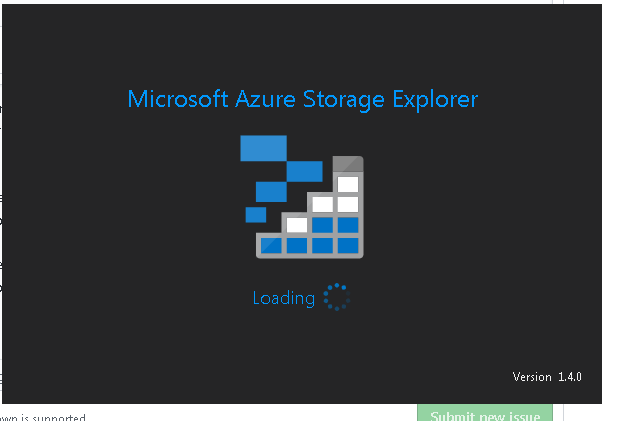
Microsoft Azure Storage Explorer is stuck at loading screen.
 vikramhegde123
All 20 comments
@vikramhegde123 , can you take a look in task manager and let me know how many storage explorer processes there are?
 MRayermannMSFT
on 14 Aug 2018
MRayermannMSFT
on 14 Aug 2018
I have the same issue!
In task manager, I see six processes names StorageExplorer.exe.
I am attempting to start Storage Explorer 1.7.0 on Windows 7.
 hawkins-dale
on 3 Apr 2019
hawkins-dale
on 3 Apr 2019
No one has posted a possible solution, so I will post what I did:
- Open Task Manager
- Go to the Processes Tab
- ensure that the Names are being ordered and find Microsoft Azure Storage Explorer (32 bit) ...
- Right click on the process and select End Task from the context menu
- Wait for the process to fully shut down (I had a Shutdown/Restart window show up for a while)
- Restart Storage Explorer.
Mine came up fine at that point. I'd like to know of a root cause and if I can do something to prevent this in the future.
Thanks!
 sscheider
on 24 Jun 2019
sscheider
on 24 Jun 2019
Hi, I too am seeing this problem.
MASE v1.12.0
Windows 10 Pro 1903
Just downloaded the latest version and it hangs on the startup screen. Previous version was doing the same thing.
Edit: If I leave MASE alone after about 15-20 minutes it finally loads. Works after that and will load much faster if closed and re-opened, however, after a reboot, the initial load again takes another ~20 minutes to load. And I don't have many resources. 4 ASQL, 1 ADW, 2 ADL
 mhammons
on 20 Jan 2020
mhammons
on 20 Jan 2020
Hi, We are seeing the same issue on multiple machines
MASE v1.12.0
Windows 7
Takes a long time to open, then will eventually crash whilst trying to authenticate. Eventually reports a .Net Framework Error saying install 4.6.2 or newer although running the latest version 4.8. ran a repair on .Net but no luck.
 darrenstilesag
on 17 Feb 2020
darrenstilesag
on 17 Feb 2020
Can y'all please do the following?
Collect Service Hub Logs
Clean the ServiceHub logs
- Open File Explorer and go to C:\Users\your username\AppData\Local\Temp\servicehub and delete the logs folder
Set Trace Level
- In the start menu search for path
- Choose "Edit the system environment variables" image
- In the dialog that pops up, click "Environment Variables...", and then in the next dialog click the first "New...", and finally name the variable SERVICEHUBTRACELEVEL and set the value to be ALL.
- Hit Ok's until all the dialogs are closed.
Repro and get us logs
- Open Storage Explorer
- Wait for the dialog to pop up
attach it here
MRayermannMSFT
on 18 Mar 2020
Hi Matthew,
I don’t have a servicehub folder under temp path:
[cid:[email protected]]
Logs attached.
mhammons
on 18 Mar 2020
Happening in mac (10.15.3) too. The application does not load. Any recommendation?
 prashanthkul
on 19 Mar 2020
prashanthkul
on 19 Mar 2020
Hi Matthew,
Just followed your instructions but nothing has happened.
Storage Explorer tries to load but nothing happens.
The only way I get Storage Explorer to load is to delete .IdentityService folder in AppData/Local
Thanks
Darren
darrenstilesag
on 19 Mar 2020
@prashanthkul here are similar instructions for you
Make sure MSAL is enabled
- Open Storage Explorer
- Make sure MSAL is enabled in the settings, if it isn’t, then enable and restart Storage Explorer
- Remove all accounts
- Close Storage Explorer
Clean the ServiceHub logs
- Open terminal
cd /Users/your username/.ServiceHub/logsopen .- In the Finder window that appears, delete everything, leave this finder window Finder open
Set Trace Level
- Go back to terminal
export SERVICEHUBTRACELEVEL=ALL- do not close this terminal
Repro and get us logs
Use the same terminal window from the previous section, you may have to modify the cd path depending on where you put our .app file.
cd /Applications/Microsoft\ Azure\ Storage\ Explorer.app/Contents/MacOS./Microsoft\ Azure\ Storage\ Explorer.- Repro the issue
- Go back to the Finder window from here, zip up everything in there, and send us the Zip
@darrenstilesag are you saying that deleting that folder unblocked you?
@mhammons your logs didn't make it. You have to come to github.com and attach the files here.
MRayermannMSFT
on 26 Mar 2020
Hi,
Originally, deleting the .identityservice folder worked each time I needed to log in to storage explorer, but more recently that stopped working. I have since upgraded to v1.11 and now storage explorer is working fine. I am running windows 7 (I know!) so not sure if this causes some issues not usually seen?
Anyway for me it’s all working and as soon as I get back to the office I’m upgrading to windows 10 so will try and upgrade storage explorer again.
Thanks
Darren
From: Matthew Rayermann [mailto:[email protected]]
Sent: 26 March 2020 16:28
To: microsoft/AzureStorageExplorer
Cc: Darren Stiles; Mention
Subject: Re: [microsoft/AzureStorageExplorer] Azure Storage Explorer Stuck at loading (#578)
@prashanthkulhttps://github.com/prashanthkul here are similar instructions for you
Make sure MSAL is enabled
- Open Storage Explorer
- Make sure MSAL is enabled in the settings, if it isn’t, then enable and restart Storage Explorer
- Remove all accounts
- Close Storage Explorer
Clean the ServiceHub logs
- Open terminal
- cd /Users/your username/.ServiceHub/logs
- open .
- In the Finder window that appears, delete everything, leave this finder window Finder open
Set Trace Level
- Go back to terminal
- export SERVICEHUBTRACELEVEL=ALL
- do not close this terminal
Repro and get us logs
Use the same terminal window from the previous section, you may have to modify the cd path depending on where you put our .app file.
- cd /Applications/Microsoft\ Azure\ Storage\ Explorer.app/Contents/MacOS
- ./Microsoft\ Azure\ Storage\ Explorer.
- Repro the issue
- Go back to the Finder window from here, zip up everything in there, and send us the Zip
@darrenstilesaghttps://github.com/darrenstilesag are you saying that deleting that folder unblocked you?
@mhammonshttps://github.com/mhammons your logs didn't make it. You have to come to github.com and attach the files here.
—
You are receiving this because you were mentioned.
Reply to this email directly, view it on GitHubhttps://github.com/microsoft/AzureStorageExplorer/issues/578#issuecomment-604530300, or unsubscribehttps://github.com/notifications/unsubscribe-auth/ALXAXXCT5JAVP5Q5AYN7HJTRJN7A5ANCNFSM4FPPM3TQ.
Consider the environment and think before you print this email.
Proud partner of The Ageas Bowl.
This email has been sent by and on behalf of one or more of Ageas (UK) Limited (registered no: 1093301 ), Ageas Insurance Limited (registered no: 354568), Ageas Retail Limited (registered no: 1324965), or a subsidiary of Ageas (UK) Limited (together “Ageas UK”). Ageas UK companies are registered in England and Wales, and each entity’s registered office is Ageas House, Hampshire Corporate Park, Templars Way, Eastleigh SO53 3YA.
Ageas Retail Limited is authorised and regulated by the Financial Conduct Authority. Financial Services Register Number: 312468.
Ageas Insurance Limited is authorised by the Prudential Regulation Authority and regulated by the Financial Conduct Authority and the Prudential Regulation Authority. Financial Services Register Number: 202039
This e-mail together with any attachments are intended for the addressee only and may be private and confidential. If you are not the intended recipient, or the person responsible for delivering it to the intended recipient, you must not open any attachments, or copy, disclose, distribute, retain or use this e-mail, including any attachments, in any way whatsoever; please return it to us immediately using the reply facility on e-mail.
Consider the environment and think before you print this email.
darrenstilesag
on 27 Mar 2020
@darrenstilesag I'm to hear you're unstuck.
We don't test against Windows 7, though I can't think of any immediate reasons why we wouldn't work on it. But staying up to date on both our version and Windows (though I can sympathize with many of the various reasons that may not be possible for you) is the best way to avoid unexpected issues..
Anyway, if you have any future problems, feel free to open a new issue. Until then, stay safe!
MRayermannMSFT
on 27 Mar 2020
Hi, just installed MASE 1.13 and it still takes 30 minutes or longer to load my storage accounts. The only change is it no longer hangs on the logo screen, it now opens MASE but now see the spinning icon while it tries to load accounts/subscriptions.
mhammons
on 12 May 2020
@MRayermannMSFT logs are attached in this message. Still have the problems above.
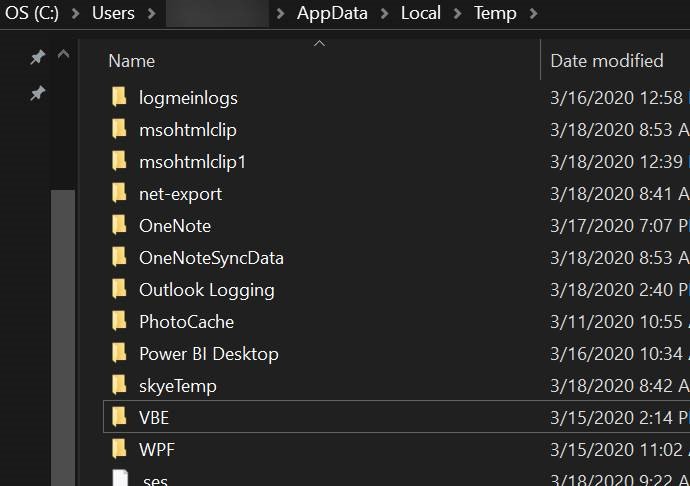
Do not have a servicehub folder under temp path. See screenshot.
mhammons
on 14 May 2020
@mhammons if you don't have a servicehub folder, then where are these logs from?
MRayermannMSFT
on 8 Jun 2020
This may not apply but it is a change to how the app used to work; maybe it will be helpful.
I've currently got 1.14.2 installed via scoop.
For those that are unfamiliar, scoop extracts the app to a version-named folder and then creates a symbolic link named "current" to that same folder. Running Storage Explorer through the symbolic link path doesn't work (it used to). Running it directly from the version named folder does.
 reddevil7nine
on 23 Jul 2020
reddevil7nine
on 23 Jul 2020
@reddevil7nine can you open a specific issue for that? :)
MRayermannMSFT
on 24 Jul 2020
We're fixing the scoop issue, but since @mhammons hasn't replied to my question, I'm going to go ahead and close this. If anyone is still having startup problems, please open a new issue. Thanks.
MRayermannMSFT
on 12 Aug 2020
Sorry...I don't recall where the logs came from...might have been from a previous install. I had deleted and re-installed.
I now have 1.13 and it now loads a bit slowly, but no where near the issues reported earlier. So as of now, it's working and no longer seeing the hangs and long delays as before.
Mike
mhammons
on 12 Aug 2020
@reddevil7nine can you open a specific issue for that? :)
Sorry, just saw this. Thanks @gldraphael
reddevil7nine
on 13 Aug 2020
Related issues
 alaendle
·
5Comments
alaendle
·
5Comments
 spboyer
·
4Comments
spboyer
·
4Comments
 thomassantosh
·
5Comments
thomassantosh
·
5Comments
 olgakorichkovskaya
·
4Comments
olgakorichkovskaya
·
4Comments
 CurtMiller66
·
6Comments
CurtMiller66
·
6Comments