Azurestorageexplorer: Storage Queue displayed out of order
Storage Explorer Version: Current 1.13.0
Build Number: 20200430.5
Platform/OS: Windows 10
Architecture: x64
Regression From: This has been broken for a long time. Not a regression issue.
Bug Description
Queue is displayed out of order. The 17th record is shown first and the first record is show in 17th location
Steps to Reproduce
Load a queue up with more than 32 records with an item in the record being sequentially numbered.
Examine the queue. Since records were written in numerical order, they should appear in that order. The system actually reading the records receives them in the correct order.
Expected Experience
Records numbered 1- 50 should appear in that order
Actual Experience
Actual order 17,2,3,4,5,6,7,8,9,10,11,12,13,14,15,16,1,18,19,20,21,22,23,24,25,26,27,28,29,30,31,32
Additional Context
Just an annoying display glitch.
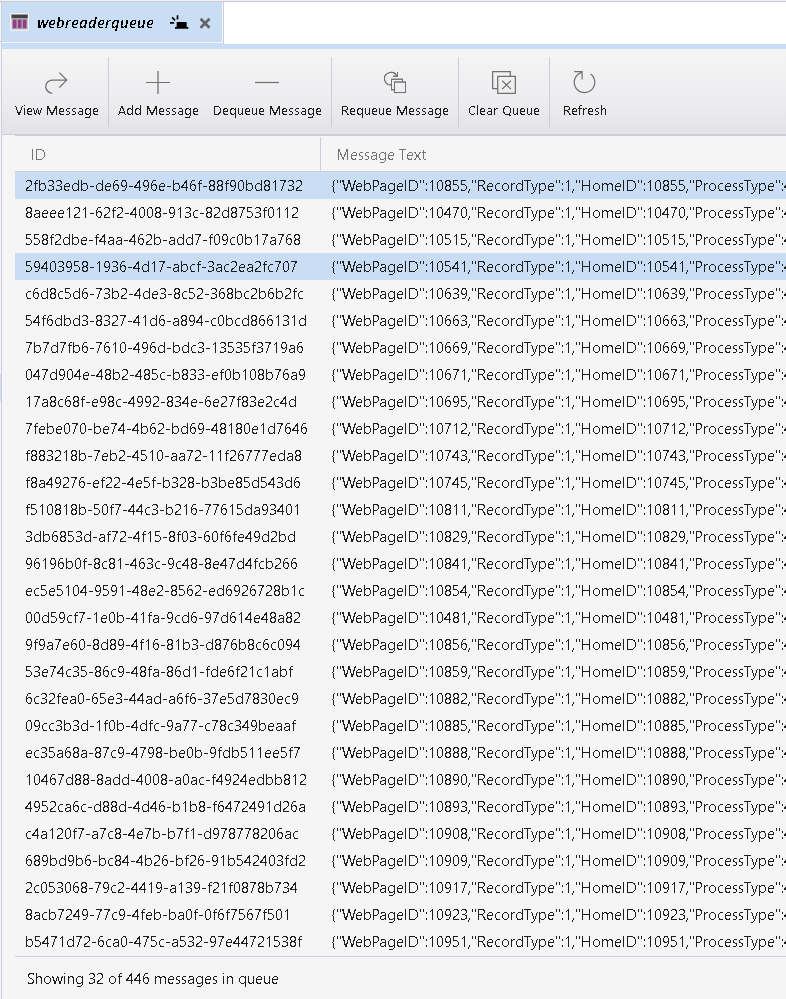
In this snapshot, HomeID 10855 is swapped with HomeID 10481. The rest of the rows shown are in the correct order that they would be found in the queue.
 CurtMiller66
All 6 comments
@CurtMiller66 how fast are you queuing these messages? The default ordering of the messages is the order they are returned to us by the server. If you are adding them all very quickly and asynchronously, the order you are expecting may not be the actual order.
 MRayermannMSFT
on 18 May 2020
MRayermannMSFT
on 18 May 2020
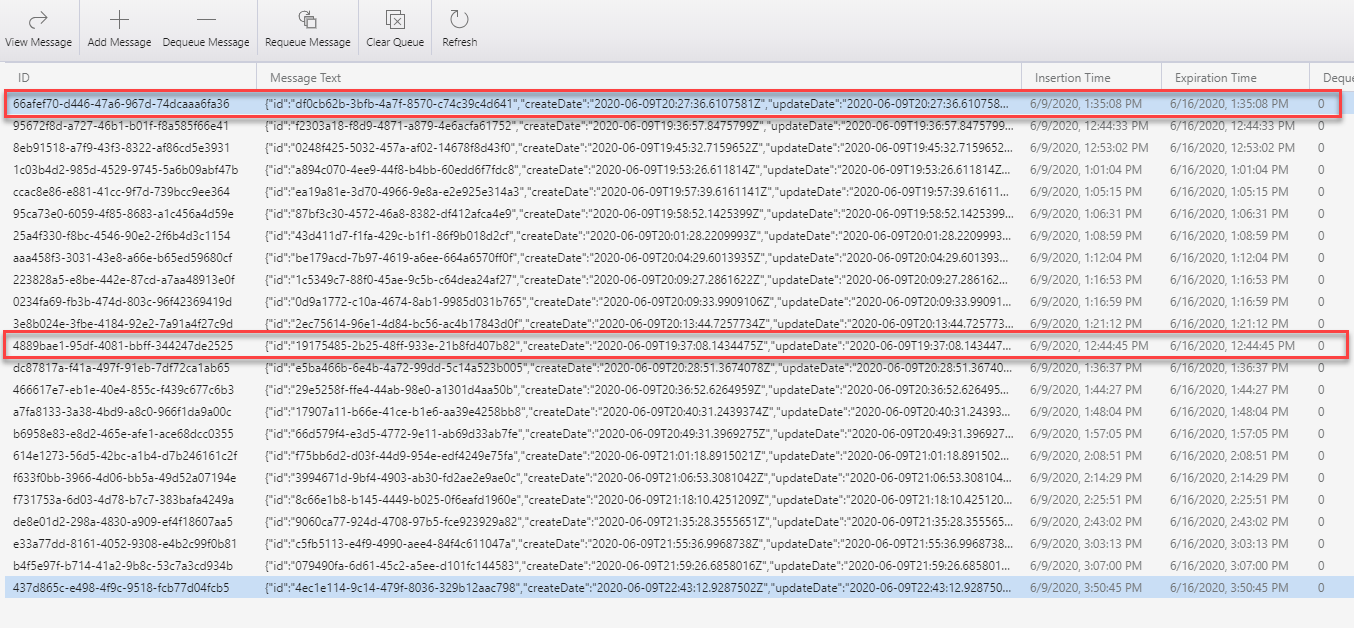
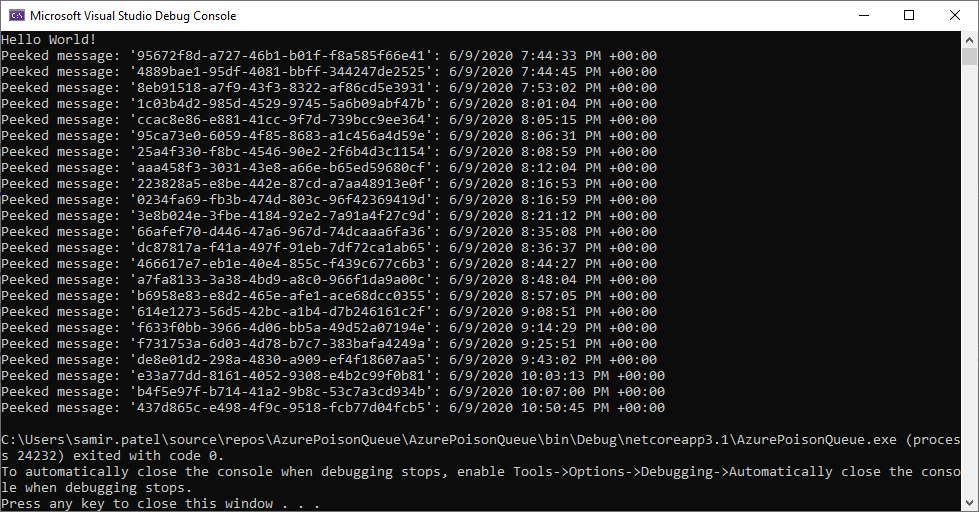
We are facing this same issue. When viewing through the storage explorer, it seems some messages are not sorted properly by the insertion time. When peeking messages using the azure sdk, the order seems correct. 'Dequeue Message' button in the storage explorer seems to correctly remove the first message matching the list pulled from the azure sdk.
storage explorer:
azure sdk:
azure sdk code:
PeekedMessage[] peekedMessages = queueClient.PeekMessages(32);

foreach (var item in peekedMessages)
{
    Console.WriteLine($"Peeked message: '{item.MessageId}': {item.InsertedOn}");
}
As you can see from the console log, the 2 items marked in red from the storage explorer are in the wrong order.
 neusamir
on 10 Jun 2020
neusamir
on 10 Jun 2020
Found the cause of this bug. We'll ship a fix for this in 1.15. Thanks for the patience y'all. In the meantime, you can click on the "insertion time" column header to force the sorting to be correct.
MRayermannMSFT
on 24 Jun 2020
Thank you. Knowing it is fixed and will be released soon is great to hear. I’ve been very happy with your teams response to suggestions and issues. I wish other parts of Microsoft could work as well.
Curt
From: Matthew Rayermann notifications@github.com
Sent: Wednesday, June 24, 2020 10:37 AM
To: microsoft/AzureStorageExplorer AzureStorageExplorer@noreply.github.com
Cc: Curt Miller CMiller@Airnote.Com; Mention mention@noreply.github.com
Subject: Re: [microsoft/AzureStorageExplorer] Storage Queue displayed out of order (#2990)
Found the cause of this bug. We'll ship a fix for this in 1.15. Thanks for the patience y'all. In the meantime, you can click on the "insertion time" column header to force the sorting to be correct.
—
You are receiving this because you were mentioned.
Reply to this email directly, view it on GitHubhttps://github.com/microsoft/AzureStorageExplorer/issues/2990#issuecomment-648962751, or unsubscribehttps://github.com/notifications/unsubscribe-auth/ACXTEWHEELYRR36RPAWHMCLRYI2SDANCNFSM4NDSFY3A.
CurtMiller66
on 24 Jun 2020
Thanks @CurtMiller66 that honestly means a lot to hear. 😊 Makes my day feel quite a bit better.
MRayermannMSFT
on 25 Jun 2020
Fix merged into master for 1.15.0
MRayermannMSFT
on 26 Jun 2020
Related issues
 kjoshi-rubikloud
·
3Comments
kjoshi-rubikloud
·
3Comments
 OffColour
·
4Comments
OffColour
·
4Comments
 jorgklein
·
4Comments
jorgklein
·
4Comments
 timoklimmer
·
6Comments
timoklimmer
·
6Comments
 eosho
·
3Comments
eosho
·
3Comments