Azurestorageexplorer: Storage Explorer is not notarized for macOS
Storage Explorer Version:
v.1.11.1
Build Number:
Explorer never opened (so didn't see this)
Platform/OS:
MacOS Catalina (Version 10.15.1)
Architecture:
x64
Regression From:
First time installing, have not used Azure Storage Explorer on a Mac before.
Bug Description
"After downloading the zip file, unzipping it, and trying to access the application, I got this error: "Microsoft Azure Storage Explorer" can't be opened because Apple cannot check it for malicious software. This software needs to be updated. Contact the developer for more information." I raised this as a Stack Overflow question https://stackoverflow.com/questions/59205482/install-for-azure-storage-explorer-on-mac-catalina-is-not-working/59206217#59206217 and was directed here. In the Stack Overflow response, it was believed that this was a "notarization restriction" Apple has put on new macOS apps.
Steps to Reproduce
- Download the zipped file on a Macbook running macOS Catalina.
- Unzip the file. The first dialog box should throw the above error.
Expected Experience
Actual Experience
Additional Context
Originally raised this as a Stack Overflow question and was directed here.
 thomassantosh
All 5 comments
Is there any preliminary date on when this will be fixed? Very annoying not being able to run the software once downloaded.
 jiimaho
on 9 Dec 2019
jiimaho
on 9 Dec 2019
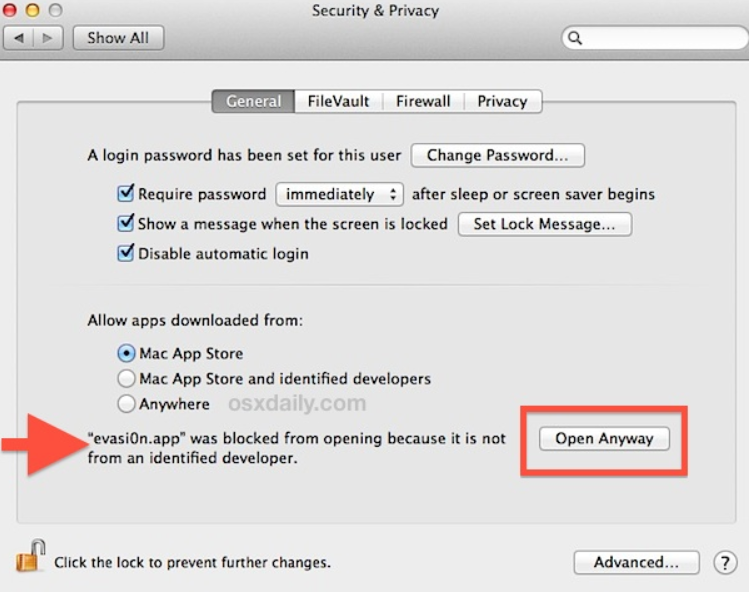
We're working with our build team to get an automated notarization process available for us to use. Once they've done that, we'll get y'all a notarized version as soon as we can. Until then, if you get the error message you can go to your Security & Privacy settings, where you should see a message that Storage Explorer was blocked from opening. You can then click "Open Anyway" to open Storage Explorer:
 MRayermannMSFT
on 18 Dec 2019
MRayermannMSFT
on 18 Dec 2019
Hi all, we just released v1.12.0 and it is notarized. If you have this issue, please go install or upgrade to v1.12.0.
 JasonYeMSFT
on 17 Jan 2020
JasonYeMSFT
on 17 Jan 2020
I downloaded the latest (v.1.12.0) and now it's working again. Thanks.
 periclitor
on 17 Jan 2020
periclitor
on 17 Jan 2020
Glad to hear @periclitor ! For everyone else, if you have an issue related to catalina, please open a new issue as I'm going to go ahead and close this one.
MRayermannMSFT
on 21 Jan 2020
Related issues
 riazjahangir
·
4Comments
riazjahangir
·
4Comments
 evictor
·
6Comments
evictor
·
6Comments
 amtsha09
·
6Comments
amtsha09
·
6Comments
 kjoshi-rubikloud
·
3Comments
kjoshi-rubikloud
·
3Comments
 ziesemer
·
3Comments
ziesemer
·
3Comments
Most helpful comment
Is there any preliminary date on when this will be fixed? Very annoying not being able to run the software once downloaded.