Azuredatastudio: SQL Server Profiler -- cannot set property 'actionBarContext' of undefined
- Azure Data Studio Version:Version: 1.17.1 (user setup)
Commit: 814ce88c41e0daaca89afed8b184e795057a6f9d
Date: 2020-04-30T00:16:35.943Z
VS Code: 1.42.0
Electron: 7.1.11
Chrome: 78.0.3904.130
Node.js: 12.8.1
V8: 7.8.279.23-electron.0
OS: Windows_NT x64 10.0.18363
Steps to Reproduce:
- Open Azure Data Studio
- Connect to database
- ALT+P
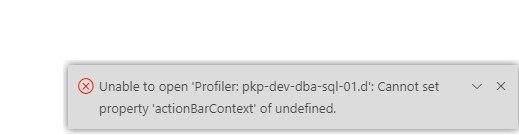
 JStanl
All 8 comments
This extension worked fine for me yesterday. I have uninstalled/disabled the extension multiple times today trying to get it to work. Last resort I guess will be to uninstall Azure Data Studio and reinstall it.
JStanl
on 14 May 2020
@JStanl I think this is a duplicate of https://github.com/microsoft/azuredatastudio/issues/10282. To workaround the issue you can open a folder or close the currently open folder, which will reset the HotExit document list. The issue is fixed in the latest insider build and the fix will ship in May release next week. Sorry for the inconvenience. Please let me know if the workaround doesn't work.
 kburtram
on 14 May 2020
kburtram
on 14 May 2020
@JStanl , please reactivate the issue if you are still seeing the issue after May release.
 alanrenmsft
on 14 May 2020
alanrenmsft
on 14 May 2020
Reopening this since @ymkumar is apparently running into this issue with the 1.20.1 build.
@alanrenmsft did we ever figure out what the issue was here?
@ymkumar Please include your ADS version info here for confirmation
 Charles-Gagnon
on 11 Aug 2020
Charles-Gagnon
on 11 Aug 2020
here is the ADS version
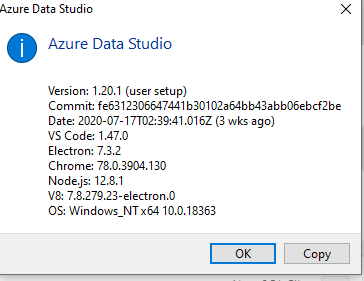
 ymkumar
on 11 Aug 2020
ymkumar
on 11 Aug 2020
@ymkumar Please follow what Karl pointed out in the other issue: https://github.com/microsoft/azuredatastudio/issues/10492#issuecomment-672090036
alanrenmsft
on 11 Aug 2020
IIRC, the issue was bad state cached by an earlier version, so the problem can repro in any future ADS build if that bad state is still cached. Open\closing a folder should reset the "open document" cache. Worst case, the entire application cache can be removed but that would lose all application state and revert to a "first launch" state.
kburtram
on 11 Aug 2020
worked with @ymkumar offline and the problem has been solved for him.
steps to resolve the issue for whoever run into this:
- In the main menu, under "File", select 'Open Folder'
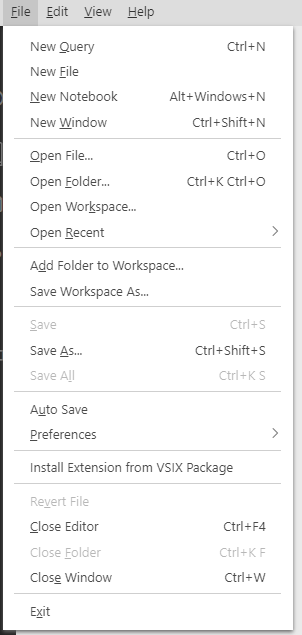
- Pick a folder and press "Select Folder"
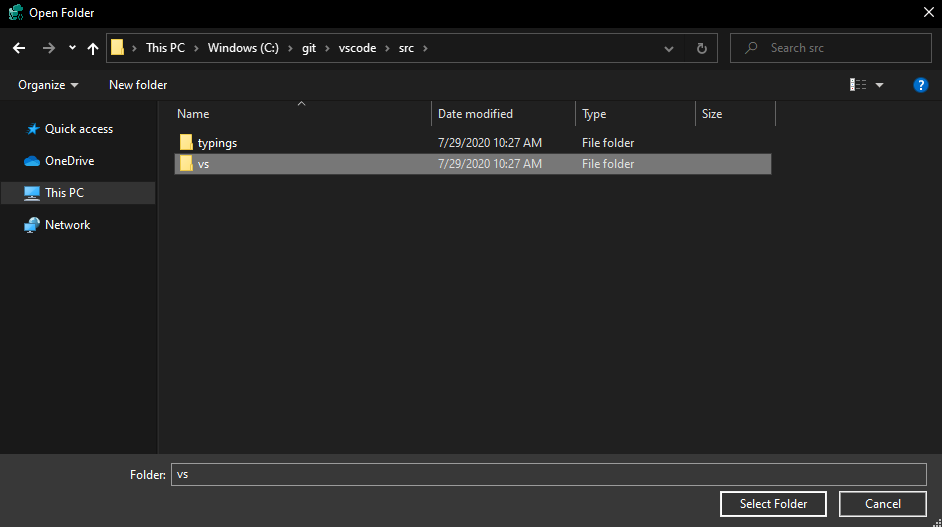
- close all editors and restart Azure Data Studio
alanrenmsft
on 11 Aug 2020
Related issues
kburtram
·
3Comments
 jsmith8858
·
3Comments
jsmith8858
·
3Comments
 sandermvanvliet
·
3Comments
sandermvanvliet
·
3Comments
 carloscfcortez
·
3Comments
carloscfcortez
·
3Comments
 Ungerfall
·
3Comments
Ungerfall
·
3Comments
Most helpful comment
@JStanl I think this is a duplicate of https://github.com/microsoft/azuredatastudio/issues/10282. To workaround the issue you can open a folder or close the currently open folder, which will reset the HotExit document list. The issue is fixed in the latest insider build and the fix will ship in May release next week. Sorry for the inconvenience. Please let me know if the workaround doesn't work.