Azuredatastudio: Unable to remove a connected Azure Account
Issue Type: Bug
How can I remove a connected Azure Account?
Azure Data Studio version: azuredatastudio 1.15.1 (83544eba2504f564d785534cc780d2073feec2cc, 2020-02-15T05:03:16.545Z)
OS version: Windows_NT x64 10.0.18363
System Info
|Item|Value|
|---|---|
|CPUs|Intel(R) Core(TM) i5-8265U CPU @ 1.60GHz (8 x 1800)|
|GPU Status|2d_canvas: enabled
flash_3d: enabled
flash_stage3d: enabled
flash_stage3d_baseline: enabled
gpu_compositing: enabled
metal: disabled_off
multiple_raster_threads: enabled_on
oop_rasterization: disabled_off
protected_video_decode: enabled
rasterization: enabled
skia_renderer: disabled_off
surface_control: disabled_off
surface_synchronization: enabled_on
video_decode: enabled
viz_display_compositor: enabled_on
viz_hit_test_surface_layer: disabled_off
webgl: enabled
webgl2: enabled|
|Load (avg)|undefined|
|Memory (System)|7.87GB (1.52GB free)|
|Process Argv||
|Screen Reader|no|
|VM|0%|
Extensions: none
 PedroMiguelFigueiredo
All 6 comments
Thanks for submitting this issue. Please also check if it is already covered by an existing one, like:
![adsbot[bot] picture](https://avatars.githubusercontent.com/in/25741?v=4&s=40) adsbot[bot]
on 4 Mar 2020
adsbot[bot]
on 4 Mar 2020
If you mouse over the account there's an x you can click to remove the account.

 Charles-Gagnon
on 4 Mar 2020
Charles-Gagnon
on 4 Mar 2020
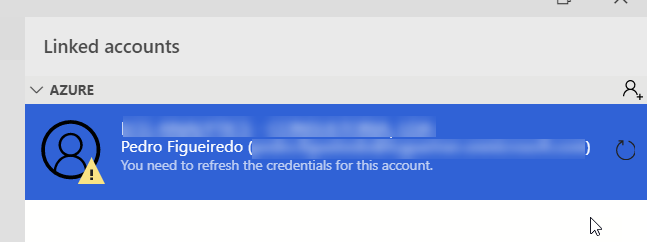
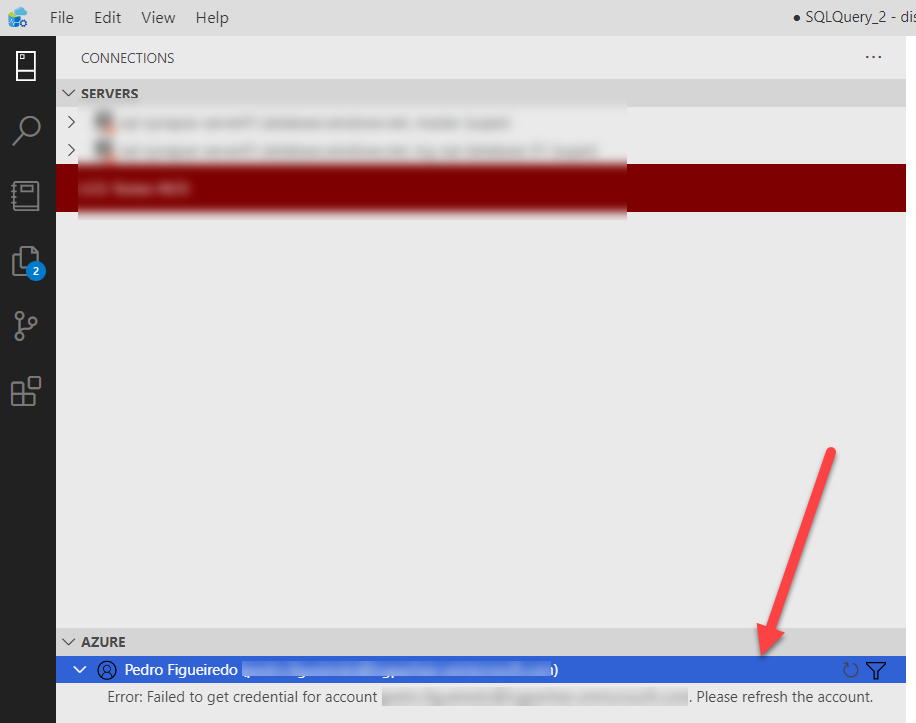
More information: it happens when the account is asking for new credential (changed password). In this case the "X" to delete the account is not visible.
PS: it's not available here also:
PedroMiguelFigueiredo
on 5 Mar 2020
Ah, thanks @PedroMiguelFigueiredo - there was an issue I found with long names hiding the delete action. I have a PR out to fix that now so it should be out in insiders soon.
In the meantime if you really want to get rid of it you can delete %APPDATA%\azuredatastudio\User\globalStorage. WARNING This will delete a number of other settings too. Unfortunately there's no other way to just delete the accounts currently.
Charles-Gagnon
on 5 Mar 2020
@PedroMiguelFigueiredo This fix is out in the latest insiders build if you wanted to test it out
Charles-Gagnon
on 11 Mar 2020
The fix is ported to release/1.16
 kburtram
on 12 Mar 2020
kburtram
on 12 Mar 2020
Related issues
 jakodev
·
26Comments
jakodev
·
26Comments
 samirbehara
·
34Comments
samirbehara
·
34Comments
 capnsue
·
48Comments
capnsue
·
48Comments
 atrauzzi
·
67Comments
atrauzzi
·
67Comments
 nnnax
·
29Comments
nnnax
·
29Comments