Azuredatastudio: Failed to start session
Issue Type: Bug
Area: SQL Profiler
I'm not able to start a new session.
I've the message :
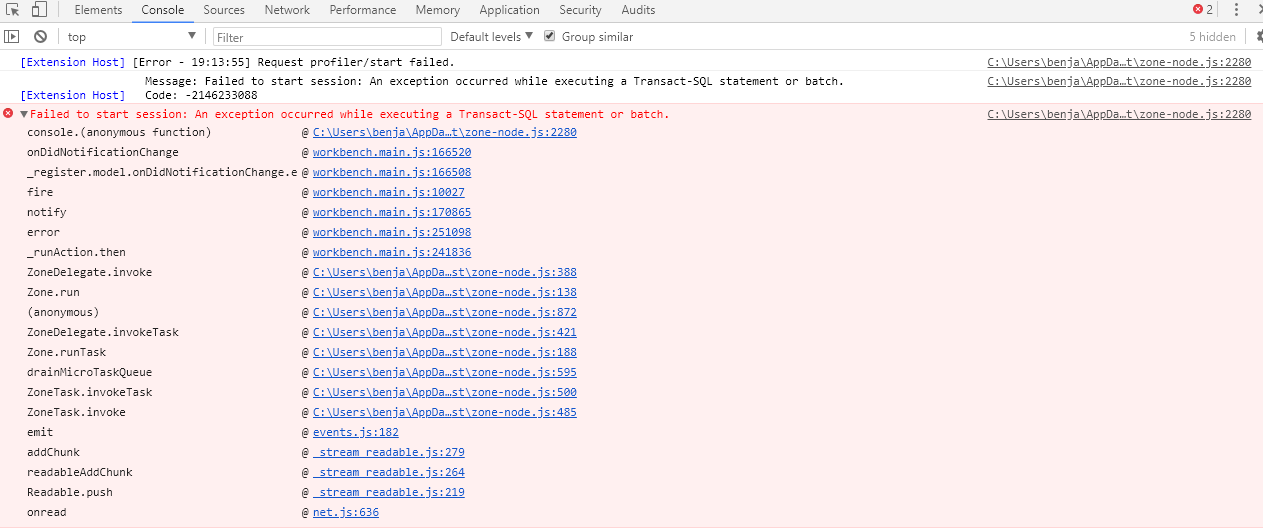
Failed to start session: An exception occurred while executing a Transact-SQL statement or batch.
Tested on windows and mac OS with the same error.
It was working fine 2 days ago with the same version of the extension.
Azure Data Studio version: azuredatastudio 1.9.0 (78a42e1d112ae3231777722b51eaf44f83ddbe55, 2019-07-10T04:31:36.998Z)
OS version: Windows_NT x64 6.1.7601
 nnnax
nnnax
All 29 comments
Are there any further error messages in the Developer Console? (Help -> Toggle Developer Tools -> Console tab)
 Charles-Gagnon
on 11 Jul 2019
Charles-Gagnon
on 11 Jul 2019
Are there any further error messages in the Developer Console? (Help -> Toggle Developer Tools -> Console tab)
Please find the Screenshot below
nnnax
on 11 Jul 2019
@nnnax what is your target server, is it an Azure SQL Server or standalone SQL Server, also what template did you pick?
 alanrenmsft
on 12 Jul 2019
alanrenmsft
on 12 Jul 2019
@nnnax what is your target server, is it an Azure SQL Server or standalone SQL Server, also what template did you pick?
@alanrenmsft I target an Azure SQL server. I picked up ADS STANDARD AZURE.
I've tried with 2 different azure subscriptions.
nnnax
on 12 Jul 2019
Same issue here. Used the profiler extension successfully for a few hours and then it stopped receiving events (the "Stop" button was disabled, and the "Start" button was clickable, but triggered the message "Failed to start session: An exception occurred while executing a Transact-SQL statement or batch."
Restarting Azure Data Studio did not fix it. I'm currently uninstall ADS, which requires a reboot apparently. I will return to update this thread shortly.
 js-cubed
on 12 Jul 2019
js-cubed
on 12 Jul 2019
This did not work:
- Uninstalled ADS fully
- Deleted
%APPDATA%\azuredatastudio - Downloaded ZIP'd version of ADS (not installer)
- Ran azuredatastudio.exe
- Enabled "preview features"
- Clicked the Gear in the bottom left
- Picked "Extensions"
- Searched for "SQL Server Profiler"
- Clicked "Install"
- Struck
Alt+P - Entered connection info, let database selection auto-populate to confirm it was connecting to the server properly.
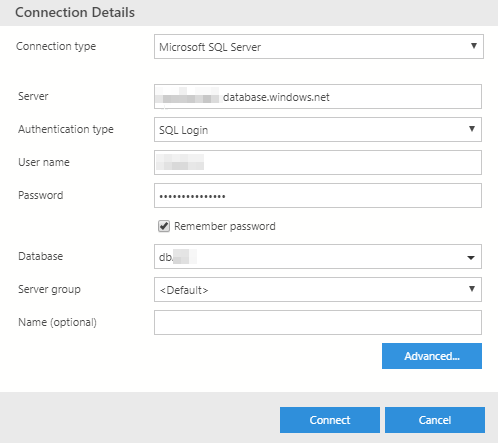
- Picked session template: "Standard Azure" (nothing else available in drop down)
- Clicked "Start", received error "Failed to create session: An exception occurred while executing a Transact-SQL statement or batch." with "Source: SQL Server Profiler (Extension)"
- Hitting "Start" produces the same output as @nnnax had ("Failed to start session" instead of "Failed to create session" with the same console output as their screen shot).

js-cubed
on 12 Jul 2019
Can you try running the following T-SQL directly against your Azure Database?
CREATE EVENT SESSION [ADS_Standard_Azure_test] ON DATABASE
ADD EVENT sqlserver.attention(
ACTION(package0.event_sequence,sqlserver.client_app_name,sqlserver.client_pid,sqlserver.database_id,sqlserver.username,sqlserver.query_hash,sqlserver.session_id)
WHERE ([package0].equal_boolean)),
ADD EVENT sqlserver.existing_connection(SET collect_options_text=(1)
ACTION(package0.event_sequence,sqlserver.client_app_name,sqlserver.client_pid,sqlserver.username,sqlserver.session_id)),
ADD EVENT sqlserver.login(SET collect_options_text=(1)
ACTION(package0.event_sequence,sqlserver.client_app_name,sqlserver.client_pid,sqlserver.username,sqlserver.session_id)),
ADD EVENT sqlserver.logout(
ACTION(package0.event_sequence,sqlserver.client_app_name,sqlserver.client_pid,sqlserver.username,sqlserver.session_id)),
ADD EVENT sqlserver.rpc_completed(
ACTION(package0.event_sequence,sqlserver.client_app_name,sqlserver.client_pid,sqlserver.database_id,sqlserver.username,sqlserver.query_hash,sqlserver.session_id)
WHERE ([package0].equal_boolean)),
ADD EVENT sqlserver.sql_batch_completed(
ACTION(package0.event_sequence,sqlserver.client_app_name,sqlserver.client_pid,sqlserver.database_id,sqlserver.username,sqlserver.query_hash,sqlserver.session_id)
WHERE ([package0].equal_boolean)),
ADD EVENT sqlserver.sql_batch_starting(
ACTION(package0.event_sequence,sqlserver.client_app_name,sqlserver.client_pid,sqlserver.database_id,sqlserver.username,sqlserver.query_hash,sqlserver.session_id)
WHERE ([package0].equal_boolean))
ADD TARGET package0.ring_buffer(SET max_events_limit=(1000),max_memory=(51200))
WITH (MAX_MEMORY=8192 KB,EVENT_RETENTION_MODE=ALLOW_SINGLE_EVENT_LOSS,MAX_DISPATCH_LATENCY=5 SECONDS,MAX_EVENT_SIZE=0 KB,MEMORY_PARTITION_MODE=PER_CPU,TRACK_CAUSALITY=ON,STARTUP_STATE=OFF)
alanrenmsft
on 12 Jul 2019
Hi @alanrenmsft
I got this error in ADS, so I put it in SMSS to get the live feedback on syntax.

Thanks.
The extension began working on Azure SQL server in my organisation (another *.database.windows.net URL). The main difference I can tell is that the one it stopped working on is part of "Elastic pool" and the one that it is working on is not part of an elastic pool.
js-cubed
on 12 Jul 2019
I created a ticket with MSFT support for the pool/server in question asking if it can be "restarted" just to check, since everything worked fine yesterday with this setup and I don't think it's anything to do with my PC as I tested it on another server in my corporate network as well as a PC outside of my corporate network.
js-cubed
on 12 Jul 2019
@nnnax, are you having similar issue (elastic pool related) as @js-cubed ?
From Azure Data Studio side, I will expose the original error message thrown by SQL Server when trying to create XEvent session to make it easier to identify the problem.
alanrenmsft
on 13 Jul 2019
@nnnax, are you having similar issue (elastic pool related) as @js-cubed ?
From Azure Data Studio side, I will expose the original error message thrown by SQL Server when trying to create XEvent session to make it easier to identify the problem.
@alanrenmsft I'am using Basic databases without Elastic Pool.
I've created a new SQL Server and new database, and I can confirm that it's works with a new SQL server. But all my existing databases on my existing SQL server are not working.
nnnax
on 13 Jul 2019
@nnnax what error are you getting when running the SQL statement I mentioned earlier in the thread?
alanrenmsft
on 15 Jul 2019
@nnnax what error are you getting when running the SQL statement I mentioned earlier in the thread?
@alanrenmsft I'am facing the same syntax error as @js-cubed
nnnax
on 16 Jul 2019
I am also facing this issue and cannot use the profile any more. It was working fine 2 days ago. I turned on auditing.
Following query fails with error.
The event 'sqlserver.logout' is not available for Azure SQL Database. Any way we remove the event from the template?
CREATE EVENT SESSION [ADS_Standard_Azure] ON DATABASE ADD EVENT sqlserver.attention( ACTION(package0.event_sequence,sqlserver.client_app_name,sqlserver.client_pid,sqlserver.database_id,sqlserver.username,sqlserver.query_hash,sqlserver.session_id) WHERE ([package0].[equal_boolean]([sqlserver].[is_system],(0)))), ADD EVENT sqlserver.existing_connection(SET collect_options_text=(1) ACTION(package0.event_sequence,sqlserver.client_app_name,sqlserver.client_pid,sqlserver.username,sqlserver.session_id)), ADD EVENT sqlserver.login(SET collect_options_text=(1) ACTION(package0.event_sequence,sqlserver.client_app_name,sqlserver.client_pid,sqlserver.username,sqlserver.session_id)), ADD EVENT sqlserver.logout( ACTION(package0.event_sequence,sqlserver.client_app_name,sqlserver.client_pid,sqlserver.username,sqlserver.session_id)), ADD EVENT sqlserver.rpc_completed( ACTION(package0.event_sequence,sqlserver.client_app_name,sqlserver.client_pid,sqlserver.database_id,sqlserver.username,sqlserver.query_hash,sqlserver.session_id) WHERE ([package0].[equal_boolean]([sqlserver].[is_system],(0)))), ADD EVENT sqlserver.sql_batch_completed( ACTION(package0.event_sequence,sqlserver.client_app_name,sqlserver.client_pid,sqlserver.database_id,sqlserver.username,sqlserver.query_hash,sqlserver.session_id) WHERE ([package0].[equal_boolean]([sqlserver].[is_system],(0)))), ADD EVENT sqlserver.sql_batch_starting( ACTION(package0.event_sequence,sqlserver.client_app_name,sqlserver.client_pid,sqlserver.database_id,sqlserver.username,sqlserver.query_hash,sqlserver.session_id) WHERE ([package0].[equal_boolean]([sqlserver].[is_system],(0)))) ADD TARGET package0.ring_buffer(SET max_events_limit=(1000),max_memory=(51200)) WITH (MAX_MEMORY=8192 KB,EVENT_RETENTION_MODE=ALLOW_SINGLE_EVENT_LOSS,MAX_DISPATCH_LATENCY=5 SECONDS,MAX_EVENT_SIZE=0 KB,MEMORY_PARTITION_MODE=PER_CPU,TRACK_CAUSALITY=ON,STARTUP_STATE=OFF)
 sambathraj
on 17 Jul 2019
sambathraj
on 17 Jul 2019
Just started to try and use profiling today for the first time, and have the same issue:
Msg 25743, Level 16, State 1, Line 1
The event 'sqlserver.logout' is not available for Azure SQL Database.
 matthewcastle
on 18 Jul 2019
matthewcastle
on 18 Jul 2019
Same issue. Did not have it 12 hours ago .. This is my error:
| console.(anonymous function) | @ | C:Program Files\Azu…t\zone-node.js:2280
-- | -- | -- | --
| onDidNotificationChange | @ | workbench.main.js:166520
| _register.model.onDidNotificationChange.e | @ | workbench.main.js:166508
| fire | @ | workbench.main.js:10027
| notify | @ | workbench.main.js:170865
| error | @ | workbench.main.js:251098
| _runAction.then | @ | workbench.main.js:241836
| ZoneDelegate.invoke | @ | C:Program Files\Azu…st\zone-node.js:388
| Zone.run | @ | C:Program Files\Azu…st\zone-node.js:138
| (anonymous) | @ | C:Program Files\Azu…st\zone-node.js:872
| ZoneDelegate.invokeTask | @ | C:Program Files\Azu…st\zone-node.js:421
| Zone.runTask | @ | C:Program Files\Azu…st\zone-node.js:188
| drainMicroTaskQueue | @ | C:Program Files\Azu…st\zone-node.js:595
| ZoneTask.invokeTask | @ | C:Program Files\Azu…st\zone-node.js:500
| ZoneTask.invoke | @ | C:Program Files\Azu…st\zone-node.js:485
| emit | @ | events.js:182
| addChunk | @ | _stream_readable.js:279
| readableAddChunk | @ | _stream_readable.js:264
| Readable.push | @ | _stream_readable.js:219
| onread | @ | net.js:636
 Gebov
on 19 Jul 2019
Gebov
on 19 Jul 2019
I managed to have it at least starting by removing the logout event from the provided script.
I ran the script against the database, then going back in Azure Data Studio and the starting the session.
CREATE EVENT SESSION [ADS_Standard_Azure] ON DATABASE ADD EVENT sqlserver.attention( ACTION(package0.event_sequence,sqlserver.client_app_name,sqlserver.client_pid,sqlserver.database_id,sqlserver.username,sqlserver.query_hash,sqlserver.session_id) WHERE ([package0].[equal_boolean]([sqlserver].[is_system],(0)))), ADD EVENT sqlserver.existing_connection(SET collect_options_text=(1) ACTION(package0.event_sequence,sqlserver.client_app_name,sqlserver.client_pid,sqlserver.username,sqlserver.session_id)), ADD EVENT sqlserver.login(SET collect_options_text=(1) ACTION(package0.event_sequence,sqlserver.client_app_name,sqlserver.client_pid,sqlserver.username,sqlserver.session_id)), ADD EVENT sqlserver.rpc_completed( ACTION(package0.event_sequence,sqlserver.client_app_name,sqlserver.client_pid,sqlserver.database_id,sqlserver.username,sqlserver.query_hash,sqlserver.session_id) WHERE ([package0].[equal_boolean]([sqlserver].[is_system],(0)))), ADD EVENT sqlserver.sql_batch_completed( ACTION(package0.event_sequence,sqlserver.client_app_name,sqlserver.client_pid,sqlserver.database_id,sqlserver.username,sqlserver.query_hash,sqlserver.session_id) WHERE ([package0].[equal_boolean]([sqlserver].[is_system],(0)))), ADD EVENT sqlserver.sql_batch_starting( ACTION(package0.event_sequence,sqlserver.client_app_name,sqlserver.client_pid,sqlserver.database_id,sqlserver.username,sqlserver.query_hash,sqlserver.session_id) WHERE ([package0].[equal_boolean]([sqlserver].[is_system],(0)))) ADD TARGET package0.ring_buffer(SET max_events_limit=(1000),max_memory=(51200)) WITH (MAX_MEMORY=8192 KB,EVENT_RETENTION_MODE=ALLOW_SINGLE_EVENT_LOSS,MAX_DISPATCH_LATENCY=5 SECONDS,MAX_EVENT_SIZE=0 KB,MEMORY_PARTITION_MODE=PER_CPU,TRACK_CAUSALITY=ON,STARTUP_STATE=OFF)
However, it seems the Azure Data Studio Extension is not able to create the Session Extended Event.
 alexiordan
on 21 Jul 2019
alexiordan
on 21 Jul 2019
Same issue. Super frustrating.
I have been a big profiler fan for a long time and I was super pumped to see this extension get released for Azure. I've been using it daily and then all of a sudden, not working. I was somewhat convinced that it coincided with my installing ADS v1.9, but I tried running 1.8 and I still had the issue. Although, it could still be something that was modified when I updated to 1.9.
 Chris-CBD
on 22 Jul 2019
Chris-CBD
on 22 Jul 2019
@yualan This issue seems to be a bit of attention, any chance of an ETA on a fix? I am hoping this is earlier than the December 2020 Planning Milestone it has been added to!
Any info would be very much appreciated.
matthewcastle
on 23 Jul 2019
Is this tied to permissions/security at all? Users in our company with the "View Server State" permission receive this error when attempting to start the session. However, I'm able to start sessions without issues in ADS 1.9 without receiving the error. I do have elevated permissions compared to the other users.
 VeritableHero
on 23 Jul 2019
VeritableHero
on 23 Jul 2019
I am looking into this now
alanrenmsft
on 23 Jul 2019
Same issue for me. Just installed VS 2019 last week. My (31) Azure databases have existed for over a year (all in an elastic pool on the same server). I just began pointing the (.net) application to these databases.
Installed Azure Data Studio and the SQL Server Profiler Extension (0.9.0) this morning. When I select a database, View Command Palette, Profiler: Launch Profiler. Start New Profiler Session with only one session template: Standard_Azure, Enter session name: prefilled with ADS_Standard_Azure. Click Start. Failed to create session: An exception occurred while executing a Transact-SQL statement or batch.
 jbutler94127
on 23 Jul 2019
jbutler94127
on 23 Jul 2019
Confirmed with Azure SQL Database team, they have a regression recently, this will be fixed in the next Azure SQL Database update.
for now please follow @alexiordan ‘s comment to get yourself unblocked: https://github.com/microsoft/azuredatastudio/issues/6353#issuecomment-513567218
Thanks @alexiordan
alanrenmsft
on 24 Jul 2019
Oddly, _something_ I did is letting the Profiler work now. Last I tried was running the script Alex posted above - https://github.com/microsoft/azuredatastudio/issues/6353#issuecomment-513567218. After that I started the profiler, created the session, and am getting results.
I have no idea why it's working, though.
 paschott
on 25 Jul 2019
paschott
on 25 Jul 2019
@paschott , Sorry, not sure I am following, are you asking why running the t-sql script Alex posted works?
alanrenmsft
on 25 Jul 2019
@alanrenmsft I think I was just confused about what the session was doing. I think I'd read the session name in the script differently. I thought it was creating a session name that wasn't the same one expected by the Profiler extension. However, it _does_ work as a workaround until we get that next release.
paschott
on 25 Jul 2019
@paschott , I see, the profiler will try to create a new session if a session with the given name doesn’t exist. otherwise it will reuse the existing session. that’s Why Alex’s T-SQL script works. and that script only needs to be run once on your Azure SQL database. If SQL Azure Database is not getting the fix in before the next ADS release, I will make the change in ADS directly.
alanrenmsft
on 26 Jul 2019
Confirming the work-around works. Run Alex's script, above, which manually creates a Session named "ADS_Standard_Azure". Then, in Azure Data Studio, attempt to profile, using a Session named exactly the same: "ADS_Standard_Azure". This combination worked for me. Don't know if this makes a difference, or not, but I'm using Azure Data Studio version 1.10.0-insider
 spursrox
on 1 Aug 2019
spursrox
on 1 Aug 2019
it seem the Azure SQL DB has fixed the missing xevent name issue, Closing the issue.
alanrenmsft
on 13 Aug 2019
Related issues
 haydnlj
·
3Comments
haydnlj
·
3Comments
 ottadvantage
·
3Comments
ottadvantage
·
3Comments
 sandermvanvliet
·
3Comments
sandermvanvliet
·
3Comments
 IObsequious
·
3Comments
IObsequious
·
3Comments
 CubsRep
·
3Comments
CubsRep
·
3Comments
Most helpful comment
Confirmed with Azure SQL Database team, they have a regression recently, this will be fixed in the next Azure SQL Database update.
for now please follow @alexiordan ‘s comment to get yourself unblocked: https://github.com/microsoft/azuredatastudio/issues/6353#issuecomment-513567218
Thanks @alexiordan