Azuredatastudio: HDFS folder expansion gives internal server error
Issue Type: Bug
- connect to BDC master instance in tree view
- attempt to expand HDFS folder
- "Error: Internal Server Error"
This worked fine this morning, failed after update this afternoon.
I can connect to the instance and look at DB stuff fine, it's just HDFS that fails. HDFS is up and running, i can access it in other ways no problem.
My BDC instance is on-prem k8 and i'm not using AD authentication.
version:
Microsoft SQL Server 2019 (RTM-CU4) (KB4548597) - 15.0.4033.1 (X64) Mar 14 2020 16:10:35 Copyright (C) 2019 Microsoft Corporation Developer Edition (64-bit) on Linux (Ubuntu 16.04.6 LTS)
Azure Data Studio version: azuredatastudio 1.22.1 (1b5c54dd8c6eb03bf7ed1e04889d9f41de0523b3, 2020-09-29T16:41:11.578Z)
OS version: Windows_NT x64 10.0.14393
System Info
|Item|Value|
|---|---|
|CPUs|Intel(R) Xeon(R) CPU E5-2650 v4 @ 2.20GHz (48 x 2200)|
|GPU Status|2d_canvas: unavailable_software
flash_3d: disabled_software
flash_stage3d: disabled_software
flash_stage3d_baseline: disabled_software
gpu_compositing: disabled_software
multiple_raster_threads: enabled_on
oop_rasterization: disabled_off
opengl: disabled_off
protected_video_decode: disabled_off
rasterization: disabled_software
skia_renderer: disabled_off_ok
video_decode: disabled_software
vulkan: disabled_off
webgl: unavailable_software
webgl2: unavailable_software|
|Load (avg)|undefined|
|Memory (System)|127.89GB (87.02GB free)|
|Process Argv||
|Screen Reader|no|
|VM|0%|
Extensions (7)
Extension|Author (truncated)|Version
---|---|---
admin-pack|Mic|0.0.2
agent|Mic|0.47.0
dacpac|Mic|1.6.0
datavirtualization|Mic|1.10.0
import|Mic|1.1.0
profiler|Mic|0.11.0
whoisactive|Mic|0.1.4
Please paste.
 capnsue
All 48 comments
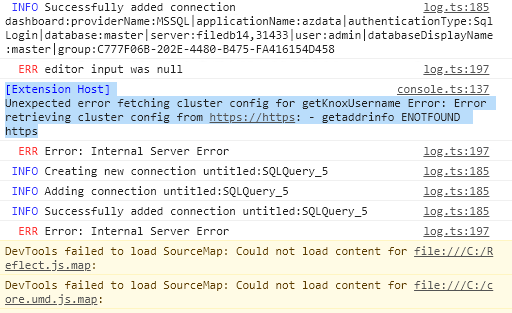
Dev tools showed me what the error was, let me know if you need me to send the full log. I downgraded to the prev release and it didn't fix the error :(
capnsue
on 15 Oct 2020
Could you run this on the server and paste the result?
select * from sys.dm_cluster_endpoints where name = 'gateway'
 Charles-Gagnon
on 15 Oct 2020
Charles-Gagnon
on 15 Oct 2020
name description endpoint protocol_desc
gateway Gateway to access HDFS files, Spark https://172.23.25.61:30443 https
capnsue
on 15 Oct 2020
Can you try removing the server connection and then re-adding it?
Charles-Gagnon
on 15 Oct 2020
just tried, got the same error.
log.ts:185 INFO Deleting connection connection:providerName:MSSQL|applicationName:azdata|authenticationType:SqlLogin|database:|server:filedb14,31433|user:admin|group:C777F06B-202E-4480-B475-FA416154D458
log.ts:185 INFO Creating new connection connection:providerName:MSSQL|applicationName:azdata|authenticationType:SqlLogin|database:|server:filedb14,31433|user:admin|group:C777F06B-202E-4480-B475-FA416154D458
log.ts:185 INFO Adding connection connection:providerName:MSSQL|applicationName:azdata|authenticationType:SqlLogin|database:|server:filedb14,31433|user:admin|group:C777F06B-202E-4480-B475-FA416154D458
log.ts:185 INFO Successfully added connection connection:providerName:MSSQL|applicationName:azdata|authenticationType:SqlLogin|database:|server:filedb14,31433|user:admin|group:C777F06B-202E-4480-B475-FA416154D458
log.ts:185 INFO Adding connection with DB name connection:providerName:MSSQL|applicationName:azdata|authenticationType:SqlLogin|database:master|server:filedb14,31433|user:admin|group:C777F06B-202E-4480-B475-FA416154D458
console.ts:137 [Extension Host] Unexpected error fetching cluster config for getKnoxUsername Error: Error retrieving cluster config from https://https: - getaddrinfo ENOTFOUND https
log.ts:197
capnsue
on 15 Oct 2020
Alright, let me look into adding some more logging since I don't know how it got into this state unfortunately.
In the meantime I don't really have any actual workaround - but you could try out our insiders build to see if that's different for some reason : https://github.com/Microsoft/azuredatastudio#try-out-the-latest-insiders-build-from-main
Charles-Gagnon
on 15 Oct 2020
ok will do. i did notice this in the insiders build about 2 weeks ago, i meant to make a bug report but i got distracted and then just switched back to the stable version. i am regretting that now! thanks for the help, let me know if you need anything from me
capnsue
on 15 Oct 2020
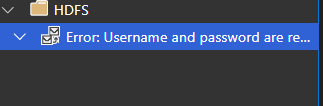
In case this info is useful -- in the insider build, trying to browse hdfs prompts me for username and password, and then Error retrieving cluster config from https://....(same exact error as above) this is on
Version: 1.23.0-insider (user setup)
Commit: 9652007266c26be8b2df0b1e00aa27ff1601ce9a
Date: 2020-10-02T05:38:32.773Z
VS Code: 1.48.0
Electron: 9.2.1
Chrome: 83.0.4103.122
Node.js: 12.14.1
V8: 8.3.110.13-electron.0
OS: Windows_NT x64 10.0.14393
capnsue
on 15 Oct 2020
Did you enter in the username/password for the cluster controller?
Note this may be different than your SQL login. It's the username/password you entered when deploying the cluster.
Charles-Gagnon
on 15 Oct 2020
And for the stable version of ADS - had you updated to 1.23.0 (released yesterday)? That should have also prompted you for the username/password.
Charles-Gagnon
on 15 Oct 2020
yes i entered my username/password. it's the same username/password as the master instance. just to be extra sure i tried "root" as the username also (which is neccessary to access the web-based spark tools) got the same behavior.
As for the stable version, my HDFS browsing was working normally as it had been working for months until i updated to the new release this afternoon. I did not redo my connection or anything, it did not prompt me for anything, it just gave an internal server error when i tried to continue browsing the HDFS.
capnsue
on 15 Oct 2020
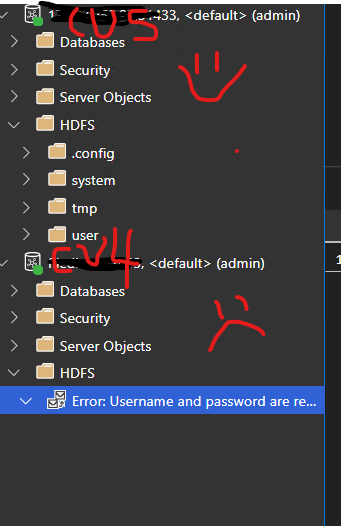
FOUND SOMETHING! i have another on-prem BDC running on a separate k8 cluster. it is running version Microsoft SQL Server 2019 (RTM-CU5) (KB4552255) - 15.0.4043.16 (X64) Jun 10 2020 18:25:25 Copyright (C) 2019 Microsoft Corporation Developer Edition (64-bit) on Linux (Ubuntu 16.04.6 LTS)
When i tried to connect to that one, it connected successfully to the HDFS like usual. did not prompt for creds. I will paste the logs. The first part of the log is when i am trying to connect to my CU4 one (named filedb14.) the second one is when i am connecting to my CU5 one ("named" 172.23.250.22)
INFO Adding connection connection:providerName:MSSQL|applicationName:azdata|authenticationType:SqlLogin|database:|server:filedb14,31433|user:admin|group:C777F06B-202E-4480-B475-FA416154D458
log.ts:185 INFO Successfully added connection connection:providerName:MSSQL|applicationName:azdata|authenticationType:SqlLogin|database:|server:filedb14,31433|user:admin|group:C777F06B-202E-4480-B475-FA416154D458
log.ts:185 INFO Adding connection with DB name connection:providerName:MSSQL|applicationName:azdata|authenticationType:SqlLogin|database:master|server:filedb14,31433|user:admin|group:C777F06B-202E-4480-B475-FA416154D458
console.ts:137 [Extension Host] Error connecting to cluster controller: Error: Error retrieving cluster config from https://https: - getaddrinfo ENOTFOUND https
console.ts:137 [Extension Host] User cancelled out of username prompt for BDC Controller
console.ts:137 [Extension Host] Unexpected error getting Knox username for SQL Cluster connection: Error: Username and password are required
log.ts:185 INFO Creating new connection connection:providerName:MSSQL|applicationName:azdata|authenticationType:SqlLogin|database:|server:172.23.250.22,31433|user:admin|group:C777F06B-202E-4480-B475-FA416154D458
log.ts:185 INFO Adding connection connection:providerName:MSSQL|applicationName:azdata|authenticationType:SqlLogin|database:|server:172.23.250.22,31433|user:admin|group:C777F06B-202E-4480-B475-FA416154D458
log.ts:185 INFO Successfully added connection connection:providerName:MSSQL|applicationName:azdata|authenticationType:SqlLogin|database:|server:172.23.250.22,31433|user:admin|group:C777F06B-202E-4480-B475-FA416154D458
log.ts:185 INFO Adding connection with DB name connection:providerName:MSSQL|applicationName:azdata|authenticationType:SqlLogin|database:master|server:172.23.250.22,31433|user:admin|group:C777F06B-202E-4480-B475-FA416154D458
log.ts:185 INFO Creating new connection untitled:SQLQuery_6
log.ts:185 INFO Adding connection untitled:SQLQuery_6
log.ts:185 INFO Successfully added connection untitled:SQLQuery_6
capnsue
on 15 Oct 2020
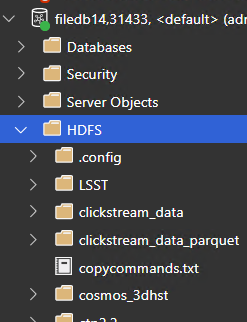
I just double checked that I'm on the latest version 1.23.0 (i had downgraded in an attempt to fix.) here is what my tree view looks like showing the cu5 vs cu4 clusters:
capnsue
on 15 Oct 2020
Would you mind trying out this private build and going through the process to expand the folder? Assuming it errors out again then get the logs from the console - I added a bit more logging to try and figure out what's going on with the URL here.
This is the zip archive so you can just unzip this wherever and run azuredatastudio-insiders.exe from that folder, no need to uninstall any previous installations.
Charles-Gagnon
on 16 Oct 2020
is the developer tools window the best way to get the logs, the way i have been doing it? would it be better to send in a csv or json rather than just copy pasting?
i will do this ASAP and send the logs. i really appreciate you looking into this so quickly.
capnsue
on 16 Oct 2020
You can also just grab the full logs following these instructions :
- Open command palette (Click View -> Command Palette)
- Run the command: Developer: Open Logs Folder
- Look for the render1.log
You can either upload the entire thing if you want - or just grab parts of it. You can also e-mail it to me directly if you don't want it on the public site.
Charles-Gagnon
on 16 Oct 2020
hey @Charles-Gagnon i've sent you an email with the logs. (please ignore my repeating myself, i had a copy/paste error.) I think the info you want is in the hdfs-nowork.log file. let me know if it would be helpful to send a similar log for the successful CU5 connection?
capnsue
on 16 Oct 2020
this probably doesn't help that much, but we have an interesting DNS setup here. the urls in ADS that rely k8 hostnames (for example, sparkhead-0) don't always work, so we have to fall back to using IP addresses to access the web based spark tools. in fact, the web urls in the spark UI are pretty much the only place we have this issue, it has never affected anything DB related. but just thought i'd let you know in case it was relevant?
in any event, browsing hdfs via ads def USED to work, i promise.
capnsue
on 16 Oct 2020
Just to confirm again - can you run the following query against the CU4 server?
BEGIN TRY
SELECT [name], [description], [endpoint], [protocol_desc] FROM .[sys].[dm_cluster_endpoints]
END TRY
BEGIN CATCH
DECLARE @endpoint VARCHAR(max)
select @endpoint = CONVERT(VARCHAR(max),SERVERPROPERTY('ControllerEndpoint'))
SELECT 'controller' AS name, 'Cluster Management Service' AS description, @endpoint as endpoint, SUBSTRING(@endpoint, 0, CHARINDEX(':', @endpoint))
END CATCH
sure! here ya go. (i think i see where the problem is.)
| name | description | endpoint | protocol_desc |
|-------------------|--------------------------------------------------------|---------------------------------------------------------|---------------|
| gateway | Gateway to access HDFS files, Spark | https://172.23.25.61:30443 | https |
| spark-history | Spark Jobs Management and Monitoring Dashboard | https://172.23.25.61:30443/gateway/default/sparkhistory | https |
| yarn-ui | Spark Diagnostics and Monitoring Dashboard | https://172.23.25.61:30443/gateway/default/yarn | https |
| app-proxy | Application Proxy | https://172.23.25.57:30778 | https |
| mgmtproxy | Management Proxy | https://172.23.25.61:30777 | https |
| logsui | Log Search Dashboard | https://172.23.25.61:30777/kibana | https |
| metricsui | Metrics Dashboard | https://172.23.25.61:30777/grafana | https |
| controller | Cluster Management Service | https: | https |
| sql-server-master | SQL Server Master Instance Front-End | 172.23.25.64,31433 | tds |
| webhdfs | HDFS File System Proxy | https://172.23.25.61:30443/gateway/default/webhdfs/v1 | https |
| livy | Proxy for running Spark statements, jobs, applications | https://172.23.25.61:30443/gateway/default/livy/v1 | https |
capnsue
on 16 Oct 2020
Well now that's certainly interesting - you ran this query earlier and it returned the correct endpoint. Was that against this same server?
select * from sys.dm_cluster_endpoints where name = 'gateway'
Charles-Gagnon
on 16 Oct 2020
Oh whoops, just realized I told you the wrong name - so try that query with name = 'controller' instead
Charles-Gagnon
on 16 Oct 2020
| name | description | endpoint | protocol_desc |
|------------|----------------------------|----------|---------------|
| controller | Cluster Management Service | https: | https |
yeah i think this is probably the problem. how in the world did it get like that? um, should i just say "update table" with the right thing? can DMV's even be updated by mere users?
capnsue
on 16 Oct 2020
Let me find out 😄 Typically not directly though since DMVs are usually populated by the engine using internal calls - they aren't tables in the traditional sense.
Do you know if you did any sort of update to the server or cluster recently that might have caused this?
Charles-Gagnon
on 16 Oct 2020
seriously, no! literally the only thing I did was update ADS. I noticed this exact same issue with the Insiders build about 2 weeks ago or so, but i just switched back to the stable build (thinking i would get around to creating a bug report at some point but..) -- everything was fine until I updated yesterday.
One thing I just thought of. While I was trying to troubleshoot this, I was thinking where it could have gotten that empty URL from. One thing stuck out to me as a possiblility: this little area here
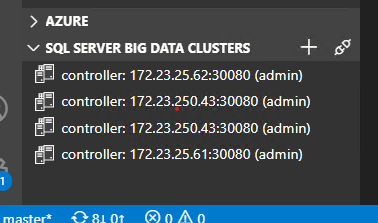
there used to be another entry in that list that basically just looked like
controller: (admin)
i do not know how or when that list item got there, it had been there for a while, i basically ignored it. when i started having this problem yesterday, i deleted the bogus empty controller item because i thought that might be where it is getting the empty URL, but it didn't have any effect. So I don't know if that is related.
capnsue
on 16 Oct 2020
In this case probably not - for the HDFS folder we directly talk to the SQL server to get the endpoints (using the query you used above). The tree view list there is mostly completely separate from that.
Somehow it looks like the SQL server is getting confused on getting the controller endpoint for that DMV. I'm following up with some people on why that might be - I'll let you know if I find out any other information.
It is pretty odd though that you saw this in insiders a while ago. Did you look at the console log back then too or just see the generic "Internal Server Error" message? I wonder if the DNS configuration you mentioned is causing this - if SQL is having difficulty talking to the controller for some reason that might be messing things up.
Charles-Gagnon
on 16 Oct 2020
Have you used the azdata CLI tool yet? It'd be useful to have you run azdata bdc endpoint list -o table after running azdata login -e https://172.23.25.61:30080 and seeing what that gives you.
Charles-Gagnon
on 16 Oct 2020
I think I first noticed the issue on insiders on Oct 3, I remember the day because my brother was over. unfortunately i don't remember what version i was running at the time :(
the insiders build actually prompted me for username and password (which was very surprising because i've been using BDC / ADS since ctp 2.0 and i'd literally never seen that prompt before.) then it gave me that little...envelope icon (or whatever it is) underneath the HDFS folder, complaining about username and password, instead of saying "internal server error" like the stable one initially did.
capnsue
on 16 Oct 2020
here you go, azdata output from my terminal! def has the same weird empty url.
Description                                             Endpoint                                                 Name               Protocol
------------------------------------------------------  -------------------------------------------------------  -----------------  ----------
Gateway to access HDFS files, Spark                     https://172.23.25.61:30443                               gateway            https
Spark Jobs Management and Monitoring Dashboard          https://172.23.25.61:30443/gateway/default/sparkhistory  spark-history      https
Spark Diagnostics and Monitoring Dashboard              https://172.23.25.61:30443/gateway/default/yarn          yarn-ui            https
Application Proxy                                       https://172.23.25.57:30778                               app-proxy          https
Management Proxy                                        https://172.23.25.61:30777                               mgmtproxy          https
Log Search Dashboard                                    https://172.23.25.61:30777/kibana                        logsui             https
Metrics Dashboard                                       https://172.23.25.61:30777/grafana                       metricsui          https
Cluster Management Service                              https:                                                   controller         https
SQL Server Master Instance Front-End                    172.23.25.64,31433                                       sql-server-master  tds
HDFS File System Proxy                                  https://172.23.25.61:30443/gateway/default/webhdfs/v1    webhdfs            https
Proxy for running Spark statements, jobs, applications  https://172.23.25.61:30443/gateway/default/livy/v1       livy               https
Would you be willing to run
azdata bdc debug copy-logs -ns <namespace>
and then e-mail them to me? If you'd rather not send them let me know and I'll see if there's any specific information I can have you look for.
Charles-Gagnon
on 19 Oct 2020
sure i can do that, no problem. i'll email them.
capnsue
on 19 Oct 2020
hey, i generated the log files, one of them is like 20GB (the dumps one) -- trying to get it into my google drive but if you have a better way to get this to you, lemme know :)
capnsue
on 19 Oct 2020
We can leave out the dumps one for now - just the text files will be enough to start with.
Charles-Gagnon
on 19 Oct 2020
ok, emailed!
capnsue
on 19 Oct 2020
hey, any update? if there is a way i can fix this (by updating a table or config somewhere) that would be great, i am having to manage several ADS installs and i have told ppl not to get the SSMS updates bc i'm worried it will break their ADS...help? i am super stoked to continue working with y'all on this if possible
capnsue
on 27 Oct 2020
Sorry, I haven't heard back from the BDC team yet. You can try submitting an issue here to see if they respond - I'm not sure how active that forum is : https://feedback.azure.com/forums/927307-sql-server-big-data-clusters/
Charles-Gagnon
on 27 Oct 2020
i will, already have a couple issues up on there. screaming into the void is fun! thanks for your help and please let me know if you hear something -- i wish i knew how to just put that value in the place that the DMV will read it :(
capnsue
on 27 Oct 2020
Unfortunately this issue seems to be something at the controller level - which you can tell because azdata is returning the same thing. (The DMV is just a view into the controller information - so you can't modify anything on the SQL instance to "fix" this)
Charles-Gagnon
on 27 Oct 2020
@capnsue Try running this command
kubectl -n <clustername> get svc controller-svc-external -o yaml
(make sure you have your kube config set up correctly beforehand)
Charles-Gagnon
on 27 Oct 2020
They did some digging and might have found the issue :
Looking at the output of copy logs, it looks like there are multiple controller pods in the cluster, even though there should only be one replica. My guess is that a lot of these pods are in some Terminating or Waiting state.

The ServiceEndpointManager has a mapping of services to pods that the service is running on.  If the cluster is using NodePort services , the endpoint manager uses the .status.HostIp  of the pod as the IP address of the service. What I think is happening is the endpoint manager is picking up one of these Terminating pods, which has an empty host IP address, which is resulting in the empty service address.

I did some experimenting, and if the hostname is empty, UriBuilder will not include the port in the resulting endpoint, which is consistent with what we are seeing
In addition to the above command could you also run this and send me the output?
kubectl get pods -n filedb
Charles-Gagnon
on 27 Oct 2020
swerner@filedb14:[~]: kf get svc controller-svc-external -o yaml
apiVersion: v1
kind: Service
metadata:
  creationTimestamp: "2020-01-23T17:18:55Z"
  labels:
    MSSQL_CLUSTER: filedb
    app: controller
    plane: control
    role: controller
  name: controller-svc-external
  namespace: filedb
  resourceVersion: "136129136"
  selfLink: /api/v1/namespaces/filedb/services/controller-svc-external
  uid: 6f6f87fb-3e04-11ea-a8b0-0cc47ad46d50
spec:
  clusterIP: 172.24.0.199
  externalTrafficPolicy: Cluster
  ports:
  - name: port-1
    nodePort: 30080
    port: 443
    protocol: TCP
    targetPort: controller-port
  selector:
    app: controller
    plane: control
    role: controller
  sessionAffinity: None
  type: NodePort
status:
  loadBalancer: {}
swerner@filedb14:[~]: kf get pods
NAME              READY   STATUS    RESTARTS   AGE
app1-h55np        2/2     Running   0          272d
appproxy-6pwxw    2/2     Running   0          18d
compute-0-0       3/3     Running   0          18d
control-2jg9t     0/3     Evicted   0          95d
control-48mtk     0/3     Evicted   0          144d
control-4lnqf     0/3     Evicted   0          28d
control-52xnx     0/3     Evicted   0          70d
control-58mgp     0/3     Evicted   0          95d
control-5zzf8     0/3     Evicted   0          95d
control-6bdwd     0/3     Evicted   0          28d
control-6ss54     0/3     Evicted   0          28d
control-6xl2s     0/3     Evicted   0          40d
control-77dzz     0/3     Evicted   0          40d
control-7fwsm     0/3     Evicted   0          95d
control-7jkq7     0/3     Evicted   0          40d
control-7t4nm     0/3     Evicted   0          56d
control-88zwk     0/3     Evicted   0          95d
control-8drtg     0/3     Evicted   0          28d
control-9b8d7     0/3     Evicted   0          40d
control-9p5x8     0/3     Evicted   0          95d
control-cgd69     0/3     Evicted   0          95d
control-fhq44     0/3     Evicted   0          40d
control-fmntp     0/3     Evicted   0          28d
control-gqdmj     0/3     Evicted   0          28d
control-h2b56     0/3     Evicted   0          46d
control-jpjcd     0/3     Evicted   0          95d
control-k7kf2     0/3     Evicted   0          95d
control-kbpzj     0/3     Evicted   0          40d
control-ktmsw     0/3     Evicted   0          28d
control-kx4jz     0/3     Evicted   0          95d
control-lmjxs     0/3     Evicted   0          40d
control-lzkgd     0/3     Evicted   0          95d
control-mgnmh     0/3     Evicted   0          95d
control-mjmc5     0/3     Evicted   0          40d
control-mpnpw     0/3     Evicted   0          28d
control-mxrf4     0/3     Evicted   0          40d
control-nvhz5     0/3     Evicted   0          95d
control-p48b7     0/3     Evicted   0          40d
control-pc2td     0/3     Evicted   0          42d
control-pr4vh     0/3     Evicted   0          95d
control-ps2qd     0/3     Evicted   0          28d
control-q7942     0/3     Evicted   0          70d
control-qd7s7     0/3     Evicted   0          28d
control-r82s5     0/3     Evicted   0          95d
control-r86gc     0/3     Evicted   0          40d
control-rdcdw     0/3     Evicted   0          95d
control-rnw4t     0/3     Evicted   0          28d
control-rtwvx     0/3     Evicted   0          28d
control-skc8m     0/3     Evicted   0          40d
control-svc5k     0/3     Evicted   0          95d
control-t2ntq     0/3     Evicted   0          28d
control-t5k6l     0/3     Evicted   0          28d
control-trrj8     0/3     Evicted   0          95d
control-tv28m     0/3     Evicted   0          95d
control-tzpkt     3/3     Running   0          9d
control-xc88k     0/3     Evicted   0          95d
control-xqgpd     0/3     Evicted   0          40d
control-xr8kf     0/3     Evicted   0          40d
control-xrx8p     0/3     Evicted   0          95d
control-z4zd7     0/3     Evicted   0          95d
control-z77l4     0/3     Evicted   0          40d
control-zclcq     0/3     Evicted   0          28d
control-zqb2r     0/3     Evicted   0          40d
controldb-0       2/2     Running   0          167d
controlwd-d92hr   1/1     Running   0          197d
data-0-0          3/3     Running   0          196d
data-0-1          3/3     Running   0          196d
data-0-2          3/3     Running   0          14d
data-0-3          3/3     Running   0          196d
gateway-0         2/2     Running   0          145d
logsdb-0          1/1     Running   0          197d
logsui-rczww      1/1     Running   0          197d
master-0          3/3     Running   0          196d
metricsdb-0       1/1     Running   0          18d
metricsdc-5kh2b   1/1     Running   0          197d
metricsdc-7n7bv   1/1     Running   6          197d
metricsdc-bcljz   1/1     Running   0          197d
metricsdc-bdkh9   1/1     Running   0          197d
metricsdc-cdhjm   1/1     Running   0          197d
metricsdc-gbxlm   1/1     Running   0          29d
metricsdc-h2w2h   1/1     Running   5          197d
metricsdc-hcxt7   1/1     Running   0          197d
metricsdc-hj9fp   0/1     Evicted   0          5m6s
metricsdc-lpqpb   1/1     Running   0          197d
metricsdc-r4l24   1/1     Running   0          29d
metricsdc-t8bts   1/1     Running   0          197d
metricsdc-tzq6v   1/1     Running   2          147d
metricsdc-xq5jt   1/1     Running   1          197d
metricsui-m7xds   1/1     Running   0          197d
mgmtproxy-9qhkn   2/2     Running   0          18d
nmnode-0-0        2/2     Running   0          196d
sparkhead-0       4/4     Running   0          18d
storage-0-0       4/4     Running   0          13d
storage-0-1       4/4     Running   0          42d
storage-0-2       4/4     Running   0          13d
storage-0-3       4/4     Running   0          13d
HOLY HELL I FULLY DID NOT REALIZE ALL THOSE EVICTED PODS WERE THERE!!!!! talking to sysadmin / k8 guru about what the hell happened 28 days ago, 40 days ago, 95 days ago...
capnsue
on 28 Oct 2020
Yeah that's interesting - let me know if you find anything you want to pass on to the team.
They're going to look into fixing up the logic to ignore the pods in invalid states which should fix the issue you're having though.
As for an immediate fix if you were to clean up those inactive pods then hopefully that would also fix the issue.
Charles-Gagnon
on 28 Oct 2020
this is great news. still don't know what caused the cluster to get into that state but i'll let you know. HDFS BROWSING IS HAPPY!
what a wild problem! also, i should probably set up some sort of monitoring alert for stuff like this (since the cluster was working fine in literally EVERY way except for browsing HDFS from ADS i would have never even noticed it until i had a reason to monkey around with the pods, which i usually don't...) I really really really appreciate your help on this, you totally rule and i'll tell that to everyone.
capnsue
on 28 Oct 2020
hey! i figured out what's up with the control pods. they are running out of disk space, and then getting evicted due to disk pressure. the stuff that is filling up is the log directories. this is going to keep happening. i went through all the sql 2019 bdc documentation and didn't find anything about this. i know i can delete the logs, but i have to set up some sort of retention policy and i'm not sure how to do that. (i know this is out of scope from the original bug, but i was wondering if you had any ideas?)
also, i was trying to use one of the provided jupyter books (TSG060 - Persistent Volume disk space for all BDC PVCs) to see what's up with my disk space situtation but it wasn't working, i'm getting an error STDERR: Unable to connect to the server: dial tcp [::1]:8080: connectex: No connection could be made because the target machine actively refused it.
but that error message helpfully points me to this: HINT: Use TSG056 - Kubectl fails with No connection could be made because the target machine actively refused it to resolve this issue.
BUT when i click on that link, or try to find it in the list of provided books, it's not there! and it's not on the filesystem either! help!
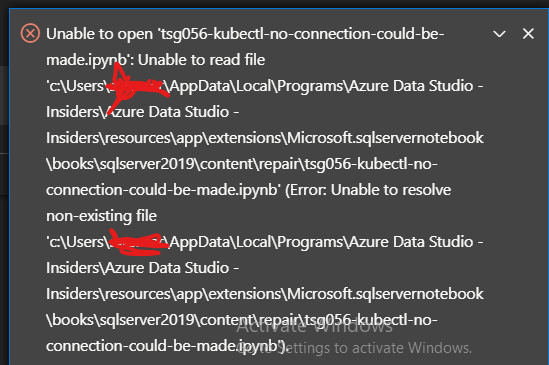
(sorry about that windows activation message, i do have a valid copy of windows, it's from my work, i don't nkow why it doesn't activate, but troubleshooting that is like absolutely last on my priority list at the moment haha)
I know I just told you about 3 separate things
- how do i deal with the logs!
- why are certain notebooks not working!
- why is that notebook missing!
and i don't know if you can help with any of them, or if i should submit separate issue reports for any of them?
I realize the logs thing isn't really your problem but it IS the root cause of why this weird error happened in the first place.....it would be awesome if you could help me out? thanks again.
capnsue
on 30 Oct 2020
hold up, i realized why some of the notebooks weren't working. MORE EVICTED CONTROL PODS! so i nuked them and some of the notebooks worked (azdata login for example) but the one i need (disk space on the PVC's) appears to have a different error now?
MaxRetryError: HTTPConnectionPool(host='localhost', port=8080): Max retries exceeded with url: /api/v1/namespaces/filedb/pods (Caused by NewConnectionError('
Probably something icky about how kubectl is set up on the machine i'm running ads on. ugh
I am going to clean up a lot of disk space on those nodes so we have a little more headroom for the logs. (i'm actually just sort of assuming it's logs to be fair, i'm not sure what other monotonically increasing stuff is being written by the control pods. dumps maybe?)
capnsue
on 30 Oct 2020
Sorry to hear you're still having issues ☹️ I'll pass the info on to the team but I'm going to close this issue now since we've resolved the original problem - if you continue to have issues with the cluster I'd suggest opening an item on https://feedback.azure.com/forums/927307-sql-server-big-data-clusters/ so the team can respond directly there. Good luck!
Charles-Gagnon
on 2 Nov 2020
Related issues
 jacobzed
·
3Comments
jacobzed
·
3Comments
 jsmith8858
·
3Comments
jsmith8858
·
3Comments
 stevenreddie
·
3Comments
stevenreddie
·
3Comments
 squillace
·
3Comments
squillace
·
3Comments
 IObsequious
·
3Comments
IObsequious
·
3Comments