Azuredatastudio: Seeking community feedback for Import/Export Data-Tier Application Framework Wizard extension
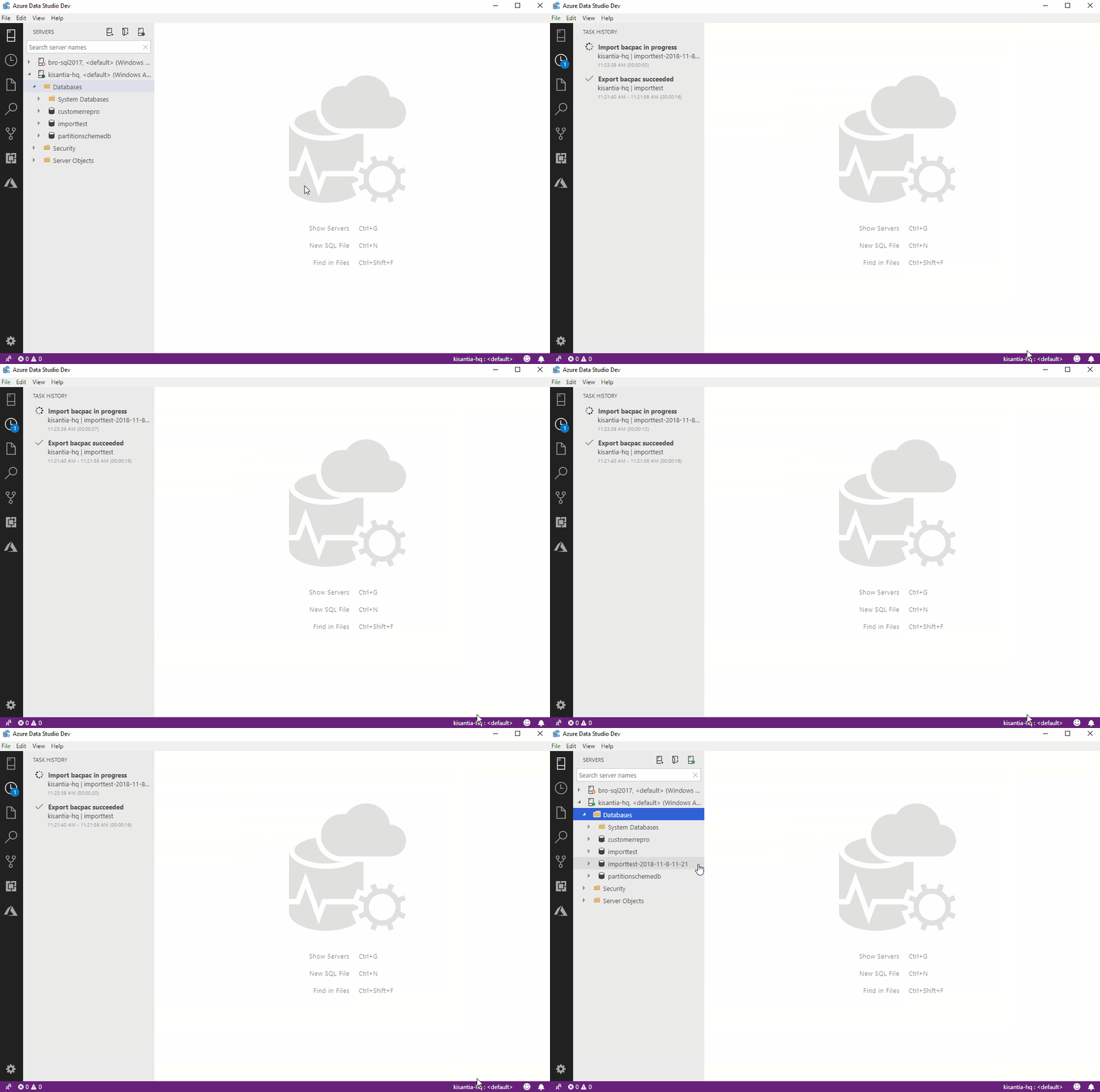
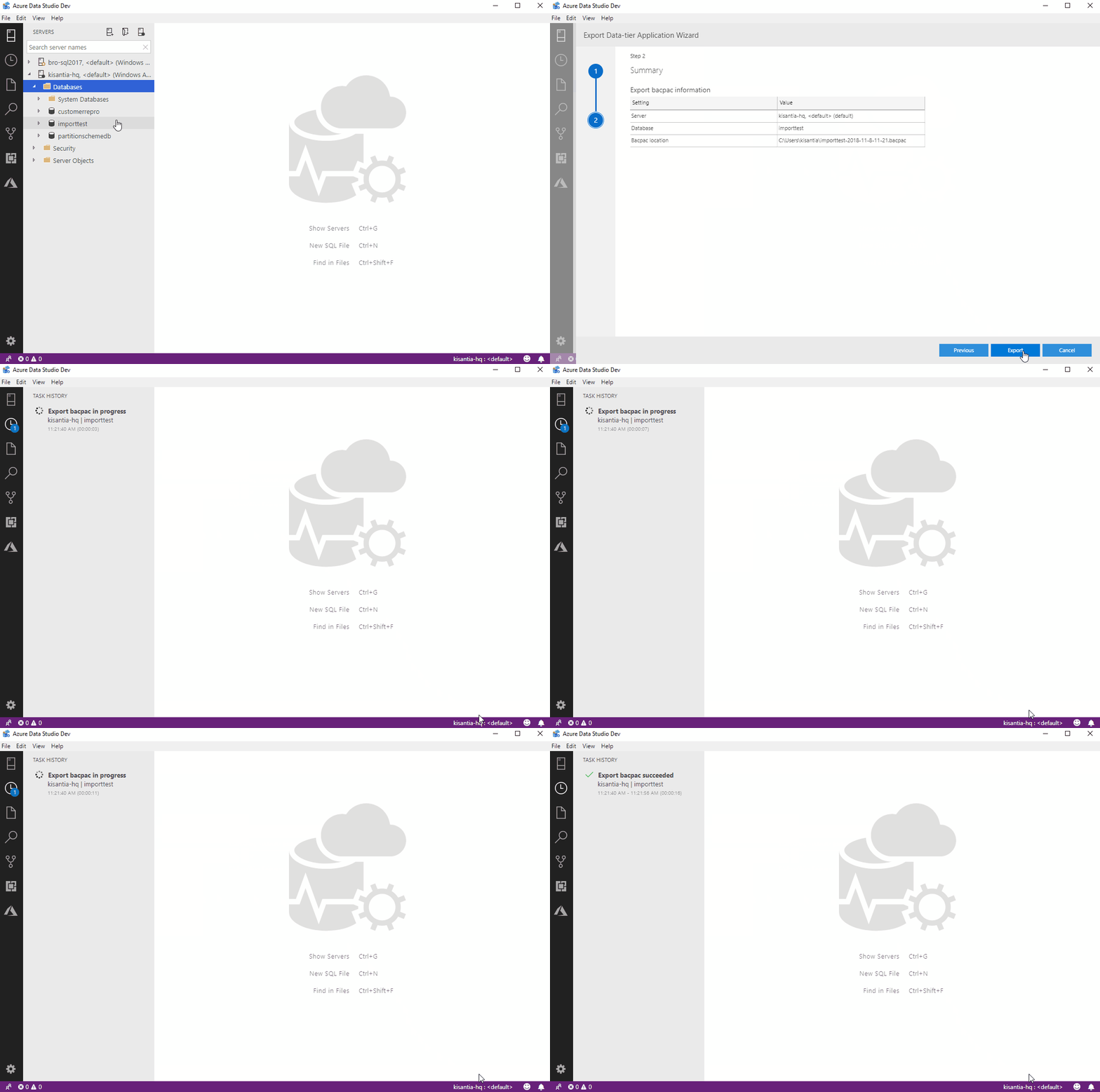
As part of bringing over key features from SSMS, the team is invested in bringing over DacFx support in Azure Data Studio, starting with the Export and Import bacpac wizards in SSMS. According to telemetry, these are the second most used wizards in SSMS after the Import Flat File Wizard.
By bringing over these experiences, we have an opportunity to improve the existing experience so that users have a better idea of knowing when to use Extract/Export/Import or more guidance for when to use DACPACs or BACPACs.
Here are some GIFs of the current experience.
Import
Export
We would appreciate your help by letting us know your thoughts of the current experience, and suggestions you have in mind as we continue to build out this feature.
You can keep track of current work here: https://github.com/Microsoft/azuredatastudio/issues/3163
 yualan
All 28 comments
@yualan Thanks for this. Can you share how to test this. I tried cloning and building branch feature/dacfxexport but the export bacpac did not succeed. Upon clicking Export button there was no task progress displayed and no bacpac file was created.
 joshbooker
on 8 Nov 2018
joshbooker
on 8 Nov 2018
Bug: I found that when I change the bacpac location, the default location still shows on the last page of the wizard.
Suggestion: it would be nice if ImportExport location defaulted to the current root path open in the file explorer.
Thanks for listening.
joshbooker
on 8 Nov 2018
Are there plans to include the Schema Compare like DacFx Script action?
How about including a way to execute scripts in sql command mode?
Thanks for listening.
joshbooker
on 8 Nov 2018
@yualan , I'm Looking forward to providing feedback to improve the cmd line experience for Extract, Compare, Update
This is what we're working with now.
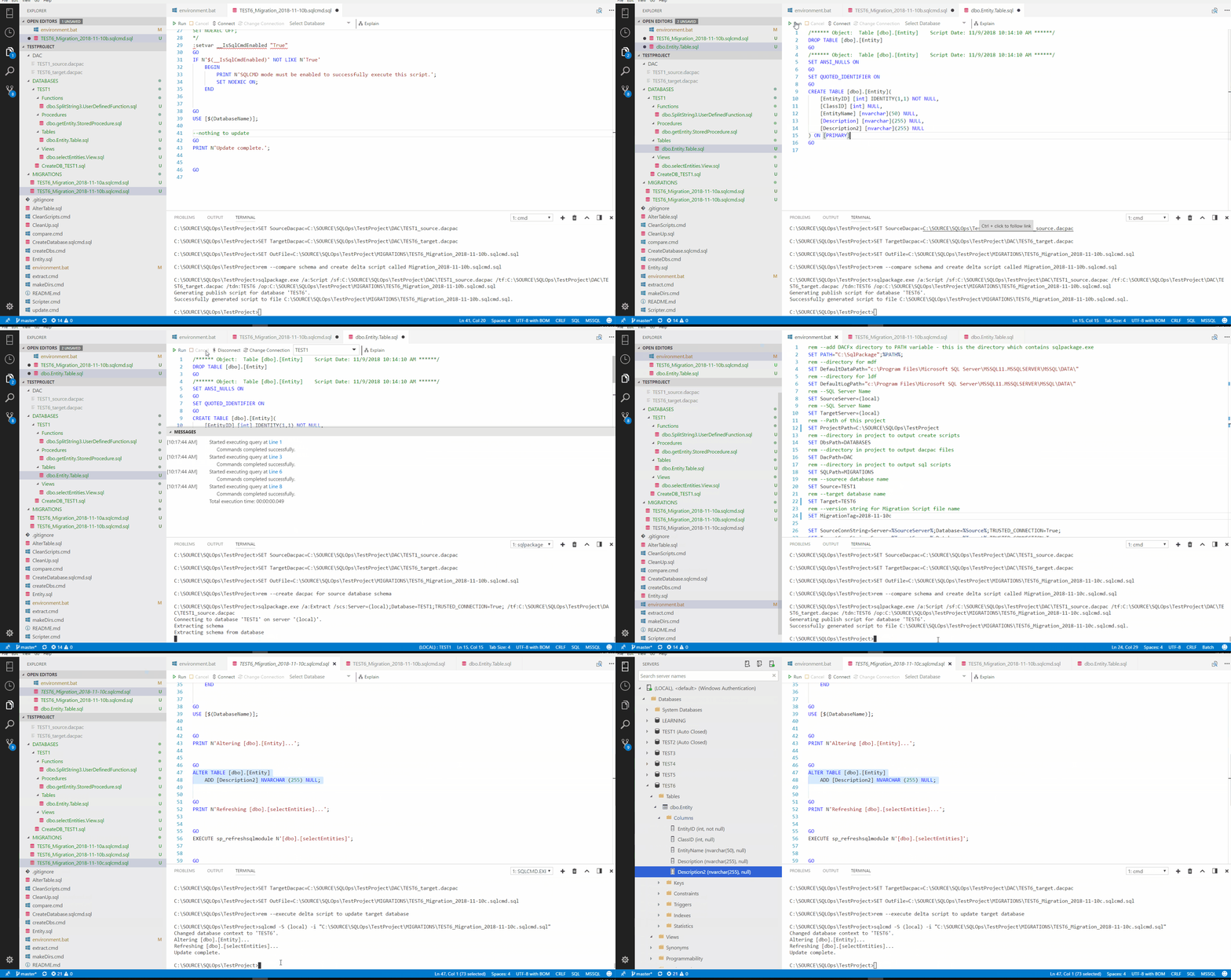
Would love to see this become a wizard experience in ADS.
joshbooker
on 10 Nov 2018
It appears the DacFx Script action is not included here: Microsoft/sqltoolsservice#728
Question: Any chance of adding the script action before this merges?
Scripting changes rather than publishing directly to database is really a important scenario...essential for maintaining the DEV to DBA relationship. :-)
Thanks for listening.
joshbooker
on 10 Nov 2018
Hi Josh, love to hear your enthusiasm. Would you be interested in joining a call with our developers and try the bits yourself? You can ask your questions on there, and then we can share the outcomes on this thread. Feel free to contact me at yu.[email protected]
yualan
on 13 Nov 2018
This would be wonderful since we use SSDT heavily in our shop. We run CI/CD. Just install Azure Data Studio, looking to explore and learn more. Also loading a Linux container on my Mac.
 armordba
on 13 Nov 2018
armordba
on 13 Nov 2018
Thanks Tom. Do you use this wizards in SSMS currently? Any feedback on the experience shown in the GIF?
yualan
on 13 Nov 2018
Hi Alan,
I currently use SSDT via Visual Studio with Azure Dev Ops for
our source control and project planning. We have continuous integration
continuous deployment. I have a MAC and I speak around the country. I
would love to use a product which would support SSDT on a MAC, so I am
being to explore Azure Data Studio to see if it offers which I need to use
my Mac without having to use a VM with windows.
Thanks,
Tom
On Mon, Nov 12, 2018 at 9:55 PM Alan Yu notifications@github.com wrote:
Thanks Tom. Do you use this wizards in SSMS currently? Any feedback on the
experience shown in the GIF?—
You are receiving this because you commented.
Reply to this email directly, view it on GitHub
https://github.com/Microsoft/azuredatastudio/issues/3171#issuecomment-438111955,
or mute the thread
https://github.com/notifications/unsubscribe-auth/AMHAVFivWIJ-fNhTKLNTINZGvVVBWr7Dks5uujSZgaJpZM4YVaIE
.
armordba
on 15 Nov 2018
Hi @armordba , what are the main features you are looking for from SSDT?
yualan
on 16 Nov 2018
- SQL Object creation and verification, for example, when creating a view
or stored procedure, SSDT will verify the table structure it is working
with and not allow the project to build. - If the build is successful, you can then publish the database project to
a database or create one if the database is not there. - Pre and Post deployment scripts I can add to the system.
- Database options can be set and published.
- Ability to check the database scripts into Source Control.
On Thu, Nov 15, 2018 at 6:03 PM Alan Yu notifications@github.com wrote:
Hi @armordba https://github.com/armordba , what are the main features
you are looking for from SSDT?—
You are receiving this because you were mentioned.
Reply to this email directly, view it on GitHub
https://github.com/Microsoft/azuredatastudio/issues/3171#issuecomment-439222187,
or mute the thread
https://github.com/notifications/unsubscribe-auth/AMHAVJZumvs5cVXyslUmXxLWrrFgsTpkks5uvfK2gaJpZM4YVaIE
.
armordba
on 16 Nov 2018
@yualan & @kisantia
It appears the DacFx Script action is not included here: Microsoft/sqltoolsservice#728
Question: Any chance of adding the script action before this merges?
Scripting changes rather than publishing directly to database is really a important scenario...essential for maintaining the DEV to DBA relationship. :-)
Thanks for listening.
cc: https://github.com/Microsoft/azuredatastudio/issues/3163
joshbooker
on 5 Dec 2018
@joshbooker I will look into adding the Generate Script action to the deploy scenario, but it won't make it into the December release.
Thanks,
Kim
 kisantia
on 6 Dec 2018
kisantia
on 6 Dec 2018
@kisantia thanks so much for your reply. Looking forward to it. Have a great day!
joshbooker
on 6 Dec 2018
EDIT: Ignore this comment
Version 1.2.4
Commit 1ebfd0235690ad044ed2874a02e65188f5fea01c
Date 2018-11-02T21:36:55.143Z
VS Code 1.26.1
Shell 2.0.9
Renderer 61.0.3163.100
Node 8.9.3
V8: 6.1.534.41
Architecture x64
I'm trying to import an Azure SQL backup in bacpac format into my local SQL Server on my Mac.
I've installed the import extension yet the Data-tier application wizard is not available, only the Flat file import.
Am I missing something? The command is not available in the commands palette neither

 Alain1405
on 4 Jan 2019
Alain1405
on 4 Jan 2019
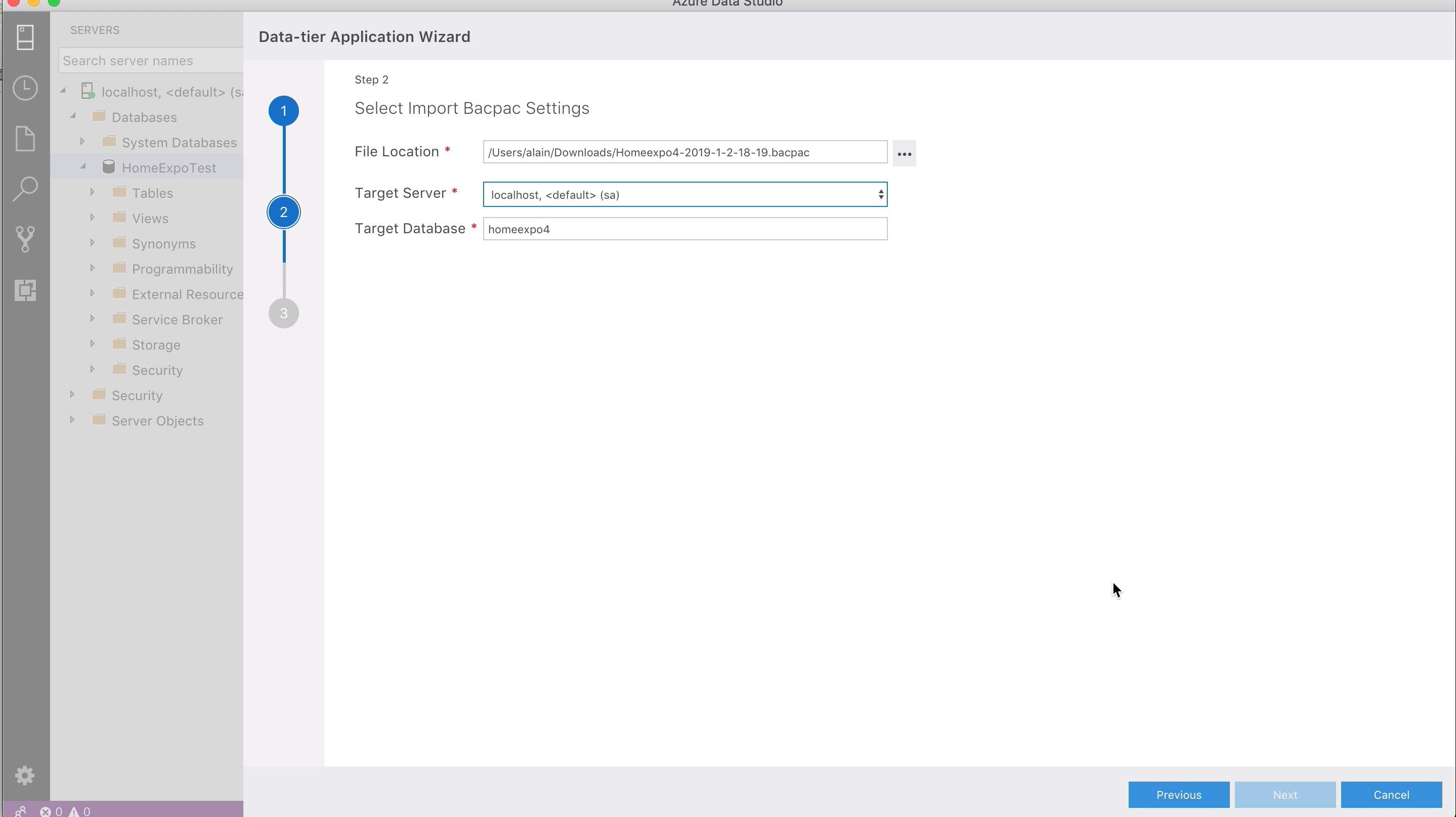
Actually, I was supposed to use an insider build. Using1.3.6-insider build, however, I encounter another issue, the Next button stays obfuscated once I try to import a bacpac file.
Alain1405
on 4 Jan 2019
I've downloaded the source for version 1.4.0 and built on Mac, to find that I had the same issue of Next button being disabled. I then opened Chrome Developer Tools and manually removed the CSS disabled configurations. Once the button was enabled, the import worked out.
Alain1405
on 5 Jan 2019
@Alain1405 thanks for finding this bug! I checked in the fix #3691 and it will be included in the next release of ADS.
A workaround in the current version is to click the Previous button to go back to the Step 1 page, then click the Next button to go back to the 'Select Import Bacpac Settings' page and the Next button should be enabled if the required fields are filled in.
kisantia
on 9 Jan 2019
I'm working on Ubuntu 18.04, trying to import a bacpac file. I had the same problem as @Alain1405, where the next button is stuck disabled. Your workaround fixed it for me (hit previous, then next), but when I hit "Import" on the summary screen, the pane immediately disappears and nothing happens. There's nothing on any of the logs.
 mikefayer
on 1 Feb 2019
mikefayer
on 1 Feb 2019
@mikefayer which version of ADS are you using? The latest release 1.3.9 has the fix for this and was working when I tested this release on my Ubuntu 16.04 VM.
kisantia
on 1 Feb 2019
@yualan I have tons of feedback for you on this topic! One piece of that feedback is: since ADS is multi-lingual, we want to be able to export a .DACPAC of all our databases with just 2 lines of code. Have a look at this old request: https://feedback.azure.com/forums/908035-sql-server/suggestions/32902240-sqlpackage-exe-needs-to-be-made-into-at-least-3
I also have a lot more feedback for you, beyond just the cmdline abilities. I will read through this page and then comment more.
 SQLvariant
on 27 Feb 2019
SQLvariant
on 27 Feb 2019
@kisantia Also works for me with the latest verison, thanks.
mikefayer
on 8 Mar 2019
@yualan and @kisantia Are there gh issues tracking feature requests related to this one including:
SqlCmd integration and mssql-scripter integration
joshbooker
on 8 Mar 2019
Tried to export a bacpac from one of our servers with the build released today. It threw an error. I can't tell for sure what the error is because I can't find a way to read it, but I'd _suspect_ that it has something to do with the fact that there's a SQL user tied to a SQL Login in the database.
Shouldn't we have a way to _not_ script those out as part of creating a bacpac? I shouldn't have to drop users/logins just to create a bacpac file to use elsewhere.
So two issues:
- Can't read the error message.
- Creating a bacpac shouldn't try to script out users tied to logins when we already know this will throw an error. (or at least give an option to not script users)
 paschott
on 18 Mar 2019
paschott
on 18 Mar 2019
@paschott can you try exporting using sqlpackage and email me the log file? My email is [email protected]
Example export command:
sqlpackage.exe /Action:Export /ssn:[server].database.windows.net /sdn:[database] /su:[user] /sp:[password] /tf:"C:Tempdatabase.bacpac" /df:sqlpackage-export.log
kisantia
on 20 Mar 2019
regarding what @joshbooker said, I think it would be nice if the path to save box showed last pah used and/or add a dropdown for recent folders used
 ffcruz85
on 11 Jan 2020
ffcruz85
on 11 Jan 2020
and another one that would be an awesome feature for me: select multiple DBs at once ... really annoying to go through the wizard 20 times...
Since we can't multiple select DBs to right click in the connections pane, maybe it would have to be an option within the wizard?
Either way, this would be great
ffcruz85
on 11 Jan 2020
Just wanted to say this is a great extension @yualan ❤️
It'd be nice if in the ADS extension search the term "import" would also bring this up. I only learned about the extension through this github issue.
 kunal-mandalia
on 10 Mar 2020
kunal-mandalia
on 10 Mar 2020
Related issues
joshbooker
·
34Comments
 capnsue
·
48Comments
capnsue
·
48Comments
 nnnax
·
29Comments
nnnax
·
29Comments
 Shawson
·
35Comments
Shawson
·
35Comments
 mrdenny
·
27Comments
mrdenny
·
27Comments