Azuredatastudio: Auto-sizing columns in the results panel
- SQL Operations Studio Version: 0.23.6
Steps to Reproduce:
Run any query
It would be great to have the results panel adjust the widths of the column based on the first few rows of data - I find after running a query I have to double click each column so I can view full dates etc. I minor thing I know, but quite annoying having come from ssms which seemed to do this a little better.
 Shawson
All 35 comments
Would love to have this too!
 liamdo
on 24 Nov 2017
liamdo
on 24 Nov 2017
+1
 JCKodel
on 27 Nov 2017
JCKodel
on 27 Nov 2017
I'll add that for E-n numbers this is super important as the E portion of the number is hidden, making you think number is wrong. Just run the following to see
select 1/cast(11442.as float)
 simonsabin
on 12 May 2018
simonsabin
on 12 May 2018
In 0.30.1 it does not work good.
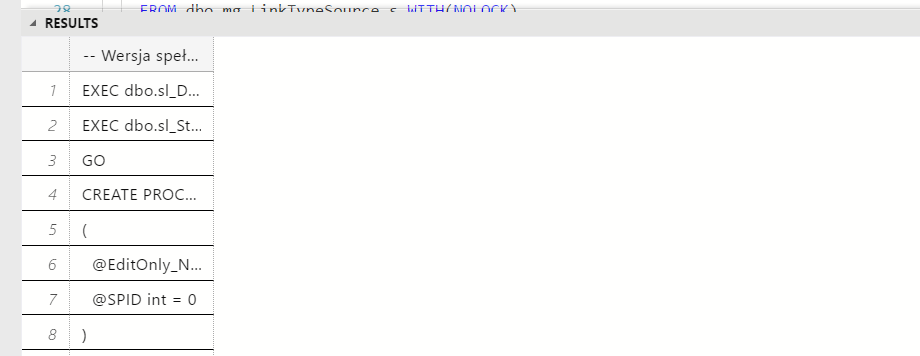
 GrzegorzLyp
on 18 May 2018
GrzegorzLyp
on 18 May 2018
Would be nice to have a user setting too where you could set a width value for the columns.
 joshtoczko
on 25 May 2018
joshtoczko
on 25 May 2018
It would be great if there would be more options to control the behavior like:
'Limit shrinking to column name length'
'Limit growing to x characters'
 salarcode
on 13 Jun 2018
salarcode
on 13 Jun 2018
+1
 austinjordanFA
on 30 Aug 2018
austinjordanFA
on 30 Aug 2018
+1
 digish777
on 5 Sep 2018
digish777
on 5 Sep 2018
+1
 mmroczka
on 7 Sep 2018
mmroczka
on 7 Sep 2018
+1
 devtanna
on 27 Sep 2018
devtanna
on 27 Sep 2018
+1
 kbraiden
on 3 Oct 2018
kbraiden
on 3 Oct 2018
+1
 real-napster
on 15 Nov 2018
real-napster
on 15 Nov 2018
+1
 leemorton
on 4 Dec 2018
leemorton
on 4 Dec 2018
+1
 ToyMakerGR
on 6 Dec 2018
ToyMakerGR
on 6 Dec 2018
+1
 rentes
on 6 Dec 2018
rentes
on 6 Dec 2018
Is there any progress on this? It's annoying little things like this that keep sending me back to SSMS.
 WhiteRabbit-BI
on 3 Jan 2019
WhiteRabbit-BI
on 3 Jan 2019
I don't think so :/ sadly for Mac users this (azure data studio) is the
only choice as far as I know
On Thu, 3 Jan 2019, 14:06 Dave Jenkins Is there any progress on this? It's annoying little things like this that —
keep sending me back to SSMS.
You are receiving this because you commented.
Reply to this email directly, view it on GitHub
https://github.com/Microsoft/azuredatastudio/issues/172#issuecomment-451100575,
or mute the thread
https://github.com/notifications/unsubscribe-auth/AAyztS9w7ubwp9m_7RpUx6uYE3L9VWUtks5u_dYkgaJpZM4Ql2_1
.
devtanna
on 3 Jan 2019
In the same boat as @WhiteRabbit-BI I switched back to SSMS months ago because of it, keenly waiting on this to be included in a release - It's seems like a silly thing but it actually really impacts the user experience.
liamdo
on 4 Jan 2019
Same I've also switched back to ssms
Shawson
on 4 Jan 2019
+1
How could anyone think that 120px as a constant default column width wouldn't be annoying? You can't even fit a date into that small of a column!
Please add the following options:
resultsGrid.defaultColumnWidth
- A value in px, or
"sizeToColumnName", or"stretchToFit"
resultsGrid.maximumStretchWidth
- A value in px, where if
resultsGrid.defaultColumnWidthis"stretchToFit", specifies the absolute maximum width in px that the colum will stretch
- A value in px, where if
I think this would satisfy most people!
 qJake
on 7 Jan 2019
qJake
on 7 Jan 2019
We're aware that this is an annoying issue that significantly impacts the SQL editing experience. We'll target getting a fix for Feb. (Jan is already basically done). The problem was we had a large performance regression with the initially implementation of this feature and need to come up with a different implementation approach.
 kburtram
on 7 Jan 2019
kburtram
on 7 Jan 2019
What is your implementation for this. Is it to size based on the visible rows, first X rows or all of the rows.
For me having the first is the critical one. Once you get into scrolling you are using the mouse and thus resizing a column isn't too bad.
The secondary is for fixed data types like date time, there should just be a size that works all the time, because the length is static
simonsabin
on 8 Jan 2019
This is merged in under a preferences flag
 anthonydresser
on 9 Jan 2019
anthonydresser
on 9 Jan 2019
+1
 juliermecarvalho
on 11 Jan 2019
juliermecarvalho
on 11 Jan 2019
@simonsabin the implementation @anthonydresser merged (https://github.com/Microsoft/azuredatastudio/pull/2778) calculates the size based on using the HTML DOM to measure all the visible cells. Apparently this works well most the time, but has some problems with particular types of values (I think large BLOBs and VARCHARS, IIRC).
I'll post an insiders build including that change to get some feedback. If the perf degradation is noticeably hurting the experience we'll look into using heuristics such as fixed sizes for various data types, or guessing sizes based on the content of cells, etc.
kburtram
on 11 Jan 2019
Biggest gripe is truncation of short columns.
Simon Sabin
Director Engineering Sabin.io
Founder SQLBits
Microsoft Regional Director & MVP
From: Karl Burtram notifications@github.com
Sent: Friday, January 11, 2019 5:38 pm
To: Microsoft/azuredatastudio
Cc: Simon Sabin; Mention
Subject: Re: [Microsoft/azuredatastudio] Auto-sizing columns in the results panel (#172)
@simonsabinhttps://github.com/simonsabin the implementation @anthonydresserhttps://github.com/anthonydresser merged (#2778https://github.com/Microsoft/azuredatastudio/pull/2778) calculates the size based on using the HTML DOM to measure all the visible cells. Apparently this works well most the time, but has some problems with particular types of values (I think large BLOBs and VARCHARS, IIRC).
I'll post an insiders build including that change to get some feedback. If the perf degradation is noticeably hurting the experience we'll look into using heuristics such as fixed sizes for various data types, or guessing sizes based on the content of cells, etc.
—
You are receiving this because you were mentioned.
Reply to this email directly, view it on GitHubhttps://github.com/Microsoft/azuredatastudio/issues/172#issuecomment-453596952, or mute the threadhttps://github.com/notifications/unsubscribe-auth/ABJ2a86uc71L9CmepxobfziIXxxY7fSpks5vCMwHgaJpZM4Ql2_1.
simonsabin
on 11 Jan 2019
Why not use the same implementation as SSMS?
 benjaminmiao
on 17 Jan 2019
benjaminmiao
on 17 Jan 2019
@benjaminmiao Probably because SSMS uses a native Windows GridView control, while ADS uses an HTML-based frontend. 😉
qJake
on 17 Jan 2019
@qJake What I mean is to use the same logic behind SSMS to calculate the columns width. not the same width for all column regardless its content or type :smile:
benjaminmiao
on 18 Jan 2019
Is the grid aware of the datatype of the column being returned? If so, it should be childsplay to establish a reasonable default width for every data type other than varchar-ish columns, without having to look at the data. The biggest annoyances in my case have been with number, date, bit (too wide), and uniqueidentifier columns.
 richardtallent
on 20 Jan 2019
richardtallent
on 20 Jan 2019
+1
Also flipping back to SSMS.
 touringsedan
on 6 Feb 2019
touringsedan
on 6 Feb 2019
Anyone has any idea when this feature will be released?
On Wed, 6 Feb 2019, 19:43 touringsedan +1 —
Also flipping back to SSMS.
You are receiving this because you commented.
Reply to this email directly, view it on GitHub
https://github.com/Microsoft/azuredatastudio/issues/172#issuecomment-461070640,
or mute the thread
https://github.com/notifications/unsubscribe-auth/AAyztVCNSKs5fTwRT9iJE-5_SlYAGY_oks5vKvgpgaJpZM4Ql2_1
.
devtanna
on 6 Feb 2019
The feature is available in the latest insider build available under https://github.com/Microsoft/azuredatastudio/releases. It can be enabled with the following setting "resultsGrid.autoSizeColumns": true. This will also be included in the February stable release planned for next week.
kburtram
on 6 Feb 2019
Awesome. Thank you. Installed 1.4.3, enabled setting and auto-width is working.
touringsedan
on 6 Feb 2019
Is the autoSizeColumns feature going to be carried into the Table object so it can be used when building a Dashboard that produces tables?
I think that currently the only way to use table object is like this:
"type": {
"table": null
}
It would be nice if something like this worked:
"type": {
"table": {
"autoSizeColumns": true
}
}
 rrgiles
on 18 Feb 2019
rrgiles
on 18 Feb 2019
Related issues
kburtram
·
3Comments
 CubsRep
·
3Comments
CubsRep
·
3Comments
 squillace
·
3Comments
squillace
·
3Comments
 stevenreddie
·
3Comments
stevenreddie
·
3Comments
 kfrajtak
·
3Comments
kfrajtak
·
3Comments
Most helpful comment
This is merged in under a preferences flag