Azure-kinect-sensor-sdk: "usb_cmd_get_device_count(). No devices found", yet Camera working
Describe the bug
I have a development PC that was successfully running 1.3 kinect software, and now somehow is unable to recognize that a device is connected. This happens with all three of the azure kinects I have here. I have tried resetting them, updated the sdk to 1.4 (along with the packaged firmware), and finally updating to latest Windows 10 version (1909 Build 18363.815).
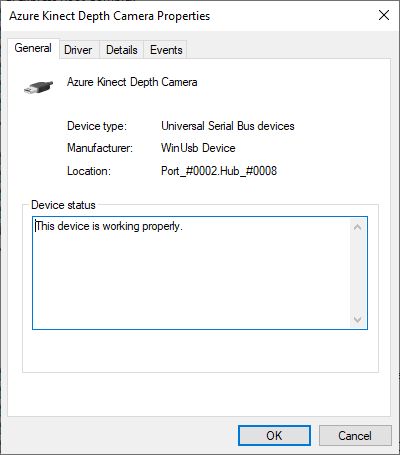
I can see the "Azure Kinect 4K Camera" in Device Manager and it appears to be working correctly, and it also works fine with both the windows Camera app and as a webcam over google chat. I also tried the cameras on a second laptop and they work fine (during this time, I updated the firmware to the latest release version).
How is it that the device is recognized in Device Manager but not by k4a? Are there more verbose logs (perhaps libusb) that I can find? Note that I've enabled K4A_ENABLE_LOG_TO_A_FILE=k4a.log with info both
Logs
New logging session started

[2020-04-28 17:14:23.465] [error] [t=8456] D:\a\1\s\extern\Azure-Kinect-Sensor-SDK\src\usbcommand\usbcommand.c (1037): usb_cmd_get_device_count(). No devices found
Screenshots

Desktop (please complete the following information):
- OS with Version: Windows 1909 Build 18363.815
- SDK Version: 1.3.0 and 1.4.0
- Firmware version: 1.6.102075014 and 1.6.108079014
Additional context
Side note: _one time_ today, I plugged in a second kinect and it worked with k4aviewer.exe. However, after switching back to the first kinect, it not working, and then again switching to the second one, k4aviewer.exe could no longer recognize the device again. Ever since, I have not been able to get k4aviewer.exe or AzureKinectFirmwareTool.exe to recognize any of my three devices.
 richardeakin
All 8 comments
Not sure if this is helpful or not, but when I run my application in the debugger, I get an exception thrown from within k4a::device::get_installed_count(), which is the first call to anything within the k4a library:
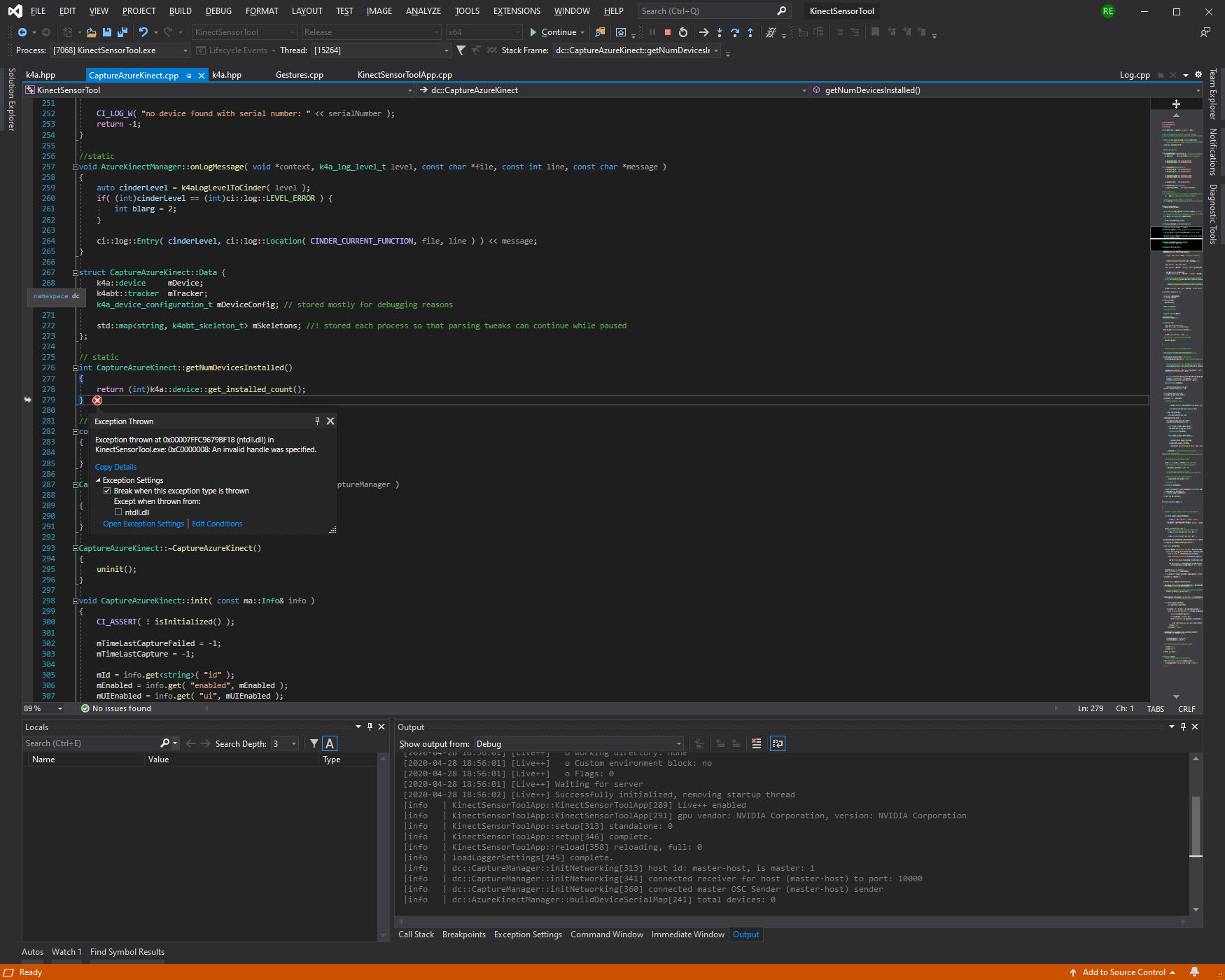
If I continue, I get the following log message:
|fatal | translate_seh_exception[114] exceptioncode: 3221225480
Looking at your Device Manager screen shot, you have 2 different USB Host controllers (Thanks for the screen shot!):
- Intel USB3.0 eXtensible Host Controller
- Via USB3.0 eXtensible Host Controller
I expect that if you connect your Azure Kinect to the USB Ports that connect to the Intel Host Controller that the Kinect will work as expected. You might have to try all the ports on your PC to map them out.
 wes-b
on 29 Apr 2020
wes-b
on 29 Apr 2020
I do have an extra PCI usb card (this one), however the kinects were working correctly when plugged into one of the motherboard's usb ports, which are Intel USB 3. It looks like the "Intel(R) USB 3.0 eXtensible Host Controller -1.0 (Microsoft)" driver was last updated on 2/2/2020, and I'm sure that the kinect was working since then.
Is there any way to get an error report of what isn't working? I'm kind of in the dark as to what is wrong right now.
Thanks,
Rich
richardeakin
on 30 Apr 2020
We expect the Intel and Renesas chipset to both work. But you need to ensure the MSFT driver is running on the card rather. You will know you are running the the Microsoft driver because you will see "(Microsoft)" on the end of the of driver name.
I can't tell from your post what is not working specifically or if something stopped working. I will note I am using a newer Intel driver from 2/20/2020 and the camera is working great for me.
wes-b
on 30 Apr 2020
Any chance you have virtual USB controllers lying around? Seems libusb is still on ver 1.0.22.
https://github.com/microsoft/Azure-Kinect-Sensor-SDK/issues/1088
https://github.com/libusb/libusb/commit/fd95d445dddc14892fa46538855c5e358efa48da
 tostercx
on 4 May 2020
tostercx
on 4 May 2020
Okay, I think it is indeed due to a USB hub that was connected to my computer, likely during an update. Seems like Windows update + libusb leads to issues even if the hub is plugged in but not in use. (I also took the step in Device Manager -> uninstall device for the VIA USB 3.0 eXtensible Host Controller that had failed to start, not sure if this was necessary beyond unplugging the device). After doing these steps, I can once again run the device uzing k4aviewer.exe.
So @tostercx I think it could be very related to that issue, the sympton that the crash happens before any k4a logs appear is identical. @wes-b perhsp libusb should be updated to 1.0.23?
(And as an aside, AFAIK all usb drivers I am using are Microsoft).
richardeakin
on 4 May 2020
Lets use this bug to track upgrading LibUsb.
wes-b
on 4 May 2020
Short update: after rebooting my PC, I had to again right click on "VIA USB 3.0 eXtensible Host Controller" and disable it in Device Manager before I could run the kinect without getting a libusb failure.
richardeakin
on 5 May 2020
Related issues
 AdrienPfeufferCarmenta
·
4Comments
AdrienPfeufferCarmenta
·
4Comments
 virtusense-trisha
·
4Comments
virtusense-trisha
·
4Comments
 benjaminrhansen
·
4Comments
benjaminrhansen
·
4Comments
 Elenaegr
·
3Comments
Elenaegr
·
3Comments
 natelowry
·
3Comments
natelowry
·
3Comments