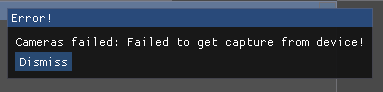
Azure-kinect-sensor-sdk: Cameras failed: Failed to get capture from device
Describe the bug
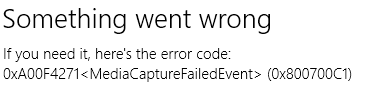
I've been working with the SDK for a couple months and with the 1.4 release for a few weeks, but recently started getting this error when running either my code OR the Azure Kinect Viewer. The camera also no longer works in the Windows Camera application. If I only select microphone in the Azure Kinect Viewer, the sound shows up. Anything w/ cameras or IMU is no go.
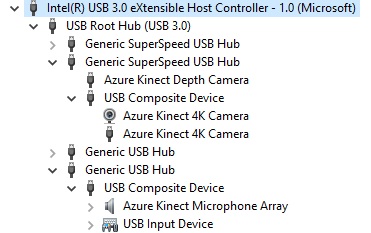
I tried different USB ports (it's currently on a dedicated 3.1 port with external power), checked device manager for weirdness with no changes. Tried updating the firmware of the camera (it was on the version that shipped w/ 1.3), reset the camera w/ the paperclip trick, uninstalled/reinstalled and repaired the SDK too. Restarted several times.
Nothing of note in the system Event Viewer either. I've been hitting my head against this for a while, so hoping someone has seen this before.
I'm wondering if it's a USB controller issue as I once got a "not enough USB controller resources" error when I had a few too many things plugged in. No warnings or fishy looking USB items though. Else, maybe some sort of dependency issue? I'd think uninstalling and reinstalling or repairing would handle that...
To Reproduce
- Plug in the Azure Kinect
- Open Azure Kinect Viewer 1.4
- Select the device from the list
- Click "Open Device"
- Enable RGB, Depth, or both
- Hit start.
Expected behavior
The depth or color data is available.
Logs
[2020-04-23 14:21:25.844] [info] [t=936] D:\x\usbcommand\usbcommand.c (343): find_libusb_device(). Container ID found: {4bfa76ff-5f39-4922-cc83-925f49f325ab}
[2020-04-23 14:21:25.845] [info] [t=936] D:\x\usbcommand\usbcommand.c (224): populate_serialnumber(). Serial Number found 000466500112
[2020-04-23 14:21:25.877] [info] [t=936] D:\x\usbcommand\usbcommand.c (343): find_libusb_device(). Container ID found: {4bfa76ff-5f39-4922-cc83-925f49f325ab}
[2020-04-23 14:21:25.878] [info] [t=936] D:\x\usbcommand\usbcommand.c (224): populate_serialnumber(). Serial Number found 000466500112
[2020-04-23 14:21:25.905] [critical] [t=936] D:\x\depth\depth.c (225): ******************** Device Info ********************
[2020-04-23 14:21:25.905] [critical] [t=936] D:\x\depth\depth.c (226): K4A SDK version:     1.4.0
[2020-04-23 14:21:25.931] [critical] [t=936] D:\x\depth\depth.c (232): Serial Number:       000466500112
[2020-04-23 14:21:25.931] [critical] [t=936] D:\x\depth\depth.c (236): RGB Sensor Version:  1.6.108
[2020-04-23 14:21:25.931] [critical] [t=936] D:\x\depth\depth.c (239): Depth Sensor Version:1.6.79
[2020-04-23 14:21:25.931] [critical] [t=936] D:\x\depth\depth.c (242): Mic Array Version:   1.6.14
[2020-04-23 14:21:25.931] [critical] [t=936] D:\x\depth\depth.c (245): Sensor Config:       6109.7
[2020-04-23 14:21:25.931] [critical] [t=936] D:\x\depth\depth.c (248): Build type:          Release
[2020-04-23 14:21:25.931] [critical] [t=936] D:\x\depth\depth.c (253): Signature type:      MSFT
[2020-04-23 14:21:25.931] [critical] [t=936] D:\x\depth\depth.c (259): ****************************************************
[2020-04-23 14:21:28.610] [info] [t=936] D:\x\sdk\k4a.c (868): k4a_device_start_cameras(). Starting camera's with the following config.
[2020-04-23 14:21:28.610] [info] [t=936] D:\x\sdk\k4a.c (869): k4a_device_start_cameras().     color_format:3
[2020-04-23 14:21:28.610] [info] [t=936] D:\x\sdk\k4a.c (870): k4a_device_start_cameras().     color_resolution:1
[2020-04-23 14:21:28.610] [info] [t=936] D:\x\sdk\k4a.c (871): k4a_device_start_cameras().     depth_mode:1
[2020-04-23 14:21:28.610] [info] [t=936] D:\x\sdk\k4a.c (872): k4a_device_start_cameras().     camera_fps:2
[2020-04-23 14:21:28.610] [info] [t=936] D:\x\sdk\k4a.c (873): k4a_device_start_cameras().     synchronized_images_only:1
[2020-04-23 14:21:28.610] [info] [t=936] D:\x\sdk\k4a.c (874): k4a_device_start_cameras().     depth_delay_off_color_usec:0
[2020-04-23 14:21:28.610] [info] [t=936] D:\x\sdk\k4a.c (875): k4a_device_start_cameras().     wired_sync_mode:0
[2020-04-23 14:21:28.610] [info] [t=936] D:\x\sdk\k4a.c (876): k4a_device_start_cameras().     subordinate_delay_off_master_usec:0
[2020-04-23 14:21:28.610] [info] [t=936] D:\x\sdk\k4a.c (877): k4a_device_start_cameras().     disable_streaming_indicator:0
[2020-04-23 14:21:28.627] [info] [t=8404] D:\x\dynlib\dynlib_windows.c (131): dynlib_create(). Depth Engine loaded C:\Program Files\Azure Kinect SDK v1.4.0\tools\depthengine_2_0.DLL
[2020-04-23 14:21:28.627] [info] [t=8404] D:\x\deloader\deloader.cpp (51): verify_plugin(). Loaded Depth Engine version: 2.1.3
[2020-04-23 14:21:28.794] [info] [t=936] D:\x\sdk\k4a.c (916): k4a_device_start_cameras(). k4a_device_start_cameras started
[2020-04-23 14:21:29.474] [error] [t=14352] D:\x\color\mfcamerareader.cpp (1126): OnReadSample(). Pipeline propagate error to callback: 0x800700c1
[2020-04-23 14:21:29.474] [warning] [t=14352] D:\x\capturesync\capturesync.c (200): capturesync_add_capture(). Capture Error Detected, Color
[2020-04-23 14:21:29.474] [info] [t=14352] D:\x\queue\queue.c (300): queue_stop(). Queue "Queue_capture" stopped, shutting down and notifying consumers.
[2020-04-23 14:21:29.474] [info] [t=14352] D:\x\queue\queue.c (278): queue_disable(). Queue "Queue_capture" waiting for blocking call to complete.
[2020-04-23 14:21:29.474] [error] [t=15116] D:\x\sdk\k4a.c (269): capturesync_get_capture(device->capturesync, capture_handle, timeout_in_ms) returned failure in k4a_device_get_capture()
[2020-04-23 14:21:29.474] [info] [t=15116] D:\x\sdk\k4a.c (931): k4a_device_stop_cameras(). k4a_device_stop_cameras stopping
[2020-04-23 14:21:29.508] [info] [t=14352] D:\x\queue\queue.c (300): queue_stop(). Queue "Queue_depth" stopped, shutting down and notifying consumers.
[2020-04-23 14:21:29.508] [info] [t=14352] D:\x\queue\queue.c (300): queue_stop(). Queue "Queue_color" stopped, shutting down and notifying consumers.
[2020-04-23 14:21:29.508] [warning] [t=14352] D:\x\color\color.cpp (123): color_capture_available(). A streaming color transfer failed
[2020-04-23 14:21:29.508] [info] [t=14352] D:\x\queue\queue.c (300): queue_stop(). Queue "Queue_capture" stopped, shutting down and notifying consumers.
[2020-04-23 14:21:29.508] [info] [t=14352] D:\x\queue\queue.c (300): queue_stop(). Queue "Queue_depth" stopped, shutting down and notifying consumers.
[2020-04-23 14:21:29.508] [info] [t=14352] D:\x\queue\queue.c (300): queue_stop(). Queue "Queue_color" stopped, shutting down and notifying consumers.
[2020-04-23 14:21:29.508] [warning] [t=14352] D:\x\color\color.cpp (123): color_capture_available(). A streaming color transfer failed
[2020-04-23 14:21:29.508] [error] [t=14352] D:\x\color\mfcamerareader.cpp (538): Stop(). Failed to request flush for stop: 0x800700c1
Screenshots
Error in Azure Viewer
Device Manager
The error I get in the Windows Camera app
Desktop (please complete the following information):
- OS with Version: Windows 10 Build 18363
- Hardware: HP Spectre x360
- SDK Version: 1.4
- Firmware version: 1.6.108
Additional context
Same error happens when trying to get a capture in the SDK from C# using the NuGet package.
Thanks!
 natelowry
All 3 comments
[2020-04-23 14:21:29.474] [error] [t=14352] D:\x\color\mfcamerareader.cpp (1126): OnReadSample(). Pipeline propagate error to callback: 0x800700c1
This is the error to investigate. 0x800700c1 means ERROR_BAD_EXE_FORMAT.
You might start by reviewing software you recently installed. Some drivers can cause Media Foundation to crash. Also check to Event Viewer to see if the System log shows any error reports at the time of your failure.
 wes-b
on 23 Apr 2020
wes-b
on 23 Apr 2020
Thanks for that! I uninstalled the latest Zoom update (who knows with video drivers). I'll try to get dependency walker running again (it was crashing when I tried earlier) and see. I also downloaded ffmpeg, but I'm pretty sure I did the standalone version.
Will report back. Thanks!
natelowry
on 23 Apr 2020
I uninstalled most everything on my PC, but that didn't seem to help. The last thing I did that seemed to have worked is running SFC which found and repaired a couple of bad DLLs. I think it may have been that or a 32/64 bit DLL thing.
Regardless, thanks for the help! Hope no one else gets this issue, but if they do that something here is helpful for them 😸
natelowry
on 27 Apr 2020
Related issues
 G-mel
·
4Comments
G-mel
·
4Comments
 szi
·
4Comments
szi
·
4Comments
 Jalroka
·
3Comments
Jalroka
·
3Comments
 t2k2
·
4Comments
t2k2
·
4Comments
 benjaminrhansen
·
4Comments
benjaminrhansen
·
4Comments