Azure-kinect-sensor-sdk: MissingFieldException when trying to get joint positions in C# from BodyTracking API
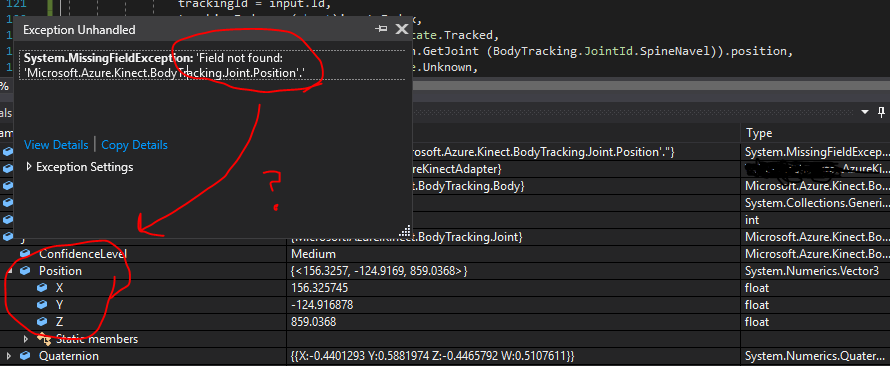
I've got color and depth streams working in my C# program, but when I try to retrieve the joint positions, it throws a MissingFieldException saying I can't get the Position field.
I have a valid BodyTracking.Frame object from PopResult.
In the debugger I can see that NumberOfBodies is 1.
In the debugger I can even dig into the BodyTracking.Joint object and it shows me the 3D position in millimeters like I'm expecting. But when I step into the next function, my code can't access the Position field.
To Reproduce
I don't have a minimal example for this but I can make one if it's not obviously something on my end.
Expected behavior
I expected to access the Position field since it's visible in the debugger and it compiled fine and everything else was working.
Logs
I didn't check the logs.
Screenshots
Desktop (please complete the following information):
- Windows 10 build 17763
- Microsoft.Azure.Kinect.Sensor v1.3.0 and Microsoft.Azure.Kinect.BodyTracking v0.9.5, from NuGet, v1.3.0 through MSI
- Firmware version: 1.6.75 for the depth camera
Additional context
I'm using the recently-made C# wrapper so maybe it's a bug in there? I tried rebuilding my project, because the documentation for this exception says it can happen if the DLL changes after compiling, but that didn't do anything.
 virtusense-trisha
All 4 comments
I compiled this example https://github.com/microsoft/Azure-Kinect-Samples/tree/master/body-tracking-samples/csharp_3d_viewer and it works fine on the same computer and the same sensor.
But I can't see what the example is doing differently in the code than I am - We both get a capture, process it, get a valid body frame, get a valid skeleton, get a joint, but then when I get the position it doesn't work.
I also noticed that the example doesn't depend on the NuGet packages Microsoft.Azure.Kinect.BodyTracking.Dependencies or ...Dependencies.cuDNN or Microsoft.Azure.Kinect.Sensor. I cannot construct this in my NuGet because Microsoft.Azure.Kinect.BodyTracking has those 3 other packages as direct dependencies.
I don't know if it makes a difference, but my project also depends on the Kinect v2 libraries. I was hoping to support both in the same code. With the Kinect v1 and v2 there was a direct conflict, but I figured if v2 and Azure were in conflict, the compiler would tell me.
virtusense-trisha
on 30 Dec 2019
I made a smaller test project in my solution that has the same target framework and NuGet dependencies as my not-working project, (v4.6.1, the example is v4.8) and it does work.
I also added the Kinect v2 dependency to the test project, and switched the not-working project to use my laptop's Nvidia GPU. Both still working and not working.
So I think that eliminates a few more differences.
virtusense-trisha
on 30 Dec 2019
I ran sha256sum on all the DLLs for both projects and found they had different versions of System.Memory.dll, System.Numerics.Vector.dll, and System.Runtime.CompilerServices.Unsafe.dll.
If I copy those 3 dlls from the working project to the non-working project, it stops crashing. Until Visual Studio rebuilds it and puts the incorrect DLLs in again.
I'm not sure how this happened as, again, they're in the same solution and NuGet doesn't show any need to consolidate versions. When I look at those DLL references in Solution Explorer in Visual Studio, they list the same versions.
virtusense-trisha
on 30 Dec 2019
The not-working project had a sister project that was dragging in the incorrect versions of those 3 DLLs. For some reason it was a direct reference so NuGet didn't know anything about it. It's not a bug in the Azure Kinect SDK so I'm closing this.
virtusense-trisha
on 30 Dec 2019
Related issues
 legacydev
·
3Comments
legacydev
·
3Comments
 t2k2
·
4Comments
t2k2
·
4Comments
 szi
·
4Comments
szi
·
4Comments
 d-walsh
·
3Comments
d-walsh
·
3Comments
 rfilkov
·
3Comments
rfilkov
·
3Comments
Most helpful comment
The not-working project had a sister project that was dragging in the incorrect versions of those 3 DLLs. For some reason it was a direct reference so NuGet didn't know anything about it. It's not a bug in the Azure Kinect SDK so I'm closing this.