Arfoundation-samples: ARFoundation Regression between 2019.1.3f1 and 2019.1.8f1
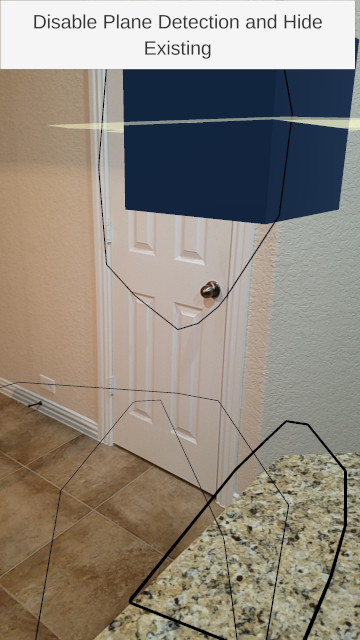
The lwrp-support-2019.1-with-2.1 SampleLWRPScene works on 2019.1.3, but is broken in 2019.1.8. On 2019.1.8 the plane ends up being in the air, while the outline for the plane is on the floor.
 Katerpilet
All 14 comments
2019.8 is not a version of Unity. Did you mean something else?
 tdmowrer
on 25 Jun 2019
tdmowrer
on 25 Jun 2019
Meant to type 2019.1.3 and 2019.1.8. Updated in original comment.
Katerpilet
on 25 Jun 2019
The minimum supported version of Unity is 2018.4, and the samples project should not be openable in 2018.1.x. Sorry, I'm still not sure which version(s) you mean.
tdmowrer
on 25 Jun 2019
I had a typo in my reply, but I updated the original comment, my reply, and the title to all represent the correct versions.
Katerpilet
on 25 Jun 2019
I agree that there seem to be some major issues that just don't work with 2019.1.8 (and .7) - that probably seem to have worked with earlier versions
Can you guys please post which versions that you have tested your samples to work with?
 yosun
on 26 Jun 2019
yosun
on 26 Jun 2019
+1. The last worked version is 2019.1.4f
I tried describe a little more about issue on the forum.
 Goncharuk-Nikita
on 27 Jun 2019
Goncharuk-Nikita
on 27 Jun 2019
Is this limited to LWRP-based applications?
tdmowrer
on 1 Jul 2019
I checked only LWRP + AR Foundation.
Goncharuk-Nikita
on 1 Jul 2019
I have seen this issue on 2019.3.0a8, 2019.3.0a5, and 2019.1.10f1.
2019.1.2f1 worked correctly.
When using LWRP with AR Foundation, it looks like all objects render at the AR Session Origin. The Line Renderer shows the outlines of the planes in the correct location, but the Mesh Renderer renders every plane centered at the origin. I placed multiple objects in the sample scene at different locations parented on the session origin, AR camera, and the world. All of them centered themselves in the same origin when the AR app started. When I remove LWRP, everything renders in the correct locations with AR Foundation alone.
 xendav
on 16 Jul 2019
xendav
on 16 Jul 2019
Bumping this thread, seems like the same thing I posted in #212.
@xendav did you find anything more about this? I've even found that planes are being attached to the spawned gameObject. You can typically only see it if they receive a shadow.
 BikutaAnkuta
on 19 Jul 2019
BikutaAnkuta
on 19 Jul 2019
@BikutaAnkuta Working on 2019.1.4f (this is the last stable for AR, I think) and can't update Unity version, this is sad (
Goncharuk-Nikita
on 20 Jul 2019
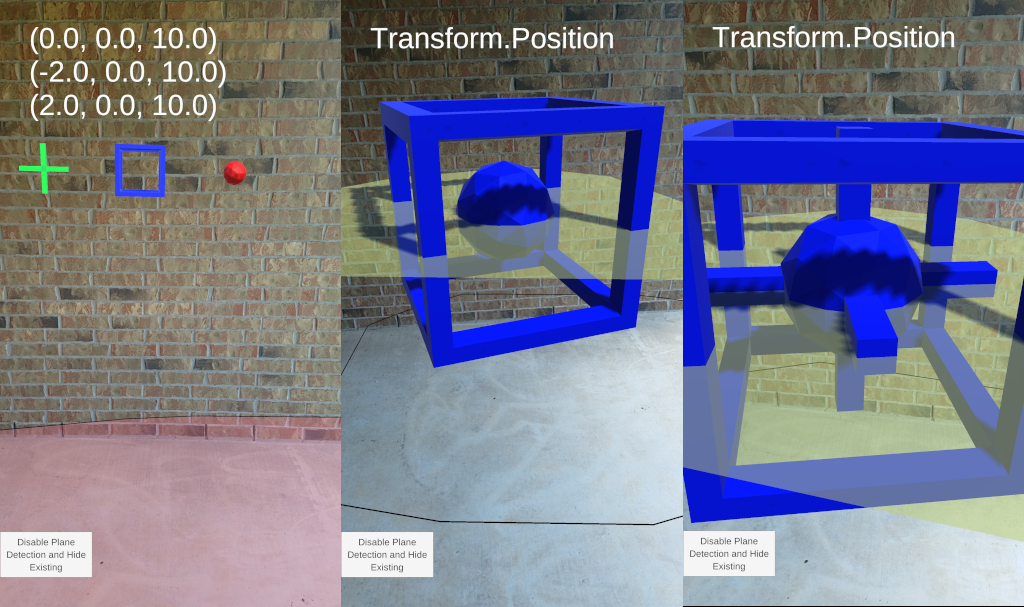
@BikutaAnkuta I haven't found a solution to get it to work on later releases. They may not be attaching to the spawned gameObject. From what I have experienced, the spawned gameObject and any other object just end up at the same position. I made an object made out of multiple pieces and it showed up in the same place as the ARPlanes with all of its parts centered. The images below are the same scene. I displayed the transform of each object at the top of the screen. When I changed to LWRP, the ARPlanes and all three objects center themselves at a single location. The materials of the three objects render with the parent's material. If I moved closer, the wireframe cube would disappear and the color would change to the color of the next child. Also, the script would no longer display the position of the three objects. @Goncharuk-Nikita I agree. I'm stuck on 2019.1.2f1 to get things to display correctly with LWRP.
xendav
on 20 Jul 2019
@Goncharuk-Nikita @xendav I can confirm that 2019.1.4f1 works like a charm for LWRP, when started from the lwrp-support-2019.1-with-2.1 sample.
@tdmowrer Can we get this branch to ask for 2019.1.4f1 instead of 1.5? It's bound to be a bit misleading.
BikutaAnkuta
on 21 Jul 2019
Please use URP instead of LWRP:
https://docs.unity3d.com/Packages/[email protected]/manual/ar-camera-background-with-scriptable-render-pipeline.html
 mdurand42
on 28 Apr 2020
mdurand42
on 28 Apr 2020
Related issues
 TimmyBest
·
6Comments
TimmyBest
·
6Comments
 ChakreyaYan
·
5Comments
ChakreyaYan
·
5Comments
 atom182
·
8Comments
atom182
·
8Comments
 jiungerich
·
6Comments
jiungerich
·
6Comments
 Berenice2018
·
3Comments
Berenice2018
·
3Comments
Most helpful comment
I had a typo in my reply, but I updated the original comment, my reply, and the title to all represent the correct versions.