Arfoundation-samples: supported devices
Hi,
i download the project and install it on 3 diferent devices, in a Moto E4 and Huawei mate 10 and a samsung S9, and only i can see the samples in the Samsung.
ARFoundation have a list of suported devices???
 atom182
All 8 comments
ARFoundation uses ARKit on iOS and ARCore on Android. So for Android look for a list of devices that support ARCore. Hope that helps.
 dorkbot
on 22 Feb 2019
dorkbot
on 22 Feb 2019
Here is the list of supported devices. Google add new devices all the time, so the list will increase over time.
 tdmowrer
on 23 Feb 2019
tdmowrer
on 23 Feb 2019
Hello @tdmowrer , I have 2 questions:
1)
Could you let me know which ARKit version (or which minimum iOS version) is required? I am using
"displayName":"AR Foundation",
"version": "1.0.0-preview.22",
"unity": "2018.3",
I think as face tracking is supported, it is ARKit 2 and thus iOS 12 and up is required, right? If I do not use face tracking, are these the same minimum requirements, or is iOS 11 with ARKit 1.5 also supported?
Unfortunately, I have not found this information neither in the manual https://docs.unity3d.com/Packages/[email protected]/manual/index.html
nor in Unity blog articles about ARFoundation or in the readme and changelog files within the Unity package.
2)
My app shall include a non-AR part which could run on a wide range of devices. If I do an ARKit/ ARCore compatibility/ support check before starting the ARFoundation scene, I may build the app for a lower Minimum iOS version or Minimum API level respectively. Is this correct?
I would appreciate your help. Thanks in advance
 Berenice2018
on 17 Apr 2019
Berenice2018
on 17 Apr 2019
- ARKit requires iOS 11. Certain features will only work on newer OS versions (e.g., face tracking), but ARFoundation in general will still work.
- You can have a non-AR fallback for unsupported devices, but you need to tell ARKit and ARCore that AR is "optional". See the docs for ARKit and ARCore for instructions on how to do this.
Note also on ARKit, we only support ARM 64, so you won't be able to target older 32-bit devices.
tdmowrer
on 17 Apr 2019
Many thanks @tdmowrer . It is awesome that I can set AR to optional in Unity! For iOS, I have done this in XCode, info.plist, after each export. Now, this is way simpler. .
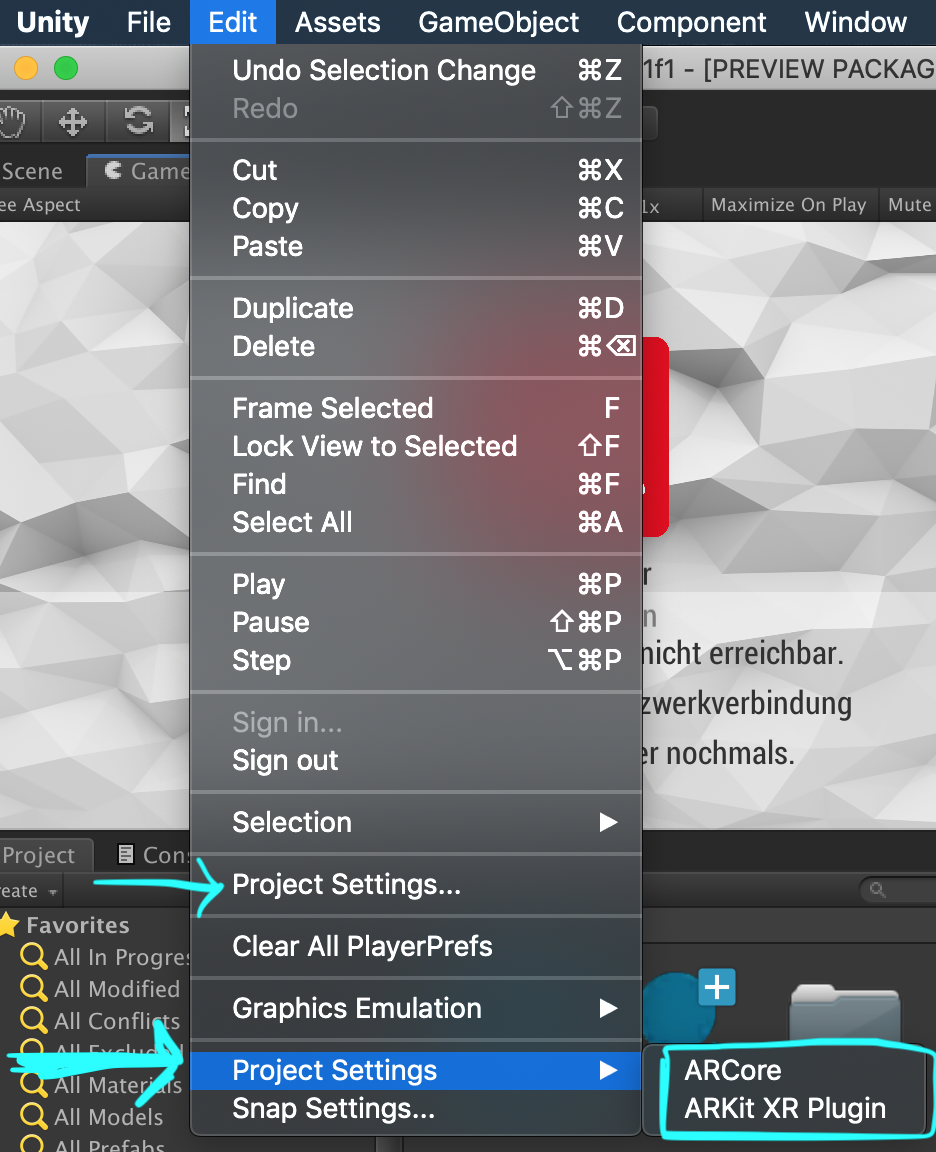
To anyone who is looking for Edit/Project Settings/ARKit XR Plugin.: There are 2 Project Settings in the dropdown menu as shown in my screenshot.
Berenice2018
on 18 Apr 2019
For iOS, I have done this in XCode, info.plist, after each export. Now, this is way simpler. .
You should not have to edit the info.plist -- ARFoundation does this for you according to the ARKit settings. Is that not working for you?
tdmowrer
on 18 Apr 2019
@tdmowrer Sure, it is working like a charm. :) I had set the value in info.plist, because I did not know that I also could set it in ARKit XR Plugin settings. Now, since you pointed it out to me, I will not change anymore the info.plist. Thanks again!
Berenice2018
on 18 Apr 2019
For iOS, I have done this in XCode, info.plist, after each export. Now, this is way simpler. .
You should not have to edit the info.plist -- ARFoundation does this for you according to the ARKit settings. Is that not working for you?
It doesn't modify .plist file now and I had to modify it manually. Unity 2019.2, ARKit 2.1.1
 novavision
on 29 Aug 2019
novavision
on 29 Aug 2019
Related issues
Berenice2018
·
3Comments
 ChakreyaYan
·
5Comments
ChakreyaYan
·
5Comments
 rvegele
·
9Comments
rvegele
·
9Comments
 KirillKuzyk
·
5Comments
KirillKuzyk
·
5Comments
 AdrienMgm
·
5Comments
AdrienMgm
·
5Comments
Most helpful comment
Note also on ARKit, we only support ARM 64, so you won't be able to target older 32-bit devices.