Arfoundation-samples: Error updating ARSessionOrigin to ARRaycastManager
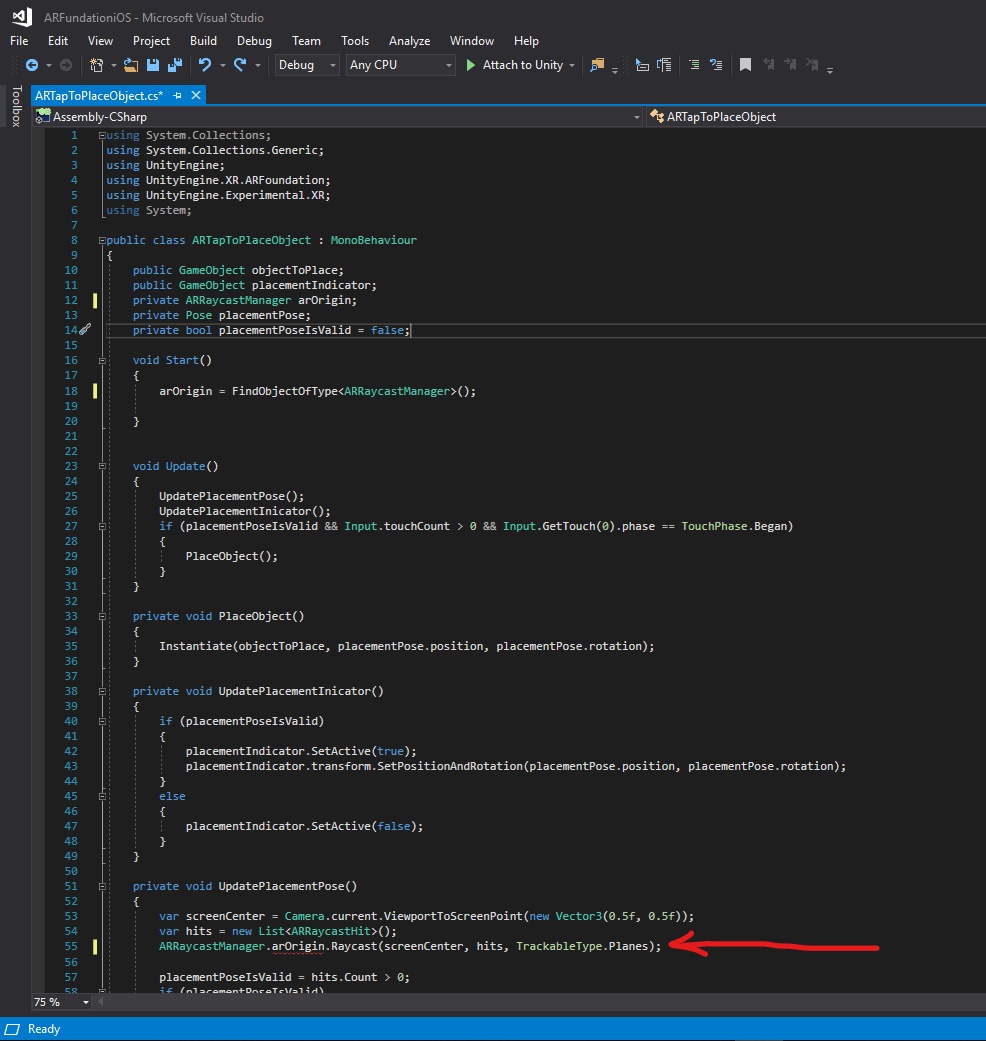
I have updated Unity project from AR foundation 1.0.0-preview 22 to AR foundation 2.2.0-preview 3. After I updated AR foundation version, it alerted error on my script: "" AssetsmaterialsARTapToPlaceObject.cs(55,18): error CS1061: 'ARSessionOrigin' does not contain a definition for 'Raycast' and no accessible extension method 'Raycast' accepting a first argument of type 'ARSessionOrigin' could be found (are you missing a using directive or an assembly reference?) ""
I have changed Raycast via the ARRaycastManager instead of the ARSessionOrigin, but could not fix above error. Could you show me to fix above issue?
Thank you very much for your help.

Code error:
 ChakreyaYan
All 5 comments
ARSessionOrigin GO holds ARRaycastManager component, you may want to try
GameObject.FindGameObjectWithTag("ARSessionOrigin")..GetComponent
 sergiosolorzano
on 24 Jul 2019
sergiosolorzano
on 24 Jul 2019
You seem to have followed https://www.youtube.com/watch?v=Ml2UakwRxjk&list=WL&index=4 right?
Instead of creating an Interaction gameobject to put the ARTapToPlaceObject, just add it to AR Session Origin. So remove your Interaction gameobject and drag and drop ARTapToPlaceObject to AR Session Origin. Then on AR Session Origin, be sure to add a "AR Plane Manager" component and a "AR Raycast Manager" component.
Here is my current ARTapToPlaceObject.cs script that I adapted to latest AR Foundation version and to be able to test it against a fake plane in the editor (see https://www.youtube.com/watch?v=x08UU-I8eZ8&list=PLw3UgsOGHn4loDyxHG75eJxSnxxVgB-Yb&index=5&t=0s):
using System.Collections.Generic;
using UnityEngine;
using UnityEngine.XR.ARFoundation;
using UnityEngine.XR.ARSubsystems;

// This script is inspired by:
// https://www.dropbox.com/s/n1i5v200npx1mf1/AutoPlaceItem.cs from video 7 of udemy course:
// https://www.udemy.com/create-ar-placement-app-and-full-template-for-photo-app/
// same video available on youtube:
// https://www.youtube.com/watch?v=x08UU-I8eZ8&list=PLw3UgsOGHn4loDyxHG75eJxSnxxVgB-Yb&index=5&t=0s
// arfoundation-examples PlaceOnPlace.cs with GetMouseButtonDown instead of GetMouseButton (was spawning 10 cubes with one click)
// video Getting Started With ARFoundation in Unity (ARKit, ARCore): https://www.youtube.com/watch?v=Ml2UakwRxjk&list=WL&index=4

[RequireComponent(typeof(ARRaycastManager))]
public class ARTapToPlaceObject : MonoBehaviour
{
    public GameObject objectToPlace;
    public GameObject placementIndicator;
    private ARRaycastManager m_RaycastManager;
    private Pose m_PlacementPose;
    private bool m_PlacementPoseIsValid = false;
    static List<ARRaycastHit> s_Hits = new List<ARRaycastHit>();

    public LayerMask layerMask;

    public GameObject[] TestingGround;

    void Awake()
    {
#if UNITY_EDITOR
        for (int i = 0; i < TestingGround.Length; i++)
        {
            TestingGround[i].SetActive(true);
        }
#else
        for (int i = 0; i < TestingGround.Length; i++)
        {
            TestingGround[i].SetActive(false);
        }
#endif

        m_RaycastManager = GetComponent<ARRaycastManager>();
    }

    bool TryGetTouchPosition(out Vector2 touchPosition)
    {
#if UNITY_EDITOR
        if (Input.GetMouseButtonDown(0))
        {
            var mousePosition = Input.mousePosition;
            touchPosition = new Vector2(mousePosition.x, mousePosition.y);
            return true;
        }
#else
        if (Input.touchCount > 0 && Input.GetTouch(0).phase == TouchPhase.Began)
        {
            touchPosition = Input.GetTouch(0).position;
            return true;
        }
#endif

        touchPosition = default;
        return false;
    }

    void Update()
    {
        TryUpdatePlacementPose();
        UpdatePlacementIndicator();

        if (!TryGetTouchPosition(out Vector2 touchPosition))
            return;

        // we actually ignore touchPosition, and always use screenCenter for the ray

        if (m_PlacementPoseIsValid)
        {
            PlaceObject();
        }
    }

    private void PlaceObject()
    {
        Instantiate(objectToPlace, m_PlacementPose.position, m_PlacementPose.rotation);
    }

    private void UpdatePlacementIndicator()
    {
        if (m_PlacementPoseIsValid)
        {
            placementIndicator.SetActive(true);
            placementIndicator.transform.SetPositionAndRotation(m_PlacementPose.position, m_PlacementPose.rotation);
        }
        else
        {
            placementIndicator.SetActive(false);
        }
    }

    private void UpdatePlacementPose(Vector3 hitPoint){
        m_PlacementPose.position = hitPoint;
        var cameraForward = Camera.main.transform.forward;
        var cameraBearing = new Vector3(cameraForward.x, 0, cameraForward.z).normalized;
        m_PlacementPose.rotation = Quaternion.LookRotation(cameraBearing);
    }

    private void TryUpdatePlacementPose()
    {
#if UNITY_EDITOR
        Ray ray = Camera.main.ScreenPointToRay(new Vector3(Camera.main.pixelWidth * 0.5f, Camera.main.pixelHeight * 0.5f, 0f));
        RaycastHit hit;

        m_PlacementPoseIsValid = Physics.Raycast(ray, out hit, 500f, layerMask);
        if (m_PlacementPoseIsValid) {
            UpdatePlacementPose(hit.point);
        }
#else
        var screenCenter = Camera.main.ViewportToScreenPoint(new Vector3(0.5f, 0.5f));
        m_RaycastManager.Raycast(screenCenter, s_Hits, TrackableType.Planes);
        m_PlacementPoseIsValid = s_Hits.Count > 0;
        if (m_PlacementPoseIsValid)
        {
            UpdatePlacementPose(s_Hits[0].pose.position);
        }
#endif
    }

}
 vincentfretin
on 24 Jul 2019
vincentfretin
on 24 Jul 2019
Thank you @vincentfretin and @sergiosolorzano for your answer.
Yes @vincentfretin, I followed above link: https://www.youtube.com/watch?v=Ml2UakwRxjk&list=WL&index=4
It worked well with AR foundation 1.0.0 . but when I updated AR foundation to 2.2.0, it alerted above error.
I have followed your above code, but when I build project, it alerted below errors.
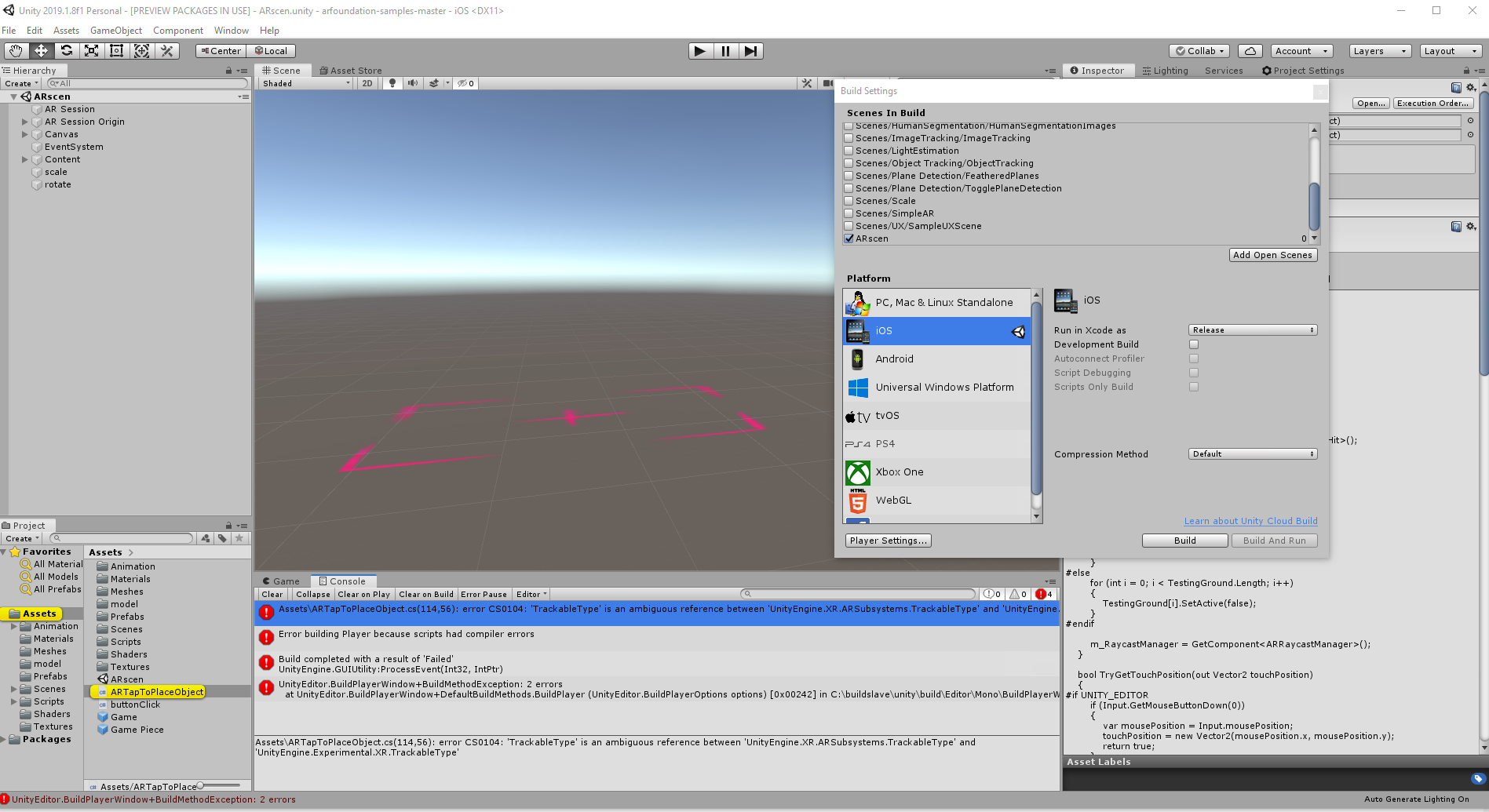
could you solve me, how to solve this errors?
Thank you @vincentfretin.
ChakreyaYan
on 25 Jul 2019
try by commenting out the line using UnityEngine.XR.ARSubsystems;
if you face some other errors try the other way around, comment out using UnityEngine.Experimental;
Unity is getting confused while trying to use TrackableTypes and doesn't know which package to use, probably.
This may or may not solve the issue as I don't know what else these packages use in your project, but worth a try. It may also inspire others who experience similar problems.
 adem-altan
on 29 Jul 2019
adem-altan
on 29 Jul 2019
Thank you @adem-altan for your answer.
ChakreyaYan
on 29 Jul 2019
Related issues
 srcnalt
·
7Comments
srcnalt
·
7Comments
 KirillKuzyk
·
5Comments
KirillKuzyk
·
5Comments
 jBachalo
·
6Comments
jBachalo
·
6Comments
 Stefjs
·
6Comments
Stefjs
·
6Comments
 kennethlng
·
5Comments
kennethlng
·
5Comments
Most helpful comment
You seem to have followed https://www.youtube.com/watch?v=Ml2UakwRxjk&list=WL&index=4 right?
Instead of creating an Interaction gameobject to put the ARTapToPlaceObject, just add it to AR Session Origin. So remove your Interaction gameobject and drag and drop ARTapToPlaceObject to AR Session Origin. Then on AR Session Origin, be sure to add a "AR Plane Manager" component and a "AR Raycast Manager" component.
Here is my current ARTapToPlaceObject.cs script that I adapted to latest AR Foundation version and to be able to test it against a fake plane in the editor (see https://www.youtube.com/watch?v=x08UU-I8eZ8&list=PLw3UgsOGHn4loDyxHG75eJxSnxxVgB-Yb&index=5&t=0s):