Apexcharts.js: Very slow chart resizing
Bug report
Codepen
https://codesandbox.io/s/grid-layout-with-apex-charts-6osw5?file=/src/App.js:482-564
Explanation
I've found issues when I was preparing layout with the apex charts included. I found that to make charts responsive I just need to set height of the chart and the width gonna be taken form the parent element so I did that.
I have content element which is simply flexbox container that align and justify items to the center:
  content: {
    height: "100%",
    display: "flex",
    alignItems: "center",
    justifyContent: "center"
  },
...and chartWrapper that is filling out the parent. I set width to 95% because apex chart was overriding the available space but that's different story.
  chartWrapper: {
    width: "95%",
    height: "100%",
    overflow: "hidden"
  }
Issue
The issue I have is the time it takes for the apex charts to adjust to the parent width when I make browser width smaller. With just one chart it works fine but when I have three charts bellow each other and I make browser width smaller then it takes around 3-4 seconds for the charts to adjust.
When I have more complicated layout it overrides other sections for the time it resizes which makes whole layout doesn't look good.

Any ideas how to solve the issue or improve performance of chart rendering?
 weech3r
All 2 comments
There are some issues when using a chart with a flex layout.
If you have a choice to remove the flex CSS, you may do so. I removed all the styles and replaced them with normal block elements, and it resized normally. I am yet to find the cause of the issue when using charts in flex layout.
 junedchhipa
on 17 Nov 2020
junedchhipa
on 17 Nov 2020
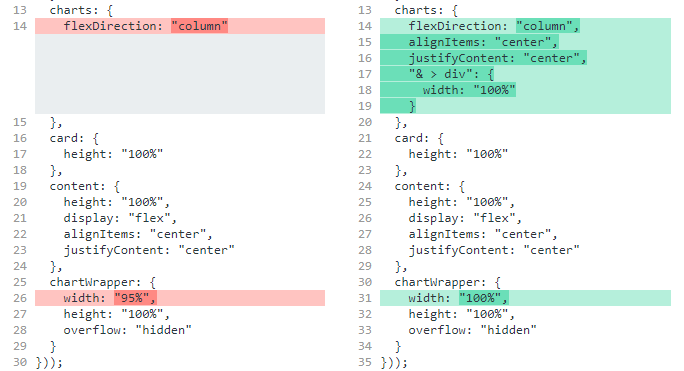
I found workaround for the issue that I've reported. It probably does not solve the root cause of the issue but making these changes solves the issue with slow resizing.
weech3r
on 23 Nov 2020
Related issues
 jimfilippou
·
23Comments
jimfilippou
·
23Comments
 LucaCorcella
·
14Comments
LucaCorcella
·
14Comments
 RyanMooreOPS
·
16Comments
RyanMooreOPS
·
16Comments
 filipinyo
·
14Comments
filipinyo
·
14Comments
 astone2014
·
15Comments
astone2014
·
15Comments
Most helpful comment
There are some issues when using a chart with a flex layout.
If you have a choice to remove the flex CSS, you may do so. I removed all the styles and replaced them with normal
blockelements, and it resized normally. I am yet to find the cause of the issue when using charts in flex layout.