Apexcharts.js: Radial bar sizing issue: unexpected padding and height for semi-circle gauge
Bug report
I can't get a radial bar chart to take up the whole of the container. This is similar to https://github.com/apexcharts/apexcharts.js/issues/1227, but for radial charts. It is also similar to https://github.com/apexcharts/apexcharts.js/issues/832, but I'm not sure if it's the same issue.
Codepen
https://codesandbox.io/embed/vue-basic-example-2lzud?fontsize=14&hidenavigation=1&theme=dark
Explanation
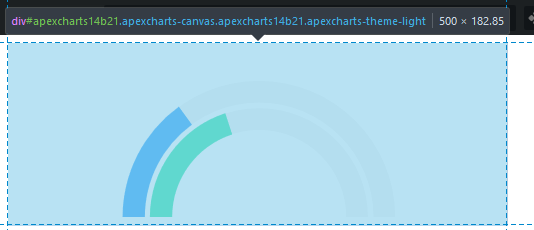
I expect the radial chart to be 500px*350px, but instead it is significantly smaller. The ApexCharts wrapper is 500px wide, at least, but the chart itself is smaller.
Screenshot
 oherik
All 4 comments
startAngle: 0,
endAngle: 360,
?
 architawr
on 30 Jan 2020
architawr
on 30 Jan 2020
startAngle: 0, endAngle: 360, ```?
That does make the wrapper take the correct height, thanks, but there is still some padding on the top and bottom:
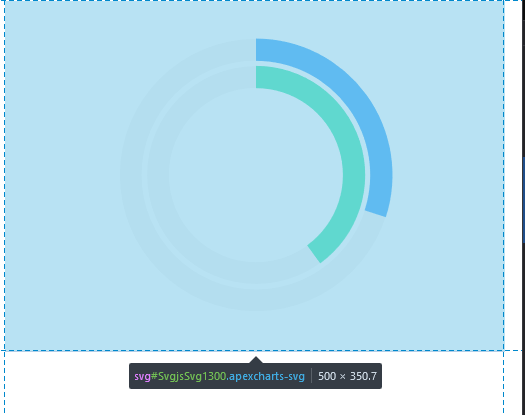
However, my goal is to make something like the semi circle gauge shown in the docs. Sorry if that wasn't clear! If I double the height the semi circle chart wrapper does get the correct size, but I'm not sure what to do about the padding:

<apexcharts width="700" height="700" type="radialBar" :options="chartOptions" :series="series"></apexcharts>
Try the grid.padding.top and grid.padding.bottom properties to control how much padding it should get on top/bottom.
If it is excessive, try negative values in grid.padding
Another way is to turn on the chart.sparkline.enabled flag to remove all the additional paddings.
 junedchhipa
on 26 Feb 2020
junedchhipa
on 26 Feb 2020
Using a radialBar chart, we wanted to eliminate the top and bottom padding/margins. Using chart.offsetY helped a bit, but only for the top margin.
Thanks to @junedchhipa's comment, I was able to crop out unnecessary top and bottom margins using negative values for grid.padding.top and grid.padding.bottom. You can do something similar with the left and right padding as well. My code ended up looking something like this:
            var options = {
                ...
                //Remove the excess padding (https://github.com/apexcharts/apexcharts.js/issues/1272#issuecomment-591388290)
                grid: {
                    padding: {
                        top: -20,
                        bottom: -15
                    }
                },
                ...
            };
Hope this helps! 😁
 rinogo
on 14 Jul 2020
rinogo
on 14 Jul 2020
Related issues
 Vvelghe
·
15Comments
Vvelghe
·
15Comments
 filipinyo
·
14Comments
filipinyo
·
14Comments
 astone2014
·
15Comments
astone2014
·
15Comments
 thellimist
·
15Comments
thellimist
·
15Comments
 jimfilippou
·
23Comments
jimfilippou
·
23Comments
Most helpful comment
Using a
radialBarchart, we wanted to eliminate the top and bottom padding/margins. Usingchart.offsetYhelped a bit, but only for the top margin.Thanks to @junedchhipa's comment, I was able to crop out unnecessary top and bottom margins using negative values for
grid.padding.topandgrid.padding.bottom. You can do something similar with the left and right padding as well. My code ended up looking something like this:Hope this helps! 😁