Altair: grouped bar charts (Faceted or VConcat)?
I'm trying to do something like this example, but repeated across a separate dimension. I'd like to have a shared y-axis within each grouped bar chart, but I'd like to have an independent y-axis across different bar charts. (Hopefully that makes sense).
I can get something to render if I just add facets, but it will share the y-axis within each chart as well as across different charts is undesirable and ends up looking like this:

If I set resolve_scale(y='independent'), it ends up decoupling the y-axis within each chart as well as across different charts which is also undesirable:

If I try to vconcat each independent grouped bar chart, it complains that my vconcat is invalid.
Any ideas on how to accomplish what I want?
I tried to repurpose the example code to use it as example code, and it fails. Hopefully this helps explain what I'm trying to do.
My code
import altair as alt
from altair.expr import datum, if_
from vega_datasets import data

source = data.population.url

base = alt.Chart(source).mark_bar(stroke='transparent').encode(
    alt.X('gender:N', scale=alt.Scale(rangeStep=12), axis=alt.Axis(title='')),
    alt.Y('sum(people):Q', axis=alt.Axis(title='population', grid=False)),
    color=alt.Color('gender:N', scale=alt.Scale(range=["#EA98D2", "#659CCA"])),
    column='age:O'
# comment out configure functions that can't be used in a vconcat
# ).configure_view(
#     stroke='transparent'
# ).configure_axis(
#     domainWidth=0.8
).transform_filter(
    datum.year == 2000
).transform_calculate(
    'gender', if_(datum.sex == 2, 'Female', 'Male')
)

chart = alt.vconcat()
chart &= base
chart
The error
Invalid specification
    altair.vegalite.v2.api.VConcatChart->vconcat->items, validating 'anyOf'

    {'data': {'url': 'https://vega.github.io/vega-datasets/data/population.json'}, 'mark': {'type': 'bar', 'stroke': 'transparent'}, 'encoding': {'color': {'type': 'nominal', 'field': 'gender', 'scale': {'range': ['#EA98D2', '#659CCA']}}, 'column': {'type': 'ordinal', 'field': 'age'}, 'x': {'type': 'nominal', 'axis': {'title': ''}, 'field': 'gender', 'scale': {'rangeStep': 12}}, 'y': {'type': 'quantitative', 'aggregate': 'sum', 'axis': {'grid': False, 'title': 'population'}, 'field': 'people'}}, 'transform': [{'filter': '(datum.year === 2000)'}, {'calculate': "if((datum.sex === 2),'Female','Male')", 'as': 'gender'}]} is not valid under any of the given schemas
 jimmywan
All 6 comments
I'd still like to know how to do this, but I was able to find a temporary workaround.
Never realized that I could just use display(chart) after this import from IPython.core.display import display until just now so I serially rendered each chart individually. Not ideal for cutting/pasting a series of images elsewhere like I can with a single FacetedChart or VConcat, but it'll get the job done.
jimmywan
on 2 Jul 2018
I dug into this a bit... one thing you can do is to make the base a FacetChart:
import altair as alt
from altair.expr import datum, if_
from vega_datasets import data

source = data.population.url

base = alt.Chart(source).mark_bar(stroke='transparent').encode(
    alt.X('gender:N', scale=alt.Scale(rangeStep=12), axis=alt.Axis(title='')),
    alt.Y('sum(people):Q', axis=alt.Axis(title='population', grid=False)),
    color=alt.Color('gender:N', scale=alt.Scale(range=["#EA98D2", "#659CCA"])),
).transform_filter(
    datum.year == 2000
).transform_calculate(
    'gender', if_(datum.sex == 2, 'Female', 'Male')
).facet(
    column='age:O'
)

chart = alt.vconcat()
chart &= base
chart
The reason that your code failed is because, according to the schema, VConcat cannot contain a FacetedCompositeUnitSpec, which is what is created by using the column encoding. It can, however, contain a FacetSpec, which is what is created by the .facet() method.
I'm not certain why that distinction should exist on the vega-lite side... maybe @kanitw or @domoritz could weigh in?
 jakevdp
on 2 Jul 2018
jakevdp
on 2 Jul 2018
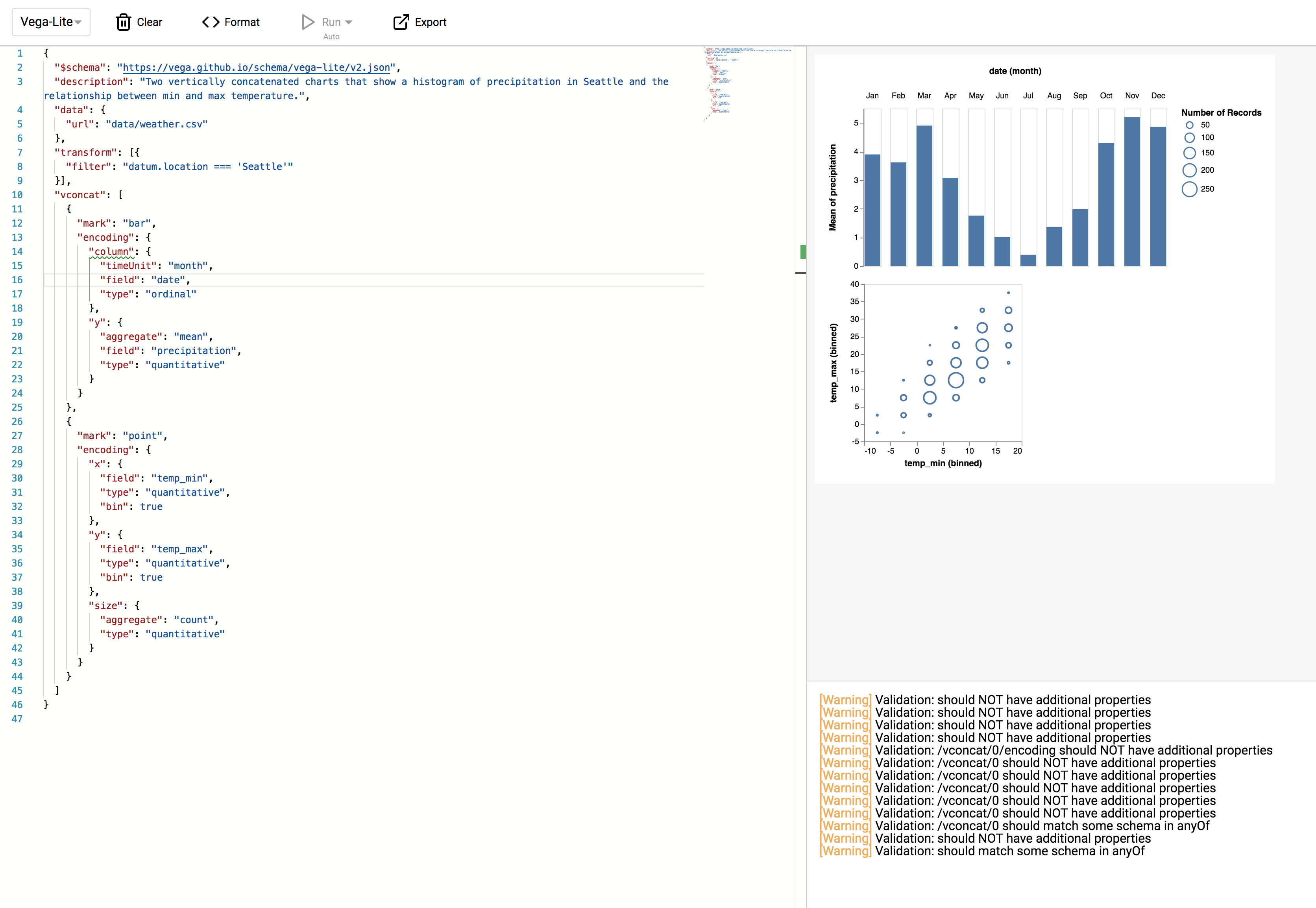
Hmm, row and column seem to work inside concat but we do not allow them in the schema. I don't think this is a bug since we expect people to use facet in nested specs and only provide row and column as a shorthand for unit specs. But I can see that it would make sense to support row and column in nested specs as well.
 domoritz
on 2 Jul 2018
domoritz
on 2 Jul 2018
We're going to fix this in Vega-Lite. It will be included in the next release.
domoritz
on 2 Jul 2018
domoritz
on 3 Jul 2018
Wow, thanks @jakevdp @domoritz for the quick turnaround.
jimmywan
on 5 Jul 2018
Related issues
jakevdp
·
17Comments
 pagpires
·
21Comments
pagpires
·
21Comments
 wmayner
·
22Comments
wmayner
·
22Comments
 dyuval
·
34Comments
jakevdp
·
23Comments
dyuval
·
34Comments
jakevdp
·
23Comments
Most helpful comment
Fixed in https://github.com/vega/vega-lite/pull/3965