Altair: Integration with geopandas geometries
geopandas is a package that reads many type of geometric datasets, including geojson, topojson and shapefiles (albeit through fiona) and parses it into a pandas dataframe, where the geometry is parsed as a separate column.
It would be great if this is geometry type is recognized in Altair to make a map easily.
Problems might arise with projections as Vega doesn’t support all EPSG projections, but EPSG:4326 equals to Mercator and that is supported.
 mattijn
All 23 comments
That's a really interesting idea... I've not done much work with geopandas, so I'm not certain what it would take.
 jakevdp
on 16 Mar 2018
jakevdp
on 16 Mar 2018
Also interested in this.
 kovasb
on 19 Mar 2018
kovasb
on 19 Mar 2018
Would this be as simple as wrapping GeoDataframe.to_json() and passing the GeoJSON along to whatever handles it? I couldn't actually find an altair example that plots features from GeoJSON, is it handled natively by VegaLite?
 bnaul
on 3 Apr 2018
bnaul
on 3 Apr 2018
I have no idea what it would entail... I'm not familiar enough with GeoJSON or GeoPandas, or what geo formats are supported in Vega-Lite.
jakevdp
on 3 Apr 2018
from vega-lite's website
it seems like Vega-Lite uses GeoJSON only (can take a TopoJSON object but will convert it into GeoJSON).
I think integration with GeoPandas would be a great addition to Altair. GeoPandas can read (through fiona) a lot of different geo files and write them as GeoJSON which altair can then use for the illustration. I think a simple wrapper of the geometry series in the geodataframe to convert it to json would work. (i.e. gdf.to_file('example.geojson', driver = 'GeoJSON'))
 chekos
on 12 Apr 2018
chekos
on 12 Apr 2018
Got it working :)
import altair as alt
import geopandas as gpd
import pandas as pd
import json
%matplotlib inline
Load two datasets
counties = r'/Users/mattijnvanhoek/Desktop/us-10m.json'
unemp_data = r'/Users/mattijnvanhoek/Desktop/unemployment.tsv'
df = pd.read_csv(unemp_data, sep='\t')
# make sure you have Fiona <= 1.8a2 or >= 1.8.5
# since the versions in between did not include the `TopoJSON` driver
gdf = gpd.read_file(counties, driver='TopoJSON')
gdf.id = gdf.id.astype(int)
Apply inner-join on GeoDataFrame and DataFrame (gdf should be on 'left' side and df on the right to maintain geometry properties in the resulting joined GeoDataFrame)
gdf_merged = gdf.merge(df, left_on='id', right_on='id', how='inner')
Plot the GeoDataFrame using matplotlib and print the head(). The rate column is joined to the DataFrame.
gdf_merged.plot()
<matplotlib.axes._subplots.AxesSubplot at 0x119e79128>

gdf_merged.head()
| geometry | id | rate | |
|---|---|---|---|
| 0 | () | 22051 | .065 |
| 1 | (POLYGON ((-90.1077214366575 30.19168413151698... | 22051 | .065 |
| 2 | (POLYGON ((-120.8536146368232 49.0001146177235... | 53073 | .078 |
| 3 | POLYGON ((-106.1123837970986 48.99904031068445... | 30105 | .046 |
| 4 | POLYGON ((-114.0698488011574 48.99904031068445... | 30029 | .088 |
Prepare GeoDataFrame for Altair
# dump as json
json_gdf = gdf_merged.to_json()
# load as a GeoJSON object.
json_features = json.loads(json_gdf)
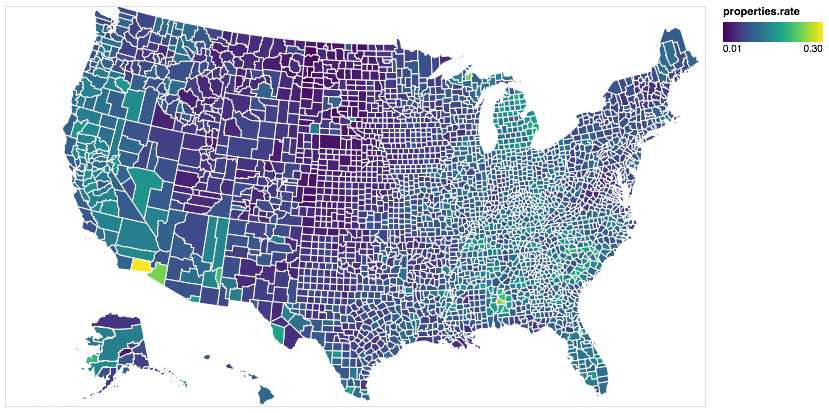
Make the Choropleth Map
# parse variable `features` from json_features to `alt.Data`
data_geo = alt.Data(values=json_features['features'])

# plot map, where variables ares nested within `properties`,
alt.Chart(data_geo).mark_geoshape(
    fill='lightgray',
    stroke='white'
).properties(
    projection={'type': 'albersUsa'},
    width=700,
    height=400
).encode(
    color='properties.rate:Q')
👍
mattijn
on 13 Apr 2018
Thanks a lot! The discussion here is super helpful, esp. the use of
alt.Data(). However, I cannot get what's shown here working, can you show me what does your us-10m.json structure look like (I notice you directly assign it tocountiesso I guess the json file is different from the one from example?)Here is a more-altair, less-pandas way to make the same plot (basically use
alt.Data()to wrap your local file, and usetransform_lookuprather thanmerge)
# download file and read into variables
us_10m = vega_datasets.data.us_10m()
unemp_data = vega_datasets.data.unemployment()

# the original unemp_data has two columns merged, need to split them
unemp_data['id'], unemp_data['rate'] = unemp_data['id\trate'].str.split('\t', 1).str

# key: convert whatever variables to altair-recognizable format by using alt.Data()
# note we need to specify the format and feed it with alt.SomeKindDataFormat()
# we need to specify feature or mesh to extract TopoJSON, the type can only be 'topojson'
counties = alt.Data(
    values=us_10m,
    format=alt.TopoDataFormat(feature='counties',type='topojson')
)

# plot by lookup
# same as the example in (https://altair-viz.github.io/user_guide/transform.html#lookup-transform
alt.Chart(counties).mark_geoshape().encode(
    color='rate:Q'
).properties(
    projection={'type': 'albersUsa'},
    width=500, height=300
).transform_lookup(
    lookup='id',
    from_=alt.LookupData(unemp_data, 'id', ['rate'])
)
Personally I guess
pd.mergeis a better way thantransform_lookup(), sincepd.mergeseparates data processing from the visualization step...I guess it would be great if we have some more examples to show how to plot local, non-pandas type of data (for now I can only think of geo-related data)? Personally I think Altair is really good for exploratory analysis, which will most likely handle private/local data...
 pagpires
on 1 May 2018
pagpires
on 1 May 2018
No the file is the same, but I had downloaded the file to disk first, before reading. To use vega_datasets directly for parsing remote vega data into a DataFrame and GeoDataFrame (not so straightforward for TopoJSON data) do as follow:
import altair as alt
import geopandas as gpd
import pandas as pd
import json
# extra
from vega_datasets import data
import requests
import fiona
%matplotlib inline
# load the tab separated unemployment file into a DataFrame
df = pd.read_csv(data.unemployment.url, sep='\t')
# parse the us_10m topojson file into memory
request = requests.get(data.us_10m.url)
visz = fiona.ogrext.buffer_to_virtual_file(bytes(request.content))

# read the features from a fiona collection into a GeoDataFrame
with fiona.Collection(visz, driver='TopoJSON') as f:
    gdf = gpd.GeoDataFrame.from_features(f, crs=f.crs)
# continue as above
gdf.id = gdf.id.astype(int)
gdf_merged = gdf.merge(df, left_on='id', right_on='id', how='inner')
gdf_merged.head()
| geometry | id | rate | |
|---|---|---|---|
| 0 | () | 22051 | 0.065 |
| 1 | (POLYGON ((-90.1077214366575 30.19168413151698... | 22051 | 0.065 |
| 2 | (POLYGON ((-120.8536146368232 49.0001146177235... | 53073 | 0.078 |
| 3 | POLYGON ((-106.1123837970986 48.99904031068445... | 30105 | 0.046 |
| 4 | POLYGON ((-114.0698488011574 48.99904031068445... | 30029 | 0.088 |
Continue from step Prepare GeoDataFrame for Altair in previous comment
mattijn
on 1 May 2018
Would it make sense to build some of that data preparation into vega_datasets?
jakevdp
on 1 May 2018
Yes, if the result is a GeoDataFrame it would be much cleaner (and people won't run away yet)
mattijn
on 1 May 2018
I think it's little bit simpler
import altair as alt
import pandas as pd
import geopandas as gpd

alt.renderers.enable('notebook')


world = gpd.read_file(gpd.datasets.get_path('naturalearth_lowres'))
world  = world[world.continent!='Antarctica'] # do not display Antarctica

data  = alt.InlineData(values = world.to_json(), #geopandas to geojson string
                       # root object type is "FeatureCollection" but we need its features
                       format = alt.DataFormat(property='features',type='json'))
alt.Chart(data).mark_geoshape(
).encode(
    color='properties.pop_est:Q', # DataFrame fields are accessible through a "properties" object
    tooltip='properties.name:N'
).properties(
    projection={"type":'mercator'},
    width=500,
    height=300
)
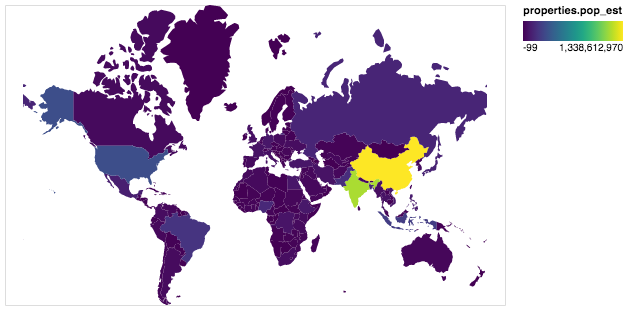
But it will crush if we add Timestamp type field to DataFrame. To to avoid crashing it could be sanitized by alt.InlineData(values = alt.utils.core.sanitize_dataframe(world).to_json(),
In general case will be great to support any object with __geo_interface__ that is widely supported by python GIS libraries. I suggest to have a special class for this case something like: data = alt.GeoData(world). I could make a PR, if it is needed.
 iliatimofeev
on 4 May 2018
iliatimofeev
on 4 May 2018
I suggest to have a special class for this case something like: data = alt.GeoData(world). I could make a PR, if it is needed.
That would be great!
jakevdp
on 4 May 2018
To avoid static dependencies between Altair and GeoPandas I have published gpdvega as a connector.
See details in documentation https://iliatimofeev.github.io/gpdvega/
iliatimofeev
on 15 Aug 2018
For what it's worth, I installed gpdvega and tried this with my own data, and found that it works well and as expected.
My taste would be for tighter integration rather than yet-another-library, but I recognize that I'm not trying to maintain a rapidly evolving library in a rapidly evolving ecosystem. If it won't be integrated, at least a reference in the altair docs would be great.
 JoeGermuska
on 12 Sep 2018
JoeGermuska
on 12 Sep 2018
I agree – sorry this has been so slow, but getting it more tightly integrated depends on a redesign of the data_transformer architecture that hasn't happened yet.
jakevdp
on 12 Sep 2018
sure, i totally understand... just wanted to verify that it's solid
JoeGermuska
on 12 Sep 2018
In general case will be great to support any object with geo_interface that is widely supported by python GIS libraries.
I would like to give a +1 to that. While it surely is a good idea to use geopandas if you are into pandas-like analysis, it is a big dependency. Supporting geo interface would allow users to stay with light-weight things like Fiona and Shapely for the geo analyses.
 kannes
on 15 Aug 2019
kannes
on 15 Aug 2019
To be honest, I don't know much about geographic data and the libraries that support them. This is not going to be solved until someone with more expertise digs in and figures out a good approach.
jakevdp
on 15 Aug 2019
Isn't this stalled because of https://github.com/altair-viz/altair/pull/887?
mattijn
on 16 Aug 2019
No, that has to do with supporting geopandas as a data transformer. I'm not totally convinced that's the best route (for example, it would be pretty confusing if your geo charts stopped working when you enabled data_server)
I think it would be better to support geo data (be it geopandas, shapely, fiona, etc.) natively as part of the Altair API, but I'm not familiar enough with geo viz libraries to have good ideas on how to do that.
jakevdp
on 17 Aug 2019
This issue is fixed by https://github.com/altair-viz/altair/pull/1664 🌍!
mattijn
on 29 Aug 2019
Does anyone know why this does not work with states? When the us10m file is read in with geopandas, why do the state ids not copy over?
 Murtz5253
on 3 Jun 2020
Murtz5253
on 3 Jun 2020
It works for me (geopandas=0.7.0):
import geopandas as gpd
import altair as alt

gdf = gpd.read_file(
    'https://raw.githubusercontent.com/vega/vega/master/docs/data/us-10m.json',
    driver='TopoJSON'
)
alt.Chart(gdf).mark_geoshape().encode(color='id:Q').project('albersUsa')

mattijn
on 3 Jun 2020
Related issues
 zanarmstrong
·
4Comments
zanarmstrong
·
4Comments
 breadbaron
·
4Comments
breadbaron
·
4Comments
 bmcfee
·
3Comments
bmcfee
·
3Comments
 HalukaMB
·
3Comments
HalukaMB
·
3Comments
 jtbaker
·
3Comments
jtbaker
·
3Comments
Most helpful comment
Got it working :)
Load two datasets
Apply inner-join on GeoDataFrame and DataFrame (
gdfshould be on 'left' side anddfon the right to maintaingeometryproperties in the resulting joined GeoDataFrame)Plot the GeoDataFrame using
matplotliband print thehead(). Theratecolumn is joined to the DataFrame.Prepare GeoDataFrame for Altair
Make the Choropleth Map
👍