Altair: Weird label alignment in stripplot
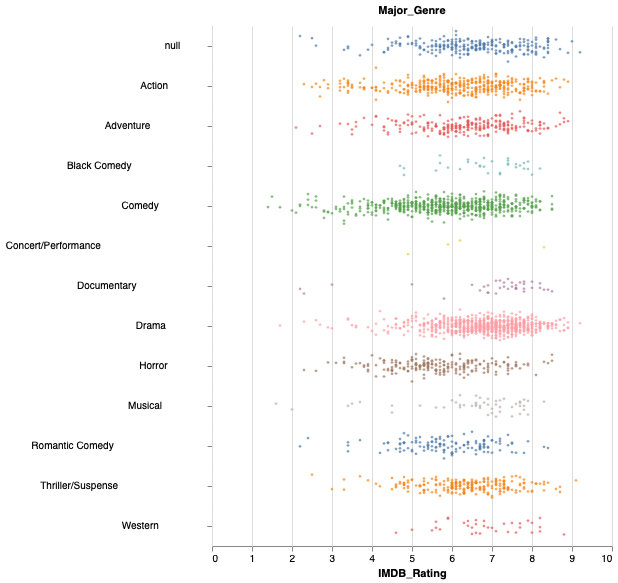
I want a stripplot with the x-axis and y-axis swapped compared to the example in the documentation. When doing this, the alignment of the y-axis labels becomes a bit strange. I did not see this behaviour in Altair 3.
# Based on https://altair-viz.github.io/gallery/stripplot.html

import altair as alt
from vega_datasets import data

source = data.movies.url

stripplot =  alt.Chart(source, width=400, height=40).mark_circle(size=8).encode(
    y=alt.Y(
        'jitter:Q',
        title=None,
        axis=alt.Axis(values=[0], ticks=True, grid=False, labels=False),
        scale=alt.Scale(),
    ),
    x=alt.X('IMDB_Rating:Q'),
    color=alt.Color('Major_Genre:N', legend=None),
    row=alt.Row(
        'Major_Genre:N',
        header=alt.Header(
            labelAngle=0,
            titleOrient='top',
            labelOrient='left',
            labelAlign='right',
        ),
    ),
).transform_calculate(
    # Generate Gaussian jitter with a Box-Muller transform
    jitter='sqrt(-2*log(random()))*cos(2*PI*random())'
).configure_facet(
    spacing=0
).configure_view(
    stroke=None
)

stripplot
 morberg
All 3 comments
This is due to a bug introduced in the most recent Vega/Vega-Lite release; see https://github.com/vega/vega/issues/2233 and https://github.com/vega/vega-lite/issues/5547
Once a fix for that is released, we'll update Altair with the fix.
 jakevdp
on 17 Dec 2019
jakevdp
on 17 Dec 2019
👍1
Thank you for the links to the core issue.
If anybody else has problems with this you can use labelAlign='left' instead of labelAlign='right' until it is fixed in Vega.
morberg
on 7 Jan 2020
👍1
Adding this SO post too for documentation on a similar issue and helping those who come across this.
 armsp
on 10 Apr 2020
armsp
on 10 Apr 2020
Was this page helpful?
0 / 5 - 0 ratings
Related issues
 LukeMathWalker
·
3Comments
LukeMathWalker
·
3Comments
 bmcfee
·
3Comments
bmcfee
·
3Comments
 galloramiro
·
3Comments
galloramiro
·
3Comments
 brylie
·
4Comments
brylie
·
4Comments
 DentonGentry
·
3Comments
DentonGentry
·
3Comments