Alacritty: Allow remapping modifier keys in the config
iTerm2 and Terminal.app both include the ability to use option as meta. This would be very useful as a boolean option in the config.
 saysjonathan
All 49 comments
Sounds reasonable
 jwilm
on 5 Jan 2017
jwilm
on 5 Jan 2017
How do you get _any_ key working as Meta in OS X? Using the default config, neither Cmd nor option send meta to tmux or emacs.
 rhaps0dy
on 7 Jan 2017
rhaps0dy
on 7 Jan 2017
As a workaround, I'm adding lines to the config in the following style:
- { key: T, mods: Command|Shift, chars: "\x1bT", }
- { key: T, mods: Command, chars: "\x1bt", }
- { key: W, mods: Command|Shift, chars: "\x1bW", }
- { key: W, mods: Command, chars: "\x1bw", }
For reasons I don't exactly understand, iTerm2 has three options for the behavior of the the option key. Leave it alone, make it set the meta bit, or send the escape key beforehand.
The faq recommends the third option, sending the escape character code beforehand, but doesn't say why.
Does anyone know what that is the recommended choice? I have always had it set the meta bit with no problems.
Asking here because it might mean that the config option should be allow either behavior.
 casey
on 20 Feb 2017
casey
on 20 Feb 2017
I believe this explains why there are two options: http://www.chiark.greenend.org.uk/~sgtatham/putty/wishlist/meta-bit.html
saysjonathan
on 20 Feb 2017
I was trying to compile a local version to get this to work. I suspect the behavior could be changed here. If the only modifier key being pressed is Alt then use charactersIgnoreingModifiers from NSEvent documented here. However I couldn't get this version of glutin to compile on my machine to verify.
 tmiller
on 18 Jul 2017
tmiller
on 18 Jul 2017
I figured out had to compile glutin with alacrity. Below is the patch that I used in glutin to temporarily enable this feature. I'm not certain it is 100% behaving correctly. @jwilm any recommendations on how you would like this feature implemented?
diff --git a/src/api/cocoa/mod.rs b/src/api/cocoa/mod.rs
index 2282176..6eb0062 100644
--- a/src/api/cocoa/mod.rs
+++ b/src/api/cocoa/mod.rs
@@ -768,7 +768,7 @@ impl GlContext for Window {
#[inline]
fn swap_buffers(&self) -> Result<(), ContextError> {
- unsafe {
+ unsafe {
let pool = NSAutoreleasePool::new(nil);
self.context.flushBuffer();
let _: () = msg_send![pool, release];
@@ -887,7 +887,12 @@ unsafe fn NSEventToEvent(window: &Window, nsevent: id) -> Option<Event> {
},
appkit::NSKeyDown => {
let mut events = VecDeque::new();
- let received_c_str = nsevent.characters().UTF8String();
+ let ev_mods = event_mods(nsevent);
+
+ let received_c_str = match ev_mods {
+ mods::ALT => nsevent.charactersIgnoringModifiers().UTF8String(),
+ _ => nsevent.characters().UTF8String(),
+ };
let received_str = CStr::from_ptr(received_c_str);
let received_str = from_utf8(received_str.to_bytes()).unwrap();
for received_char in received_str.chars() {
@@ -895,7 +900,6 @@ unsafe fn NSEventToEvent(window: &Window, nsevent: id) -> Option<Event> {
}
let vkey = event::vkeycode_to_element(NSEvent::keyCode(nsevent));
- let ev_mods = event_mods(nsevent);
events.push_back(Event::KeyboardInput(ElementState::Pressed, NSEvent::keyCode(nsevent) as u8, vkey, ev_mods, Some(received_str.to_owned())));
let event = events.pop_front();
window.delegate.state.pending_events.lock().unwrap().extend(events.into_iter());
I have tried to dig into this problem too, and it looks like it is more or less what iTerm2 does. Maybe we can borrow more stuff from there. Another question is why are we using fork of glutin? It looks like code that you are referring is now resides in winit
 aslpavel
on 18 Jul 2017
aslpavel
on 18 Jul 2017
For the work-around, how do you figure out what chars to send for a given key/modifiers combination?
 andrey-mishchenko
on 2 Oct 2017
andrey-mishchenko
on 2 Oct 2017
@mishchea it should just be "\x1b" followed by the character. For instance:
- { key: T, mods: Command, chars: "\x1bt", }
If there's anyone who's manually assigned all the mappings themselves as a temporary workaround, would you care to share the relevant portion of your alacritty.yml file to spare the rest of us the tedium? Maybe we could dedicate a wiki page for this purpose, until the feature is available.
 rlue
on 28 Nov 2017
rlue
on 28 Nov 2017
@rlue Here is my bindings, feedback is welcome. I can edit it if there is something missing. Control + Alt combinations also work with these lines, no need to include.
I couldn't find a way for keys like Alt + ` (backtick). Alacritty won't open if you add backtick to key. (Thanks goes to @SteVwonder for pointing out the solution. I added these too.)
For other people, if you don't know, you need to put those lines to alacritty.yml, key_bindings: section.
  - { key: A,         mods: Alt,       chars: "\x1ba"                       }
  - { key: B,         mods: Alt,       chars: "\x1bb"                       }
  - { key: C,         mods: Alt,       chars: "\x1bc"                       }
  - { key: D,         mods: Alt,       chars: "\x1bd"                       }
  - { key: E,         mods: Alt,       chars: "\x1be"                       }
  - { key: F,         mods: Alt,       chars: "\x1bf"                       }
  - { key: G,         mods: Alt,       chars: "\x1bg"                       }
  - { key: H,         mods: Alt,       chars: "\x1bh"                       }
  - { key: I,         mods: Alt,       chars: "\x1bi"                       }
  - { key: J,         mods: Alt,       chars: "\x1bj"                       }
  - { key: K,         mods: Alt,       chars: "\x1bk"                       }
  - { key: L,         mods: Alt,       chars: "\x1bl"                       }
  - { key: M,         mods: Alt,       chars: "\x1bm"                       }
  - { key: N,         mods: Alt,       chars: "\x1bn"                       }
  - { key: O,         mods: Alt,       chars: "\x1bo"                       }
  - { key: P,         mods: Alt,       chars: "\x1bp"                       }
  - { key: Q,         mods: Alt,       chars: "\x1bq"                       }
  - { key: R,         mods: Alt,       chars: "\x1br"                       }
  - { key: S,         mods: Alt,       chars: "\x1bs"                       }
  - { key: T,         mods: Alt,       chars: "\x1bt"                       }
  - { key: U,         mods: Alt,       chars: "\x1bu"                       }
  - { key: V,         mods: Alt,       chars: "\x1bv"                       }
  - { key: W,         mods: Alt,       chars: "\x1bw"                       }
  - { key: X,         mods: Alt,       chars: "\x1bx"                       }
  - { key: Y,         mods: Alt,       chars: "\x1by"                       }
  - { key: Z,         mods: Alt,       chars: "\x1bz"                       }
  - { key: A,         mods: Alt|Shift, chars: "\x1bA"                       }
  - { key: B,         mods: Alt|Shift, chars: "\x1bB"                       }
  - { key: C,         mods: Alt|Shift, chars: "\x1bC"                       }
  - { key: D,         mods: Alt|Shift, chars: "\x1bD"                       }
  - { key: E,         mods: Alt|Shift, chars: "\x1bE"                       }
  - { key: F,         mods: Alt|Shift, chars: "\x1bF"                       }
  - { key: G,         mods: Alt|Shift, chars: "\x1bG"                       }
  - { key: H,         mods: Alt|Shift, chars: "\x1bH"                       }
  - { key: I,         mods: Alt|Shift, chars: "\x1bI"                       }
  - { key: J,         mods: Alt|Shift, chars: "\x1bJ"                       }
  - { key: K,         mods: Alt|Shift, chars: "\x1bK"                       }
  - { key: L,         mods: Alt|Shift, chars: "\x1bL"                       }
  - { key: M,         mods: Alt|Shift, chars: "\x1bM"                       }
  - { key: N,         mods: Alt|Shift, chars: "\x1bN"                       }
  - { key: O,         mods: Alt|Shift, chars: "\x1bO"                       }
  - { key: P,         mods: Alt|Shift, chars: "\x1bP"                       }
  - { key: Q,         mods: Alt|Shift, chars: "\x1bQ"                       }
  - { key: R,         mods: Alt|Shift, chars: "\x1bR"                       }
  - { key: S,         mods: Alt|Shift, chars: "\x1bS"                       }
  - { key: T,         mods: Alt|Shift, chars: "\x1bT"                       }
  - { key: U,         mods: Alt|Shift, chars: "\x1bU"                       }
  - { key: V,         mods: Alt|Shift, chars: "\x1bV"                       }
  - { key: W,         mods: Alt|Shift, chars: "\x1bW"                       }
  - { key: X,         mods: Alt|Shift, chars: "\x1bX"                       }
  - { key: Y,         mods: Alt|Shift, chars: "\x1bY"                       }
  - { key: Z,         mods: Alt|Shift, chars: "\x1bZ"                       }
  - { key: Key1,      mods: Alt,       chars: "\x1b1"                       }
  - { key: Key2,      mods: Alt,       chars: "\x1b2"                       }
  - { key: Key3,      mods: Alt,       chars: "\x1b3"                       }
  - { key: Key4,      mods: Alt,       chars: "\x1b4"                       }
  - { key: Key5,      mods: Alt,       chars: "\x1b5"                       }
  - { key: Key6,      mods: Alt,       chars: "\x1b6"                       }
  - { key: Key7,      mods: Alt,       chars: "\x1b7"                       }
  - { key: Key8,      mods: Alt,       chars: "\x1b8"                       }
  - { key: Key9,      mods: Alt,       chars: "\x1b9"                       }
  - { key: Key0,      mods: Alt,       chars: "\x1b0"                       }
  - { key: Space,     mods: Control,   chars: "\x00"                        } # Ctrl + Space
  - { key: Grave,     mods: Alt,       chars: "\x1b`"                       } # Alt + `
  - { key: Grave,     mods: Alt|Shift, chars: "\x1b~"                       } # Alt + ~
  - { key: Period,    mods: Alt,       chars: "\x1b."                       } # Alt + .
  - { key: Key8,      mods: Alt|Shift, chars: "\x1b*"                       } # Alt + *
  - { key: Key3,      mods: Alt|Shift, chars: "\x1b#"                       } # Alt + #
  - { key: Period,    mods: Alt|Shift, chars: "\x1b>"                       } # Alt + >
  - { key: Comma,     mods: Alt|Shift, chars: "\x1b<"                       } # Alt + <
  - { key: Minus,     mods: Alt|Shift, chars: "\x1b_"                       } # Alt + _
  - { key: Key5,      mods: Alt|Shift, chars: "\x1b%"                       } # Alt + %
  - { key: Key6,      mods: Alt|Shift, chars: "\x1b^"                       } # Alt + ^
  - { key: Backslash, mods: Alt,       chars: "\x1b\\"                      } # Alt + \
  - { key: Backslash, mods: Alt|Shift, chars: "\x1b|"                       } # Alt + |
 kutsan
on 28 Nov 2017
kutsan
on 28 Nov 2017
@kutsan: https://github.com/jwilm/alacritty/issues/821 and https://github.com/jwilm/alacritty/issues/639 might hold the answer to getting backtick to work. Trying using Grave
 SteVwonder
on 28 Nov 2017
SteVwonder
on 28 Nov 2017
@SteVwonder Awesome, thanks! I've added two of them too.
kutsan
on 28 Nov 2017
Some additional mappings for useful bash commands like alt-. alt-* and alt-# :
- { key: Period,   mods: Alt,       chars: "\x1b."                       }
- { key: Key8,     mods: Alt|Shift, chars: "\x1b*"                       }
- { key: Key3,     mods: Alt|Shift, chars: "\x1b#"                       }
 Asheq
on 29 Nov 2017
Asheq
on 29 Nov 2017
If you're a tmux user and like switching layouts these might be useful as well:
  - { key: Key1,     mods: Alt,     chars: "\x1b1"                       }
  - { key: Key2,     mods: Alt,     chars: "\x1b2"                       }
  - { key: Key3,     mods: Alt,     chars: "\x1b3"                       }
  - { key: Key4,     mods: Alt,     chars: "\x1b4"                       }
  - { key: Key5,     mods: Alt,     chars: "\x1b5"                       }
  - { key: Key6,     mods: Alt,     chars: "\x1b6"                       }
  - { key: Key7,     mods: Alt,     chars: "\x1b7"                       }
  - { key: Key8,     mods: Alt,     chars: "\x1b8"                       }
  - { key: Key9,     mods: Alt,     chars: "\x1b9"                       }
  - { key: Key0,     mods: Alt,     chars: "\x1b0"                       }
 valencik
on 5 Dec 2017
valencik
on 5 Dec 2017
@valencik I added those of them too for easy copy-pasting.
kutsan
on 5 Dec 2017
If you're an emacs user you might want these:
  - { key: Period,   mods: Alt|Shift, chars: "\x1b>"                       } # Alt + >
  - { key: Comma,    mods: Alt|Shift, chars: "\x1b<"                       } # Alt + <
If my yak stack wasn't already pretty deep I'd write a program to generate all of these.
 spudlyo
on 25 Feb 2018
spudlyo
on 25 Feb 2018
Another useful shortcut for me as an emacs user is:
- { key: Space, mods: Control, chars: "\x00" } # Ctrl + Space
 ptek
on 6 Mar 2018
ptek
on 6 Mar 2018
A few more I ran into while using emacs:
  - { key: Minus,     mods: Alt|Shift, chars: "\x1b_"                       } # Alt + _
  - { key: Key5,      mods: Alt|Shift, chars: "\x1b%"                       } # Alt + %
  - { key: Key6,      mods: Alt|Shift, chars: "\x1b^"                       } # Alt + ^
  - { key: Backslash, mods: Alt,       chars: "\x1b\\"                      } # Alt + \
  - { key: Backslash, mods: Alt|Shift, chars: "\x1b|"                       } # Alt + |
@ptek @SteVwonder Done, thanks!
kutsan
on 16 Mar 2018
I wanted to define an AltReturn mapping in vim, so added to my alacritty.yml:
- { key: Return, mods: Alt, chars: "\x1b\x0d" } # Alt + Return
then realized that's already what it sends so no need for the above line. But can anyone tell me what AltShiftReturn sends by default?
 ivanbrennan
on 21 Mar 2018
ivanbrennan
on 21 Mar 2018
I added this for Alt + ; for emacs
- { key: Semicolon, mods: Alt, chars: "\x1b;" } # Alt + ;
 ktsujister
on 7 May 2018
ktsujister
on 7 May 2018
How would one define Alt ??
I've tried - { key: Slash, mods: Alt|Shift, chars: "\x1b?" } but that gets interpreted as <ESC>DEL>. And prefixing the ? with a backslash doesn't work.
 russelldavies
on 20 Jun 2018
russelldavies
on 20 Jun 2018
Please note that for non-US Layouts one needs to differentiate between RightAlt for "special" characters like RightAlt-L -> '@' and LeftAlt to send Meta. iTerm2 does this. It doesn't look like glutin's winit dependency exposes this yet.
 clemensw
on 19 Sep 2018
clemensw
on 19 Sep 2018
Just want to say that this is a really cool project but as the meta key is not supported atm it's not really useful on mac.
 mimoo
on 23 Nov 2018
mimoo
on 23 Nov 2018
I am using the suggested key binds above to produce Meta-modifiers. While it works most of the time I have encountered an issue in kakoune editor. It uses Meta+I to drop to selection mode followed by a single keystroke to decide what to select.
For example Meta+I followed by B should select everything within parentheses. The first step (i.e. Meta+I ) correctly works and kakoune shows its prompt waiting for second key. But hitting B moves the curser Backward rather than selecting the Bracket.
This is my key binding:
- { key: I, mods: Alt, chars: "\x1bi" } # M-i
And this is Alacritty's behavior vs iTerm's:
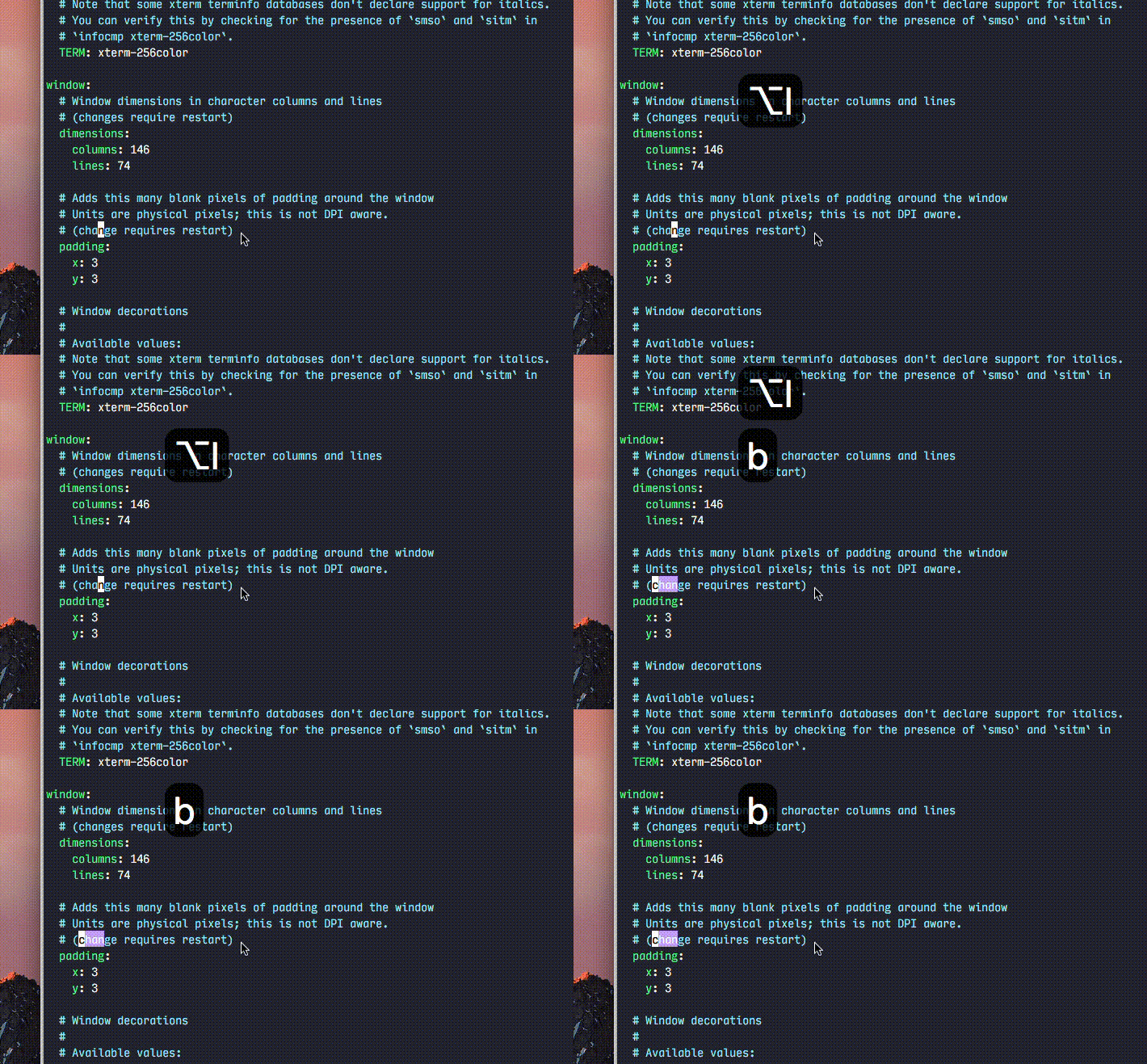
iTerm:
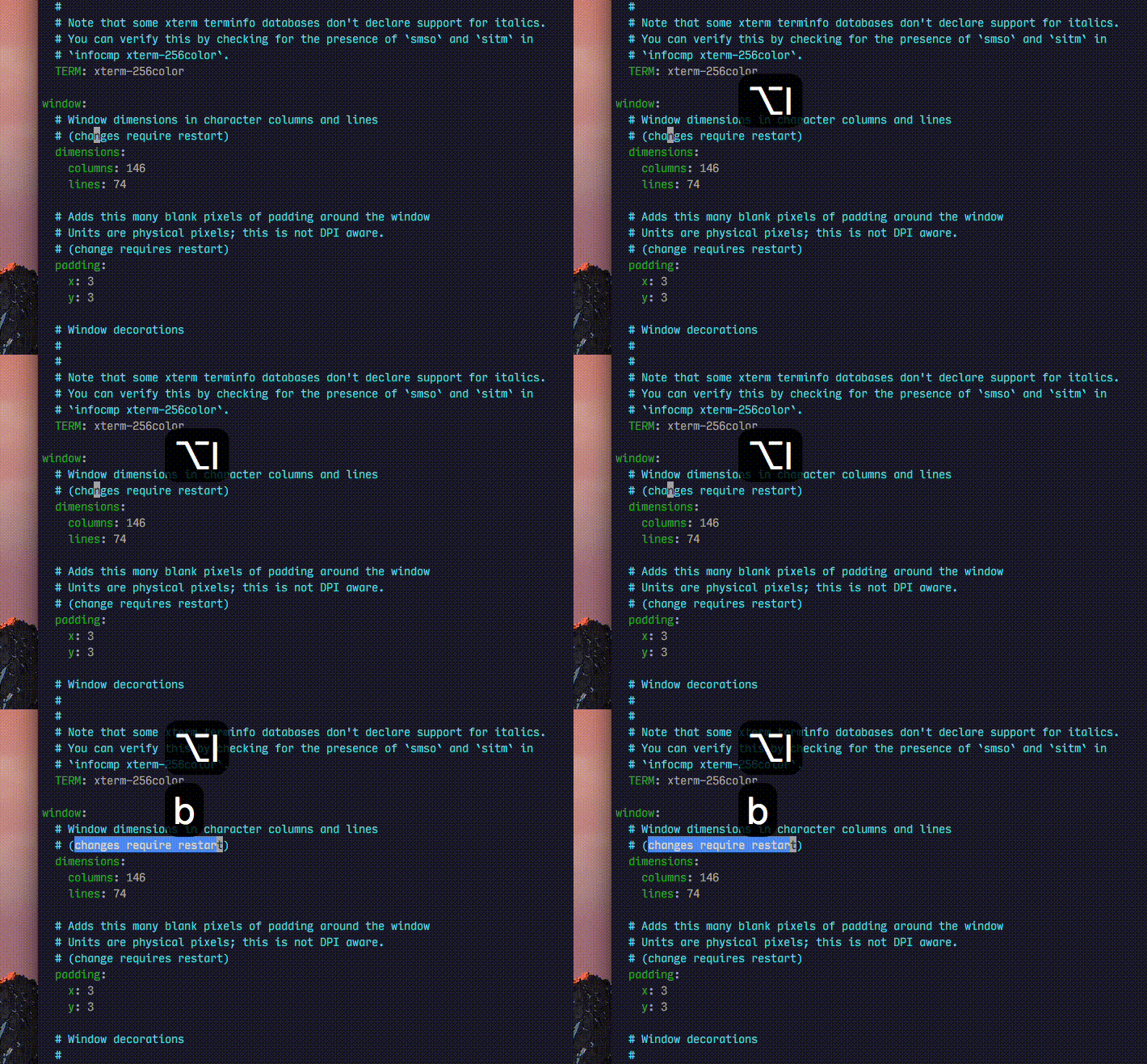
any hints on how to fix this? or this can be an issue on kakoune side?
 spamwax
on 18 Jan 2019
spamwax
on 18 Jan 2019
For what it's worth I want the similar, but subtly different feature of "Command sends Meta"
 mountainstorm
on 17 Mar 2019
mountainstorm
on 17 Mar 2019
@mountainstorm For now you can copy @kustan's suggestion and replace Alt with Command.
- { key: N, mods: Command, chars: "\x1bn" }
Might be time for a config option:
keyboard:
  meta_key: Alt
@spamwax It looks like the behavior of subsequent characters is different in Alacritty vs other emulators. You can see the difference using ed (using your M-i b example)
In Terminal.app:
$ ed
^[ib
In Alacritty:
$ ed
^[iˆb
As fully dissected in #2017, it seems it is the issue of the crate alacritty uses to handle key events.
Key binds such as
- { key: I, mods: Alt, chars: "\x1bi" }
don't fully address the issue since winit intercepts and changes keys before reaching alacritty.
spamwax
on 22 Mar 2019
Is there a way to bind ctrl + / (undo) shortcut?
Edit: I've managed to make undo work with
- { key: Underline, chars: "Underline" }
which can be triggered with ctrl + - or ctrl + _.
No success on ctrl + /, but still better than nothing.
 lsnch
on 23 Mar 2019
lsnch
on 23 Mar 2019
What is the current status of using alt as meta on macOS?
 sandersantema
on 9 Apr 2019
sandersantema
on 9 Apr 2019
@sandersantema this post https://github.com/jwilm/alacritty/issues/62#issuecomment-347552058 gets it mostly working for me.
 robertmeta
on 10 Apr 2019
robertmeta
on 10 Apr 2019
so kustan's workaround worked, and I have no idea why. I was expecting to see Option everywhere Alt appears in that workaround. Apparently option is already being remapped to alt?!?! In that case, why didn't alt_send_esc: true work? That's what it's for...
 iugo-eric
on 17 May 2019
iugo-eric
on 17 May 2019
Possibly my fault and I'm missing it in the issue, but the comment makes both alt keys turn into meta (whereas say in iTerm, you can preserve one for actually using as a compose key and the other turn into meta).
 Julian
on 25 May 2019
Julian
on 25 May 2019
Re: https://github.com/jwilm/alacritty/issues/62#issuecomment-475881820 I've managed to get ctrl + / (undo) working with
- { key: Slash, mods: Control, chars: "\x1f" }
but it triggers a bell and I haven't found a way to disable it yet for this action
 thaedal
on 31 May 2019
thaedal
on 31 May 2019
Any idea how to make Ctrl + ` work? The binding below does not work.
- { key: Grave, mods: Command, chars: "\x00" }
Same combination with Alt works as expected (Alt + `).
I use this combination as meta in tmux and sadly only few terminals support it out of the box. Eg. xterm, kitty, st (suckless), iTerm2 (not by default but mapping can be added like above)
 snobb
on 5 Jun 2019
snobb
on 5 Jun 2019
Ctrl + `- { key: Grave, mods: Command, chars: "\x00"
Are you sure the "mod" you want in the binding is "Command" and not "Control" ?
 gagbo
on 12 Jun 2019
gagbo
on 12 Jun 2019
Are you sure the "mod" you want in the binding is "Command" and not "Control" ?
Thanks for your response. I've tried all variants and I've read somewhere that Grave+Command is supposed to work as Ctlr+`, but it doesn't either way: it does not work with Command nor with Control. Grave+Alt works as Alt+`, so there is something with the Control that it does not agree.
Also there are all sort of issues with fonts, resolution, etc. so I guess it's too early for it to be usable.
snobb
on 13 Jun 2019
- { key: LBracket, mods: Command|Shift, chars: "\x1b{"                    }
- { key: RBracket, mods: Command|Shift, chars: "\x1b}"                    }
Use this to bind next/previous - buffer in terminal emacs. Similar to switching tabs in macos.
- { key: X, mods: Command, chars: "\x1bx" }
To send M-x when mac-command-key-is-meta.
 1bharat
on 15 Jun 2019
1bharat
on 15 Jun 2019
Is there a PR I could help test, or is this just way back on the roadmap?
 evantravers
on 13 Jul 2019
evantravers
on 13 Jul 2019
Any update on this? This is really the only thing stopping me from using this terminal.
Update: I've got it working by adding the following configuration/key-binding:
- { key: Period, mods: Alt, chars: "\e-\e.", }
This gives me the last word of the last command, and of you keep pressing . it will scroll through the last words of every command before.
Command: Option(Alt) + .
Now, is there any way I can make it so that it's only applicable to the LAlt key and not both Alt/Option keys?
 james-gonzalez
on 19 Jul 2019
james-gonzalez
on 19 Jul 2019
hey all! thanks for all the tips, I've gotten most of what I need. I'm just missing the M-Backspace behavior (delete word backward)... The key on Mac is called delete so I'm not sure what exactly I'm supposed to use here. Any help would be appreciated!
 aiguofer
on 6 Jan 2020
aiguofer
on 6 Jan 2020
hey all! thanks for all the tips, I've gotten most of what I need. I'm just missing the
M-Backspacebehavior (delete word backward)... The key on Mac is calleddeleteso I'm not sure what exactly I'm supposed to use here. Any help would be appreciated!
@aiguofer Maybe try \x1b\x74 (the unicode for delete key according to Key Codes.app).
 chrischen
on 2 May 2020
chrischen
on 2 May 2020
Thanks! yeah I actually got it working a while back but forgot to update.
- { key: Back, mods: Alt, chars: "\x1b\x7f" }
sorry for noob question
how does this work i mean i understand -{ key: Key5, mods: Alt, chars:"\x1b%"}is alt+% but do i have to copy all those mappings and change alt to command for mapping the command key on mac to the Meta key or am i missing something
 YashKarthik
on 28 Sep 2020
YashKarthik
on 28 Sep 2020
but do i have to copy all those mappings and change alt to command for mapping the command key on mac to the Meta key or am i missing something
I'm not sure if there is a better way now, but back in 2017 the answer to that question was yes. (Sorry to not be of more help, haven't touched my alacritty config in a while)
SteVwonder
on 7 Oct 2020
There doesn't seem to be an elegant way to do this as of yet but the above didn't work for me. I used xxd to get the codes manually and type them in. Try this for anyone that the above doesn't work for. I have my control and command switched as well in MacOS settings. You can hopefully see the pattern for my situation.
  - { key: A,         mods: Command,       chars: "\x01"                       }
  - { key: B,         mods: Command,       chars: "\x02"                       }
  - { key: C,         mods: Command,       chars: "\x03"                       }
  - { key: D,         mods: Command,       chars: "\x04"                       }
  - { key: E,         mods: Command,       chars: "\x05"                       }
  - { key: F,         mods: Command,       chars: "\x06"                       }
  - { key: G,         mods: Command,       chars: "\x07"                       }
  - { key: H,         mods: Command,       chars: "\x08"                       }
  - { key: I,         mods: Command,       chars: "\x09"                       }
  - { key: J,         mods: Command,       chars: "\x0a"                       }
  - { key: K,         mods: Command,       chars: "\x0b"                       }
  - { key: L,         mods: Command,       chars: "\x0c"                       }
  - { key: M,         mods: Command,       chars: "\x0d"                       }
  - { key: N,         mods: Command,       chars: "\x0e"                       }
  - { key: O,         mods: Command,       chars: "\x0f"                       }
  - { key: P,         mods: Command,       chars: "\x10"                       }
  - { key: Q,         mods: Command,       chars: "\x11"                       }
  - { key: R,         mods: Command,       chars: "\x12"                       }
  - { key: S,         mods: Command,       chars: "\x13"                       }
  - { key: T,         mods: Command,       chars: "\x14"                       }
  - { key: U,         mods: Command,       chars: "\x15"                       }
  - { key: V,         mods: Command,       chars: "\x16"                       }
  - { key: W,         mods: Command,       chars: "\x17"                       }
  - { key: X,         mods: Command,       chars: "\x18"                       }
  - { key: Y,         mods: Command,       chars: "\x19"                       }
  - { key: Z,         mods: Command,       chars: "\x1a"                       }
 AlphaDaze
on 3 Nov 2020
AlphaDaze
on 3 Nov 2020
Related issues
 net
·
112Comments
net
·
112Comments
 tecosaur
·
47Comments
tecosaur
·
47Comments
 occivink
·
49Comments
occivink
·
49Comments
 HalosGhost
·
48Comments
jwilm
·
105Comments
HalosGhost
·
48Comments
jwilm
·
105Comments
Most helpful comment
@rlue Here is my bindings, feedback is welcome. I can edit it if there is something missing. Control + Alt combinations also work with these lines, no need to include.
I couldn't find a way for keys like Alt + ` (backtick). Alacritty won't open if you add backtick to key.(Thanks goes to @SteVwonder for pointing out the solution. I added these too.)For other people, if you don't know, you need to put those lines to
alacritty.yml,key_bindings:section.