On an X11 Linux system (Solus) I find that if I leave a 'busy' (read: console visualiser type stuff) tmux session running for a while I find something like this
MEM%   TIME+  Command
39.8 40:21.62 /usr/bin/alacritty
For reference that's 6.3gb of RAM!!!
Of all things I didn't expect alacritty to be a resource hog. What's going on?
 tecosaur
All 47 comments
Which version of Alacritty are you running?
 chrisduerr
on 12 Jun 2019
chrisduerr
on 12 Jun 2019
Ahh, that's important info — 0.3.2
tecosaur
on 12 Jun 2019
I'd assume this takes a long time to reproduce? Have you ever run into this without running tmux?
chrisduerr
on 12 Jun 2019
Not before running tmux. The ram usage seems to just steadily increase till I restart alacritty. Re: duration, a _long_ time. I believe it took 2 days to get to 6gb, so I can cope with it, but I feel that alacritty _should_ be able to run without doing that.
tecosaur
on 12 Jun 2019
Is this program constantly writing to the scrollback buffer, or working in a self-contained screen which it always clears and redraws?
Also what's the memory usage of the child process (tmux) like?
chrisduerr
on 12 Jun 2019
Re: (1) how would I work that out? I can't scroll btw
Re: (2) tmux is at 0.2% memory consumption
tecosaur
on 12 Jun 2019
If you can't scroll, it's likely in the alternate screen buffer. Which is very odd since Alacritty has very, very little permanent state that could be growing besides the scrollback buffer.
Are you able to immediately notice the memory usage increasing, so would this be reproducible within a short timeframe? Or does it take a long time (hours) to notice anything at all?
Also which program exactly are you running inside of tmux? It seems very odd to me that it does not reproduce outside of tmux.
chrisduerr
on 12 Jun 2019
I have two notable programs running. I'll run them both outside tmux to see what happens.
- htop
- cava (audio spectrum)
Memory increase seems to be a few tens of MB per hour (current rate, I imagine it fluctuates).
tecosaur
on 12 Jun 2019
Could you also share your config and any command line parameters you pass to Alacritty?
chrisduerr
on 12 Jun 2019
The .desktop file just has Exec=alacritty and Terminal=false, no arguments.
My config is the default + aesthetic changes + keybindings, but here's the full contents https://pastebin.com/F6hV6fQA
tecosaur
on 12 Jun 2019
Does the memory usage go back to normal when you kill cava/cava+tmux or when you run reset? Or do you need to completely kill Alacritty?
chrisduerr
on 12 Jun 2019
So far what I've done is just hit the close window button, and that works. I'll have to decouple my shell session from tmux since currently it's in my .zshrc. I'll get back to you.
tecosaur
on 12 Jun 2019
Also just to make sure we're on the same page here, when you say it was using 6.3GB of RAM, that was RES, not VIRT, right?
chrisduerr
on 12 Jun 2019
That said closing, ram dropping to 0, and reattatching to the same tmux session clears the ram — this makes me suspect that the issue lies solely with tmux.
_Edit: meant to say I suspect alacritty,_ not _tmux._
tecosaur
on 12 Jun 2019
Oh yep, RES.
tecosaur
on 12 Jun 2019
Being able to reproduce this in tmux but not without it makes me think it is tmux too, however closing tmux and opening it again does cause you to leave the alt screen and enter it again, so I wouldn't completely rule it out.
Can you reproduce this in any other terminal emulator?
chrisduerr
on 12 Jun 2019
Haven't tried. I'll let you know what the result is if/when I do
tecosaur
on 12 Jun 2019
Also oops I had a brain-hands disconnect earlier. What I meant to say was this:
Since detatching from the tmux session, clossing alacritty, and re-attaching to the tmux session suscessfully clears the ram I suspect it is _not_ tmux but _alacritty_ that is the issue.
This is because when detatching from the tmux session it keeps all the processes running within it, their states, and even history.
tecosaur
on 12 Jun 2019
Well it's a server/client thing. So only because the server doesn't leak doesn't mean that the client doesn't.
I've been running cava for a while now myself and I'm having troubles finding any linear growth in Alacritty memory usage.
chrisduerr
on 12 Jun 2019
I've restarted a new session of tmux, and then a non-tmux session of both htop and cava.
So far all are stable at ~0.3% memory usage. I'd say it's a fluke if it wasn't for the fact that every time I've left this running for >1d I've gone "alacritty is using _how much!?_". I'll just leave those running and report back.
tecosaur
on 12 Jun 2019
I'd say for now the most interesting part is probably if this can be reproduced in any other terminal emulator. If it can not, then chances are very high it's because of Alacritty and if it can be reproduced that would save a lot of time.
In the meanwhile I'll try to find a way to reproduce this in Alacritty without having to wait hours ever time.
chrisduerr
on 12 Jun 2019
I'll open up gnome-terminal and see what happens when it's put under the same conditions
tecosaur
on 12 Jun 2019
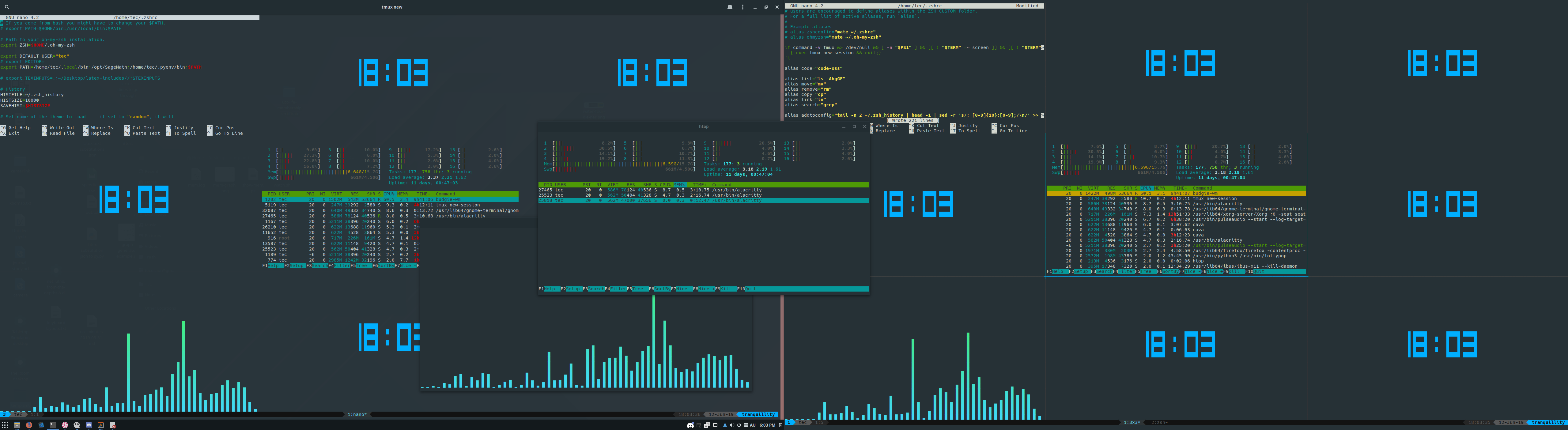
This is what I've now got going. I'll let you know if anthing interesting happens.
tecosaur
on 12 Jun 2019
Do you know if there's likely to be frequent window size changes, or if the memory usage grows even without touching the window at all?
chrisduerr
on 12 Jun 2019
No frequent size changes. I tend to leave it fullscreen. Re: touching the window, I'll find out.
I've found an easy way to plot the memory usage, and I'm taking one sample every minute.
tecosaur
on 12 Jun 2019
Right. Got some preliminary results.
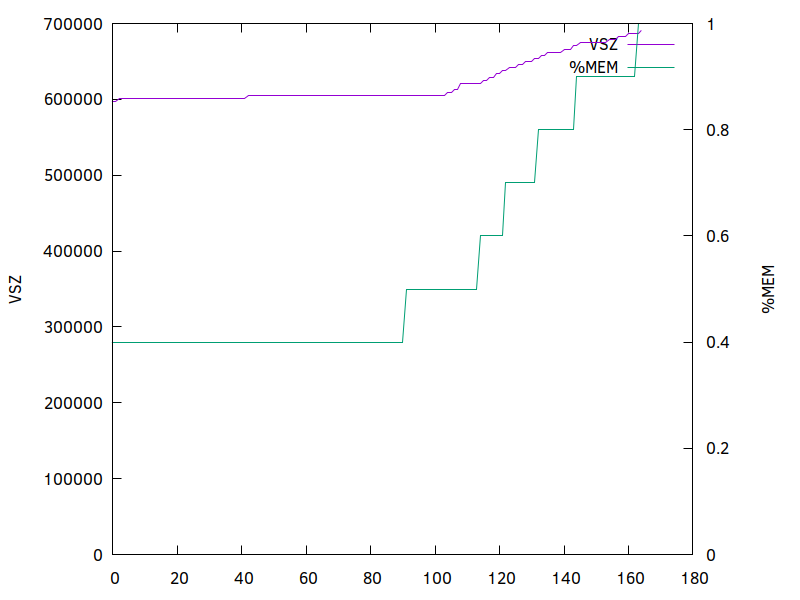
Units along the bottom are minutes. Here's the relevant information:
| Program |RAM usage (mb) |
|---|---|
| Alacrity + tmux | 184mb |
| Alacritty + cava | 50mb |
| Alacritty + htop | 47mb |
| gnome-terminal + tmux | 50mb |
tecosaur
on 12 Jun 2019
By Alacritty + tmux, do you mean cava running inside Alacritty + tmux, or just Alacritty + tmux?
chrisduerr
on 12 Jun 2019
By that, I mean the tmux session which has cava + htop. Sorry for the ambiguity.
tecosaur
on 12 Jun 2019
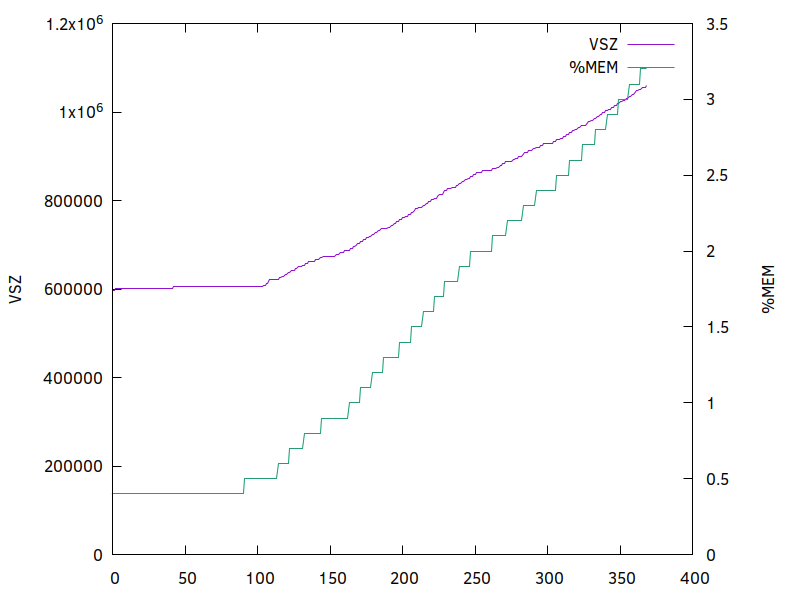
Yea, I have a suspicion this doesn't stop…
tecosaur
on 12 Jun 2019
It looks like it takes quite some time until it starts going up though, which is kinda odd.
What's the X axis label, minutes? That looks like it's not possible to reproduce this unless Alacritty is run for at least ~100 minutes?
chrisduerr
on 12 Jun 2019
It might be interesting to see if it can be reproduced after applying the following diff to the latest master:
diff --git a/alacritty_terminal/src/renderer/mod.rs b/alacritty_terminal/src/renderer/mod.rs
index dfaa797..9d7b0c4 100644
--- a/alacritty_terminal/src/renderer/mod.rs
+++ b/alacritty_terminal/src/renderer/mod.rs
@@ -1550,7 +1550,7 @@ impl Atlas {

         // If there's still not room, there's nothing that can be done here.
         if !self.room_in_row(glyph) {
-            return Err(AtlasInsertError::Full);
+            return Err(AtlasInsertError::GlyphTooLarge);
         }

         // There appears to be room; load the glyph.
This is basically just a wild guess, but since it takes so long to repro I thought it's better to make an educated guess than doing nothing. I'll be running that for a few hours to see if I can repro, however I wasn't able to repro the original issue yet so if you have the time to test this patch too, I'd appreciate it.
chrisduerr
on 12 Jun 2019
Okay, another small update. I've been running Alacritty with and without this patch for about 6 hours now and there has been no leakage at all for both instances. Things also still seem to work and nothing is frozen or anything like that. This was using the latest master.
I've tested this without any cava or tmux config, if you've got any of those two configured, please try running without config or telling me which config you've got so I can try to repro again.
So it seems like there has to be a bit more to it. Could you provide some more system information like GPU, graphics drivers, kernel, WM?
Also just to make sure this hasn't been fixed since 0.3.2, I'd appreciate it if you could test the latest master when you've got the chance.
chrisduerr
on 13 Jun 2019
Hmmm. This is interesting. Cava hasn't been configured and my .tmux.conf is as follows (shortcuts etc. removed):
#make terminal color/font work
set -g default-terminal 'tmux-256color'
set -as terminal-overrides ',xterm*:Tc:sitm=\E[3m'

# List of plugins
set -g @plugin 'tmux-plugins/tpm'
set -g @plugin 'tmux-plugins/tmux-sensible'

set -g @plugin 'jimeh/tmux-themepack'
set -g @themepack 'powerline/double/cyan'

set -g @plugin 'tmux-plugins/tmux-pain-control'

set -g @plugin 'tmux-plugins/tmux-resurrect'
set -g @plugin 'tmux-plugins/tmux-continuum'
set -g @continuum-restore 'on'

# Initialize TMUX plugin manager (keep this line at the very bottom of tmux.conf)
run -b '~/.tmux/plugins/tpm/tpm'
I imagine the way to try that patch would be to (1) clone (2) apply patch (3) recompile.
Just haven't done anything with rust before.
tecosaur
on 13 Jun 2019
The following command should do the job, assuming you've got cargo installed (infos for how to do that can be found on https://rustup.rs).
git clone https://github.com/jwilm/alacritty && cd alacritty && git apply <PATCH FILE> && cargo build --release
If you don't want to compile it but you're still interested in troubleshooting, another reasonable step might be to run tmux without any configuration. I've personally just launched alacritty, then typed tmux without any config file to get my tests, would be interesting to see if you can reproduce it that way.
chrisduerr
on 13 Jun 2019
(Have not forgotten, just became busy, will come back to this)
tecosaur
on 4 Jul 2019
Ah, I'm sorry, I did forget :disappointed: I'm unable to do anything for the next two weeks, but now that I've remembered, when I get the chance I'll test this again and see if anything has changed.
tecosaur
on 28 Oct 2019
I can reproduce this quickly on up-to-date Arch Linux/Gnome 3.36, with my little terminal app, langtons-termite.
Steps:
1) Install langtons-termite (source: https://gitlab.com/ssprang/langtons-termite):
$ cargo install langtons-termite
2) In an alacritty window, run
$ langtons-termite
3) Type 'f' a few times to get the ant going at maximum speed.
4) Totally obscure the alacritty window with another window (I use Gnome System Monitor)
5) In Gnome System Monitor, Select the Processes tab, and search for alacritty.
Result: alacritty's memory usage climbs rapidly. This doesn't seem to occur if the window is not obscured.
 sprang
on 12 Mar 2020
sprang
on 12 Mar 2020
@sprang could you launch alacritty on X11(xwayland) and retest your obscure thing?
 kchibisov
on 12 Mar 2020
kchibisov
on 12 Mar 2020
@sprang first of all, as a fan of Conway's Game of Life, thanks for showing me another very cool generative algorithm.
However on my system X11+i3 I couldn't reproduce this, even when I overlapped a window over the terminal as you suggest (something I rarely do). I'm not saying there isn't an issue here, just that it's not trivial for me to reproduce. Perhaps I'll install a Gnome setup at some point and give it another whirl.
I'm also curious how other GPU terminals behave in the same situation for you?
 nixpulvis
on 12 Mar 2020
nixpulvis
on 12 Mar 2020
I mean the key point here is obscure and Wayland, I could say that it blocks on swap_buffers and parser just runs and runs.
kchibisov
on 12 Mar 2020
( quick interjection, even though I didn't actually get around to more testing, I used X11 when I had my issue )
tecosaur
on 13 Mar 2020
Yeah, your issue isn't forgotten, but this one looks like a bit different thing.
kchibisov
on 13 Mar 2020
Does not occur with:
env WINIT_UNIX_BACKEND=x11 alacritty
I also don't see the problem with Cool Retro Term or kitty.
sprang
on 13 Mar 2020
so your specific issue is likely tracked there https://github.com/alacritty/alacritty/issues/2851 .
kchibisov
on 13 Mar 2020
I'm seeing pretty high memory usage on FreeBSD (0.4.1 installed from ports) on an GTX 1070 Ti driving i3. No xcompmgr, nothing fancy like that, just i3 and alacritty, and instances use about 170 MB of memory from startup. This is a nonstarter for me with my current workflow
 anahata0108
on 11 Apr 2020
anahata0108
on 11 Apr 2020
I have the same issue. very strange. I am on arch linux
 Titaniumtown
on 9 May 2020
Titaniumtown
on 9 May 2020
Cruising at ~60MB per instance here with alacritty 0.6.0. That's rather high for one window, but I am not working on a raspberry pi so I'm ready to switch.
 avindra
on 25 Nov 2020
avindra
on 25 Nov 2020
Related issues
 svaderia
·
57Comments
svaderia
·
57Comments
 teknokatze
·
84Comments
teknokatze
·
84Comments
 VickyJin
·
46Comments
VickyJin
·
46Comments
 pikajude
·
62Comments
pikajude
·
62Comments
 NickeZ
·
50Comments
NickeZ
·
50Comments
Most helpful comment
I mean the key point here is
obscureandWayland, I could say that it blocks on swap_buffers and parser just runs and runs.