Alacritty: Font sizes differ on different screens
Which operating system does the issue occur on?
Linux
If on linux, are you using X11 or Wayland?
X11
I use Ubuntu 18.04 LTS with I3.
I first noticed that my font was huge on my laptop screen after updating to latest master (765949f2). So I changed my font config from 10.0 to 6.0 (to have the same size as before). But now my font is tiny on the external monitor.
Launching from my laptop screen:
$ alacritty -v
Welcome to Alacritty.
Configuration loaded from /home/niklas/.config/alacritty.yml
device_pixel_ratio: 1.6666666
width: 956, height: 1032
Initializing glyph cache
Finished initializing glyph cache in 0.043678361
width: 644, height: 388
Cell Size: (8 x 16)
PTY Dimensions: Line(24) x Column(80)
Font size changed: Size(12)
width: 956, height: 1032
Launching from external screen:
$ alacritty -v
Welcome to Alacritty.
Configuration loaded from /home/niklas/.config/alacritty.yml
device_pixel_ratio: 1
width: 956, height: 1152
Initializing glyph cache
Finished initializing glyph cache in 0.045528064
width: 404, height: 220
Cell Size: (5 x 9)
PTY Dimensions: Line(24) x Column(80)
Font size changed: Size(12)
width: 956, height: 1152
niklas @ niklas-tp : ~/git/alacritty (master=)
$ git --no-pager log -1
commit 765949f256aefcc513d0bfb46b64d315f9c2f3d2 (HEAD -> master, upstream/master, origin/master, origin/HEAD)
Author: Francesca Frangipane <[email protected]>
Date:   Mon May 14 23:21:06 2018 -0400
    Update to glutin 0.16.0
    Note that `WM_CLASS` is now set to `"alacritty", "Alacritty"`
    instead of the previous value of `"Alacritty", "Alacritty"`. This
    seems to be more standard.
    This also contains some revised recommendations for installing the
    `.desktop` file.
 NickeZ
All 50 comments
You can see that the device_pixel_ratio on the different machines is not the same. This is sounds like it's a DPI difference which leads to this issue.
There's no dynamic DPI yet (#71) unfortunately.
 chrisduerr
on 30 May 2018
chrisduerr
on 30 May 2018
This worked differently before yesterday.
So between my 14" laptop and my 24" monitor (with the same resolution) there is a 1:1.66 difference. If I create the Alacritty window on the laptop and then move it to the external monitor it looks like before (size seems reasonable).
Can I hard code it to always use device_pixel_ratio 1? Or what would be a temporary fix here? Or was it correctly using device_pixel_ration 1.66 before?
NickeZ
on 30 May 2018
Oh yeah I believe the PR from @francesca64 changed something about the font size/DPI. It would be possible to ignore DPI completely but that might be a bit of work. Maybe @francesca64 has an idea how this can be solved? Seems like the PR fixed an issue that made font size calculation more accurate but the lack of screen DPI change handling worse?
The best solution would obviously be solving the issue in winit and solving the DPI monitor change stuff, but I'm not quite sure what exactly has to be done here.
chrisduerr
on 30 May 2018
At least when alacritty is launched it should be able to set the font size correctly. Handling monitor change can be a future improvement.
NickeZ
on 30 May 2018
@NickeZ does it always use the same DPI regardless of which monitor it opens on?
 jwilm
on 30 May 2018
jwilm
on 30 May 2018
I don't think so, according to the verbose output the cell sizes are not the same. Should i check the dpi in some other way?
I usually have the laptop monitor closer to my eyes than my external monitor, so i would prefer that the font size was the same, independent of pixel size and dpi.
NickeZ
on 31 May 2018
winit's X11 backend used to always report a DPI factor of 1.0 (unless you used MonitorId::get_hidpi_factor instead of Window::hidpi_factor); now both methods report the same (correct) value.
Changing the hidpi_factor method in Alacritty's Window struct to always return 1.0 would be a simple temporary fix, if you want such a thing. I also think @sodiumjoe has a branch somewhere that handles HiDPIFactorChanged.
Though, that event is presently never emitted on any platform other than macOS... I've been working on going through every backend to have proper (and consistent) DPI support (https://github.com/tomaka/winit/issues/105#issuecomment-389330207), and so far X11, Windows, macOS, and iOS are done (which is when I got sidetracked, since glutin's iOS backend doesn't even compile, so I had to fix that too). While the implementation + API migration will be done soon, I can't say how quickly that will make it downstream, since 1) ideally the changes will be well-tested before being released, 2) I'm also considering doing some work on glutin this time, and 3) I'm putting off writing documentation.
 francesca64
on 31 May 2018
francesca64
on 31 May 2018
Thanks for all your work @francesca64. I'm sure I'm not the only one who's really looking forward to "proper" DPI support in alacritty even when changing monitors, that will be a big step in the right direction!
chrisduerr
on 31 May 2018
Hopefully you still feel that way when you see how much the new API breaks everything downstream! While I do have an Alacritty branch that's already migrated, it's a bit of a hackjob so I'd like someone else to do it more properly.
francesca64
on 31 May 2018
API breakage sounds like fun! :D
chrisduerr
on 31 May 2018
Yeah I have a branch over in https://github.com/jwilm/alacritty/issues/964#issuecomment-382098460, but I need to rebase against master and possibly deal with some winit api changes. I think it will address this issue.
 sodiumjoe
on 31 May 2018
sodiumjoe
on 31 May 2018
I think maybe it comes down to how the sizes are rounded. The current setup I have is:
- laptop screen 14"
- height: 175mm (as reported by xrandr)
- device_pixel_ratio: 1.6666666 (as reported by alaxritty)
- external monitor 22"
- height: 268mm (as reported by xrandr)
- device_pixel_ratio: 1.0833334 (as reported by alacritty
The small screen gives me 21 pixels heigh cells and the big one gives me 13. 268/175 = 1.53 and 21/13 = 1.62. If I shrink the font by one size on the small screen I get 18px heigh cells which looks good to me, however 18/13 = 1.38. So simply looking at the math I guess Alacritty is doing the right thing and rounds to the closest font size.
Looking at the physical millimetres I get 175/1080*21 = 3.40 and 268/1080*13 = 3.23 whereas I want 175/1080*18 = 2.92.
Without knowing the details of how this is implemented. Maybe what I want is to be able to set the "maximum font size" so that it never rounds up?
I noticed that I can use partial font sizes as well. It looks like 7.5 is closer to what I want (13 pixels on big screen and 19 on small)
NickeZ
on 31 May 2018
I also noticed that if I set font size to 7.5 it reports Size(15) in the console. And by using the shortcuts to resize the font I can only achieve odd numbers until I go all the way down to 2:
$ alacritty -v
Welcome to Alacritty.
Configuration loaded from /home/niklas/.config/alacritty.yml
device_pixel_ratio: 1.6666666
width: 636, height: 1032
Initializing glyph cache
Finished initializing glyph cache in 0.040205583
width: 804, height: 460
Cell Size: (10 x 19)
PTY Dimensions: Line(24) x Column(80)
Font size changed: Size(15)
width: 636, height: 1032
Font size changed: Size(17)
width: 636, height: 1032
Font size changed: Size(19)
width: 636, height: 1032
Font size changed: Size(21)
width: 636, height: 1032
Font size changed: Size(19)
width: 636, height: 1032
Font size changed: Size(17)
width: 636, height: 1032
Font size changed: Size(15)
width: 636, height: 1032
Font size changed: Size(13)
width: 636, height: 1032
Font size changed: Size(11)
width: 636, height: 1032
Font size changed: Size(9)
width: 636, height: 1032
Font size changed: Size(7)
width: 636, height: 1032
Font size changed: Size(5)
width: 636, height: 1032
Font size changed: Size(3)
width: 636, height: 1032
Font size changed: Size(2)
width: 636, height: 1032
Font size changed: Size(4)
width: 636, height: 1032
Font size changed: Size(6)
width: 636, height: 1032
Font size changed: Size(8)
width: 636, height: 1032
Font size changed: Size(10)
width: 636, height: 1032
Font size changed: Size(12)
width: 636, height: 1032
Font size changed: Size(14)
width: 636, height: 1032
Font size changed: Size(16)
width: 636, height: 1032
Font size changed: Size(18)
width: 636, height: 1032
Font size changed: Size(20)
width: 636, height: 1032
Font size changed: Size(22)
width: 636, height: 1032
I have exactly the same problem after the upgrade. I have two monitors, this is output from alacritty:
External monitor:
❯ alacritty -v
Welcome to Alacritty.
Configuration loaded from /home/jprokop/.config/alacritty/alacritty.yml
device_pixel_ratio: 3.1666667
width: 954, height: 354
Initializing glyph cache
Finished initializing glyph cache in 0.028728687
Cell Size: (27 x 68)
PTY Dimensions: Line(5) x Column(35)
Font size changed: Size(26)
width: 954, height: 354
Laptop:
❯ alacritty -v
Welcome to Alacritty.
Configuration loaded from /home/jprokop/.config/alacritty/alacritty.yml
device_pixel_ratio: 1.75
width: 634, height: 1026
Initializing glyph cache
Finished initializing glyph cache in 0.029028492
Cell Size: (15 x 37)
PTY Dimensions: Line(27) x Column(42)
Font size changed: Size(26)
width: 634, height: 1026
This is how it looks on external monitor:

It's not much usable :-) I spent like 2 hours of research how to configure my monitors properly. I tested /etc/X11/xorg.conf.d/90-monitor.conf with a proper DisplaySize, I tried to use --fbmm or --dpi on xrandr (but that is setting value for the whole screen, not per monitor). After digging in xrandr source code I found there is --setmonitor so I also tested it but I either get some weird error or if it's fine the values reported by xrandr are unchanged. It's really frustrating :-) And I would really like to understand the problem with my setup because obviously something is wrong here:
❯ xrandr -v
xrandr program version       1.5.0
Server reports RandR version 1.5
❯ xrandr -q
Screen 0: minimum 8 x 8, current 1920 x 2160, maximum 32767 x 32767
eDP1 connected 1920x1080+0+1080 (normal left inverted right x axis y axis) 290mm x 170mm
   1920x1080     60.02*+  59.93    48.01
…
DP1 disconnected (normal left inverted right x axis y axis)
HDMI1 connected primary 1920x1080+0+0 (normal left inverted right x axis y axis) 160mm x 90mm
   1920x1080     60.00*+  50.00    59.94
…
HDMI2 disconnected (normal left inverted right x axis y axis)
VIRTUAL1 disconnected (normal left inverted right x axis y axis)
HDMI1 should have 530x300mm according to my measurements.
This is the content for /etc/X11/xorg.conf.d/90-monitor.conf I tested:
Section "Monitor"
    Identifier "HDMI1"
    DisplaySize 530 300
EndSection
And those are various commands for xrandr I tried:
xrandr --delmonitor HDMI1
xrandr --setmonitor HDMI1 1920/530x1080/300+0+0 HDMI1
xrandr --delmonitor "*HDMI1"
xrandr --setmonitor "*HDMI1" 1920/530x1080/300+0+0 HDMI1
xrandr --delmonitor "+*HDMI1"
xrandr --setmonitor "+*HDMI1" 1920/530x1080/300+0+0 HDMI1
For most of them I got:
output list HDMI1
add monitor HDMI1
output name HDMI1
X Error of failed request:  BadValue (integer parameter out of range for operation)
  Major opcode of failed request:  140 (RANDR)
  Minor opcode of failed request:  43 ()
  Value in failed request:  0x1d2
  Serial number of failed request:  41
  Current serial number in output stream:  42
Am I doing something totally wrong or is there a bug in Xorg/Xrandr? Sorry for the long comment… and thanks for any clue in advance…
 synaptiko
on 31 May 2018
synaptiko
on 31 May 2018
@synaptiko Did you find this? https://bbs.archlinux.org/viewtopic.php?id=133815
I have it working now. I added a screen section to monitor.conf
Section "Monitor"
  Identifier "Monitor0"
  DisplaySize 345 195
EndSection

Section "Screen"
    Identifier    "Screen0"
    Monitor       "Monitor0"
EndSection
EDIT: or actually:
$ cat /etc/X11/xorg.conf.d/90-monitor.conf
Section "Monitor"
    Option    "UseEdidDpi"    "false"
    Identifier "Monitor0"
    DisplaySize 477 269
EndSection

Section "Screen"
    Identifier    "Screen0"
    Monitor       "Monitor0"
EndSection
@NickeZ No, I didn't. Unfortunately even if I copy&paste exactly the same config (and I adjust the DisplaySize to my values) then it still does nothing for me (after reboot). So I'm really puzzled about what's happening here… Maybe I have some bad drivers or something… Btw. I noticed recently that interface for new version of VLC is also scaled up on my monitor which is probably related to this… and it means that if programs start to adopting the new way how to read the dpi I'm screwed :-D
synaptiko
on 1 Jun 2018
can you try https://github.com/jwilm/alacritty/pull/1346
sodiumjoe
on 1 Jun 2018
can you try #1346
I can't see any difference in behavior to the master branch.
NickeZ
on 1 Jun 2018
@sodiumjoe #1346 would just change things on macos, right? This issue is reported for X11 where dpi change events aren't reported yet afaik.
chrisduerr
on 1 Jun 2018
It took me several hours to figure out my problem. It's actually not related to alacritty at all. I found out that my Samsung SyncMaster 2494HM monitor is reporting incorrect display size in EDID when connected over HDMI (funnily, it's correct over VGA) and for some reason I wasn't able to override it over any option in xorg.conf. I found out that incorrect EDID is quite a common problem, at least with Samsung monitors.
For anybody interested, here are steps I used to fix my problem: https://gist.github.com/synaptiko/b59d814ea07186a9a9f210724930f2ca
Btw. it also fixed VLC interface…
synaptiko
on 1 Jun 2018
So to be clear, this is the intended behaviour? If so, could a config option be added to always set the device_pixel_ratio to 1.0?
 Tezkerek
on 4 Jun 2018
Tezkerek
on 4 Jun 2018
Once winit 0.15.1 is out (which should be by Friday) you'll be able to use the WINIT_HIDPI_FACTOR env variable to override the DPI factor (on X11 only).
francesca64
on 4 Jun 2018
Out of curiosity, but related. Is there a bug tracking the ability to change font size with a keybinding? I use alacritty at work, and sometimes would like to make sharing things easier for everyone to see.
 nixpulvis
on 4 Jun 2018
nixpulvis
on 4 Jun 2018
@nixpulvis It works with ctrl+= and ctrl+- for me.
Tezkerek
on 4 Jun 2018
@Tezkerek I should have done more grepping before making that comment. I can just make a keybind, I didn't have one for whatever reason. Sorry for the noise.
Interestingly I can't seem to get the Minus binding to work in Linux. Maybe I'm still doing something wrong
nixpulvis
on 4 Jun 2018
To get back on track with this issue based on what @NickeZ said (I haven't properly read the full thread before), it seems like the DPI scaling is not the issue, but the improper font size calculation is.
Based on his results it seems like the DPI factor is treated as a whole, rather than a floating point number. I'll try to look into this later today, but I thought when testing the WINIT_HIDPI_FACTOR env variable that 0.5 didn't give me the same result as 1.4.
chrisduerr
on 4 Jun 2018
So this is how font size on freetype is currently calculated:
https://github.com/jwilm/alacritty/blob/master/font/src/ft/mod.rs#L147
The result of this operation returns the font size in pixels. We first take the input font size as a floating point number (size.as_f32_pts()), multiply it by the resolution and then divide it by 72. The 72 here is just a magic number used by freetype because one point is defined as 1/72th of an inch.
The resolution is calculated as self.device_pixel_ratio * 96.. The device_pixel_ratio here is the DPI factor returned by winit, this should be around 1.0 and vary slightly depending on monitor size. The 96. is the default DPI for X.Org displays.
So following the info from @NickeZ this would look somewhat like this:
size_f32_pts = 6 / 2 = 3
resolution = 1.666666666 * 96 = 160
size = size_f32_pts * resolution / 72 = 6.66666666666
Size::new = size * 2 as i16 = 13.333333 as i16 = 13
And for his other example:
size_f32_pts = 6 / 2 = 3
resolution = 1 * 96 = 96
size = size_f32_pts * resolution / 72 = 4
Size::new = size * 2 as i16 = 8 as i16 = 8
Now don't get me wrong, it is likely that there was at least some kind of math error in my calculations, but it seems like the result for running this on your external monitor should not be Size(12). I'd love to see what a println of each value used in this calculation would result in for your system @NickeZ. It seems like the 12/13 could be a rounding/truncation error, however the 12 instead of 8 just seems a bit odd.
However looking at these calculations it seems like the font on your external monitor should be smaller, not bigger. Which makes sense because the DPR is smaller on your external monitor too. However I'd still like to know if the current font size calculation is actually correctly using the DPR.
Source where all this is documented: https://www.freetype.org/freetype2/docs/glyphs/glyphs-2.html
From what I can tell alacritty's current behavior doesn't seem toooo far off, there might still be some inaccuracies though, but I'd love to fix those if we can get some more info. If nothing else I hope this at least sheds a little more light on how font sizes are calculated with freetype.
Also a little postscript: I'm not entirely sure why Alacritty's Size is double the actual font size. I'm not sure why this is done but it shouldn't have any influence on scaling because it's a constant factor applied to all font sizes equally, so just halving the font size should result in the same behavior as not doubling the font size at all. It is possible that this could mess with floating point accuracy though.
chrisduerr
on 4 Jun 2018
Another quick addition: If the DPI is ever not 96, this will definitely return the wrong result.
chrisduerr
on 4 Jun 2018
Okay, another addition: The font size logged using Font size changed: {:?} is apparently just the configuration font size and not the actual font size. So chances are the calculation is doing the right thing.
I guess the only question left is if xdpyinfo | grep dots returns something other than 96 for you @NickeZ.
chrisduerr
on 4 Jun 2018
Here's a picture of three alacritty instances on three different setups.
- (top) Is a desktop with a 24" monitor at 1920x1080, reporting 96DPI according to
xdpyinfo. - (bottomleft) is a thinkpad without a HiDPI monitor, 14" at 1920x1080, reporting 96DPI according to
xdpyinfo. - (bottomright) is a thinkpad with a HiDPI monitor, 14" at 2560x1440, reporting 96DPI according to
xdpyinfo.
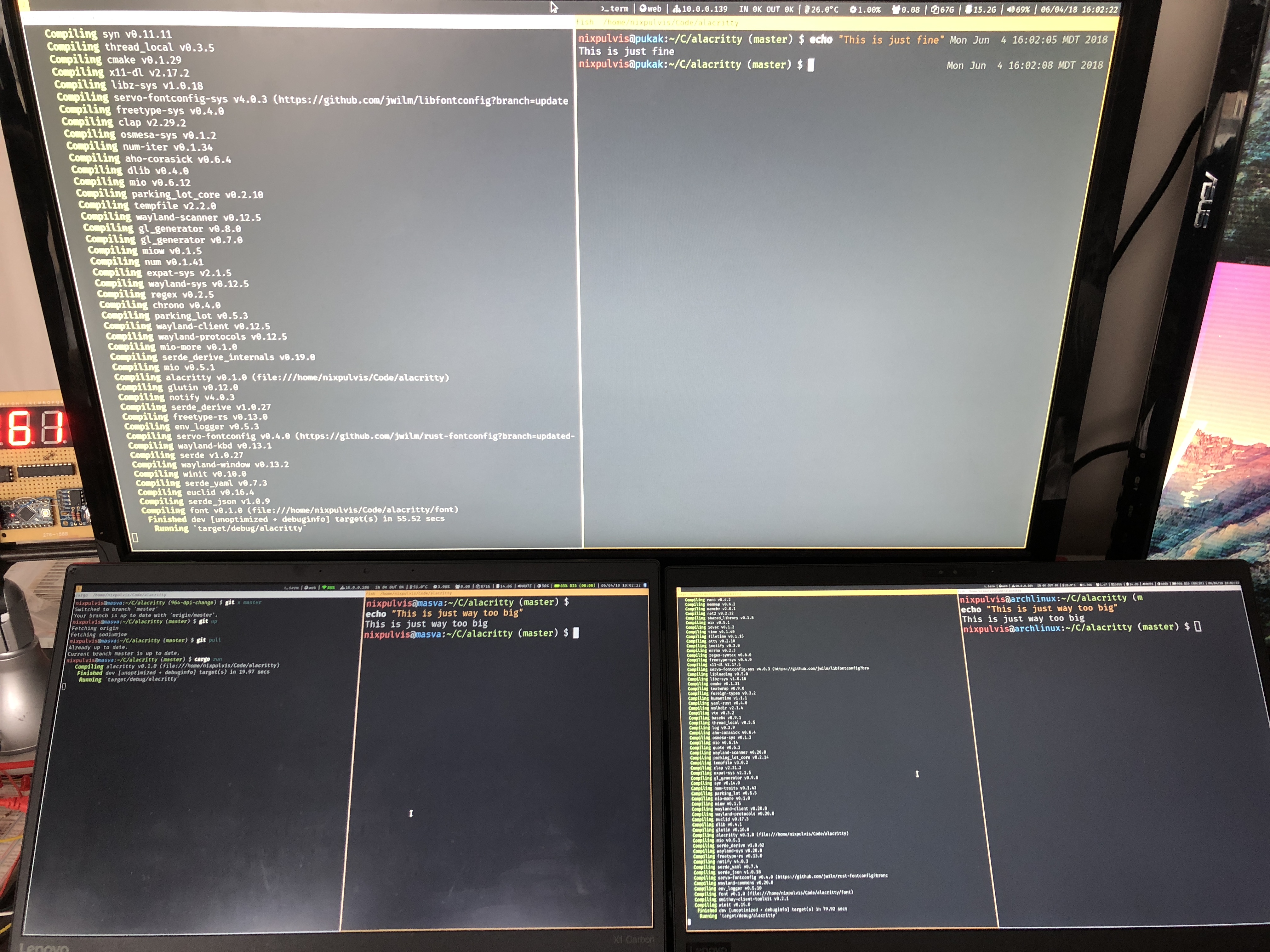
I can set my HiDPI laptop to a more suitable DPI and report back later (because alacritty used to scale as intended).
nixpulvis
on 5 Jun 2018
@nixpulvis Alacritty used to not scale at all. It looks to me like it scales properly now. The physical size of the text seems to be the same on both the HiDPI and non-HiDPI monitor. So DPI is respected and font size is increased on the HiDPI monitor.
chrisduerr
on 5 Jun 2018
dpi is close enough:
$ xdpyinfo | grep dots
56:  resolution:    98x98 dots per inch
The physical size of the text seems to be the same on both the HiDPI and non-HiDPI monitor.
I still think the scaling is suboptimal. It might be scaling linearly but I'm actually used to having a physically smaller font on my smaller screen. For me it is more important to have roughly the same amount of columns on my screens so that I can see the same amount of code.
I will try WINIT_HIDPI_FACTOR when that is merged into master.
NickeZ
on 5 Jun 2018
Yeah for everyone who expects no DPR scaling the WINIT_HIDPI_FACTOR will probably solve this issue. As it stands right now, besides the bug with infinite DPR, it looks to me like DPI is now working as intended.
chrisduerr
on 5 Jun 2018
Alacritty is the first application that works like this for me. If I for example open a webpage on a smaller screen I see a smaller version of the webpage. If I open a document in libroffice writer it will also be smaller on the small screen.
But maybe Apple users are more used to this because of high-dpi screens and an OS that scales like this?
NickeZ
on 5 Jun 2018
Yeah I'm pretty sure this is not super common on linux yet, however I think it's a great idea. If you want to slightly tweak values it should be possible to do so using the xorg monitor configuration.
I think having slightly bigger fonts on high dpi screens definitely makes sense, especially when people want to use 4k+ screens without having to change around font sizes.
chrisduerr
on 5 Jun 2018
Yeah I suppose I should override the reported size of the monitor.
NickeZ
on 5 Jun 2018
@NickeZ this was my assessment after all this as well. I'm waiting till I get home to test it, however I'm worried that other applications will scale incorrectly afterwards.
nixpulvis
on 5 Jun 2018
Manually changing the DPI using Xft.dpi in ~/.Xresources doesn't affect alacritty, but it does affect the rest of the programs, like termite and firefox. IMO this isn't right, alacritty should scale according to the DPI set by the user, not calculate it on its own.
Tezkerek
on 5 Jun 2018
Currently alacritty assumes a fixed DPI of 96. It is correct that this is not accurate. Right now only the DPR is used (hidpi factor/device pixel ratio).
chrisduerr
on 5 Jun 2018
It is possible to see the hardcoded 96.0 here:
https://github.com/jwilm/alacritty/blob/master/font/src/ft/mod.rs#L147
This is probably all that would need to be changed to get "proper" DPI support, instead of just DPR.
chrisduerr
on 5 Jun 2018
But I do have DPI set to 96, at least that's what xdpyinfo reports. According to DPI calculators, my laptop screen should have a DPI of 141, and indeed, if I set it to that in xorg, termite will have the exact same font size as alacritty has regardless of xorg's DPI.
Tezkerek
on 5 Jun 2018
Oh I think I understand how things work then.
Winit's hidpi method calculates the DPI factor you would need to apply to a 96 DPI screen to achieve "proper" DPI scaling. Alacritty then applies that scaling to the 96 DPI to calculate the actual font size. That's probably where the 96 comes from both in winit's DPI method and in alacritty's size calculation.
Can you confirm/deny if this is accurate @francesca64? It took me a bit to read through all the DPI code but I believe I kinda understand it now? Is it possible to get the actual monitor DPI from winit? Is winit doing things this way because in x11 usually DPI is calculated for the whole screen instead of the individual display?
So right now alacritty forces dpi scaling, to disable it we could either add a config option or make use of the WINIT_HIDPI_FACTOR env variable.
chrisduerr
on 5 Jun 2018
The core protocol (which is what xdpyinfo uses, as opposed to xrandr) doesn't support mixed DPI, and my understanding is that the core protocol is unreliable and always reports 96. Xft.dpi would have to be read manually within winit.
What do you mean by "actual monitor DPI"?
francesca64
on 5 Jun 2018
So xrandr doesn't report the DPI set in xorg? I've also tried xrandr --dpi 96, but it has no effect.
How do other programs get the DPI then, since setting the DPI in .Xresources affects their scaling?
Tezkerek
on 5 Jun 2018
@Tezkerek, yea I too have been bit by xdpyinfo not properly handling multiple displays. There are a bunch of issues open on various projects for this already. As for how to get a DPI number from xrandr (or another tool) I'm not sure.
I've started to assume (maybe wrongly) that applications are only given the screen size (mm) and resolution (px), and also apparently a DPR (scale factor) which I haven't ever used or tested.
At the end of the day this is all way more confusing than it should be, grrrrrr.
nixpulvis
on 5 Jun 2018
I don't think xdpyinfo always returns 96, based on this:
https://wiki.archlinux.org/index.php/Font_configuration#Distorted_fonts
By "actual monitor DPI" I mean getting what is actually returned by xdpyinfo. Right now it seems like there are three ways to do DPI in x11:
- Don't
- Rely on xdpyinfo and whatever that uses (drawback: screen not monitor based)
- DIY (as far as I understand this is what alacritty + winit are doing right now)
If you don't want DPI at all, it seems like an option to disable it should be added (not a huge fan of having to rely on the env variable).
If you want "proper" DPI scaling no matter the cost, it should just be fine the way it works right now.
The only issue I see is if you want DPI scaling but some intermediate level. So running DPI 110 if your monitor is 120 or something like that. It seems difficult to do this with the way winit and alacritty do DPI right now, the only solution in this case seems to be using the WINIT_HIDPI_FACTOR env variable.
chrisduerr
on 5 Jun 2018
From my limited testing xdpyinfo returns the correct DPI (in some cases, not sure about multiple screens), but fails to return the correct resolution when there are more than one display connected. It simply treats them all as one big display, and reports that number instead.
nixpulvis
on 5 Jun 2018
That's intentional. In x11 a screen and a display are two different entities. That's why I said it's not possible to specify the DPI for each display, only for each screen.
chrisduerr
on 5 Jun 2018
For anyone who wants to more effectively hold me accountable, someone over in tomaka/winit#169 wrote about this topic in depth: http://wok.oblomov.eu/tecnologia/mixed-dpi-x11/
xdpyinfo source code: https://cgit.freedesktop.org/xorg/app/xdpyinfo/tree/xdpyinfo.c
francesca64
on 5 Jun 2018
I ran into the same issue today while using a projector. My temporary solution is spawning an alacritty instance on my laptop screen and then moving it to the projector (using i3wm). Hope it gets fixed soon!
 adbX
on 20 Jun 2018
adbX
on 20 Jun 2018
Related issues
 theduke
·
69Comments
theduke
·
69Comments
 HalosGhost
·
48Comments
HalosGhost
·
48Comments
 teknokatze
·
84Comments
teknokatze
·
84Comments
 spamwax
·
50Comments
spamwax
·
50Comments
 i336
·
99Comments
i336
·
99Comments
Most helpful comment
winit's X11 backend used to always report a DPI factor of 1.0 (unless you used
MonitorId::get_hidpi_factorinstead ofWindow::hidpi_factor); now both methods report the same (correct) value.Changing the
hidpi_factormethod in Alacritty'sWindowstruct to always return 1.0 would be a simple temporary fix, if you want such a thing. I also think @sodiumjoe has a branch somewhere that handlesHiDPIFactorChanged.Though, that event is presently never emitted on any platform other than macOS... I've been working on going through every backend to have proper (and consistent) DPI support (https://github.com/tomaka/winit/issues/105#issuecomment-389330207), and so far X11, Windows, macOS, and iOS are done (which is when I got sidetracked, since glutin's iOS backend doesn't even compile, so I had to fix that too). While the implementation + API migration will be done soon, I can't say how quickly that will make it downstream, since 1) ideally the changes will be well-tested before being released, 2) I'm also considering doing some work on glutin this time, and 3) I'm putting off writing documentation.