Alacritty: Alacritty doesn't display emoji
I know, I know.
Anyway, iTerm 2 and Terminal.app are both able to display emoji:

but alacritty isn't:

 pikajude
All 62 comments
Good to have a tracking issue for it :)
 jwilm
on 7 Jan 2017
jwilm
on 7 Jan 2017
It would be nice to be able to define a specific font for these (emoji one, for example, as not all fonts have all emojis defined), maybe even an utf8 code point range? This could also be used for something like https://github.com/ryanoasis/powerline-extra-symbols without the need to patch existing fonts.
 topaxi
on 7 Jan 2017
topaxi
on 7 Jan 2017
@topaxi, in case fontconfig is configured correctly, and alacritty supports fallback fonts (https://github.com/jwilm/alacritty/issues/45), there is no need for that kind of custom functionality.
 ton
on 7 Jan 2017
ton
on 7 Jan 2017
@ton, nice!
topaxi
on 7 Jan 2017
Alacritty doesn't display the icons in powerline fonts: https://github.com/powerline/fonts/tree/master/Inconsolata
I presume that bug should go here. Let me know if I should file another one.
 manishrjain
on 8 Jan 2017
manishrjain
on 8 Jan 2017
On Arch Linux with Infinality and ttf-noto-fonts-emoji-ib I see an illegibly tiny dot-type-thing in place of emoji.

termite (vte3-ng-based) for comparison (note that while these emojis print correctly, they only use one rendering "space" because of how VTE works sans-patches. The patches make life more miserable anyway)

 klardotsh
on 8 Jan 2017
klardotsh
on 8 Jan 2017
You might have some monochrome emoji on FreeType systems now
jwilm
on 3 Mar 2017
Glad to have monochrome emojis for now:

For color Linux support it looks like you'd have to have support for _SVG in Open Type_ fonts, such as https://github.com/eosrei/emojione-color-font
 PaulBGD
on 8 May 2017
PaulBGD
on 8 May 2017
SVGinOT is not the only option, it's complicated in Linux 🙂
For example, eosrei/emojione-color-font that you mentioned is a custom build of EmojiOne to add support for Firefox via SVGinOT technology, but the official Ranks/emojione has emojione-android.ttf which provides color emoji via CBDT/CBLC technology for all Chrome-based apps, as well as all GTK+ apps if you install a patched cairo.
By the way, the font from the official repo consists of the EmojiOne v3, which is a redesigned version of older EmojiOne v2, and the community is working right now to add the latest Unicode 4.0 emojis in the font.
So, in summary it would be a pity to support only SVGinOT stack.
UPDATE 1: CBDT/CBLC fonts seem to work in Firefox as well now.
UPDATE 2: cairo merged the patch in upstream, so it also supports CBDT/CBLC. In other words, CBDT/CBLC technology is supported almost in all apps now on Linux. Alacritty should support it too.
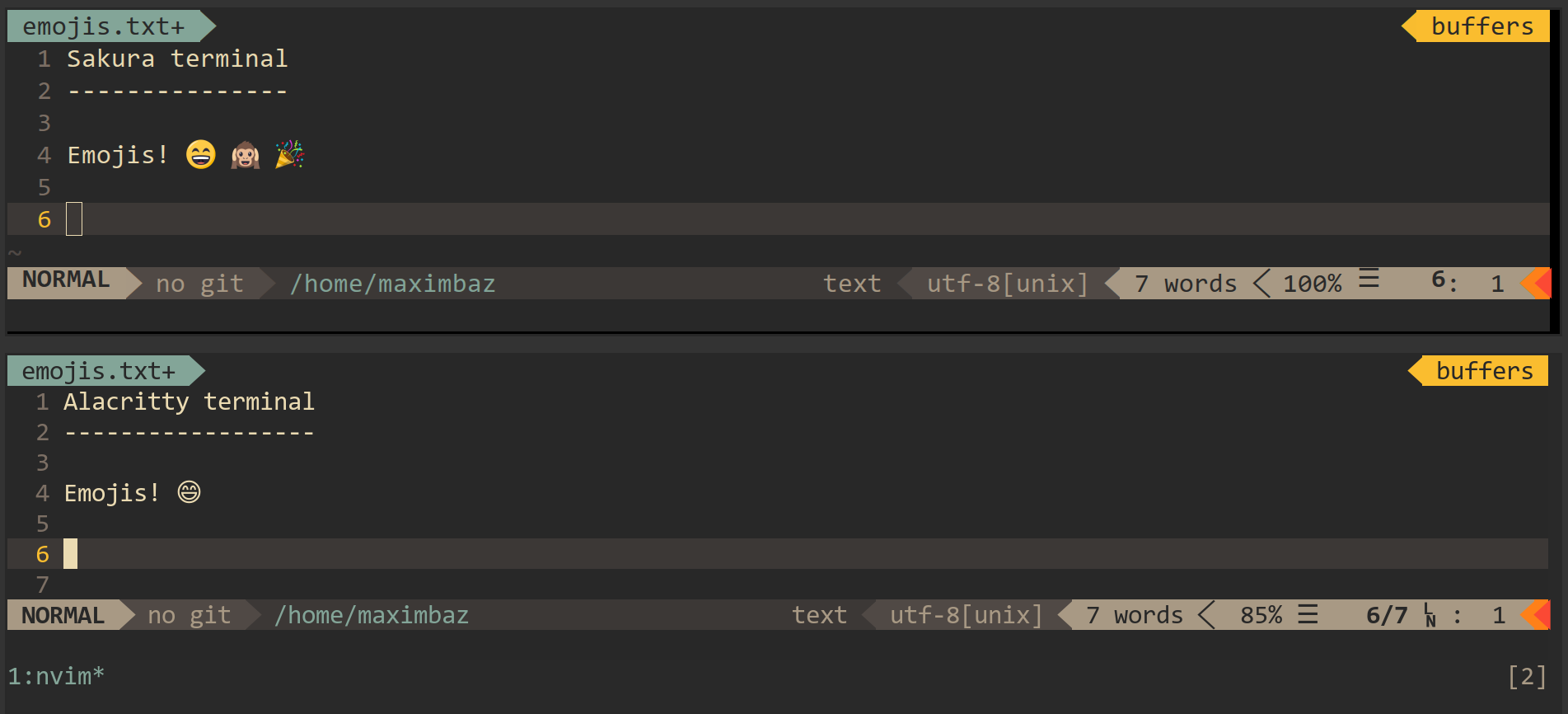
UPDATE 3: With no configuration from my side, Sakura terminal now supports CBDT/CBLC technology to show colorful emojis (do they just use cairo?):
 maximbaz
on 8 May 2017
maximbaz
on 8 May 2017
Huh, just hearing about CBDT/CBLC. Definitely sounds like a good solution too, as long as I can get my color emoji.
PaulBGD
on 8 May 2017
Any update in this space? I'd love to get the Rocket emojis back 😄
 felipesere
on 5 Nov 2017
felipesere
on 5 Nov 2017
Emoji works for me, but they are rendered semi-transparent. macOS using Fira Code

 k0nserv
on 6 Nov 2017
k0nserv
on 6 Nov 2017
@maximbaz, I'am afraid CBDT/CBLC isn't supported by Firefox yet. I've tried current stable and Quantum under linux, here is what I get from https://pixelambacht.nl/chromacheck/
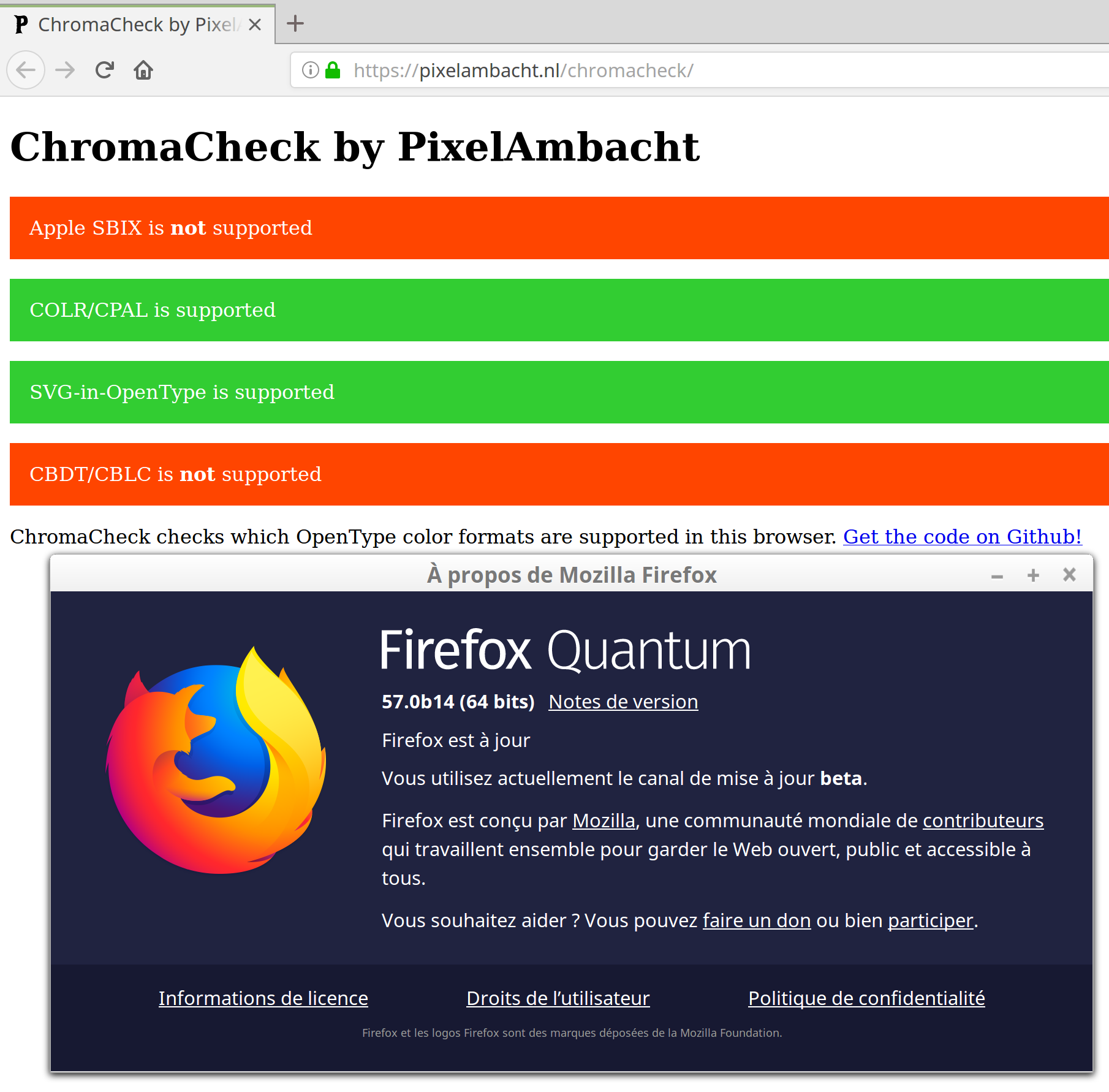
What version are you using?
 dvergeylen
on 6 Nov 2017
dvergeylen
on 6 Nov 2017
I'm using Chromium on daily basis, but I have a EmojiOne font installed (which I was told is using CBDT/CBLC format) and latest official Firefox and emojis are being rendered in color:
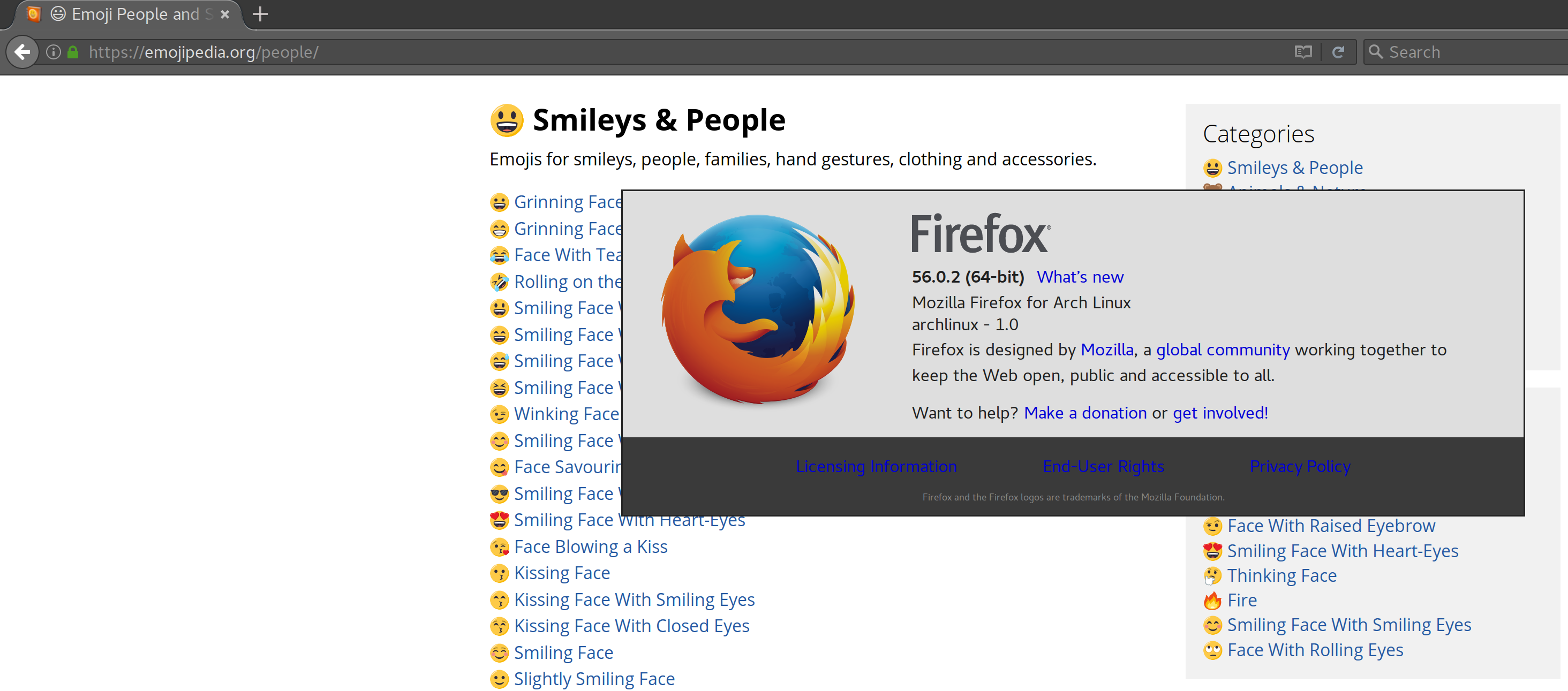
This website that you are referring to shows no support in both Firefox and Chromium in my case, I'm not sure if we can trust it.
maximbaz
on 6 Nov 2017
on macOS 10.13.2 i copied 🚀 and i pasted it in Alacritty and it showed up perfectly fine.
 unphased
on 31 Dec 2017
unphased
on 31 Dec 2017
i believe this was fixed in https://github.com/jwilm/alacritty/pull/956
 sodiumjoe
on 4 Feb 2018
sodiumjoe
on 4 Feb 2018
Unfortunately only for Mac, the issue is still valid for Linux.
maximbaz
on 4 Feb 2018
@maximbaz do you know whether there is anything required to have colored emojis in sakura?
 alexanderadam
on 14 Mar 2018
alexanderadam
on 14 Mar 2018
No specific configuration in sakura itself (it works with the default config), however, fontconfig must be properly configured to have colorful emojis in all linux apps (sadly, except alacritty). If you use ArchLinux, try aur/ttf-emojione which I maintain, otherwise here's the relevant configuration - 70-emojione-color.conf - which you should save as ~/.config/fontconfig/conf.d/70-emojione-color.conf and then refresh the cache with $ fc-cache -f; sudo fc-cache -f.
maximbaz
on 14 Mar 2018
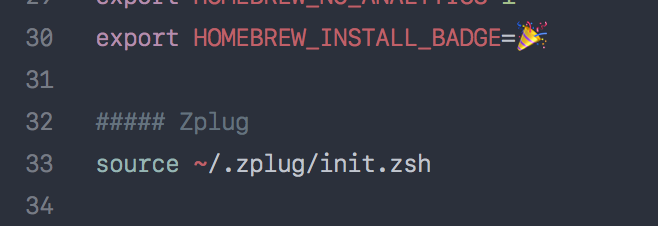
Am I crazy but on Mac, Alacritty is still not displaying emoji the same way as other apps?
Alacritty
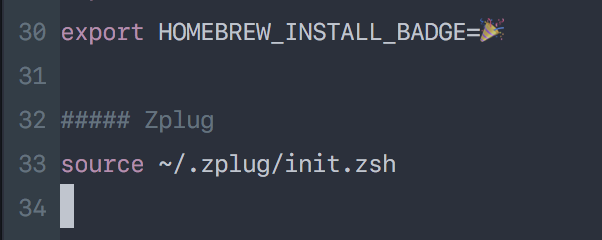
iTerm2
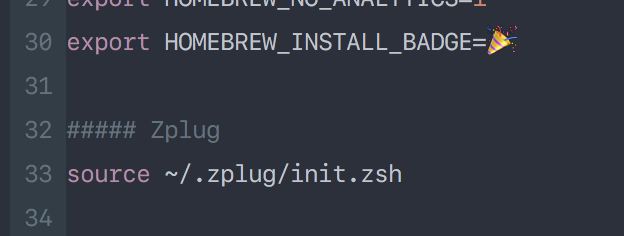
Sublime Text
 ngocphamm
on 10 Jun 2018
ngocphamm
on 10 Jun 2018
@ngocphamm This is probably a font configuration thing, it might be fixed once work on #957 starts.
 chrisduerr
on 10 Jun 2018
chrisduerr
on 10 Jun 2018
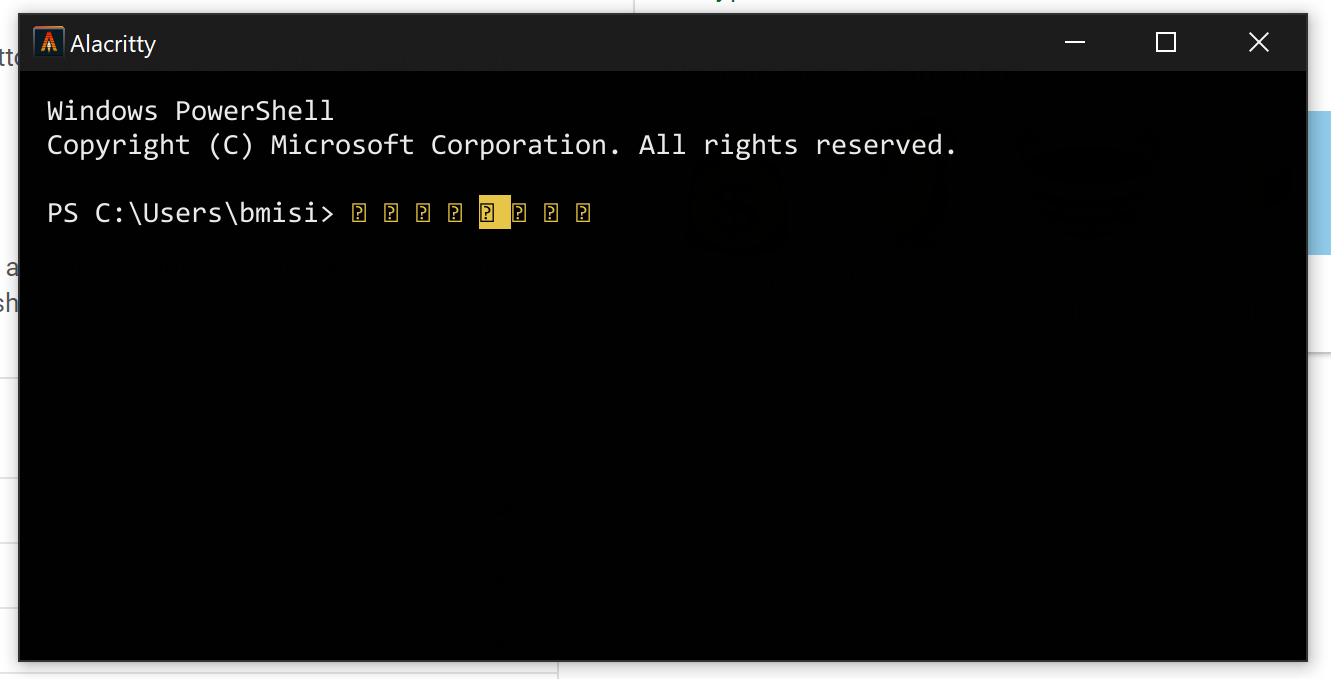
On Windows 1809 (ConPTY backend), emojis don't show up on the default config.
 bmisiak
on 17 Feb 2019
bmisiak
on 17 Feb 2019
Guys, I'm sorry if the question sounds uninformed, does Alacritty support emojis on Windows at all? Even with the new ConPty interface?
 saifali96
on 23 May 2019
saifali96
on 23 May 2019
Humble linux user awaits :crossed_fingers:
alacritty:
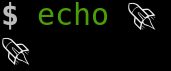
gnome-terminal:

I am using Alacritty 0.3.3 on Mint 19.1 tessa
PS. since i found a way of hiding the title bar (window decoration) on gnome-terminal, i decided to temporarily move away from alacritty :crying_cat_face:
 zachliu
on 26 Jul 2019
zachliu
on 26 Jul 2019
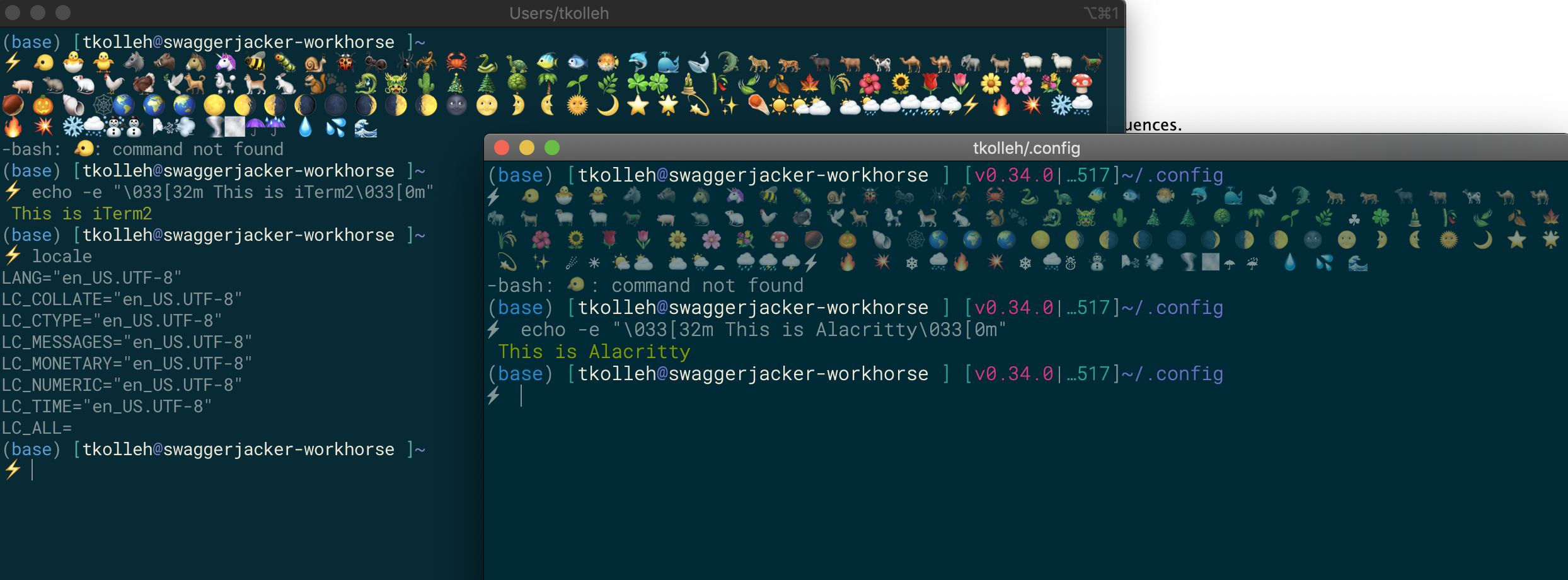
Hello - Any ideas on how to get this ⚡️ emoji to display properly?
I am seeing inconsistent support for emojis on MacOS (Mojave). The thunderbolt emoji (⚡️) is not shown in detail in Alacritty (version 0.3.3). All emojis have a haze to them as compared with iTem and as mentioned in @ngocphamm comment.
Emojis copied from: https://eosrei.github.io/emojione-color-font/full-demo.html
 tkolleh
on 27 Aug 2019
tkolleh
on 27 Aug 2019
@tkolleh That looks like some other font might provide this emoji before your actual emoji font. You could try to change the default font and check if that fixes it.
chrisduerr
on 27 Aug 2019
@chrisduerr Thank you. That looks to be the challenge. Now to figure out how to use the font and display the emoji. Similiar behavior is demonstrated in markdown by escaping the emoji.
local LINEINDICATOR="⚡️"
local LINEINDICATOR="⚡️"
tkolleh
on 3 Sep 2019
somehow it doesn't work, my :rocket: is still in the same colorless shape :sob:
did i miss anything? any extra setups to make this work?
alacritty 0.4.1-dev (36185c4)
zachliu
on 10 Dec 2019
You should properly configure your font fallback and use emojis compatible with freetype (e.g. Noto Color Emoji).
 kchibisov
on 10 Dec 2019
kchibisov
on 10 Dec 2019
You should properly configure your font fallback and use emojis compatible with freetype (e.g. Noto Color Emoji).
How do we do that? 😇
Edit: alacritty.yml > font > normal > family, but which to choose on Linux? (default monospace)
dvergeylen
on 10 Dec 2019
https://github.com/eosrei/twemoji-color-font/blob/master/linux/fontconfig/56-twemoji-color.conf Try this as a pattern, but use Noto Color Emoji instead of twitter ones. Put it in .config/fontconfig/fonts.conf idk. Use this thing to debug 🤔
kchibisov
on 10 Dec 2019
Also see my comment here: https://github.com/jwilm/alacritty/pull/3011#issuecomment-563475481
 cole-h
on 10 Dec 2019
cole-h
on 10 Dec 2019
@cole-h I've used your code but have been unable to get color emojis to show up normally.
 lovesegfault
on 11 Dec 2019
lovesegfault
on 11 Dec 2019
@lovesegfault Do you have Noto Color Emoji installed? If so, what does fc-match 'Noto Color Emoji' print?
If you're trying an emoji font other than Noto Color, you'll probably have to replace the name at every occurrence inside that XML-structure conf file.
EDIT: Rather than continuing this conversation here, where we ping 23 participants on every post, feel free to connect with me on IRC (same username) or email (on my profile) and I'll do my best to help with what meager knowledge I have.
cole-h
on 12 Dec 2019
For reference:
❯ fc-match 'Noto Color Emoji'
NotoColorEmoji.ttf: "Noto Color Emoji" "Regular"
will ping you on IRC.
lovesegfault
on 12 Dec 2019
I have to chime in and report that I have the same issue than @lovesegfault and @zachliu no matter which of the suggested fallback configurations I use :-/
 wimstefan
on 12 Dec 2019
wimstefan
on 12 Dec 2019
This is probably more related to #1560 than colored emojis. Obviously if the first matching emoji font is not colored, you won't get colored emojis. This specifically fixes the problem where no emojis are rendered at all, because the colored emoji is picked but can't be rendered.
For people running into fontconfig fallback issues, it would be extremely helpful if they could provide feedback if the PR https://github.com/jwilm/alacritty/pull/2935 helps with this.
Of course the best we can do is what other applications are able to do too wrt fontconfig fallback. So if this doesn't work in any terminal emulator, you'll likely have to fix your fontconfig.
chrisduerr
on 12 Dec 2019
I can confirm that most emojis are displayed with #2935. Some of the basic face emojis are not colored (maybe they are included in my font). I'm using Iosevka Nerd Font on Arch.
On v0.4.0 it doesn't display any emojis. Also xterm doesn't display most emojis but Terminator works fine. I think my fontconfig is correct. Can't be sure though. I followed https://github.com/jwilm/alacritty/pull/3011#issuecomment-563475481
 Lythenas
on 12 Dec 2019
Lythenas
on 12 Dec 2019
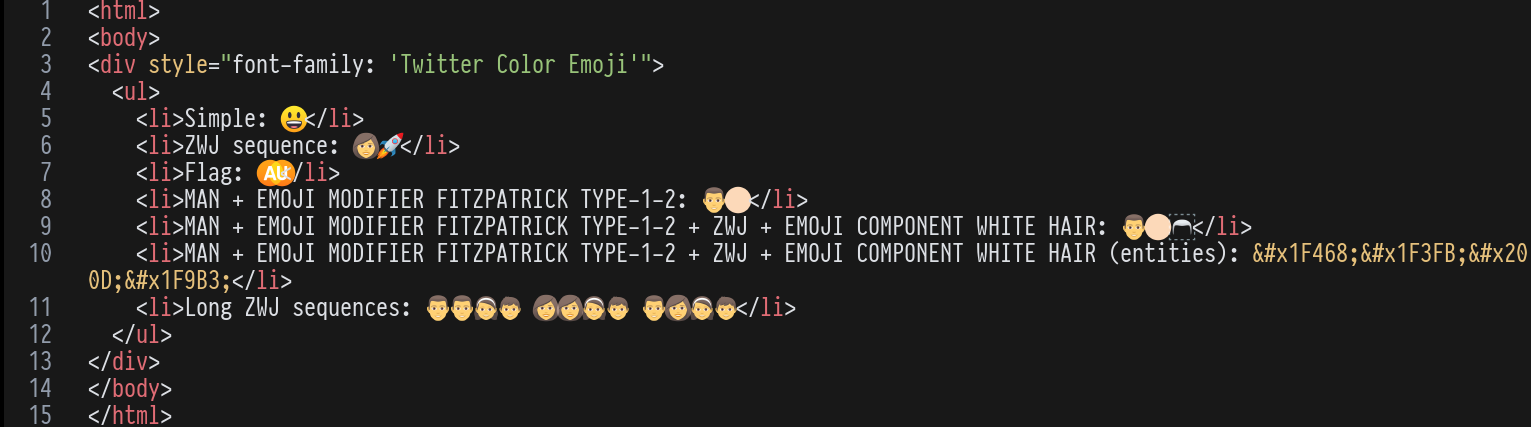
Yep I can confirm it works too. I'm using the ttf-joypixels package on Arch Linux. Note that you have to symlink the config after installation to configure fontconfig to use it (sudo ln -sf /etc/fonts/conf.avail/75-joypixels.conf /etc/fonts/conf.d/75-joypixels.conf).
Also it only seems to support single emoji, not emoji ZWJ sequences.
 wezm
on 12 Dec 2019
wezm
on 12 Dec 2019
Also it only seems to support single emoji, not emoji ZWJ sequences.
That is correct and there's no intention to support that at the moment.
chrisduerr
on 13 Dec 2019
Just adding in this still is not working with all the above fixes. Not sure if this was closed because it was fixed or not.
 Findarato
on 16 Dec 2019
Findarato
on 16 Dec 2019
Just adding in this still is not working with all the above fixes. Not sure if this was closed because it was fixed or not.
It was closed because it was implemented as you can see in the reason of close on a github. However you need an emoji font that freetype can understand.
To make things clear.
We're not gating emojis like most apps do. So if you see them monochrome some fonts could come before, etc. The better handling of fallback will be added with #957 and I also has some notes laying around about fontconfig and how its fallback can behave in a weird way, so there's a change that we land something before rfc being implemented.
One more reason of monochrome emojis is a font that freetype couldn't understand, like Twitter Color Emoji with SVG in Open Type.
kchibisov
on 16 Dec 2019
It was closed because it was implemented as you can see in the reason of close on a github. However you need an emoji font that freetype can understand.
I am running from the master branch with NotoColorEmoji and still not working. I see the PR #3163 mentions fallback configuration but the example configuration in the repo does not show how and every attempt to try different syntaxes fails. If it is indeed fixed, how then is this configured, all other applications work fine for me.
 abelsromero
on 8 Apr 2020
abelsromero
on 8 Apr 2020
It was closed because it was implemented as you can see in the reason of close on a github. However you need an emoji font that freetype can understand.
I am running from the master branch with NotoColorEmoji and still not working. I see the PR #3163 mentions fallback configuration but the example configuration in the repo does not show how and every attempt to try different syntaxes fails. If it is indeed fixed, how then is this configured, all other applications work fine for me.
I've got same here : https://github.com/alacritty/alacritty/issues/3294
time to time, i try a git pull here and hope ^^
I've tried anything, but i havent found a workaround :(
i'm back to gnome-terminal since
 jeremie-H
on 27 Apr 2020
jeremie-H
on 27 Apr 2020
Hello,
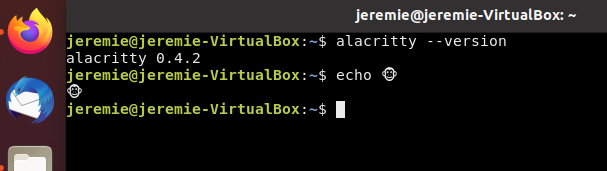
I think we should reopen this issue, i've tried an easy step to reproduce this still complex emoji issue. It doesn't display colored emoji :
_easy step to reproduce_
- download ubuntu 20.04 iso
- install fresh ubuntu 20.04, default desktop (in virtual box if you prefer)
- no specific configuration, no fonts to install, neither any others applications to install, nothing else
- follow install instructions :
sudo add-apt-repository ppa:mmstick76/alacritty
sudo apt install alacritty
- copy/paste in alacritty the following command :
echo 🐵
Result

It doesnt work :-(
jeremie-H
on 27 Apr 2020
Post me the output of fc-match -s YOUR_FONT_IN_ALACRITTY from alacritty v0.4.2, if the version isn't v0.4.2 (you can check that by alacritty --version)? If it's not v0.4.2, make sure to use v0.4.2.
kchibisov
on 27 Apr 2020
ok, you're right, it's the default install 0.4.1 in repository up to date ...
i can try with a fresh v0.5 if you want ?
but i need to install rustup, cargo and so on ... i just want to show that existing issue is still alive in a fresh install
jeremie-H
on 27 Apr 2020
and i havent specify ANY YOUR_FONT_IN_ALACRITTY.
All is by default install
jeremie-H
on 27 Apr 2020
then query by fc-match -s monospace.
kchibisov
on 27 Apr 2020
v0.4.2 is fine, v0.5.0 isn't released yet, and is a dev version.
kchibisov
on 27 Apr 2020
0.4.2 isnt fine more than 0.4.1
jeremie-H
on 27 Apr 2020
steps are easy to reproduce, all configuration is default, a virtualbox with fresh ubuntu 20.04 install
jeremie-H
on 27 Apr 2020
As I said, post the output of fc-match -s monospace.
kchibisov
on 27 Apr 2020
As I said ... you've got an easy steps to reproduce. It couldn't be simpler, It doesn't work out of the box on a fresh install.
it should be sufficient to reopen this issue.
jeremie-H
on 27 Apr 2020
if it could make you happy, here your output of fc-match -s monospace
DejaVuSansMono.ttf: "DejaVu Sans Mono" "Book"
DejaVuSansMono-Bold.ttf: "DejaVu Sans Mono" "Bold"
NimbusMonoPS-Regular.otf: "Nimbus Mono PS" "Regular"
TlwgTypo.ttf: "Tlwg Typo" "Regular"
TlwgTypo-Bold.ttf: "Tlwg Typo" "Bold"
NotoSansCJK-Regular.ttc: "Noto Sans Mono CJK JP" "Regular"
KhmerOSsys.ttf: "Khmer OS System" "Regular"
mitra.ttf: "Mitra Mono" "Regular"
Lohit-Bengali.ttf: "Lohit Bengali" "Regular"
Lohit-Gujarati.ttf: "Lohit Gujarati" "Regular"
Lohit-Tamil.ttf: "Lohit Tamil" "Regular"
Meera-Regular.ttf: "Meera" "Regular"
Lohit-Kannada.ttf: "Lohit Kannada" "Regular"
Lohit-Telugu.ttf: "Lohit Telugu" "Regular"
lklug.ttf: "LKLUG" "Regular"
FreeMono.ttf: "FreeMono" "Regular"
FreeSans.ttf: "FreeSans" "Regular"
FreeSerif.ttf: "FreeSerif" "Regular"
opens___.ttf: "OpenSymbol" "Regular"
Norasi.ttf: "Norasi" "Regular"
Rachana-Regular.ttf: "Rachana" "Regular"
KacstOne.ttf: "KacstOne" "Regular"
Laksaman.ttf: "Laksaman" "Regular"
Purisa.ttf: "Purisa" "Regular"
Padauk-Regular.ttf: "Padauk" "Regular"
Sawasdee.ttf: "Sawasdee" "Regular"
Lohit-Devanagari.ttf: "Lohit Devanagari" "Regular"
DejaVuSans.ttf: "DejaVu Sans" "Book"
DejaVuSerif.ttf: "DejaVu Serif" "Book"
LiberationMono-Regular.ttf: "Liberation Mono" "Regular"
AbyssinicaSIL-Regular.ttf: "Abyssinica SIL" "Regular"
D050000L.otf: "D050000L" "Regular"
TibetanMachineUni.ttf: "Tibetan Machine Uni" "Regular"
Manjari-Regular.otf: "Manjari" "Regular"
Pothana2000.ttf: "Pothana2000" "Regular"
chandas1-2.ttf: "Chandas" "Regular"
Pagul.ttf: "Pagul" "猀 愀瀀瀀氀"
mry_KacstQurn.ttf: "mry_KacstQurn" "Regular"
Rasa-Regular.ttf: "Rasa" "Regular"
Waree.ttf: "Waree" "Regular"
Phetsarath_OT.ttf: "Phetsarath OT" "Phetsarath OT"
DroidSansFallbackFull.ttf: "Droid Sans Fallback" "Regular"
Ubuntu-C.ttf: "Ubuntu Condensed" "Regular"
Ubuntu-R.ttf: "Ubuntu" "Regular"
StandardSymbolsPS.t1: "Standard Symbols PS" "Regular"
Samyak-Devanagari.ttf: "Samyak Devanagari" "Regular"
Samyak-Gujarati.ttf: "Samyak Gujarati" "Regular"
padmaa.ttf: "padmaa" "Normal"
Rekha.ttf: "Rekha" "Medium"
utkal.ttf: "ori1Uni" "Medium"
padmaa-Bold.1.1.ttf: "padmaa-Bold.1.1" "Bold.1.1"
LiberationSerif-Italic.ttf: "Liberation Serif" "Italic"
NotoColorEmoji.ttf: "Noto Color Emoji" "Regular"
Yeah, as it was expected, your NotoColorEmoji font is the last one, so I guess you're getting this monochrome emoji from some other of these bazillion fonts you have. The only solution is to define your own fontconfig rules. On a lot of systems they ship rules, some folks define their own fontconfig rules, some apps hard code emoji fonts.
You'll need similar rules from https://github.com/eosrei/twemoji-color-font/blob/master/linux/fontconfig/56-twemoji-color.conf , but for Noto Color Emoji and your font. Then you should place them in ~/.config/fontconfig/fonts.conf or add them globaly to the system fonts config.
This issue is purely about rendering colored emoji glyphs if you fallback to a colored emoji font during fallback, which is why it was closed, since we can render them now. If you end up falling back to a monochrome emoji font.
And this is also example on how to configure them https://github.com/alacritty/alacritty/issues/153#issuecomment-565224608 and you can see them being rendered.
So please, don't ping this issue if your system provides not desired font configuration by default or don't ship required fontconfig rules.
As I said ... you've got an easy steps to reproduce. It couldn't be simpler, It doesn't work out of the box on a fresh install.
it should be sufficient to reopen this issue.
I don't have time to setup vm with ubuntu to prove again, that you should define fontconfig rules. There're a lot of references on how to that and is quite a common problem.
kchibisov
on 27 Apr 2020
Thanks to the points rised by @kchibisov I could delve deeper and fix it with this instructions https://forum.manjaro.org/t/tutorial-how-to-enable-system-wide-color-emoji-support/35188. For whoever needs it, check the comment below and not the main post for a user only configuration.
abelsromero
on 27 Apr 2020
For Debian / Ubuntu users, paste this in ~/.config/fontconfig/fonts.conf:
<?xml version="1.0"?>
<!DOCTYPE fontconfig SYSTEM "fonts.dtd">
<fontconfig>
<alias>
<family>monospace</family>
<prefer>
<family>DejaVu Sans Mono</family>
<family>Noto Color Emoji</family>
<family>Noto Emoji</family>
</prefer>
</alias>
</fontconfig>
This will render MOST of the emojis in color.
Before:
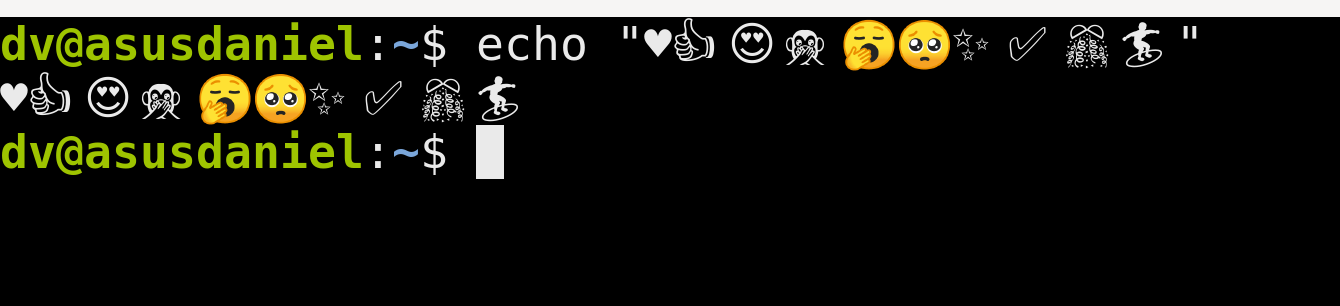
After:

Testing line: echo "♥👍😍🙊🥱🥺✨✅🎊🏄"
Edit: You can of course use Noto Mono instead of DejaVu Sans Mono as proposed by abelsromero's link, but this renders differently than the latter (default Debian/Ubuntu terminal's font?):

dvergeylen
on 28 Apr 2020
I tried this from the help of someone in the #alacritty irc channel today but couldn't get it working sadly. after setting this up and running fc-cache -vf and closing an alacritty window and opening it up again i still get black and white emojis
<?xml version="1.0"?>
<!DOCTYPE fontconfig SYSTEM "fonts.dtd">
<fontconfig>
<alias>
<family>monospace</family>
<prefer>
<family>Ubuntu Mono derivative Powerline</family>
<family>Noto Color Emoji</family>
<family>Noto Emoji</family>
</prefer>
</alias>
</fontconfig>
 arooni
on 29 Apr 2020
arooni
on 29 Apr 2020
@arooni that worked for me. Obvious suggestions but...
- Make sure Noto Color Emoji is installed correctly.

- Ensure your rule is under
$HOME/.config/fontconfigand is calledfonts.conf.
Side note, in some cases you will still see text signs, not all symbols are covered by Noto Color
 abelsalgadoromeroWD
on 29 Apr 2020
abelsalgadoromeroWD
on 29 Apr 2020
I managed to set this up after some minor struggles. The following should hopefully help others to get everything setup properly:
- Start with installing Noto Color Emoji. On Arch:
% yay -S noto-fonts-emoji
- Force a font rescan with:
% fc-cache --really-force
- Ensure that the font is available by running:
% fc-list | grep -i "emoji"
/usr/share/fonts/noto/NotoColorEmoji.ttf: Noto Color Emoji:style=Regular
- Edit the user
fonts.confinclude our emoji font above:
% $EDITOR $XDG_CONFIG_HOME/fontconfig/fonts.conf
- Either add or edit your
monospacefamily entry, for example:
<?xml version="1.0"?>
<!DOCTYPE fontconfig SYSTEM "fonts.dtd">
<fontconfig>
  <alias>
    <family>monospace</family>
    <prefer>
      <family>Cousine</family> <!-- Your preferred monospace font -->
      <family>Noto Color Emoji</family> <!-- Your preferred emoji font -->
     </prefer>
  </alias>
</fontconfig>
- Force rescan again if you made any changes.
% fc-cache --really-force
- Ensure that you have set
monospaceas your font inalacritty.yml:
% cat $XDG_CONFIG_HOME/alacritty/alacritty.yml                   ~
...
font:
  normal:
    family: monospace
    style: Regular
  bold:
    family: monospace
    style: Bold
  italic:
    family: monospace
    style: Italic
  size: 18
  offset:
    x: 0
    y: 0
  glyph_offset:
    x: 0
    y: 0
...
- Open a new
alacrittyterminal. - Test your success with
echo "♥👍😍🙊🥱🥺✨✅🎊🏄".
Note: You can create any family alias you want in your font.conf. Instead of using monospace you could create a family called foobar. For example:
<?xml version="1.0"?>
<!DOCTYPE fontconfig SYSTEM "fonts.dtd">
<fontconfig>
  <alias>
    <family>foobar</family>
    <prefer>
      <family>Cousine</family> <!-- Your preferred monospace font -->
      <family>Noto Color Emoji</family> <!-- Your preferred emoji font -->
     </prefer>
  </alias>
</fontconfig>
 sQVe
on 19 May 2020
sQVe
on 19 May 2020
i'm on linux mint 19.3 and using alacritty 0.5.0-dev (e009869). this is my zsh (v5.7.1) and bash (v4.4.20):
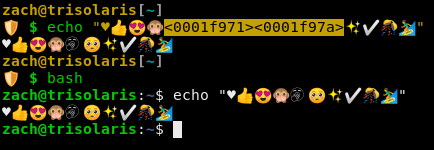
don't know why it looks different with yours @dvergeylen ¯\_(ツ)_/¯
this is on my chrome

this is my .config/fontconfig/font.conf
<?xml version="1.0" encoding="UTF-8"?>
<!DOCTYPE fontconfig SYSTEM "fonts.dtd">
<fontconfig>

    <!-- Add generic family. -->
    <match target="pattern">
        <test qual="any" name="family"><string>emoji</string></test>
        <edit name="family" mode="assign" binding="same"><string>Noto Color Emoji</string></edit>
    </match>

    <!-- This adds Noto Color Emoji as a final fallback font for the default font families. -->
    <match target="pattern">
        <test name="family"><string>sans</string></test>
        <edit name="family" mode="append"><string>Noto Color Emoji</string></edit>
    </match>

    <match target="pattern">
        <test name="family"><string>serif</string></test>
        <edit name="family" mode="append"><string>Noto Color Emoji</string></edit>
    </match>

    <match target="pattern">
        <test name="family"><string>sans-serif</string></test>
        <edit name="family" mode="append"><string>Noto Color Emoji</string></edit>
    </match>

    <match target="pattern">
        <test name="family"><string>monospace</string></test>
        <edit name="family" mode="append"><string>Noto Color Emoji</string></edit>
    </match>

    <!-- Block Symbola from the list of fallback fonts. -->
    <selectfont>
        <rejectfont>
            <pattern>
                <patelt name="family">
                    <string>Symbola</string>
                </patelt>
            </pattern>
        </rejectfont>
    </selectfont>

</fontconfig>
this is my ~/.font/
.
├── AppleColorEmoji.ttf
├── Cousine
│   ├── Cousine Bold Italic Nerd Font Complete Mono.ttf
│   ├── Cousine Bold Italic Nerd Font Complete Mono Windows Compatible.ttf
│   ├── Cousine Bold Italic Nerd Font Complete.ttf
│   ├── Cousine Bold Italic Nerd Font Complete Windows Compatible.ttf
│   ├── Cousine Bold Nerd Font Complete Mono.ttf
│   ├── Cousine Bold Nerd Font Complete Mono Windows Compatible.ttf
│   ├── Cousine Bold Nerd Font Complete.ttf
│   ├── Cousine Bold Nerd Font Complete Windows Compatible.ttf
│   ├── Cousine Italic Nerd Font Complete Mono.ttf
│   ├── Cousine Italic Nerd Font Complete Mono Windows Compatible.ttf
│   ├── Cousine Italic Nerd Font Complete.ttf
│   ├── Cousine Italic Nerd Font Complete Windows Compatible.ttf
│   ├── Cousine Regular Nerd Font Complete Mono.ttf
│   ├── Cousine Regular Nerd Font Complete Mono Windows Compatible.ttf
│   ├── Cousine Regular Nerd Font Complete.ttf
│   └── Cousine Regular Nerd Font Complete Windows Compatible.ttf
├── NotoColorEmoji.ttf
├── NotoEmoji-Regular.ttf
└── TwitterColorEmoji-SVGinOT.ttf
Related issues
 net
·
112Comments
net
·
112Comments
 spamwax
·
50Comments
spamwax
·
50Comments
 i336
·
99Comments
jwilm
·
105Comments
i336
·
99Comments
jwilm
·
105Comments
 theduke
·
69Comments
theduke
·
69Comments
Most helpful comment
I managed to set this up after some minor struggles. The following should hopefully help others to get everything setup properly:
fonts.confinclude our emoji font above:monospacefamily entry, for example:monospaceas your font inalacritty.yml:alacrittyterminal.echo "♥👍😍🙊🥱🥺✨✅🎊🏄".Note: You can create any family alias you want in your
font.conf. Instead of usingmonospaceyou could create a family calledfoobar. For example: