Support Windows via the Linux subsystem
 jwilm
jwilm
All 105 comments
When you say "via WSL", do you mean the end user would install alacritty inside of Ubuntu and use it from there?
 berwyn
on 5 Jan 2017
berwyn
on 5 Jan 2017
I want it for cmd.exe and powershell too please not just linux subsystem
 ehartford
on 6 Jan 2017
ehartford
on 6 Jan 2017
I'd think it'd be like ConEmu right and be able to run any shell you want (cygwin, mingw, cmd.exe, powershell, wsl)
ehartford
on 6 Jan 2017
Getting graphics rendering out of the WSL would be pretty tricky. Microsoft will not support anything X11 based, you need to run an X11 server and forward out of WSL.
 voltagex
on 7 Jan 2017
voltagex
on 7 Jan 2017
At the moment building on Windows bails out at servo-fontconfig-sys - should I open an issue for this?
voltagex
on 7 Jan 2017
@voltagex I opened #177 about building on Windows
 martinlindhe
on 7 Jan 2017
martinlindhe
on 7 Jan 2017
I managed to build this on WSL (Ubuntu 16.04.1 LTS), fully updated (sudo apt-get update && sudo apt-get upgrade) yesterday evening.
I'm on Insider Slow Ring (build rs_prerelease 14986).
But as unsurprisingly it bails on exec:
alacritty$ ./target/release/alacritty
Alacritty encountered an unrecoverable error:

        Error creating glutin::Window; No backend is available
This is mostly (as stated below) connected to WSL not exposing any GPU support (Microsoft/BashOnWindows#829), which in the end leads to the inability to support modern Linux graphics subsystem architectures (like Wayland or Mir, see Microsoft/BashOnWindows#938).
 flaki
on 8 Jan 2017
flaki
on 8 Jan 2017
Well yeah, it'd be better to target native Windows if at all possible
On 8 January 2017 at 21:18, István Szmozsánszky notifications@github.com
wrote:
I managed to build this on WSL/bash, but as expected it bails on exec:
alacritty$ ./target/release/alacritty
Alacritty encountered an unrecoverable error:Error creating glutin::Window; No backend is availableThis is mostly (as stated below) connected to WSL not exposing any GPU
support (Microsoft/BashOnWindows#829
https://github.com/Microsoft/BashOnWindows/issues/829), which in the
end leads to the inability to support modern Linux graphics subsystem
architectures (like Wayland or Mir, see Microsoft/BashOnWindows#938
https://github.com/Microsoft/BashOnWindows/issues/938).—
You are receiving this because you were mentioned.
Reply to this email directly, view it on GitHub
https://github.com/jwilm/alacritty/issues/28#issuecomment-271142121, or mute
the thread
https://github.com/notifications/unsubscribe-auth/AAJvTw8uq0fLEcpyGZ9RFyrrXSDPOXtFks5rQLgMgaJpZM4LP0lZ
.
voltagex
on 8 Jan 2017
Relevant resources on Windows font rendering in Rust:
https://github.com/servo/servo/pull/14153
https://github.com/vvuk/dwrote-rs
 rigtorp
on 8 Jan 2017
rigtorp
on 8 Jan 2017
The easiest solution I see is Alacritty built as a Windows-native application and using wslbridge for WSL support, allowing for any of WSL, Cygwin, PowerShell, or plain ol' cmd.exe in Alacritty.
 Celti
on 14 Jan 2017
Celti
on 14 Jan 2017
Hey guys. I'm attempting to implement a working windows build in my spare time. I'm a Rust n00b, so excuse the roughness...
https://github.com/rayman22201/alacritty/commit/dab775a9feddffcf61cb817f5a0bd72643826d73
Using the links @rigtorp posted, and a bit of digging, I _think_ that I have font rendering working for windows. (A very rough pass of something that I think might work if I'm lucky... The module compiles at least)
But I have other problems that prevent me from testing it:
You seem to be pegged to a particular commit of @jwilm's fork of Glutin. This fork does not compile on windows. the Glutin Windows implementation does not implement the clear_current function of the glContext trait. (A function that doesn't even exist in later commits, btw)
Why are you pegged to an old commit of your Glutin fork @jwilm ?
Bumping up to the latest commit of the Glutin fork successfully compiles on windows, but then the config.rs goes looking for a glutin::{mods, Mods} and fails to find them.
It looks like the Glutin event system has totally changed in later commits.
Any thoughts on getting Glutin to work on the windows build?
Is the correct action to implement clear_window for this pegged commit?
Or is the correct action to bump up to the latest Glutin and fix the issues with the event handling?
There is also a whole bunch of unix specific stuff that the code goes looking for, which obviously fail to compile, but that seems more straightforward to fix, or at least I consider that to be a battle for another day lol.
Here is a Gist with the Rust Compiler Outputs for reference:
(Shows the output for both the old and the new revisions of Glutin)
https://gist.github.com/rayman22201/6672e595277c8077472d2ac66a065099
 rayman22201
on 18 Jan 2017
rayman22201
on 18 Jan 2017
If you check the branch some changes have been added in his fork.
Modifier keys have been added to key events and some function added to the graphics part such as clear_current which clears the current context.
Implementing clear_current isn't hard but i got stuck getting the modifier keys on Windows
You can just put None for now but modifiers won't work
Wish I hadn't rage deleted my commits now :(
 dten
on 18 Jan 2017
dten
on 18 Jan 2017
@rayman22201 @dten I'm working on upstreaming the necessary changes to glutin/winit: https://github.com/tomaka/winit/pull/112. Unfortunately upstream seems hesitant making these changes.
rigtorp
on 18 Jan 2017
This should definitely not be solved via the Linux Subsystem.
- As pointed out earlier in the thread, WSL has no graphics backend
- WSL terminals cannot interact with the Windows host, so you cannot launch Windows programs from it. You are basically locked out of your normal workflow. For example, you cannot launch any Windows-based text editor from a WSL terminal.
 0rvar
on 15 Feb 2017
0rvar
on 15 Feb 2017
(I think the second point is no longer strictly true, as of a recent Insiders build which can launch PE Exes from WSL, but I couldn't agree with the sentiment of the @awestroke more strongly. The first point alone should put the Native vs WSL question to rest.)
 colemickens
on 15 Feb 2017
colemickens
on 15 Feb 2017
You can definitely get graphics working in WSL (via a custom X Server), but that's not the point. You'd need a terminal in the first place to be able to launch any WSL app. A native Windows binary is the way to go here.
 pierrebeaucamp
on 15 Feb 2017
pierrebeaucamp
on 15 Feb 2017
https://github.com/tomaka/winit/pull/112 is merged!
 slumos
on 7 Mar 2017
slumos
on 7 Mar 2017
Any movement on this? I'd love to try Alacritty on Windows.
 samnardoni
on 7 May 2017
samnardoni
on 7 May 2017
I'm also having a go at getting things working under Windows. Also a rust noob. Have a look here to see how far I've gotten. https://github.com/dparnell/alacritty/tree/windows-patches
I've taken the work done by @rayman22201 as my starting point. It still doesn't quite compile, but I think it is getting close.
 dparnell
on 17 Jul 2017
dparnell
on 17 Jul 2017
@dparnell Glad you are having a go. As is so common these days, I got sidetracked with other projects and never found the time to get back to this one. 👍
rayman22201
on 27 Jul 2017
@rayman22201 I know what that's like! I've got so many little side projects going on at the moment. I really want a fast terminal for Windows. I'm running iTerm2 on my Macs and something like that on WIndows would make working there a lot less painful.
dparnell
on 27 Jul 2017
How is this going? I just took some time to try and get winpty working in rust. Have made some progress (nothing outward facing yet). Might be something worth looking into so we don't have to reinvent the wheel? Would require distributing the winpty binaries with the windows builds, a bunch of other terminal emulators do it including VS Code and hyper, so it might be viable. Any thoughts?
 Kethku
on 1 Aug 2017
Kethku
on 1 Aug 2017
@Kethku I've not had much time to play with the code lately.
dparnell
on 1 Aug 2017
It might be useful to look at winpty for the ability to support all the possible shell backends (cmd, powershell, WSL). It's what the VSCode guys use to interface their integrated terminal frontend with the actual shells. (Technically they use nodepty, which wraps winpty on windows).
Edit: I guess I should more thoroughly read comments before I offer suggestions.
 ZoeyR
on 15 Aug 2017
ZoeyR
on 15 Aug 2017
Is there an echo in here?
Kethku
on 15 Aug 2017
@dgriffen I did a little work trying to interact with winpty through ffi, but I'm super new to rust. Would you be interested in collaborating on this with me?
Kethku
on 15 Aug 2017
This should be natively supported, not via WSL.
 binary132
on 14 Oct 2017
binary132
on 14 Oct 2017
@binary132 I meant winpty. Dont know why I typed wsl
Kethku
on 16 Oct 2017
I'm in the progress of porting it at the moment.
I'm currently adding rusttype for font rendering and rust-font-loader for fetching fonts.
I'm in an awkward position because rusttype does a lot more than FreeType does, such as providing a gpu-based cache, and working it into the existing renderer is going to be a decent amount of work.
My plan is to move GlyphCache into an interface and provide a wrapper around rusttype's gpu_cache.
I'm not planning on supporting other features rusttype provides like special character pair kerning from the start.
 zacps
on 5 Nov 2017
zacps
on 5 Nov 2017
Update: I managed to get around having to modify the renderer (yet) and I'm on to replacing the various libc calls with windows equivalents.
Is there any preference on where config files should be stored?
The styles I currently have on my computer are:
C:\Users\$USERNAME\.alacritty\alacritty.yml
C:\Users\$USERNAME\.config\alacritty\alacritty.yml
C:\Users\$USERNAME\alacritty.yml
@jwilm Regarding clipboard management there are three main options:
- Replace copypasta with rust-clipboard (Loose selection capability)
- Add rust-clipboard into copypasta (Probably the best)
- Add rust-clipboard support into
input.rs
Views?
zacps
on 5 Nov 2017
C:\Users\$USERNAME\AppData\Roaming\alacritty\alacritty.yml is the way to go, I would think.
 j-selby
on 5 Nov 2017
j-selby
on 5 Nov 2017
Also known as %APPDATA%\alacritty\alacritty.yml
Please do use the right env variable :D
dten
on 5 Nov 2017
I've finished clipboard support and I'm now working on the pty code.
It looks like the easiest way is going to be to use winpty which provides a layer that translates unix-style pty commands into WINAPI commands.
Does anyone here have experience linking c++ code into rust? I've got the dll but I'm not sure where to go from here.
zacps
on 6 Nov 2017
Just FYI winpty has an annoying bug where Ctrl-C doesn't work at all. There's a workaround for GUI programs on Win8+, but I'm waiting to see if MS's OpenSSH team can solve that issue before I think about forking winpty.
As far as linking goes - are you using winpty.dll? If so, you don't have to link anything - just use LoadLibrary/GetProcAddress. If you're trying to link statically, you probably need to build winpty with the same toolchain you use for Rust's linker, and make sure it includes the C++ rtlib. I think most people load winpty dynamically though. I guess you could try using an import library - I've never tried that with Rust, but I think you'd just need to declare everything as function pointers called __imp_<exported name> and pass the import lib to the linker.
 parkovski
on 16 Nov 2017
parkovski
on 16 Nov 2017
@zacps I made some partial progress toward interacting with winpty from rust a while back. I've pushed what I got to https://github.com/Kethku/RustConsoleEmulator. I may do some looking at it further later tonight if I get around to it. Maybe this will help?
I basically just built some simple bindings for the winpty dll and stopped there.
Kethku
on 16 Nov 2017
@parkovski I feel like the VT220 terminal mode line in https://github.com/PowerShell/Win32-OpenSSH/wiki/Project-Scope means that the MS team probably wont be super helpful. Maybe I'm misunderstanding? Would be awesome if MS could bring their console story into the present day... Writing console emulators on windows is unnecessarily hard.
Kethku
on 16 Nov 2017
I was referring to this - reliably triggering a Ctrl-C event in another process on Windows seems to be somewhere between impossible and "probably need to hook a bunch of APIs", but I'm waiting to see what MS themselves do. I've tried everything I could think of, and I've disassembled cmd and conhost, and yet somehow they always know it's a fake event and ignore it.
VT emulation is actually something I've been working on for PSReadLine, but that will only work on Windows 10, and possibly only PowerShell 6. But once that's complete, supporting that would be really easy - just pipe the input and output to and from PowerShell, no Windows APIs or winpty necessary.
parkovski
on 16 Nov 2017
Thanks for the link @Kethku, I've already finished winpty bindings though. I'm currently planning on statically linking it.
winpty isn't ideal in a number of ways but it's by far the simplest to get some level of support working. After I've got an initial version merged I'm going to look at ConEmu's approach (Injecting a DLL into the process) which is partially explained here.
Also see this mintty issue for some more discussion of potential solutions.
zacps
on 16 Nov 2017
@parkovski Thats awesome. Mind sharing a link for what you have so far for that? Sounds really cool
Kethku
on 16 Nov 2017
@parkovski I'll try and simplify the PTY interface so that integrating additional methods will be relatively simple. I assume it'll provide two named, overlapped pipes?
zacps
on 16 Nov 2017
Would it be easier to gain windows support via a built in ssh client? Similar to https://chrome.google.com/webstore/detail/secure-shell/pnhechapfaindjhompbnflcldabbghjo?hl=en
Example use case / user story:
I don't want to work with windows subsystem because its slow, but i need an open source cross platform terminal emulator that isn't horrific.
If access to the windows subsystem is required you could ssh into the subsystem and work that way. Also this way it helps abstract away the complexity of handling the intricacies of windows. I mostly would like to be able to use the terminal emulator for remote hosts via ssh on windows.
I have been working this way for 3-4 years using chrome's secure shell to meet my requirements for an open source cross platform terminal emulator, but unfortunately I'm switching to Firefox and there are no alternatives. Also a terminal emulator within the browser isn't so secure.
Would this be out of the scope of the project? or would you consider this a separate issue / user story?
 ghost
on 25 Nov 2017
ghost
on 25 Nov 2017
@DebugXYZ Are you looking for an ssh server for Windows? Microsoft is porting OpenSSH here. If you're thinking of something like PuTTY, I don't think I'd consider that "supporting Windows" since you'd want a terminal emulator to run a shell on the host platform.
@Kethku The first half of it was recently merged. I'm hoping to have the rest of it done soon. Unfortunately it looks like that's not going to make into a PowerShell release for a while, so you'd have to upgrade PSReadLine yourself.
@zacps Yeah, that should work. Just make two anonymous pipes and start the shell process hidden with those pipes for its input and output handles. PowerShell and cmd can both handle this scenario right now, but the editing experience is not good. You'll have to install PowerShell 6 / PSReadLine 2 yourself for now to get a decent shell experience (once I finish my changes).
parkovski
on 25 Nov 2017
@parkovski What's the install process for PSReadLine? Could we inject/start it if we were told to run PowerShell without requiring a separate install?
zacps
on 25 Nov 2017
Hmm, possibly. Personally I just replace my copy with the new one. There's a PSModulePath env variable, but you'd have to be careful. PSReadLine 2 works fine on the new open source PowerShell, but if I point Windows PowerShell (PS5) to that folder, it spews a bunch of errors and can't resolve some DLL I think. It would at least take some experimenting.
parkovski
on 25 Nov 2017
So I've been using alacritty on Linux with tmux, and I'm thinking the biggest issue people have with the Windows console is the lack of tabs, which alacritty also doesn't have. But the stuff I've been doing with PSReadLine was with the intention to use tmux with PowerShell on Windows anyways, and recent insider builds are enabling WSL processes to outlive the console, which means tmux will work like it's supposed to.
Basically, I'm thinking the people this would appeal to most are the ones like me, who would want to use tmux on Windows. To make this work, what I think is needed is:
- Alacritty needs to build on Windows but can use anonymous pipes as the tty.
- A small linux program that intercepts signals and translates relevant ones by writing to stdout, because currently sending SIGINT to a Windows process started from WSL just gives you an unreachable zombie process that you have to kill by looking up the Windows pid.
- I need to finish redirected input for PSReadLine. PowerShell will work right now, but the editing experience is really bad. Cmd's editing experience is always bad and it's just as mediocre as it always has been with redirected input, so nothing needs to be done there.
Right now, your tmux session will be lost when the console ends, but after the next major Windows update or if you're running an insider build, this _should_ more or less work like a terminal is supposed to.
The console APIs don't _really_ support non-conhost terminals, which is why you have winpty and why ConEmu and others hook APIs, and they still give an inconsistent experience. Personally at this point I would just support shells that understand ANSI - MS has said that's the new console API, and even Win7 users can install the new PowerShell and use it this way.
I'll update this thread when I finish PSReadLine support.
parkovski
on 1 Dec 2017
I now have alacritty compiling!
There's still going to be a lot of work before the build works, and after that I'll have to go back and fix the code for other platforms that I've clobbered but a lot of progress has been made.
I'll update this comment with a link to the repo shortly, keep in mind that this is my first 'real work' in rust and there is a lot of ugly code especially in the event_loop/tty parts which I'll clean up once everything is working.
Edit: In progress at https://github.com/zacps/alacritty/tree/windows
zacps
on 2 Dec 2017
Hey that's great! One thing I'm anticipating - there's no terminfo on Windows. Vim handles this by having it hard-coded, and Ubuntu's tmux-256color seems to work best for me on the Windows console in Linux vim. Since I've been doing a lot of work with Windows' ANSI support, if you want, I wouldn't mind generating that piece and the default input mapping and making sure it's accurate.
parkovski
on 3 Dec 2017
I thought I'd update this thread just so people know I'm still working on it.
I'm currently blocked on gl-rs#443 which might not be a quick problem to solve.
zacps
on 2 Jan 2018
@parkovski Can you link to MS's comments on powershell ANSI support? I'm interested to learn more about how that will work
Kethku
on 3 Jan 2018
It turns out the issue was caused by alacritty calling window.get_proc_address BEFORE calling window.make_current.
On linux get_proc_address is just the same as loading any other function pointer, however on windows it often (All post 1.2(?) functions) requires an active GL context.
Switching the order of the calls fixed the problem.
zacps
on 5 Jan 2018
Nice. I haven’t worked on redirected input in a while. There’s an issue with cursor positioning when input comes from a WSL shell that I solved in C++ but am trying to avoid platform dependent code if I can.
@Kethku most of what’s supported is documented here. Some escapes aren’t listed (things like Ctrl+home) but they’re documented in PSReadLine - CharMap.cs. The Microsoft/WSL repo has a lot of discussion too.
It sounded like MS wants to provide some type of PTY API which is the only thing that will make all of this work seamlessly but it may be a while. I still miss tmux on Windows, hoping to get the WSL thing sorted out soon.
parkovski
on 6 Jan 2018
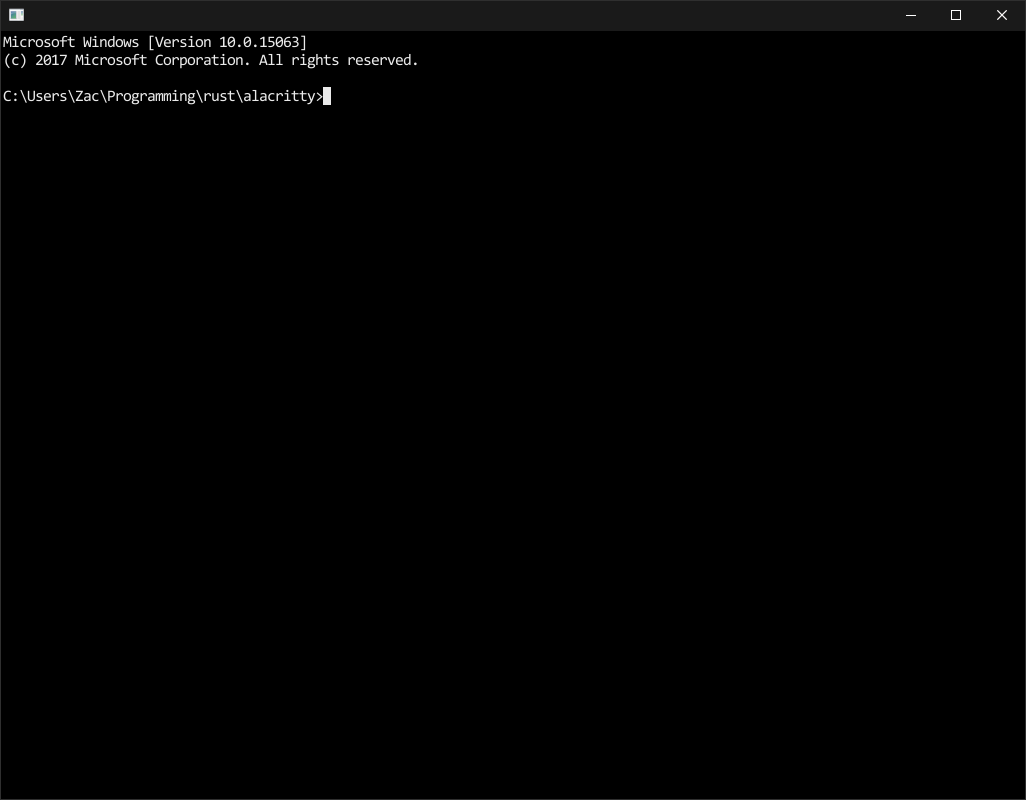
This looks suspiciously like alacritty running on windows...
Still more work to go but the end is definitely in sight :)
If anyone wants to help out with some small issues there are some things that I've skipped over in trying to get to a MVP. I'll post a list of them here shortly.
I also want to get someone to review my work on my rust winpty bindings once I push my last changes later today. I'd like to get the generated one's merged into the main winpty project and my safe ones on crates.io soon-ish.
Edit: There will also be a need for beta testers when I get it into a usable state.
zacps
on 28 Feb 2018
There's a list of small issues that someone could jump on under the help-wanted label.
zacps
on 28 Feb 2018
I am up for doing some beta testing when it is ready! :),
Also I might have a look into the issues but have very limited rust experience so don't know how much help I can be.
Thanks for all you work
 gavinhow
on 28 Feb 2018
gavinhow
on 28 Feb 2018
That looks really good! Is it supposed to be able to accept user input yet as when I run it I'm not able to do anything.
dparnell
on 28 Feb 2018
I am currently running in to build problems on winpty-sys v1.0.0
Compiling winpty-sys v1.0.0 (https://github.com/zacps/winpty?branch=rust#546cfcdc)
error: failed to run custom build command for winpty-sys v1.0.0 (https://github.com/zacps/winpty?branch=rust#546cfcdc)
process didn't exit successfully: E:\Development\alacritty\target\release\build\winpty-sys-98171d98a448a96d\build-script-build` (exit code: 101)
I installed Cygwin and the packages that were listed as necessary on the winpty GitHub.
Any help would be appreciated.
gavinhow
on 28 Feb 2018
@dparnell Not quite, I'll hopefully have that fixed today/tomorrow.
@gavinhow Cygwin isn't actually required as we're just using the dll (built statically) and winpty-agent.exe built with msbuild.
Could you find out where in the build.rs it's failing?
I have a suspicion I might have worked around the GenVersion file on my machine.
Did you install the dependencies for bindgen?
zacps
on 28 Feb 2018
@dparnell Input issue is now fixed.
I'm happy for people to come and do some testing now as basic functionality seems to work, maybe call this an alpha.
Edit: At the bare minimum bash (lsfw), powershell and cmd work with the first two also working with ctrl bindings. Copy-paste also works fine.
zacps
on 1 Mar 2018
@zacps Doesn't build for me too. Here is the full error. https://pastebin.com/1zSM6RJK
WinptyVersion.cc
src/shared/WinptyVersion.cc(31): fatal error C1083: Cannot open include file: 'GenVersion.h': No such file or directory
exit code: 2
Would be more than happy to try out the compiled binary if someone can share it or might be have it available in the release page of github.
 prabirshrestha
on 1 Mar 2018
prabirshrestha
on 1 Mar 2018
@prabirshrestha Should be fixed by e4bab56.
Releases are a good idea, I'd like to get appveyor building them from the start rather than manually building them though.
zacps
on 1 Mar 2018
@zacps Thanks for your help. I managed to get it to build. It was to do with the GenVersion.h file and was fixed with a Cargo Update.
Now however I am getting a different error when I try to run alactritty.exe.
```
Welcome to Alacritty.
Configuration loaded from C:\Users\gavin\alacritty.yml
device_pixel_ratio: 1
width: 1024, height: 768
thread 'main' panicked at 'gl function was not loaded', E:\Development\alacritty\target\release\build\alacritty-aabf91f3f7e36563\out/gl_bindings.rs:20617:13
stack backtrace:
0: std::panicking::default_hook::{{closure}}
at C:\projects\rust\src\libstd\panicking.rs:386
1: std::panicking::rust_panic_with_hook
at C:\projects\rust\src\libstd\panicking.rs:563
2: std::panicking::begin_panic
at C:\projects\rust\src\libstd\panicking.rs:538
3: alacritty::gl::missing_fn_panic
at .\build\alacritty-aabf91f3f7e36563\out\gl_bindings.rs:20617
4: alacritty::main
at E:\Development\alacritty\src\main.rs:45
5: std::rt::lang_start::{{closure}}<()>
at C:\projects\rust\src\libstd\rt.rs:74
6: main
7: __scrt_common_main_seh
at f:\dd\vctools\crt\vcstartup\src\startup\exe_common.inl:283
8: BaseThreadInitThunk
gavinhow
on 1 Mar 2018
@gavinhow Moved discussion to https://github.com/zacps/alacritty/issues/12.
zacps
on 1 Mar 2018
I'm having a little trouble getting the reworked tty interface working on linux. Currently it does not respond to input because the fd is never marked as readable for some reason.
I'd appreciate if anyone who has a little more experience with mio could give it a look on the windows-linux branch.
zacps
on 9 Mar 2018
Oh, appveyor is also building binaries (both debug and release).
Go to https://ci.appveyor.com/project/zacps/alacritty, click the job for your artitecture, go to artifacts, and download alacritty.exe AND winpty-agent.exe.
zacps
on 10 Mar 2018
Microsoft console team and open source terminal emulator developers are discussing about pty api for cmd here: https://github.com/Microsoft/console/issues/57 the people at this thread may be interested.
 joelhandwell
on 15 Mar 2018
joelhandwell
on 15 Mar 2018
Noob question but would directx or opengl fit into the build somewhere?
 CardSnap
on 13 Apr 2018
CardSnap
on 13 Apr 2018
Alacritty uses opengl for rendering, my build doesn't change that.
Switching to directx would be a lot of work for little gain.
On Sat, 14 Apr 2018, 5:35 AM CardSnap, notifications@github.com wrote:
Noob question but would directx or opengl fit into the build somewhere?
—
You are receiving this because you were mentioned.
Reply to this email directly, view it on GitHub
https://github.com/jwilm/alacritty/issues/28#issuecomment-381208032, or mute
the thread
https://github.com/notifications/unsubscribe-auth/AJX1cIDwDzBp9S7_e3Rfm8sSN9aKKHCXks5toOHjgaJpZM4LP0lZ
.
zacps
on 13 Apr 2018
Recently I tried Alacritty on Linux,its amazing. Any news regarding support on Windows? Would love this on Windows.
 gurpreetshanky
on 8 Jun 2018
gurpreetshanky
on 8 Jun 2018
See my comments above, I haven't tried approaching that issue since, mostly because I have no idea where to start. Windows builds work for the most part but it's quite far behind master now.
I'd still very much appreciate any help anyone is able to give to get it across the line.
zacps
on 8 Jun 2018
@zacps Thanks for the builds and yes it would be nice if someone active with Alacritty development would help you on that.
gurpreetshanky
on 8 Jun 2018
I've just spent a bit of time today getting the windows port up to date with master again.
You can see the results here: https://github.com/dparnell/alacritty/tree/windows-master-merge
dparnell
on 9 Jun 2018
A little bit more work is in this branch: https://github.com/dparnell/alacritty/tree/windows
I have verified that it builds and runs on both Windows and MacOS.
It works on my machine
dparnell
on 12 Jun 2018
@dparnell I can't get a build env. working on windows atm. - would you care to upload some binaries ? :)
 tzekid
on 12 Jun 2018
tzekid
on 12 Jun 2018
To get the build working you'll need to install Microsoft Visual Studio 2017. Make sure you install the command line tools. Once they are installed look for x64 Native Tools Command Prompt for VS 2017 in your Start menu to open a command prompt with the path all set up correctly. You will also need Rust installed and in your path. Then you should be able to run cargo build to get a nicely compiled EXE. Before it will run correctly you'll need to make sure to copy the winpty-agent.exe from assets\windows\x86_64 to target\debug and install the windows version of the config file into your home folder.
dparnell
on 13 Jun 2018
@dparnell Well I'm getting build error particular on glutin.
gurpreetshanky
on 13 Jun 2018
@gurpreetshanky which version of the Rust compiler are you using? I'm building it successfully here with rustc 1.26.2 (594fb253c 2018-06-01)
dparnell
on 13 Jun 2018
rustc 1.26.2
gurpreetshanky
on 13 Jun 2018
this is on the windows branch right?
dparnell
on 13 Jun 2018
I've put a preview build up here: https://github.com/dparnell/alacritty/releases/tag/preview-build
dparnell
on 14 Jun 2018
Yes it was on the windows.Thanks for the build.
gurpreetshanky
on 14 Jun 2018
Pull request is up https://github.com/jwilm/alacritty/pull/1374
zacps
on 14 Jun 2018
I've been assuming that this will work on a Windows system with only https://rustup.rs/ installed, is that correct?
(edit)
 nixpulvis
on 15 Jun 2018
nixpulvis
on 15 Jun 2018
You'll also need a C/C++ compiler of some sort. I 'm using Microsoft Visual Studio 2017 as described above
dparnell
on 15 Jun 2018
Has anyone tested the DPI support? I have two different DPI monitors, and the window and fonts get lots smaller when dragging it to the higher DPI monitor. winit handles this so I'm not sure where the message is getting lost.
parkovski
on 15 Jun 2018
@parkovski @dparnell Did some related work here. I don't have multiple monitors so I can't test it myself.
If you create an issue on my repository it'll be moved into the main one if it's unresolved when it gets merged.
zacps
on 15 Jun 2018
Yeah, that part tells windows to do its part of per monitor v2, which works. The problem seems to be that the underlying window library, either glutin or winit isn't handling WM_DPICHANGED (except I linked to where it does...) or the scaling factor isn't getting passed on to alacritty. I'll open a more detailed issue in your repo though.
parkovski
on 15 Jun 2018
Oh, um, nevermind. I see winit implemented HiDPI support 17 hours ago, so I'm guessing it'll work fine in future builds.
parkovski
on 15 Jun 2018
@parkovski that's the dream. DPI implementation has been thrashing a little bit, partly due to attempts at fixing things in multiple places. I'm thinking things will stabilize once those updates make it in, and once #1346 and #1362 land.
@chrisduerr and @francesca64 probably know best how that's all coming together.
nixpulvis
on 15 Jun 2018
The manifest entry actually has no impact on functionality, though it's quite important for anyone using something like DPI Awareness Enabler, as otherwise the application will be erroneously detected as DPI unaware (I had to disable it for winit testing, and now my legacy applications have blurry text...)
Also, @zacps, you don't need multiple monitors to test that. You can just change the display scale factor, assuming you're on 8.1 or newer.
Once HiDPI support makes its way downstream, everything should work automagically (assuming the new types are properly integrated and any necessary HiDpiFactorChanged handling is done). There's very little I have to do before releasing winit 0.16.0, and then I can cut a glutin release right afterwards.
Anyway, Windows support is pretty exciting. I'll admit I don't actually use Alacritty, but the ability to use the same terminal across all platforms might just sell me on it.
 francesca64
on 15 Jun 2018
francesca64
on 15 Jun 2018
It is pretty exciting. I've been using wsl tmux on insider builds when it's not broken. Win32-WSL PTY interop is getting there. Console team is doing an awesome job, but they also have to support business apps from the 90s so progress is slow. A terminal with modern rendering will be a great addition to Windows dev land. Now if we could just get a sudo without UAC popups...
parkovski
on 15 Jun 2018
Great to see the progress. Should mouse be working? I've tried vim and tmux with each one's mouse support enabled but alacritty seems to use its native text selection instead of passing the events onward.
 jasonparekh
on 15 Jun 2018
jasonparekh
on 15 Jun 2018
@jasonparekh Does it work in cmd/powershell? If so please create an issue on my fork.
zacps
on 19 Jun 2018
I know its not very polite to write such to open pr, but guys, is there any build link or description how to build on windows so I can try out? Know very little about rust, please dont judje)
 sandric
on 23 Jun 2018
sandric
on 23 Jun 2018
@sandric Builds are linked above: https://github.com/jwilm/alacritty/issues/28#issuecomment-371980015
zacps
on 23 Jun 2018
@zacps thanks a lot, it indeed works, and alacritty.exe is show up, the problem is all letters in it rendered as white rectangles for some reason. If I select them and copy paste to say notepad - its valid symbols, like that one string "(c) 2018 Microsoft Corporation. All rights reserved.". Anyone knows what that might be?
sandric
on 23 Jun 2018
@sandric As I have said previously in this issue please create an issue on my fork rather than notifying all 33 participants on this issue.
zacps
on 23 Jun 2018
Sure, you right.
sandric
on 23 Jun 2018
To anyone implementing native integration with Windows, you may find this article interesting (I’m not sure if it would be helpful):
 matttproud
on 21 Jul 2018
matttproud
on 21 Jul 2018
@matttproud I'm definitely interested in adding support for this. It won't happen immediately though, partly because the API is currently undocumented and in alpha state. And secondly because I run business channel on my desktop, so I won't have access to the APIs for a while.
If anyone else is interested in trying to add support you should just need to create another implementation of the EventedRW trait in src/tty/mod.rs.
The issue for the API is here: https://github.com/Microsoft/console/issues/57
zacps
on 21 Jul 2018
I would much rather see this targetting cygwin than WSL. WSL will reach a much smaller audience as it doesn't support Windows 8 or 7 (still a majority user base) or the only remotely user-controllable and privacy-respecting versions of Windows 10 like LTSB 2016 or anyone who has no interest in using Windows Store where WSL platforms are exclusively distributed.
 nathanchere
on 1 Aug 2018
nathanchere
on 1 Aug 2018
It’s not targeting either, the current implementation is a regular windows console using winpty which is about as good as it gets before the current in progress win10 release.
The new PTY stuff isn’t documented yet, but you can see how it’s done here.
parkovski
on 2 Aug 2018
It looks like the first versions of the API are going out now in Windows 10. An announcement can be found here:
https://blogs.msdn.microsoft.com/commandline/2018/08/02/windows-command-line-introducing-the-windows-pseudo-console-conpty/
 chrisduerr
on 15 Aug 2018
chrisduerr
on 15 Aug 2018
@chrisduerr I just came here to post that same thing. Exciting stuff! I glanced through the doc pretty quickly, but it looks like they've got something like winpty internally now. Using the new ConPTY interface, it's possible to write code like this:
// Input "echo Hello, World!", press enter to have cmd process the command,
//  input an up arrow (to get the previous command), and enter again to execute.
std::string helloWorld = "echo Hello, World!\n\x1b[A\n";
DWORD dwWritten;
WriteFile(hIn, helloWorld.c_str(), (DWORD)helloWorld.length(), &dwWritten, nullptr);
The part that jumps out to me here is the \x1b[A which is 100% VT protocol :smile:. This is a nice path going forward, but we'll still need winpty support if we care at all about older versions.
jwilm
on 15 Aug 2018
Issue tracking ConPTY support on my repo: https://github.com/zacps/alacritty/issues/25
zacps
on 18 Aug 2018
I would like a replacement for putty. It's being maintained the old school way. The authors don't like common features of modern terminal emulators. But, plink + alacritty should be a great match! We don't even have to implement terminal protocols for cmd.exe or powershell. The only thing needed is a gui.
 Congee
on 4 Oct 2018
Congee
on 4 Oct 2018
Related issues
 multun
·
52Comments
multun
·
52Comments
 svaderia
·
57Comments
svaderia
·
57Comments
 i336
·
99Comments
i336
·
99Comments
 pikajude
·
62Comments
pikajude
·
62Comments
 valff
·
51Comments
valff
·
51Comments
Most helpful comment
I want it for cmd.exe and powershell too please not just linux subsystem