Alacritty: Support multiple windows
I use a window manager instead of tmux. With other terminal emulators when I want a new terminal instance, I simply open a new window. As far as I can tell, the only way to accomplish this with Alacritty is to open a new instance of the application. This is inferior for three reasons:
Load times when opening a new instance of Alacritty are subpar. For a program that prides itself on being the fastest, opening new terminals should be no exception. (Loading a new instance of Alacritty lasts about 1 second for me vs instant when opening a new window in iTerm.)
On macOS opening multiple instances of Alacritty fills up the Dock and Application Switcher.
Currently, such behavior must be implemented manually by the user.
From what I can tell from other issues, using window managers as a replacement for tmux is within Alacritty's scope. Even when using tmux, it can be desirable to open a second tmux instance for an unrelated session without detaching from the current session. I think multiple windows should be supported natively by Alacritty.
 net
net
All 112 comments
Related: #241 (daemon mode)
 maximbaz
on 11 Jun 2017
maximbaz
on 11 Jun 2017
I add this to get a 'new window' command.
It's not very nice but it works when I need two tmux sessions in seperate windows...
 robertgzr
on 11 Jun 2017
robertgzr
on 11 Jun 2017
It would be nice to get "new window" support. Nesting tmux is terrible, and I use it remotely via SSH a lot. Maybe someone can help me out here, is there a good way to do this?
 blark
on 30 Jun 2017
blark
on 30 Jun 2017
My opinion on this is alacritty should become a sort of terminal emulator UI component, so other programs could use alacritty as a renderer and provide tabs, split panes, multiple windows, GUI configuration, and all that cool stuff.
 tbodt
on 13 Jul 2017
tbodt
on 13 Jul 2017
The main reason I would like multi-window is I ran into some scenarios where I wanted to monitor a whole lot of panes simultaneously and wanted a window on one monitor and one on another. Ideally after starting the Alacritty.app there would be some hotkey to spawn a new window.
 mkeeler
on 24 Aug 2017
mkeeler
on 24 Aug 2017
Quoting from #674:
While I can create some alias to launch a new alacritty window easily, we still cannot:
- use spotlight to bring a running version of alacritty to the front - which I guess should be the default behaviour.
- open a new alacritty window without dropping to a shell first - maybe the macOS app should have a "new window" menu item, seems like it might be a common usage.
These two things are surmountable, but would greatly improve the UX on macOS (I have no idea the difficulty of implementation however)
I feel the same way!
My current workaround for having no way to launch a second alacritty window from SpotLight is to launch terminal.app for times I would use a secondary alacritty window.
 brycefisher
on 25 Aug 2017
brycefisher
on 25 Aug 2017
On macOS opening multiple instances of Alacritty fills up the Dock and Application Switcher
How did you even do it? When I try to open the second I get:
LSOpenURLsWithRole() failed for the application .../Alacritty.app with error -600
Edit:
Sorry, I just saw #674 which contains the solution: open -n. (I also did badly at reading open --help apparently!)
 OJFord
on 10 Sep 2017
OJFord
on 10 Sep 2017
Based on @OJFord's comment, here's a super hacky way to implement this on MacOS. In your alacritty_macos.yml, add a new key_bindings like this:
key_bindings:
  - { key: N,        mods: Command, command: { program: "open", args: ["-n", "/Applications/Alacritty.app"] } }
Now, pressing Command + N will open a new window. It works how you'd expect, except that Command + Q will only kill one window (since each window is run as a separate desktop application).
brycefisher
on 13 Sep 2017
@brycefisher cool! Now how to switch between them using cmd + `...?
 asilvadesigns
on 23 Oct 2017
asilvadesigns
on 23 Oct 2017
@brycefisher have you run into any issues using this strategy?
 jwilm
on 23 Oct 2017
jwilm
on 23 Oct 2017
I've run into the same thing @asilvadesigns has, i.e. you can't switch between alacritty windows with cmd + `. It's a small but annoying artifact of it not being a real window, I think.
Also, FYI, this isn't solved by using winit's actual multi-window api. The same thing happens when you run winit's multiwindow example. This is one of the things I investigated that led me to make this comment.
 sodiumjoe
on 23 Oct 2017
sodiumjoe
on 23 Oct 2017
@sodiumjoe thanks for the feedback! It seems to me that this use case ought to be supported by winit. Are you familiar enough with Cocoa to have any idea what's going wrong? The main thing preventing better support on macOS so far is lack of experience on my side.
jwilm
on 23 Oct 2017
@jwilm I'm not really, I just started looking into some of the cocoa api when I started investigating this and some of the titlebar issues, but from my cursory investigation, it seems like it would increase the surface area of winit a lot, and also there would be some leaking in the abstraction, since some of the behavior that should be configurable is incompatible with linux.
I think it also discourages contribution by people who are familiar with cocoa, since they have to go through cocoa-rs through winit, meaning they have to know both rust and cocoa. It limits the potential contributor pool. But I guess I'm repeating myself.
sodiumjoe
on 23 Oct 2017
It's ok to have things that aren't compatible with Linux. These are generally implemented behind some sort of extension trait which can either be conditionally compiled or simple made into no-ops on unsupported platforms.
You make a good point about it being difficult to contribute to even if you have cocoa experience. It seems to me though that this is just a bug with winit's multiple window support on macOS.
@mitchmindtree hope you don't mind being pinged here. Curious about your take on this since you're responsible for much of winit's macOS support. TLDR is that multiple windows with winit don't behave the same as in a normal cocoa app, specifically Command + ` alt-tab within single process behavior.
jwilm
on 24 Oct 2017
@jwilm how is #912 related to this? Was the change in behavior #912 is outlining a work around for this?
 drewdeponte
on 22 Nov 2017
drewdeponte
on 22 Nov 2017
@cyphactor This issue captures proper multi-window support for macOS. Please see item 2.
jwilm
on 22 Nov 2017
one window has been a minor annoyance but not huge. I would recommend always running tmux within alacritty. It provides you everything you might need with tabs (windows in tmux parlance) and additionally you can split an individual window into panes. You would have to learn or customize some tmux key bindings for “tab” navigation but after that it’s simple.
mkeeler
on 28 Jan 2018
(Tmux would indeed be a solution. But I also noticed that tmux slows down vim performance.)
- update 12 hours later: I have given in and tmux is indeed very nice. Thanks!
 michaelfresco
on 28 Jan 2018
michaelfresco
on 28 Jan 2018
But I also noticed that tmux slows down vim performance
Do you have actual numbers for this or is it a "it feels like it" kind of thing? IME, it depends more on the backing terminal than tmux itself.
 mathstuf
on 29 Jan 2018
mathstuf
on 29 Jan 2018
@mathstuf: no hard numbers, but it is possible to check it for yourself. If you open a large document in vim, and quickly scroll up and down, you will see the occasionally 'jagged' frame with tmux. It's 99% the same though, and not a big issue. I made a video to show it:
michaelfresco
on 29 Jan 2018
I opened an amalgamated sqlite.c file (200k lines), turned syntax highlighting off (because Vim's C highlighting is…slow to say the least) in both tmux on urxvt256c and urxvt256c by itself. Both took about 10 seconds (I'd guess non-tmux got there a bit later, but it's within the error bars) to get to 10% by holding down PgDn, but without tmux the redraw was flickering quite a bit (so much so that it actually looked dimmer). I suspect the terminal is more to blame than tmux itself. It may also have to do with the non-standard fonts in use and the use of higher Unicode planes for the "fancy" stuff :) . My status bar is just a single color with information.
mathstuf
on 29 Jan 2018
I repeated it with syntax highlighting on and folding completely expanded. Still about the same time between the two (11 seconds this time), but even more flickering without tmux.
mathstuf
on 29 Jan 2018
Update: in recent versions of winit, the multiwindow now works as expected for a macos application. I.e. `Cmd-`` works correctly, as does the focus api.
The example just creates multiple windows like this:
    let window1 = winit::Window::new(&events_loop).unwrap();
    let window2 = winit::Window::new(&events_loop).unwrap();
    let window3 = winit::Window::new(&events_loop).unwrap();
However, it doesn't look like it'd be trivial to refactor run to do this. I tried just throwing run inside of a thread::spawn just to see if this would work at all, but I got
thread '<unnamed>' panicked at 'Windows can only be created on the main thread on macOS'
I would think implementing this would fix #1137 as well.
sodiumjoe
on 16 Mar 2018
That sounds like something that can be used from inside the code to open a second window, but I feel like we would want to start a completely different alacritty instance.
I don't think opening multiple windows from inside of alacritty is the right approach, but I'm no macos user. I'm not sure if this is related to #1137 either.
 chrisduerr
on 16 Mar 2018
chrisduerr
on 16 Mar 2018
Being a macOS user and developer. And the ways that Terminal, the default macOS terminal app works is that you open new windows or new tabs from within the app.
It is NOT launching separate instances of the binary.
This is how apps work in general on macOS
drewdeponte
on 16 Mar 2018
Yeah, we'll want to spawn multiple windows. I imagine the story is similar on Windows, and it's just Linux where separate processes are desirable. There's a bit of refactoring needed to support this, though.
jwilm
on 16 Mar 2018
MacOs:
open -n /Applications/Alacritty.app/
This will start a second instance. Perhaps not the ideal but still quite handy at times!
michaelfresco
on 23 Mar 2018
That has already been suggested in this thread as have the various issues with it.
sodiumjoe
on 23 Mar 2018
Right right, I actually forgot myself that you could do this. I mainly posted that 'oneliner' above for the benefit of others. This way you can at least get a 2nd window, even if there are issues associated with it.
michaelfresco
on 23 Mar 2018
This would be perfect...
 dgtlmoon
on 11 Apr 2018
dgtlmoon
on 11 Apr 2018
just a FYI, open -nb io.alacritty doesn't need a hardcoded path to Alacritty.app (I'm using this now with an Alfred workflow)
 13k
on 10 May 2018
13k
on 10 May 2018
Thanks @13k, adding this to alacritty.yml key_bindings:
- { key: N, mods: Command, command: { program: "open", args: ["-nb", "io.alacritty"] } }
So easy to open new instances with Command + N.
 adrigzr
on 19 Jul 2018
adrigzr
on 19 Jul 2018
Is there an issue about alacritty getting tabbing support? If not should I make it? For discussion for the very least, as in my opinion tabbing (for ex. Konsole) offers two (in my opinion) great features when dealing with more than one session that multiple windows just can't solve in any way:
- Not cluttering alt-tab and thus simplifying switching between windows and/or terminal sessions
- Significantly simplifying keeping terminal windows on top of other windows, if you have more than one alacritty open it starts to become really tedious to mark all the windows to stay on top or to fall behind.
 Avamander
on 7 Aug 2018
Avamander
on 7 Aug 2018
@avamander I think the general idea (and its one I prefer) is to use your favorite terminal multiplexor like tmux for "tabs". The windowing issue for me is a bit different because there are times you may want to have alacritty on multiple monitors at once.
mkeeler
on 7 Aug 2018
@mkeeler tmux doesn't integrate with DEs as well as say Konsole does though and as people have previously said it carries a performance penalty.
he windowing issue for me is a bit different because there are times you may want to have alacritty on multiple monitors at once.
Having both new window and tabs as an option would not cause this to be an issue.
Avamander
on 7 Aug 2018
@Avamander I think jwilm has decided against tabs at least for now (search the issues). If you really want, you could probably start another issue about it, but I think it's certainly out of scope for this issue.
One thing you might find interesting is: https://github.com/jwilm/alacritty/issues/450, and the related PR, which presumably would allow for a different UI on top of alacritty-core that could have tabs.
sodiumjoe
on 7 Aug 2018
@Avamander it looks like tabs are on the table: https://github.com/jwilm/alacritty/issues/1544
sodiumjoe
on 20 Sep 2018
@sodiumjoe to be totally clear, this would be a minor change to support macOS auto-tabbing of multiple windows. That is to say, there's not going to be native tab support within Alacritty. This is just enabling a window manager to do its thing.
jwilm
on 20 Sep 2018
As I understand it if/when #450 lands, that's when we could think about versions of a frontend with tabs. I personally don't care much because I can run pretty much as many instances of alacritty as I need in a tiling WM.
 nixpulvis
on 20 Sep 2018
nixpulvis
on 20 Sep 2018
@nixpulvis As far as I understand it, #1544 seems to be similar to WM tabs. Instead of actually having tabs built into Alacritty.
chrisduerr
on 20 Sep 2018
I should have been more clear maybe. #450 could make it easy to create something yourself with tabs. Or at least that's the right way to go about it probably. I doubt we actually want multiple versions of the alacritty app.
nixpulvis
on 20 Sep 2018
Yeah, that's the idea. Unlikely that something like tab support would be appropriate for Alacritty when WMs already are capable of supporting this so well. So #450 would definitely be the way to solve this if someone still needs to have tabs or any other complex visual features.
chrisduerr
on 20 Sep 2018
@jwilm thanks for the clarification.
@nixpulvis @chrisduerr Maybe I'm not understanding everything, but from this thread I gathered that it would be relatively simple to refactor alacritty to spawn multiple winit windows (on macOS and maybe Windows) https://github.com/jwilm/alacritty/issues/607#issuecomment-373772190 (relative to #450, that is).
If that's the case, it also seems like the easiest way to get tabs on macos.
I'm not really sure what the status of #1023 is, but if it's still pretty far off, I was interested in taking a stab at the refactoring that would allow multiple alacritty windows in macos/windows.
sodiumjoe
on 20 Sep 2018
@sodiumjoe The main thing preventing alacritty from spawning multiple windows is some of the refactoring like you mentioned, but moreso moving the rendering to a separate thread from the winit event loop. In the multi-window world, there will still only be one event-loop thread, but each window will render independently.
For tabs, I'm not clear on the requirements there, but it sounded (to me) like macOS can group multiple processes into a single window with tabs. If there's a requirement on all of the windows being in the same process, then we of course need to land a fix for this issue first.
jwilm
on 21 Sep 2018
@jwilm Interesting, I tried an extremely naive implementation of multiple windows by just creating duplicates of each of: display, pty, event_loop, loop_tx, processor, and io_thread, which when predictably poorly, but I did get two windows 😄
That does explain the weird results I saw, and gives me a path forward, so thanks! I think I'll keep hacking on this when I find time, and I would definitely appreciate any other pointers you have for this.
As for tabs, it's entirely possible I was mistaken in my impression, I'll let someone who's interested in tabs in macos try to figure that out.
sodiumjoe
on 22 Sep 2018
@jwilm The windows need to be in the same process to be grouped into tabs.
tbodt
on 22 Sep 2018
I'm not familiar with macOS, but this honestly sounds like a lot of changes would be required to Alacritty to properly support this. And at that point the only thing left to support tabs on all platforms would be rendering it to the GUI.
As far as I understand it, there's not gonna be a lot of stuff we're going to be able to reuse across tabs/windows. @jwilm mentioned that it would be possible to have only one event loop, but that would only work for multiple tabs, since multiple windows require differentiating between the different windows a glutin/winit event is associated to.
I initially thought that for supporting multiple windows me might just be able to spawn a separate process (using ::std::process::Command) from within Alacritty and set some environment variables on that. But if this basically requires restructuring Alacritty completely, I would question how this aligns with the idea to keep things simple. For a feature that only affects macOS, it doesn't seem reasonable to introduce such a huge code change.
If it is simple to support native macOS tabs and linked windows, that would of course make sense. But I don't see why Alacritty would take over the job of a window manager for macOS, it shouldn't be necessary to bundle up all Alacritty instances into one giant process.
If I misunderstood anything in the previous comments, please let me know.
chrisduerr
on 22 Sep 2018
@sodiumjoe the last time I looked into multiple window support, I ran into a problem where I couldn't clear/unset the glContext on the current thread, send to another, and then use it there. This was a limitation in the Glutin API at the time, and I'm unsure if it's changed. One option might be only ever using the glContext from a render thread.
One other thing that you will run into if working on this is handling _wakeups_ for the render thread. Today, wakeups are done through the the input event loop, but that'll be off on the main thread under the multi-window system. My initial approach here would be to use a parking_lot::Condvar and maybe also an AtomicBool to avoid hitting the Condvar unnecessarily.
@tbodt thanks for filling in that detail
@chrisduerr I appreciate the concern here, and your interest in avoiding unnecessary complexity. However, there are benefits to this work beyond just macOS windows/tabs. All of the work for multiple windows on macOS is the same thing we need for the low-latency improvements. This would also potentially resolve a lot of quality-of-life issues on macOS (such as alt + `) without impacting Linux in a negative way. One final note is that this potentially paves the way for something like alacrittyd akin to urxvtd for other improvements related to startup time and memory usage. So, yeah there is extra complexity here, but there's a big upside.
since multiple windows require differentiating between the different windows a glutin/winit event is associated to.
This is handled by winit; every event includes a window ID which we can use to route input to the correct pty/window.
jwilm
on 22 Sep 2018
alacrittyd would be awesome.
nixpulvis
on 22 Sep 2018
While alacrittyd would be something that could be investigated with this. I don't think we could move anything other than the event loop to the deamon. As far as I have heard, the daemon is mainly about saving memory and that would likely not help, or save very little memory only. While still creating the risk to crash every Alacritty instance if anything goes wrong.
While there definitely is some value in alacrittyd if it could ever lead to significant memory reduction, I don't think it would help when only the event loop is shared between windows.
chrisduerr
on 22 Sep 2018
ok, my first exploration is here: https://github.com/jwilm/alacritty/pull/1589
but i could really use some help!
sodiumjoe
on 26 Sep 2018
Just adding that a feature that is usually present in tabbed terminals (e.g. gnome-terminal) that would improve the UX for many users is new windows to open with the last pwd.
The option to have this would make using some kind of alacrittyd worth it as the startup time is not much of an issue for me.
 badosu
on 27 Dec 2018
badosu
on 27 Dec 2018
It seems like some Linux DEs like GNOME on Wayland seem to think this is a great thing to do too, so this is not macOS specific anymore: https://github.com/jwilm/alacritty/issues/1137.
chrisduerr
on 5 Feb 2019
I think this would be a great feature. Having tabs and new windows that you can open with a right click in the terminal is a deal breaker for me. I really hope you add this feature in the future...
 Jacalz
on 26 Apr 2019
Jacalz
on 26 Apr 2019
Having a right-click menu to open new tabs will not be supported in Alacritty.
chrisduerr
on 26 Apr 2019
Having a right-click menu to open new tabs will not be supported in Alacritty.
True, but you can configure your alacritty to have a shortcut to spawn a new instance of alacritty. For example, in my alacritty.yml I have this
key_bindings:
  - { key: E,        mods: Control|Shift,    action: SpawnNewInstance    }
It might be enough for you.
 tforgione
on 27 Apr 2019
tforgione
on 27 Apr 2019
@tforgione
Tried in macOS, but it seems the action SpawnNewInstance is trying create a new new instance to replace the current instance, rather than make the two instance exist together.
Is the behavior same in Linux? Or is this a bug in macOS?
update: it works when I upgrade alacritty to latest version.
 foisonocean
on 28 Apr 2019
foisonocean
on 28 Apr 2019
@foisonocean Huh, didn't try it on mac, but on my machine (linux), it spawns a new alacritty and the old one keeps running
tforgione
on 28 Apr 2019
I pulled the latest master on MacOS and use it (and SpawnNewInstance)
daily. I've never seen that behavior before. I would open a new issue and
post complete details of alacritty.yaml, git ref, and steps to repro there.
On Sun, Apr 28, 2019, 1:54 AM Thomas Forgione notifications@github.com
wrote:
@foisonocean https://github.com/foisonocean Huh, didn't try it on mac,
but on linux, it spawns a new alacritty and the old one keeps running—
You are receiving this because you were mentioned.
Reply to this email directly, view it on GitHub
https://github.com/jwilm/alacritty/issues/607#issuecomment-487359357,
or mute the thread
https://github.com/notifications/unsubscribe-auth/AABVXSV6YXI34L34P3JXCZLPSVQ4XANCNFSM4DOZH3CA
.
brycefisher
on 28 Apr 2019
I think this would be a great feature. Having tabs and new windows that you can open with a right click in the terminal is a deal breaker for me. I really hope you add this feature in the future...
mouse_bindings:
  - { mouse: Right,  action: SpawnNewInstance }
Works for me.
 keithbowes
on 24 Jun 2019
keithbowes
on 24 Jun 2019
Looks like I'm the only one who actually enjoys having multiple instances of the terminal firing up on macOS using this shortcut. :-) The only thing I'd wish for would be to have the instances rename themselves in the macOS app switcher, so they are more easily recognisable (e.g. by using the current process' name: Alacritty: ssh). Other than that I'm really enjoying being able to have multiple instances across different desktops ("workspaces") and being able to switch to them by cmd+tab-ing. That's something I missed in every other Terminal so far.
 mrusme
on 5 Jul 2019
mrusme
on 5 Jul 2019
@mrusme -- I totally agree with you personally. I very rarely want to use the CMD+~ shortcut to switch between windows of the same app. I much prefer CMD+TAB global namespace for everything.
Tabs I would probably find useful, but using multiple windows or standard linux process control (hup or [cmd] & and fg 1 and CTRL+Z) to be sufficient and sometimes preferable.
brycefisher
on 9 Jul 2019
My opinion on this is alacritty should become a sort of terminal emulator UI component, so other programs could use alacritty as a renderer and provide tabs, split panes, multiple windows, GUI configuration, and all that cool stuff.
@tbodt
If you want something like that tilix is your best bet, not exactly what you described but pretty close
 8bitkitkat
on 14 Jan 2020
8bitkitkat
on 14 Jan 2020
So you propose a solution for other languages to wrap alacritty code and spawn each renderer in a separate window/tab instead of giving native built in solution in alacritty ?
Just out of curiosity. Why not built in solution for tabs / split panes / multiple windows ?
 luqasz
on 14 Jan 2020
luqasz
on 14 Jan 2020
On linux, check out tabbed by suckless project. It can wrap windows of other programs and provide tab support for them.
 hyiltiz
on 5 Feb 2020
hyiltiz
on 5 Feb 2020
Has anyone mentioned Byobu yet? I use it and it's quite nice.
 dev-sngy
on 7 Feb 2020
dev-sngy
on 7 Feb 2020
Has anyone mentioned Byobu yet? I use it and it's quite nice.
The build fails on Arch. I use oh my tmux, but generally I dont like too complex stuff. If you are okay with black and white/8colors, you can use mtm.
 matu3ba
on 12 Feb 2020
matu3ba
on 12 Feb 2020
Is there any method to switch quickly between alacritty windows in Mac? Tried cmd + ` and it's not working.
 pharrellyhy
on 10 May 2020
pharrellyhy
on 10 May 2020
@pharrellyhy Alacritty does not support multiple windows. If you are running multiple instances of it, you can switch between them like you switch between any apps, with cmd+tab.
 jbg
on 11 May 2020
jbg
on 11 May 2020
Hi, @jbg, Yes, using cmd + tab will switch between different apps but what I want is only switch between Alacritty instances. Normally we can achieve that with cmd + ` on Mac while it is not the case for Alacritty.
pharrellyhy
on 11 May 2020
No, what you can normally achieve with cmd + ` is switching between multiple windows of a single running application. Alacritty doesn't support multiple windows, so what you have is multiple applications (several instances of Alacritty).
jbg
on 11 May 2020
@jbg Sorry, I misunderstood that and thanks for the clarification.
pharrellyhy
on 11 May 2020
Multiple window support _(and perhaps even multiple tab support, but not necessarily)_ are quite essential for me to switch from the macOS Terminal.app to Alacritty. It's practically impossible to work with only one window.
 dancojocaru2000
on 11 May 2020
dancojocaru2000
on 11 May 2020
On macOS you can have multiple instances of Alacritty open and switch them like apps with cmd + tab
I have a keybinding setup like so in order to enable cmd + n to spawn a new instance:
- { key: N, mods: Command, command: { program: "open", args: ["-nb", "io.alacritty"] } }
It might not be as efficient as being able to swithc between multiple windows of the same app but its something.
mkeeler
on 11 May 2020
It's _something_, but it should be regarded as a temporary workaround rather than a viable solution. It is annoying enough that I will only use Alacritty on my Linux machine, not on my Mac laptop.
dancojocaru2000
on 12 May 2020
Switching on Mac using cmd+tab you will have two identical icons and names. So there is no way to switch to a specific window. If we could have a way to name them that would be ideal, imo.
 paulmeier
on 12 May 2020
paulmeier
on 12 May 2020
@paulmeier You could try WindowSwitcher which will give you a grid view of the window.
pharrellyhy
on 13 May 2020
While tmux can be used as a console window and session manager, I found out dvtm [1] which is more geared towards window management. It might even be desirable to include/embed something like this in alacritty, instead of adding tab support through the GUI libraries. Maybe going along the lines with how mpv provides the overlay "GUI", alacritty could provide a text-mode driven tab support, e.g. in the top line, there could be 5 character widths of "tab"/"workspace", which can be switched with mouse click and hotkeys.But then that is just reinventing the wheel; tmux does just that (and more if needed).
hyiltiz
on 17 May 2020
Exactly, tmux already does that.
The devs mentioned that multiple window support is not prioritised because most of them use tiling window managers.
This issue, however, seems to be geared towards the people who prefer using the GUI, and generally also who prefer using stuff based on the desktop metaphor. For example, I personally like to have a terminal window (generally with multiple tabs, but I don't necessarily mind multiple windows when tabs aren't available) on virtual workspace dedicated to certain things, and another terminal window on another desktop doing other things.
Having just one terminal window with something like tmux is very inconvenient since I would have to essentially switch the visible stuff and then move the window over to another workspace to work there.
I didn't know about dvtm before though, thank you for bringing it up. It looks very interesting and I will look into it. I generally stick to terminal multiplexers in SSH connections since it's rather inconvenient to start multiple SSH connections from multiple windows.
Keep in mind though that this reply is overall through my view on things. Some people might agree with your solution!
dancojocaru2000
on 17 May 2020
It is not true that you'll have to switch off the visible terminal content in tmux when switching workspace. You can do things like this (first thing that showed up in Duckduckgo: tmux split screen):
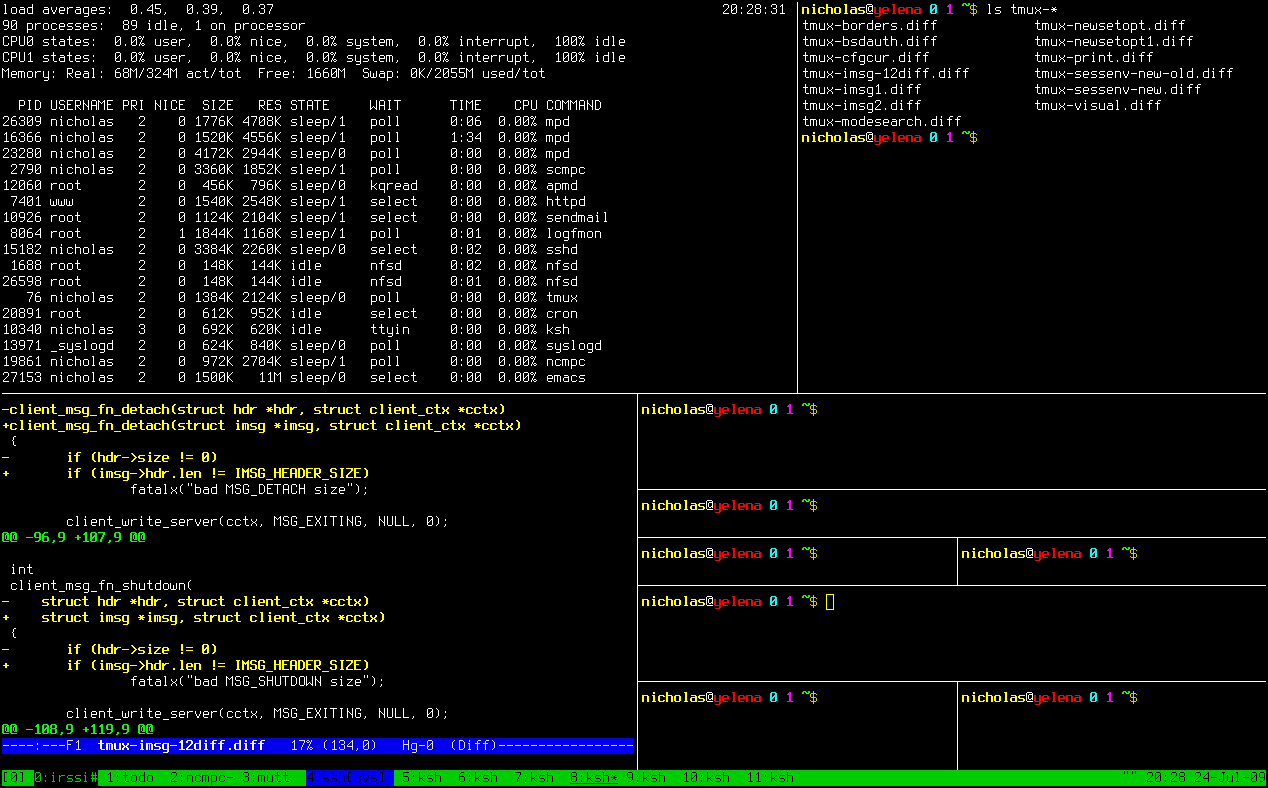
If you used tabs, you'll have to switch off the visible content when switching tabs though... I may have misunderstood what you meant by:
Having just one terminal window with something like tmux is very inconvenient since I would have to essentially switch the visible stuff and then move the window over to another workspace to work there.
hyiltiz
on 17 May 2020
What I meant was that in a multiple workspace setup, each set of terminals from each workspace should be separate.
To illustrate, these two would be two different workspaces with two (or more) different things happening in terminals:
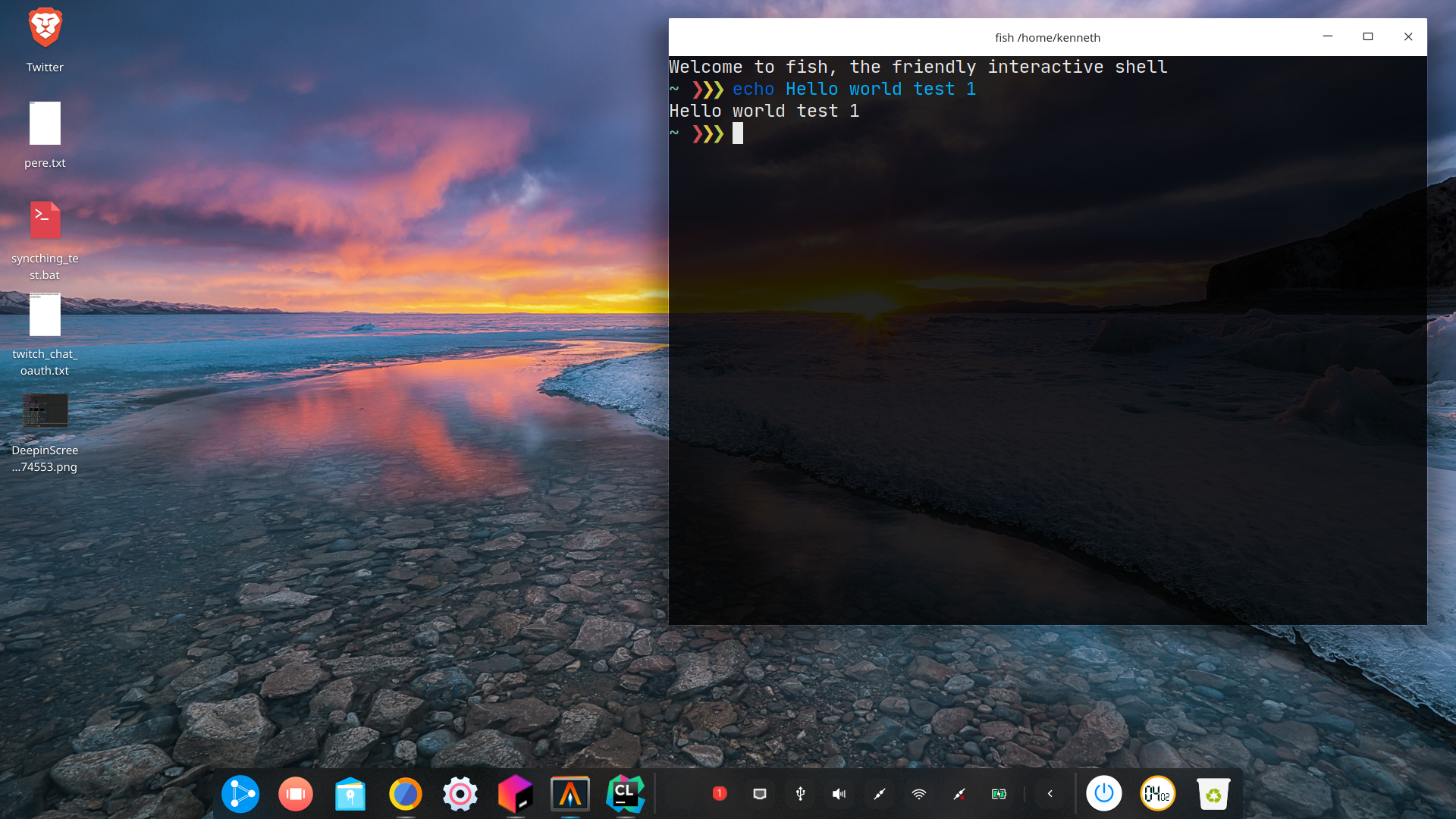
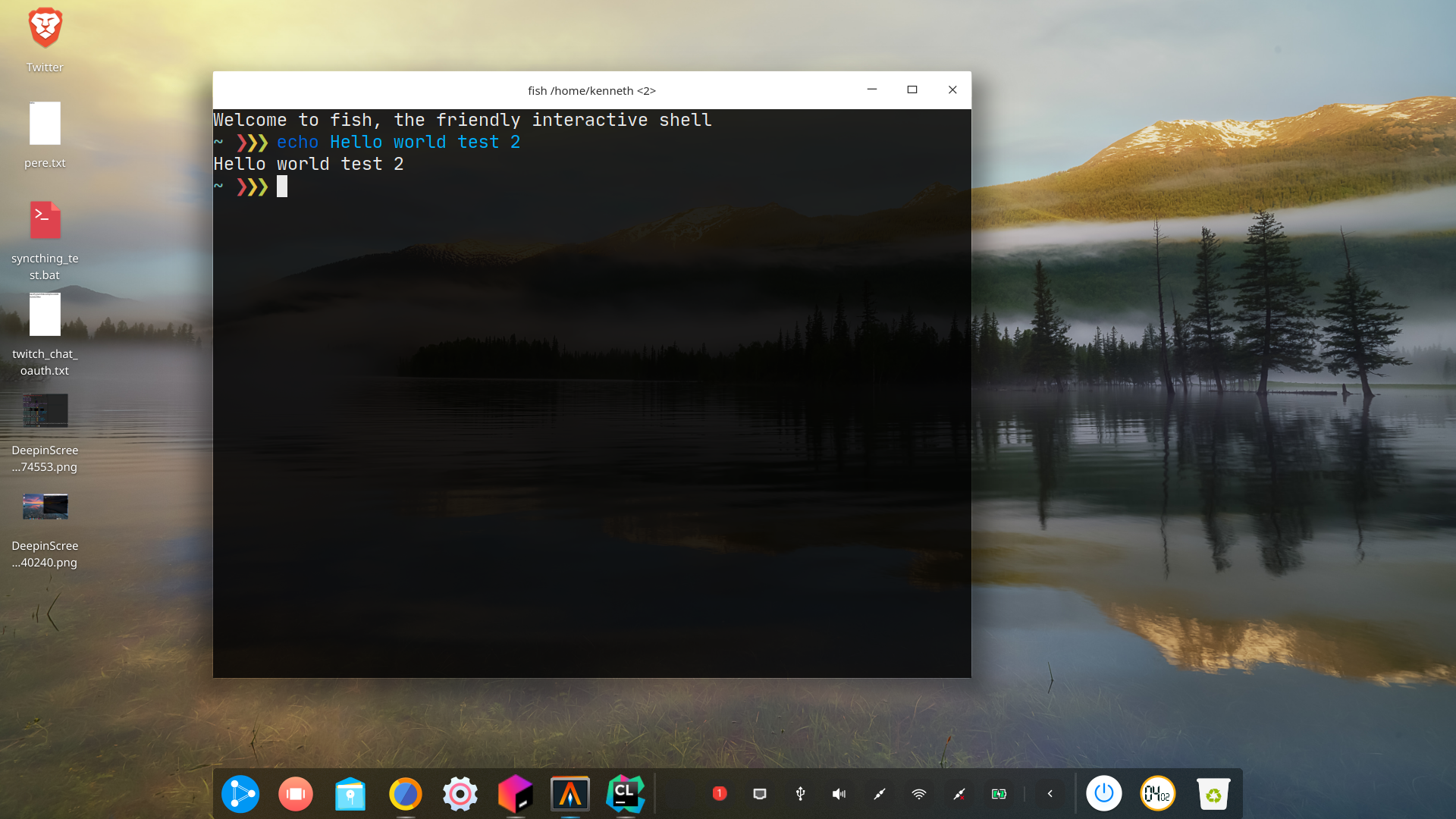
Emulating such behaviour with tmux would be quite hard, since it would require some switching to have separate stuff opened in separate workspaces.
dancojocaru2000
on 17 May 2020
You could setup a tmux server per workspace (tmux -L $workspace) instead of using a single server. It may be better to use a single server and use separate sessions instead if you don't normally use sessions much (then you could move terminals between sessions easily if needed).
mathstuf
on 17 May 2020
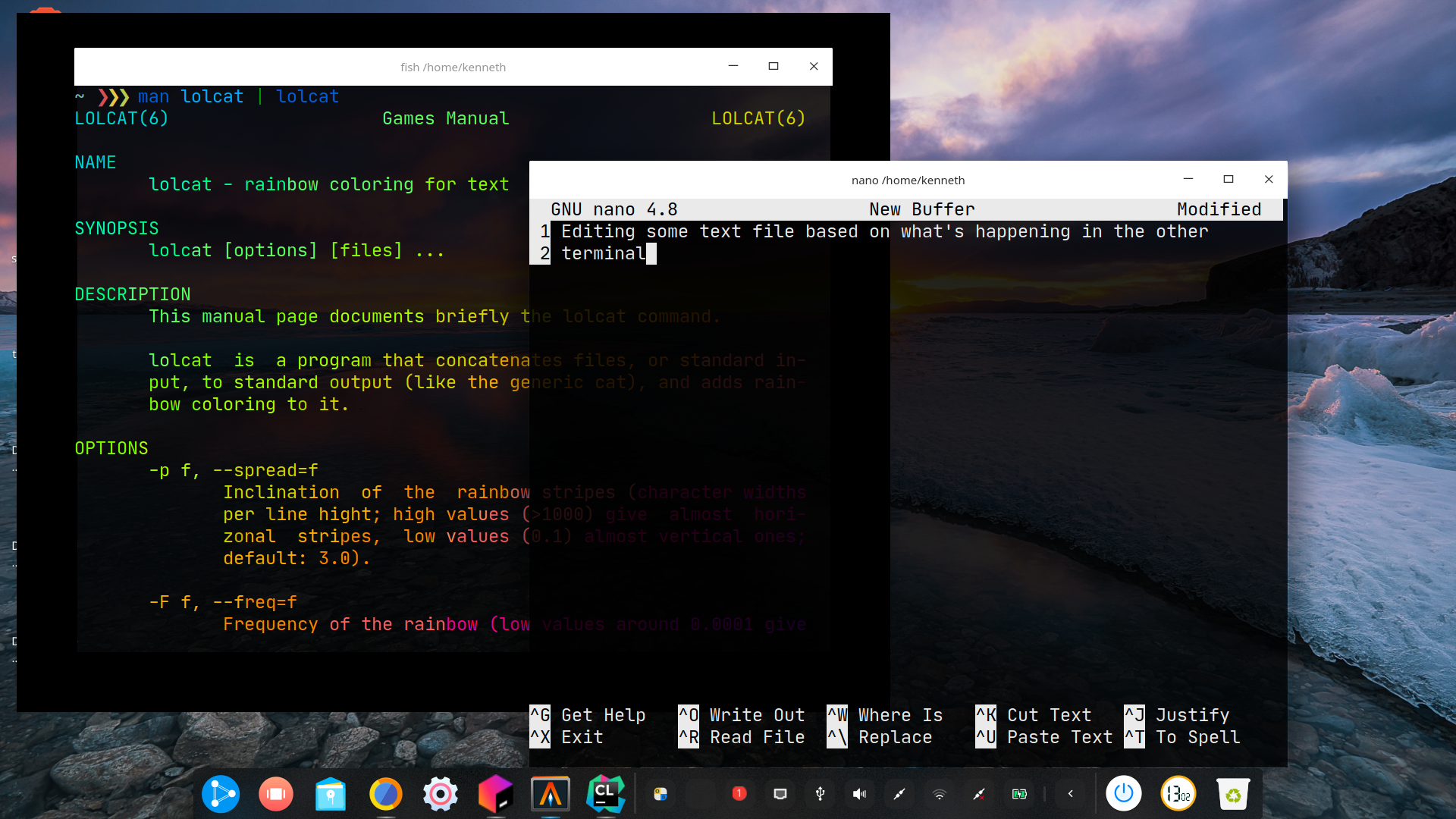
Sure, but that is certainly a workaround and tmux certainly doesn't allow this kind of overlapping (ignore the visual bug around the window in the background):
dancojocaru2000
on 17 May 2020
Well, no. Personally I use a tiling WM, and I don't know why people like such overlapping in the first place, so I don't really have a suggestion there :) .
mathstuf
on 17 May 2020
Well, that's essentially the point. Not everybody likes tiling WMs, hence why "just use tmux" isn't really a solution for everybody.
dancojocaru2000
on 17 May 2020
@dancojocaru2000 And not everyone likes tabless terminal emulators, which Alacritty is and its maintainers have made clear it will remain.
There are other ways of achieving that sort of behaviour, but if you don't like those either then it would seem Alacritty just doesn't fit your workflow.
This issue isn't about adding tabs, which again, has been made clear will not happen as a matter of design philosophy/'not term's problem', it's about fixing quirks in running multiple instances. e.g. multiple unnamed indistinguishable entries in the 'command-tab' list on macOS; perhaps something similar if you use a DE on Linux.
OJFord
on 17 May 2020
Furthermore, not everybody is fluent in or wants to learn keyboard shortcuts in order to use multiple "windows". The usual reply is "but then why use a terminal in the first place?", to which I reply sudo systemctl stop nginx and other things that just aren't easy to do in a GUI. Or, for example, SSHing into a server.
I personally have to open the man page for tmux whenever I have to do something other than C-b + d. The main reason I use it is to have terminal sessions survive between SSH ones.
Just because I know how to use sudo apt install something (and I prefer it at times) instead of searching for something in Ubuntu Software, it doesn't mean I suddenly tolerate using vim or emacs.
I understand that the devs have their own priorities and their own ways of doing things and, until I submit a PR for something I complain about, I understand and agree that my opinions are nothing more than just "yet another opinion". Which is fine.
I just want to make it clear that "use tmux" isn't a solution for everybody, but merely a workaround, and support for multiple windows isn't a non-issue.
@OJFord I have mentioned in a previous reply that the difference between multiple tabs in a window and multiple windows isn't something that will bother me and it is something that I can live with. The problem indeed is the lack of multiple windows support on macOS, which makes me able to use Alacritty only on my Ubuntu machine.
The main issue according to my quick _research_ is that the lifecycle of the window is tied to the lifecycle of the Alacritty process. On macOS, this behaviour is expected only for single window applications, applications supporting multiple windows being supposed to handle all windows from the same process.
The redesign needed to handle macOS's expectations properly seems to be quite difficult to pull off, hence why I totally understand why this issue is low priority.
The point I am trying to make overall is that the lack of multiple window support indeed makes Alacritty unsuitable for my workflow on macOS and that while other workarounds proposed could work to a certain degree, they are still ultimately workarounds.
dancojocaru2000
on 17 May 2020
- Both
dvtmandtmuxallow tiling aka split screens which, once created, can be switched with a mouse click; creating an additional window is usually done with a hotkey in other common terms anyways; - For overlapping windows, can't you open two instances of Alacritty?
hyiltiz
on 17 May 2020
Because of how macOS expects multiple windows to behave, opening multiple instances creates several inconveniences outlined earlier in this issue.
dancojocaru2000
on 17 May 2020
Because of how macOS expects multiple windows to behave, opening multiple instances creates several inconveniences outlined earlier in this issue.
In that case, it sounds like macOS is broken; being an OS, it should've provided with a sensible Window Manager in the first place so this issue wouldn't have existed. Care to file a issue with Apple as well?
p.s. At this point, this is becoming discussion, which is usually frowned upon in Github Issues by the developers. Unsubscribing from this discussion now.
hyiltiz
on 17 May 2020
That's how the OS is designed. Just like any other OS, you can't really argue with design choices. Just like the devs of Alacritty made a design choice not to include tabs.
dancojocaru2000
on 17 May 2020
macOS does not expect you to open multiple instances of the same program, and things often go wrong when you try. I don't expect that to ever get fixed.
tbodt
on 17 May 2020
Would open -n -a Alacritty fix the issue with macOS? I just read it explicitly creates another instance [1].
[1] https://www.cnet.com/news/how-to-open-multiple-instances-of-an-application-in-os-x/
hyiltiz
on 17 May 2020
No, that just opens multiple instances, which has problems as discussed previously
tbodt
on 17 May 2020
No.
Having multiple instances of apps is _supported_, but GUI apps should not do that on macOS.
That's why, when opening an app bundle of an already running app, macOS sends a system event to the running app instead of starting a new instance.
Some issues of running multiple instances:
- multiple icons appear in the dock and in the Cmd+Tab menu
- the multiple windows don't appear in App Exposé
- Cmd+`, a common keyboard shortcut to switch between the windows of an open app, doesn't work
- Cmd+Q, the quit command, closes just one instance and one window, not all at once
dancojocaru2000
on 17 May 2020
All sound like macOS bugs to me :shrug:
hyiltiz
on 17 May 2020
All sounds like macOS bugs to me 🤷
That's like saying that partitions on Linux being mounted as folders, commonly in /mnt, instead of being letters as in C:, D:, etc., or that you can't cd \home\user and you can only use / is a Linux bug. It's just the way the system is designed.
dancojocaru2000
on 17 May 2020
On a separate note, I skimmed through this whole thread, and no mention of the MS WIndows OS; does opening multiple Alacritty instances work fine there? For macOS, a few workarounds have been suggested above. Ideally, if @tbodt's suggestion about "erminal emulator UI component" is accepted by the devs, it would be a much better solution (which probably can interface well with the daemon interface in discussion as well) than hacking in tab support just so it works with macOS's buggy restrictions.
hyiltiz
on 17 May 2020
There's no intention to hack in tab support for supporting macOS. The goal is to support multi-windows to properly work on macOS. Yes, this is 100% macOS being stupid but there can be some advantages for other systems too. If you want to ship an application to macOS, that's just what you have to do, no way around that.
chrisduerr
on 17 May 2020
Windows doesn't do any special handling of the "this window belongs to app X" kind. It just shows all windows separately in Alt+Tab. I don't really know how it combines multiple windows of the same app in the task bar, though it probably is something naive like checking for the process name.
In fact, preventing multiple instances must be done manually by checking if an old instance is running in the new one. Basically the opposite of macOS.
Once again, @hyiltiz, tab support has nothing to do with multiple window support in the same instance. Furthermore, you keep insisting that design choices are the same thing as bugs. In the same manner, Alacritty could be called buggy because it doesn't support tabs due to a design choice (which is, however, not the case, considering the issue #3129 is closed).
dancojocaru2000
on 17 May 2020
Weighing in against my better judgement, but I’m very interested in the life of this issue:
- Tabs vs windows is a design choice. Alacritty maintainers don’t want to do tabs. No big deal.
- Adherence to windowing environment UI conventions is a usability and compatibility issue. For supported platforms, any app should respect upstream UX conventions, or we all live in 1990s Java world.
- Implementing Mac UX conventions might not be a priority but shouldn’t be a “won’t fix” issue. Someone, maybe me, will make it work when they have time.
- Platform UX conventions
- For below:
- _document_ == _terminal session_
- _application_ == _all processes spawned from a single binary_
- X
- Window-per-document
- Maybe tab-per-document if supported by GUI toolkit — not the case with Alacritty
- No universal window-per-application convention/API
- Windows
- Used to be window-per-application (MDI), until Windows Vista(?)
- Now window-per-document except legacy apps
- Mac
- Window-per-document but under single menu bar (“Apple menu”)
- Tab-per-document, but as an alternative to above (like browsers; example: Terminal.app)
- Even Microsoft’s Mac apps run as multiple documents under one icon/menu bar
- For below:
 overhacked
on 22 May 2020
overhacked
on 22 May 2020
Tab-per-document, but as an alternative to above (like browsers; example: Terminal.app)
I would argue that's not the case. I am not aware of an app that provides multiple tab support but does not provide multiple window support.
Other than this, I wholeheartedly agree with your reply!
Also, a little bit off topic but Java 9 added built in support for handling the macOS About, Preferences and Quit menus so there's that as well, correcting past mistakes perhaps.
dancojocaru2000
on 22 May 2020
A number of people have suggested using tmux to create splits in Alacritty. I use tmux right now, but I'm moving to using a window manager because that allows me to have splits between different applications--not just terminals. tmux works when you just need multiple terminals next to one another, but a window manager is the solution for having a browser, mail client, and terminal all on the same screen. Please support multiple windows :)
 Exr0n
on 19 Aug 2020
Exr0n
on 19 Aug 2020
Please support multiple windows :)
This has nothing to do with supporting multiple windows inside of Alacritty and there's no interest in doing so.
chrisduerr
on 19 Aug 2020
This has nothing to do with supporting multiple windows inside of Alacritty and there's no interest in doing so.
@chrisduerr, our message here is potentially confusing at this point. If I were to take your statement above at face value, we should just close this issue outright. However, I know that there are other factors to this. I do however agree completely, that it's not our job to implement a window manager and having multiple windows within a single instance of Alacritty would be just that.
Issue #241 references this issue as the "first step", which is primarily concerned with memory usage optimizations, which is my primary concern as well. Our process startup time is good enough on all platforms I've tested to simply open a new Alacritty each time you need a new window, which is how I use my terminal every day. If this is not the case, there's another issue.
As for how to resolve the confusion moving forward, perhaps we do in fact close this issue, and just direct people to #241. There are sure to be other smaller platform specific snags to this approach, for example on Windows I believe it's still the case that each window gets it's own icon. Perhaps (while we may not be able to fix these things at this time) we could track them separately as smaller issues?
Thoughts overall?
nixpulvis
on 19 Aug 2020
@chrisduerr, our message here is potentially confusing at this point. If I were to take your statement above at face value, we should just close this issue outright.
Have you actually read the issue description?
As for how to resolve the confusion moving forward, perhaps we do in fact close this issue, and just direct people to #241.
I have no intention to close issues only because people can't even do the most basic thing like reading the issue description. Any discussion about that is just an even further waste of my time.
chrisduerr
on 19 Aug 2020
Sorry, I guess I wasn't clear about what I meant. I was simply commenting on how there are reasons to use a WM and Alacritty windows/instances with it, instead of just using tmux. Although I personally think it would be nice if Alacritty behaved more like other MacOS apps, in that there is one "instance" (and one Alacritty in the dock) and that "instance" owns multiple windows. However, just opening multiple instances is fine by me.
Exr0n
on 19 Aug 2020
Sorry, I guess I wasn't clear about what I meant. I was simply commenting on how there are reasons to use a WM and Alacritty windows/instances with it, instead of just using tmux. Although I personally think it would be nice if Alacritty behaved more like other MacOS apps, in that there is one "instance" (or whatever shows up in the dock) and that "instance" owns multiple windows. However, just opening multiple instances is fine by me.
Thanks for clarifying, then this issue is exactly what you want and I did not understand you correctly.
chrisduerr
on 19 Aug 2020
Let's try again then:
The general consensus seems to be that if you want multiple terminals on a screen, you should use tmux. However, I've recently switched to using a window manager (yabai) because I would like to be able to have different applications on the same screen. (I think of it as tmux but with any application instead of just terminals and TUIs).
At the moment, we can run multiple instances of Alacritty but this is not ideal (at least on MacOS, the instances clutter up the dock and command-tab switcher). Other Mac apps usually have one instance that owns multiple windows, with menu bar items that do things like creating new windows.
I would personally love to see Alacritty get similar menu bar items, or at least one to create a new window / spawn a new instance. This would make Alacritty much easier to plug into the existing Mac automation ecosystem. Better yet, the menu bar item could have an associated keybind, like Command+N to open a new window. This is what i mean by "please support multiple windows".
Exr0n
on 19 Aug 2020
The general consensus seems to be that if you want multiple terminals on a screen, you should use tmux.
That's not correct. Multiple terminals on one screen shouldn't have anything to do with tmux or not. Tmux is about multiple terminals within the same Alacritty instance.
I would personally love to see Alacritty get similar menu bar items, or at least one to create a new window / spawn a new instance.
Menu bar items are a completely different topic again, so one step at a time. The goal is to first reduce the number of Alacritty instances to just a single one in the macOS dock.
Better yet, the menu bar item could have an associated keybind, like Command+N to open a new window.
Well such a binding already exists for active Alacritty terminals. Just not in any macOS menu.
chrisduerr
on 19 Aug 2020
Menu bar items are a completely different topic again, so one step at a time.
If this is not an immediate veto, I'd be happy to create an issue for it.
The goal is to first reduce the number of Alacritty instances to just a single one in the macOS dock.
I'm sorry, I didn't realize that that was the goal of this thread. I'll keep that in mind. It might be helpful to update the issue title/description for future readers.
Well such a binding already exists for active Alacritty terminals. Just not in any macOS menu.
I wasn't aware of such a default binding, although it can be configured in the alacritty.yml. Does a default one exist for Mac?
Exr0n
on 19 Aug 2020
If this is not an immediate veto, I'd be happy to create an issue for it.
It sounded like you're talking about right click menus within the Dock? Or are you talking about the menu in the panel at the top? The latter is already documented here: https://github.com/alacritty/alacritty/issues/3245. It might also have some overlap I suppose, I'm not sure.
I wasn't aware of such a default binding, although it can be configured in the alacritty.yml. Does a default one exist for Mac?
It should be bound to Command + N by default: https://github.com/alacritty/alacritty/blob/master/alacritty.yml#L714
chrisduerr
on 19 Aug 2020
Related issues
 tecosaur
·
47Comments
tecosaur
·
47Comments
 inoperable
·
60Comments
inoperable
·
60Comments
 tusqasi
·
55Comments
tusqasi
·
55Comments
 HalosGhost
·
48Comments
HalosGhost
·
48Comments
 fuine
·
131Comments
fuine
·
131Comments
Most helpful comment
My opinion on this is alacritty should become a sort of terminal emulator UI component, so other programs could use alacritty as a renderer and provide tabs, split panes, multiple windows, GUI configuration, and all that cool stuff.