Adguardhome: Windows's NSLOOKUP could not get response with AGH version after v0.99.3
Prerequisites
Please answer the following questions for yourself before submitting an issue. YOU MAY DELETE THE PREREQUISITES SECTION.
- [x] I am running the latest version
- [x] I checked the documentation and found no answer
- [x] I checked to make sure that this issue has not already been filed
Issue Details
- Version of AdGuard Home server:
- v0.100.6
- How did you setup DNS configuration:
- IoT(Raspberry Pi 3 B+) and also Windows Machine
- If it's a router or IoT, please write device model:
- Raspberry Pi 3 B+
- Operating system and version:
- Latest Version for Raspberry Pi and Windows
Expected Behavior
Windows's cmd tool(nslookup) could get what i can get as usual without any timeout.
Actual Behavior
100% get 2 seconds timeout for every nslookup with AdGuard Home version higher than v0.99.3. The results i was tested with the v0.99.3 and v0.100.5->v0.100.6 within AGH run on Windows and Raspbian, Ubuntu platform.
Screenshots
Screenshot:
Additional Information
AdGuard Home's dns query logs show it have receive the dns request from client and looks fine.
Below is the verbose log from my AGH. Nslookup from linux system can function normally.
 DavidTai780
All 33 comments
Cannot reproduce using windows 10 1903. Probably your firewall or something else?
 ghost
on 22 Dec 2019
ghost
on 22 Dec 2019
The result has tested in local machine and tested from other pc with nothing to modify with Firewall. I am sure it is not the firewall blocking it. After i switch it back to v0.99.3 on same device with all same settings the nslookup can work normally.
DavidTai780
on 22 Dec 2019
then @szolin will take care about that 😊
ghost
on 22 Dec 2019
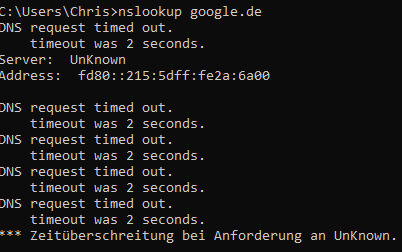
i can also reproduce it - with no firewall
 Who-42
on 22 Dec 2019
Who-42
on 22 Dec 2019
because maybe there is no fe80 monitor for example
127.0.0.1
::1
192.xx.0.1
2409:xxxx:316:3d40::1
fd47:xxxx:1556::1
192.xx.192.55
 rufengsuixing
on 22 Dec 2019
rufengsuixing
on 22 Dec 2019
how we can add ::0?
Who-42
on 22 Dec 2019
By default, it listens to 0.0.0.0 so it should listen to all your network interfaces including [::].
 ameshkov
on 23 Dec 2019
ameshkov
on 23 Dec 2019
@DavidTai780 the problem in your case is that AdGuard DNS is unavailable, and we use it for "browsing security" lookups:
2019/12/22 16:23:21 3720#138 [debug] github.com/AdguardTeam/dnsproxy/upstream.lookup(): failed to lookup for dns-family.adguard.com in 3002 milliseconds using 176.103.130.131: read udp 192.168.1.190:63365->176.103.130.131:53: i/o timeout
If you disable browsing security, the issue will go away.
ameshkov
on 23 Dec 2019
@DavidTai780 any idea why AG DNS is unavailable from your place?
ameshkov
on 23 Dec 2019
@ameshkov i got the same problem as you can see some posts above - but i have no browsing sec active
Who-42
on 23 Dec 2019
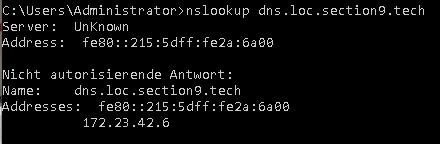
@Who-42 yours is very different. For some reason, in your case nslookup tries to query a link-local IPv6 address.
You should check your DNS settings, what DNS server addresses do you have there?
ameshkov
on 23 Dec 2019
but i can use the link local IPv6 to access the ADG Home Webinterface - why its not working for dns querry?
Who-42
on 23 Dec 2019
@Who-42 check AdGuardHome.yaml, what do you have in bind_host?
ameshkov
on 23 Dec 2019
@ameshkov
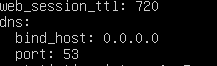
Who-42
on 23 Dec 2019
@Who-42 well, no idea then:( Try replacing it with bind_host: "::" just in case
ameshkov
on 23 Dec 2019
@ameshkov maybe this helps IPv4 works / Ipv6 not

Who-42
on 23 Dec 2019
@Who-42 I cannot reproduce this on a Windows VM.
Tbh, I don't consider this an issue at all, link-local addresses aren't supposed to be used for that.
ameshkov
on 23 Dec 2019
@ameshkov as i understand you can use link-local for communication in a network segement?
Who-42
on 23 Dec 2019
@Who-42 yeah, but don't confuse it with your local network address
ameshkov
on 23 Dec 2019
@ameshkov so why ADG Home don't listen on all IPv6 traffic as intended - thats what it looks like for me :-D
Who-42
on 23 Dec 2019
i test on my router the fe80: can be use when set to 0.0.0.0
rufengsuixing
on 23 Dec 2019
strange - hm maybe i should wait a short time there is a beta firmware for my router with DOT/DOH Support
so i can switch to my 2 VPS ADG Home Server and then theres no need for the local one
Who-42
on 23 Dec 2019
@Who-42 I suppose this might be some Windows-specific issue.
Also, I don't think it cannot listen to IPv6 traffic -- it just might be ignoring link-local addresses.
ameshkov
on 23 Dec 2019
Adguard is running on ubuntu - i was just testing from windows
Who-42
on 23 Dec 2019
@DavidTai780 any idea why AG DNS is unavailable from your place?
Sorry for late to reply your message, yes the problem is now solve when the AGH with option disable for browse security and parent control. Thank You
DavidTai780
on 24 Dec 2019
@DavidTai780 any idea why AG DNS is unavailable from your place?
Sorry for late to reply your message, yes the problem is now solve when the AGH with option disable for browse security and parent control. Thank You
But you didn't answer to the question or if you may tell about your ISP name then we can play from our end to check it 😉
ghost
on 24 Dec 2019
Yeah, maybe we could check out what's wrong and fix this somehow
ameshkov
on 24 Dec 2019
My ISP is DIGIIX-AP DiGi Telecommunications Sdn. Bhd. Located in Malaysia
DavidTai780
on 24 Dec 2019
@DavidTai780 the problem in your case is that AdGuard DNS is unavailable, and we use it for "browsing security" lookups:
2019/12/22 16:23:21 3720#138 [debug] github.com/AdguardTeam/dnsproxy/upstream.lookup(): failed to lookup for dns-family.adguard.com in 3002 milliseconds using 176.103.130.131: read udp 192.168.1.190:63365->176.103.130.131:53: i/o timeoutIf you disable browsing security, the issue will go away.
Just now i test it once more times, this issue(failed to lookup dns-family.adguard.com) is now solved even if the option browse security and parent control is enable
DavidTai780
on 24 Dec 2019
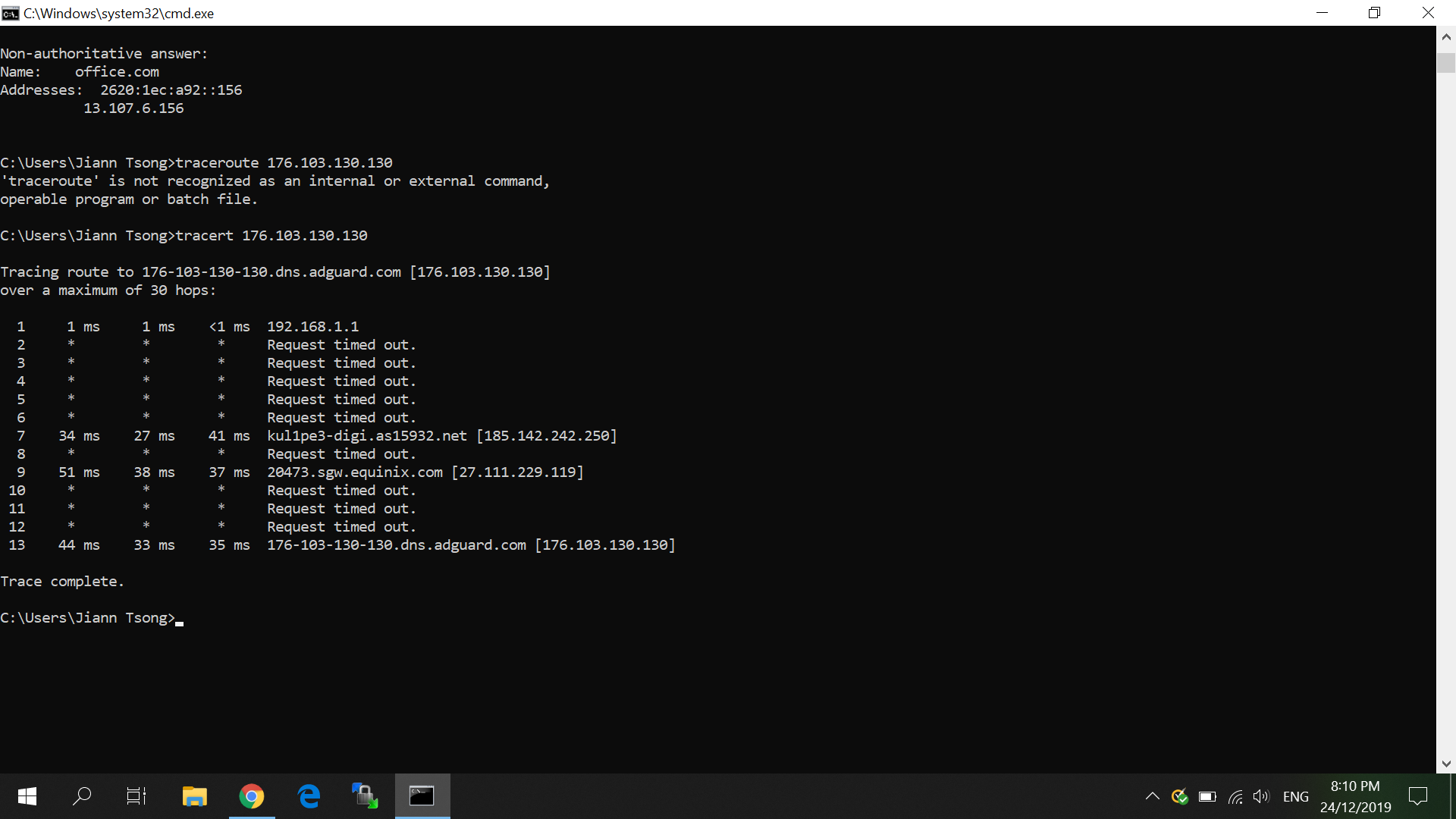
Could you please also show the output of: traceroute 176.103.130.130
ameshkov
on 24 Dec 2019
Just now i test it once more times, this issue(failed to lookup dns-family.adguard.com) is now solved even if the option browse security and parent control is enable
Hmm, maybe that was a temporary glitch?
ameshkov
on 24 Dec 2019
Here the record for tracing the route
DavidTai780
on 24 Dec 2019
Yeah, well, looks okay now:) Thank you anyway!
ameshkov
on 24 Dec 2019
Related issues
 iAYMANi
·
51Comments
iAYMANi
·
51Comments
 Mosney
·
35Comments
Mosney
·
35Comments
 AnthonyBe
·
32Comments
AnthonyBe
·
32Comments
 rfgamaral
·
27Comments
rfgamaral
·
27Comments
 ronaldvdmeer
·
33Comments
ronaldvdmeer
·
33Comments