Adguardhome: favicon.ico is not displayed correctly behind an HTTPS reverse proxy
Steps to reproduce
- Load any AdGuard Home page.
- Observe that the
favicon.icois not show.
It could be relevant that I'm accessing AdGuard Home through a local NGINX reverse proxy that points a specific hostname (HTTPS only) on my network to <ADGUARD_IP>:3000.
Expected behavior
AdGuard favicon should be displayed in browsers tabs.
Actual behavior
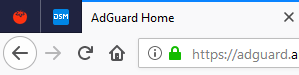
AdGuard favicon IS NOT displayed in browsers tabs.
Screenshot:
Your environment
| Description | Value |
| -------------- | ------------ |
| Version of AdGuard Home server:| (e.g. v0.94)
 rfgamaral
All 27 comments
@rfgamaral hi! A few questions:
- Could you please check the network requests in dev tools, do you see
favicon.icoloading there? - Could you please try a different browser just in case? This might be due to a favicons cache (at least in Chrome there's no easy way to clean it)
 ameshkov
on 3 Apr 2019
ameshkov
on 3 Apr 2019
- Yes, the request is there with
200 OK. - Doesn't work in Chrome or Edge either.
Firefox:
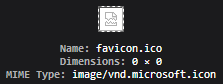
Chrome:
net::ERR_SPDY_PROTOCOL_ERROR 200
rfgamaral
on 3 Apr 2019
Huh, okay, that's weird, as if nginx fails to proxify this request. There should be something about this in nginx log
ameshkov
on 3 Apr 2019
Indeed:
upstream prematurely closed connection while reading upstream
Need to look into AdGuard's logs now... Where can I find AdGuard's web server logs in the Docker container?
rfgamaral
on 3 Apr 2019
Hm, we don't write them:( But you can try opening this URL directly without nginx (or executing curl) and see what headers does it send.
ameshkov
on 3 Apr 2019
Got this by invoking curl from my PC and using the machine IP where the Docker container is running with --net=host (no HTTPS, no NGINX proxy):
$ curl --user "username:password" http://192.168.0.99:3000/favicon.ico --output favicon.ico
  % Total    % Received % Xferd  Average Speed   Time    Time     Time  Current
                                 Dload  Upload   Total   Spent    Left  Speed
 97 15086   97 14574    0     0  1186k      0 --:--:-- --:--:-- --:--:-- 1186k
curl: (18) transfer closed with 512 bytes remaining to read
Looks like a bug to me. Now the question is how to reproduce this on our side:)
ameshkov
on 3 Apr 2019
Just installed directly the Linux version on the same machine, no Docker, same issue.
EDIT: And also tried the Windows 64-bit version on my PC and that one worked.
EDIT 2: Again, my PC, linux version inside WSL, works too. Maybe a problem with the machine where I'm installing this originally... Can't think of a reason for causing this though.
rfgamaral
on 3 Apr 2019
I also do not see the favicon on Raspberry PI and docker.
@ameshkov If you log onto my AGHome with link I sent you yesterday in Telegram, you'll notice the icon does not show.
 adrianh-za
on 4 Apr 2019
adrianh-za
on 4 Apr 2019
@rfgamaral @adrianh-za Hello!
Can you check this once again with the latest AGH version?
It looks like a network issue, so in order to isolate it, please use curl command on the same machine where AGH is running, try it several times, is it 100% reproducible?
 szolin
on 30 Apr 2019
szolin
on 30 Apr 2019
@szolin
I do not know how to execute the curl command you require. Please can you post it for me and then I shall execute it a little later.
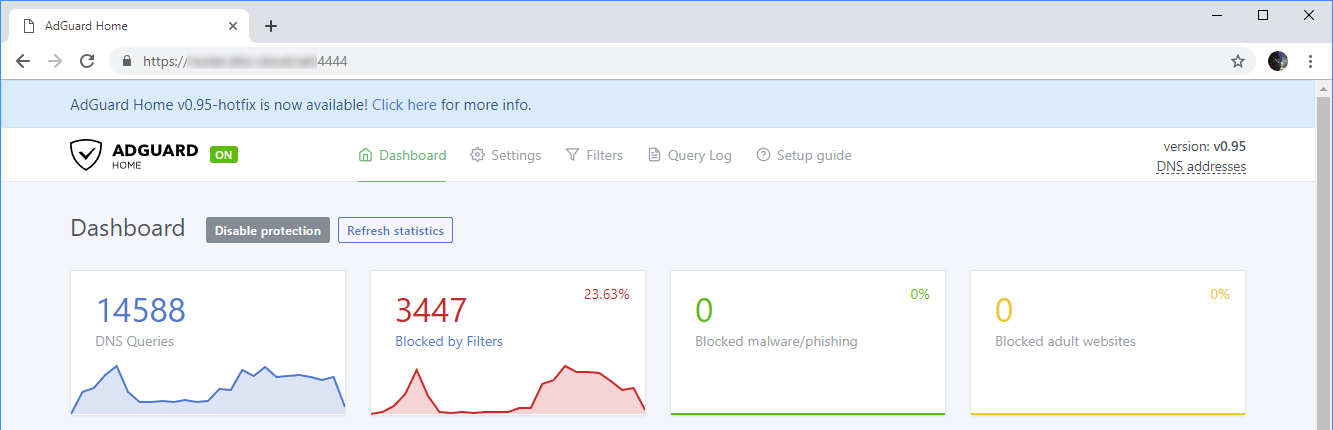
That said, running 0.95 (no hotfix) the icon is not showing on any browser, be it on my home network or connecting externally.
adrianh-za
on 30 Apr 2019
Try this command (another user has posted it earlier here):
curl --user "username:password" http://<AGH_IP>:<AGH_PORT>/favicon.ico --output favicon.ico
szolin
on 30 Apr 2019
@rfgamaral @adrianh-za Hello!
Can you check this once again with the latest AGH version?
It looks like a network issue, so in order to isolate it, please usecurlcommand on the same machine where AGH is running, try it several times, is it 100% reproducible?
Using the latest here (0.95-hotfix) and it still happens, same as above. Tried running curl multiple times, always the same issue:
curl: (18) transfer closed with 512 bytes remaining to read
rfgamaral
on 30 Apr 2019
Try to set bind_host: 0.0.0.0 in AdGuardHome.yaml file (so AGH will listen on all network interfaces) and run the same curl command but now using 127.0.0.1 as AGH address? We'll see whether the issue persists on loopback interface.
curl --user "username:password" http://127.0.0.1:3000/favicon.ico --output favicon.ico
szolin
on 30 Apr 2019
That command with username/password returns the following:
  % Total    % Received % Xferd  Average Speed   Time    Time     Time  Current
                                 Dload  Upload   Total   Spent    Left  Speed
100    14  100    14    0     0   3611      0 --:--:-- --:--:-- --:--:--  4666
and without
  % Total    % Received % Xferd  Average Speed   Time    Time     Time  Current
                                 Dload  Upload   Total   Spent    Left  Speed
100    14  100    14    0     0   3034      0 --:--:-- --:--:-- --:--:--  4666
Total value should be 15086. Most likely that you have a wrong IP address in your curl command. You should use the address that AGH is running on.
szolin
on 30 Apr 2019
Unfortunately the IP is correct. See the putty dump below with IP and docker containers that are running.
Linux RPi-Black 4.14.98-v7+ #1200 SMP Tue Feb 12 20:27:48 GMT 2019 armv7l

The programs included with the Debian GNU/Linux system are free software;
the exact distribution terms for each program are described in the
individual files in /usr/share/doc/*/copyright.

Debian GNU/Linux comes with ABSOLUTELY NO WARRANTY, to the extent
permitted by applicable law.
Last login: Mon Apr 29 22:14:00 2019 from 192.168.10.113

pi@RPi-Black:~ $ curl --user "######:######" http://192.168.10.14:3000/favicon.ico --output favicon.ico
  % Total    % Received % Xferd  Average Speed   Time    Time     Time  Current
                                 Dload  Upload   Total   Spent    Left  Speed
100    14  100    14    0     0   3611      0 --:--:-- --:--:-- --:--:--  4666

pi@RPi-Black:~ $ curl  http://192.168.10.14:3000/favicon.ico --output favicon.ico
  % Total    % Received % Xferd  Average Speed   Time    Time     Time  Current
                                 Dload  Upload   Total   Spent    Left  Speed
100    14  100    14    0     0   3034      0 --:--:-- --:--:-- --:--:--  4666

pi@RPi-Black:~ $ docker ps -a
CONTAINER ID        IMAGE                              COMMAND                  CREATED             STATUS              PORTS                    NAMES
1ce6b3fddd47        mrhadenough/rpi-socks5-server      "/socks5 --restart=u…"   6 days ago          Up 22 hours         0.0.0.0:1080->1080/tcp   socks5-rpi
12c8539b5d7c        adguard/adguardhome:armhf-latest   "/opt/adguardhome/Ad…"   6 days ago          Up 26 hours                                  adguardhome
7e74d495e70b        tkoopman/shellinabox-rpi           "/usr/bin/entry.sh /…"   2 weeks ago         Up 26 hours         0.0.0.0:4200->4200/tcp   shell-in-a-box
20195a6ea2f4        michaelmiklis/rpi-monitor:latest   "/usr/bin/entry.sh /…"   2 weeks ago         Up 26 hours         0.0.0.0:8888->8888/tcp   rpi-monitor

pi@RPi-Black:~ $
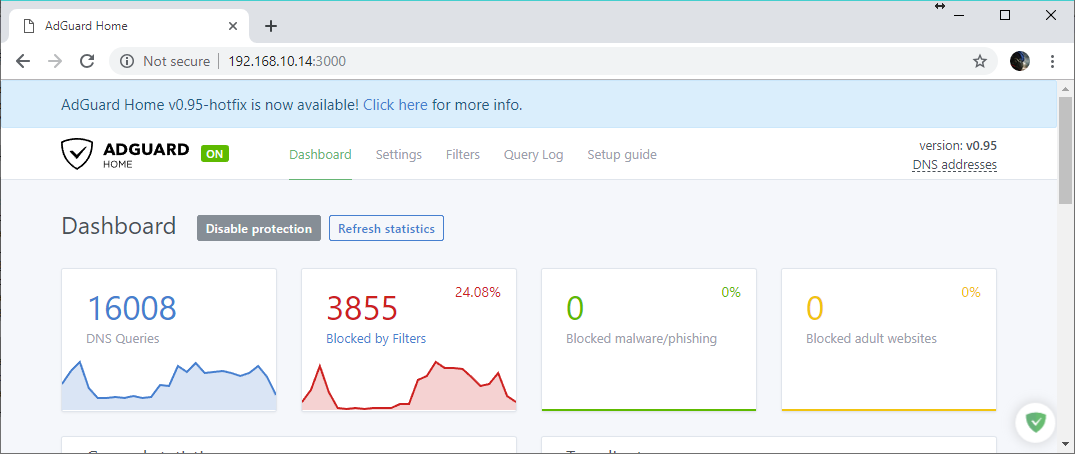
and screenshot of same IP address
adrianh-za
on 30 Apr 2019
Try to set
bind_host: 0.0.0.0in AdGuardHome.yaml file (so AGH will listen on all network interfaces) and run the same curl command but now using 127.0.0.1 as AGH address? We'll see whether the issue persists on loopback interface.
curl --user "username:password" http://127.0.0.1:3000/favicon.ico --output favicon.ico
All my tests had already AGH listening on all interfaces and I've used localhost and 127.0.0.1 as the address.
rfgamaral
on 30 Apr 2019
Can you execute this command and show what's printed?
wget --user=USER --password=PASS -S http://127.0.0.1:3000/favicon.ico
szolin
on 13 May 2019
Yeah, not sure this command works properly. It keeps removing special characters from my password
Username/Password Authentication Failed.
--2019-05-13 15:34:17--  http://127.0.0.1:3000/favicon.ico
Reusing existing connection to 127.0.0.1:3000.
HTTP request sent, awaiting response...
  HTTP/1.1 401 Unauthorized
  Access-Control-Allow-Origin: *
  Www-Authenticate: Basic realm="dnsfilter"
  Date: Mon, 13 May 2019 13:34:17 GMT
  Content-Length: 14
  Content-Type: text/plain; charset=utf-8
Ok, using quotes worked
--2019-05-13 15:40:57--  http://127.0.0.1:3000/favicon.ico
Connecting to 127.0.0.1:3000... connected.
HTTP request sent, awaiting response...
  HTTP/1.1 401 Unauthorized
  Access-Control-Allow-Origin: *
  Www-Authenticate: Basic realm="dnsfilter"
  Date: Mon, 13 May 2019 13:40:57 GMT
  Content-Length: 14
  Content-Type: text/plain; charset=utf-8
Authentication selected: Basic realm="dnsfilter"
Reusing existing connection to 127.0.0.1:3000.
HTTP request sent, awaiting response...
  HTTP/1.1 200 OK
  Accept-Ranges: bytes
  Access-Control-Allow-Origin: *
  Content-Length: 15086
  Content-Type: image/vnd.microsoft.icon
  Last-Modified: Mon, 13 May 2019 13:40:57 GMT
  Vary: Accept-Encoding
  Date: Mon, 13 May 2019 13:40:57 GMT
Length: 15086 (15K) [image/vnd.microsoft.icon]
Saving to: ‘favicon.ico.1’

favicon.ico.1                                      96%[=========================================================================================================>    ]  14.23K  --.-KB/s    in 0s

2019-05-13 15:40:57 (54.0 MB/s) - Connection closed at byte 14574. Retrying.

--2019-05-13 15:40:58--  (try: 2)  http://127.0.0.1:3000/favicon.ico
Connecting to 127.0.0.1:3000... connected.
HTTP request sent, awaiting response...
  HTTP/1.1 206 Partial Content
  Accept-Ranges: bytes
  Access-Control-Allow-Origin: *
  Content-Length: 512
  Content-Range: bytes 14574-15085/15086
  Content-Type: image/vnd.microsoft.icon
  Last-Modified: Mon, 13 May 2019 13:40:58 GMT
  Vary: Accept-Encoding
  Date: Mon, 13 May 2019 13:40:58 GMT
Length: 15086 (15K), 512 remaining [image/vnd.microsoft.icon]
Saving to: ‘favicon.ico.1’

favicon.ico.1                                     100%[++++++++++++++++++++++++++++++++++++++++++++++++++++++++++++++++++++++++++++++++++++++++++++++++++++++++++===>]  14.73K  --.-KB/s    in 0s

2019-05-13 15:40:58 (13.6 MB/s) - ‘favicon.ico.1’ saved [15086/15086]
Thank you!
I honestly don't know what can possibly cause this. I can't add any logs there because we use standard Go libraries and gobuffalo/packr package for serving static content via HTTP. The strange part is that .html and .js content is loaded fine on your side and the problem is only with .ico.
But just to be sure, can you execute wget command for http://127.0.0.1:3000/main.HASH.css ?
Replace 'HASH' with the actual hash value - you can see the full URL in your browser's Developer Tools, in Network tab when you go to http://127.0.0.1:3000 in your browser.
szolin
on 13 May 2019
--2019-05-13 16:15:49--  http://127.0.0.1:3000/main.5f8b432d85a4f7401641efe13663e21b.css
Connecting to 127.0.0.1:3000... connected.
HTTP request sent, awaiting response... 401 Unauthorized
Authentication selected: Basic realm="dnsfilter"
Reusing existing connection to 127.0.0.1:3000.
HTTP request sent, awaiting response... 200 OK
Length: 384511 (375K) [text/css]
Saving to: ‘main.5f8b432d85a4f7401641efe13663e21b.css’

main.5f8b432d85a4f7401641efe13663e21b.cs 100%[=================================================================================>] 375.50K  --.-KB/s    in 0.005s

2019-05-13 16:15:49 (79.4 MB/s) - ‘main.5f8b432d85a4f7401641efe13663e21b.css’ saved [384511/384511]
The issue appeared after we added gzip compression. The easiest way would be to disable gzip handler for .ico and see if it fixes the issue.
ameshkov
on 13 May 2019
We've changed favicon.ico to favicon.png - please reopen this issue if you'll be able to reproduce it with v0.96.
szolin
on 4 Jun 2019
We've changed favicon.ico to favicon.png - please reopen this issue if you'll be able to reproduce it with v0.96.
Thanks, any ETA for v0.96?
rfgamaral
on 4 Jun 2019
Thanks, any ETA for v0.96?
If nothing goes wrong, this week
ameshkov
on 4 Jun 2019
Related issues
 ammnt
·
28Comments
ammnt
·
28Comments
 akmLaVx
·
31Comments
akmLaVx
·
31Comments
 ronaldvdmeer
·
33Comments
ronaldvdmeer
·
33Comments
 mrtargaryen
·
26Comments
mrtargaryen
·
26Comments
 rashidjehangir
·
38Comments
rashidjehangir
·
38Comments
Most helpful comment
If nothing goes wrong, this week