Adguardhome: Hardcode AG DNS IP addresses in the SB/PC services
I’m trying to find out how I can enable the adult filter. The adult button in settings doesn’t prevent me from resolving popular adult websites
- I am running the latest version
- I checked the documentation and found no answer
- I checked to make sure that this issue has not already been filed
 ronaldvdmeer
All 33 comments
@ronaldvdmeer does that happen after updated to latest version and reproducible on computers(except mobiles)?
or are you new adguard home user?
 Aikatsui
on 25 Jul 2020
Aikatsui
on 25 Jul 2020
Yes updated to the latest version. When enabled in settings I can still resolve various adult websites. Yes I’m new to AdGuard and have it running on Debian.
ronaldvdmeer
on 25 Jul 2020
Yes updated to the latest version. When enabled in settings I can still resolve various adult websites.
If that happen after updated to latest version then probably bug.
However if you do not use adguard home built-in DHCP server then make sure each devices have configured to use the server IP.
You also able to use adguard DNS family protection addresses in DNS settings temporally till fix this.
Aikatsui
on 25 Jul 2020
In both versions it didn’t work. Tested in yesterday, did not work. Updated it this morning, still didn’t work
ronaldvdmeer
on 26 Jul 2020
Please note that by default AGH will return 176.103.130.135 for an adult website - this is an IP address where the "Access Denied" page is hosted. You can change this behavior by changing parental_block_host in the configuration file
 ameshkov
on 26 Jul 2020
ameshkov
on 26 Jul 2020
Thats not it. Let me show you what i'm seeing.
ronald@MacBook-Pro-van-Ronald ~ % dig pornhub.com @192.168.1.11

; <<>> DiG 9.10.6 <<>> pornhub.com @192.168.1.11
;; global options: +cmd
;; Got answer:
;; ->>HEADER<<- opcode: QUERY, status: NOERROR, id: 56367
;; flags: qr rd ra; QUERY: 1, ANSWER: 1, AUTHORITY: 0, ADDITIONAL: 0

;; QUESTION SECTION:
;pornhub.com.           IN  A

;; ANSWER SECTION:
pornhub.com.        1946    IN  A   **66.254.114.41**

;; Query time: **43** msec
;; SERVER: 192.168.1.11#53(192.168.1.11)
;; WHEN: Sun Jul 26 17:19:37 CEST 2020
;; MSG SIZE  rcvd: 45
Enabled the option and waited one minute. Also see the time it takes before it will give results.
ronald@MacBook-Pro-van-Ronald ~ % dig pornhub.com @192.168.1.11

; <<>> DiG 9.10.6 <<>> pornhub.com @192.168.1.11
;; global options: +cmd
;; Got answer:
;; ->>HEADER<<- opcode: QUERY, status: NOERROR, id: 39784
;; flags: qr rd ra; QUERY: 1, ANSWER: 1, AUTHORITY: 0, ADDITIONAL: 0

;; QUESTION SECTION:
;pornhub.com.           IN  A

;; ANSWER SECTION:
pornhub.com.        1935    IN  A   **66.254.114.41**

;; Query time: **4059** msec
;; SERVER: 192.168.1.11#53(192.168.1.11)
;; WHEN: Sun Jul 26 17:19:47 CEST 2020
;; MSG SIZE  rcvd: 45
What's the value of parental_enabled: & parental_block_host: settings in your AdGuardHome.yaml file?
They should be
parental_block_host: family-block.dns.adguard.com
parental_enabled: true
If so, do you see your request in Query logs? Please attach screenshot
 szolin
on 28 Jul 2020
szolin
on 28 Jul 2020
root@su01dns02:/opt/AdGuardHome# cat AdGuardHome.yaml | grep -i par
  parental_block_host: family-block.dns.adguard.com
  parental_enabled: true
  parental_cache_size: 1048576
ronaldvandermeer@MacBook-Pro-van-Ronald ~ % dig pornhub.com @192.168.1.12

; <<>> DiG 9.10.6 <<>> pornhub.com @192.168.1.12
;; global options: +cmd
;; Got answer:
;; ->>HEADER<<- opcode: QUERY, status: NOERROR, id: 8707
;; flags: qr rd ra; QUERY: 1, ANSWER: 1, AUTHORITY: 0, ADDITIONAL: 1

;; OPT PSEUDOSECTION:
; EDNS: version: 0, flags:; udp: 1232
;; QUESTION SECTION:
;pornhub.com.           IN  A

;; ANSWER SECTION:
pornhub.com.        999 IN  A   66.254.114.41

;; Query time: 40 msec
;; SERVER: 192.168.1.12#53(192.168.1.12)
;; WHEN: Tue Jul 28 11:53:27 CEST 2020
;; MSG SIZE  rcvd: 56

ronaldvandermeer@MacBook-Pro-van-Ronald ~ % dig pornhub.com @192.168.1.12

; <<>> DiG 9.10.6 <<>> pornhub.com @192.168.1.12
;; global options: +cmd
;; Got answer:
;; ->>HEADER<<- opcode: QUERY, status: NOERROR, id: 34149
;; flags: qr rd ra; QUERY: 1, ANSWER: 1, AUTHORITY: 0, ADDITIONAL: 0

;; QUESTION SECTION:
;pornhub.com.           IN  A

;; ANSWER SECTION:
pornhub.com.        994 IN  A   66.254.114.41

;; Query time: 40 msec
;; SERVER: 192.168.1.12#53(192.168.1.12)
;; WHEN: Tue Jul 28 11:53:32 CEST 2020
;; MSG SIZE  rcvd: 45

ronaldvandermeer@MacBook-Pro-van-Ronald ~ % dig pornhub.com @192.168.1.12

; <<>> DiG 9.10.6 <<>> pornhub.com @192.168.1.12
;; global options: +cmd
;; Got answer:
;; ->>HEADER<<- opcode: QUERY, status: NOERROR, id: 50269
;; flags: qr rd ra; QUERY: 1, ANSWER: 1, AUTHORITY: 0, ADDITIONAL: 0

;; QUESTION SECTION:
;pornhub.com.           IN  A

;; ANSWER SECTION:
pornhub.com.        991 IN  A   66.254.114.41

;; Query time: 3007 msec
;; SERVER: 192.168.1.12#53(192.168.1.12)
;; WHEN: Tue Jul 28 11:53:36 CEST 2020
;; MSG SIZE  rcvd: 45
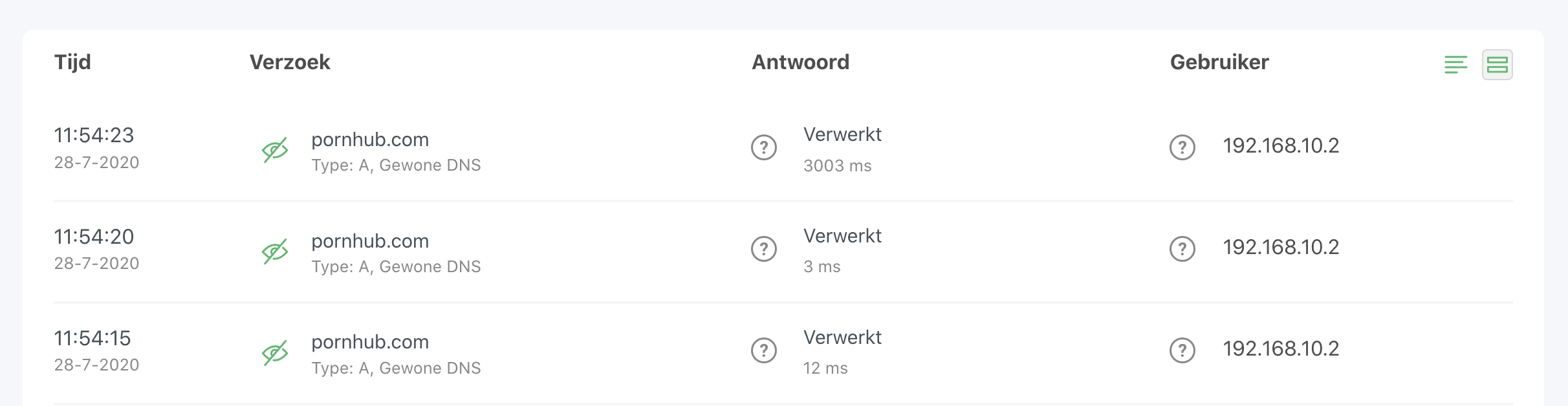
ronaldvdmeer
on 28 Jul 2020
Restart AGH.
If the problem persists, please exec
nslookup family-block.dns.adguard.com 192.168.1.12and if it resolves to176.103.130.135then please attach debug logs:Configure AdGuard Home to collect logs:
- Specify
log_file - Set
verbosetoTrue
- Specify
- Restart AdGuard Home and reproduce the issue
- Post the log file here.
szolin
on 28 Jul 2020
2020/07/28 14:45:55 12432#12 [info] AdGuard Home, version 0.103.3, channel release, arch linux amd64
2020/07/28 14:45:55 12432#12 [debug] Current working directory is /opt/AdGuardHome
2020/07/28 14:45:55 12432#12 [info] AdGuard Home is running as a service
2020/07/28 14:45:55 12432#12 [debug] github.com/AdguardTeam/AdGuardHome/home.upgradeConfig(): got schema version 6
2020/07/28 14:45:55 12432#12 [debug] Reading config file: /opt/AdGuardHome/AdGuardHome.yaml
2020/07/28 14:45:55 12432#12 [debug] Clients: removed 0 client aliases
2020/07/28 14:45:55 12432#12 [debug] Clients: added 0 client aliases from DHCP
2020/07/28 14:45:55 12432#12 [debug] Writing YAML file: /opt/AdGuardHome/AdGuardHome.yaml
2020/07/28 14:45:55 12432#12 [info] Initializing auth module: /opt/AdGuardHome/data/sessions.db
2020/07/28 14:45:55 12432#12 [debug] Auth: loaded 5 sessions from DB (removed 0 expired)
2020/07/28 14:45:55 12432#12 [info] Auth: initialized.  users:1  sessions:5
2020/07/28 14:45:55 12432#12 [info] Initialize web module
2020/07/28 14:45:55 12432#12 [debug] github.com/AdguardTeam/AdGuardHome/stats.(*statsCtx).dbOpen(): db.Open...
2020/07/28 14:45:55 12432#12 [debug] github.com/AdguardTeam/AdGuardHome/stats.(*statsCtx).dbOpen(): db.Open
2020/07/28 14:45:55 12432#12 [debug] github.com/AdguardTeam/AdGuardHome/stats.(*statsCtx).beginTxn(): db.Begin...
2020/07/28 14:45:55 12432#12 [debug] github.com/AdguardTeam/AdGuardHome/stats.(*statsCtx).beginTxn(): db.Begin
2020/07/28 14:45:55 12432#12 [debug] github.com/AdguardTeam/AdGuardHome/stats.createObject(): Deleting old units...
2020/07/28 14:45:55 12432#12 [debug] Stats: initialized
2020/07/28 14:45:55 12432#12 [debug] DNS: added 0 PTR entries from DHCP
2020/07/28 14:45:55 12432#12 [debug] Bootstraps: [1.1.1.1]
2020/07/28 14:45:55 12432#12 [debug] Upstream 0: https://1.1.1.1:443/dns-query
2020/07/28 14:45:55 12432#12 [debug] github.com/AdguardTeam/AdGuardHome/home.(*Filtering).load(): Loading filter 1595588232 contents to: /opt/AdGuardHome/data/filters/1595588232.txt
2020/07/28 14:45:55 12432#12 [debug] github.com/AdguardTeam/AdGuardHome/home.(*Filtering).load(): File /opt/AdGuardHome/data/filters/1595588232.txt, id 1595588232, length 35585
2020/07/28 14:45:55 12432#12 [debug] github.com/AdguardTeam/AdGuardHome/home.(*Filtering).load(): Loading filter 1595588233 contents to: /opt/AdGuardHome/data/filters/1595588233.txt
2020/07/28 14:45:55 12432#12 [debug] github.com/AdguardTeam/AdGuardHome/home.(*Filtering).load(): File /opt/AdGuardHome/data/filters/1595588233.txt, id 1595588233, length 687326
2020/07/28 14:45:55 12432#12 [debug] github.com/AdguardTeam/AdGuardHome/home.(*Filtering).load(): Loading filter 1595588234 contents to: /opt/AdGuardHome/data/filters/1595588234.txt
2020/07/28 14:45:55 12432#12 [debug] github.com/AdguardTeam/AdGuardHome/home.(*Filtering).load(): File /opt/AdGuardHome/data/filters/1595588234.txt, id 1595588234, length 9751757
2020/07/28 14:45:55 12432#12 [debug] Web: applying new TLS configuration
2020/07/28 14:45:55 12432#12 [debug] Start AutoHosts module
2020/07/28 14:45:55 12432#12 [info] AdGuard Home is available on the following addresses:
2020/07/28 14:45:55 12432#17 [debug] AutoHosts: loading hosts from file /etc/hosts
2020/07/28 14:45:55 12432#17 [debug] AutoHosts: added 127.0.0.1 -> localhost.localdomain
2020/07/28 14:45:55 12432#17 [debug] AutoHosts: added reverse-address 127.0.0.1 -> localhost.localdomain
2020/07/28 14:45:55 12432#17 [debug] AutoHosts: added 127.0.0.1 -> localhost
2020/07/28 14:45:55 12432#17 [debug] AutoHosts: added ::1 -> localhost6.localdomain6
2020/07/28 14:45:55 12432#17 [debug] AutoHosts: added reverse-address ::1 -> localhost6.localdomain6
2020/07/28 14:45:55 12432#17 [debug] AutoHosts: added ::1 -> localhost6
2020/07/28 14:45:55 12432#17 [debug] AutoHosts: added 192.168.1.11 -> su01dns01.localnet
2020/07/28 14:45:55 12432#17 [debug] AutoHosts: added reverse-address 192.168.1.11 -> su01dns01.localnet
2020/07/28 14:45:55 12432#17 [debug] AutoHosts: added 192.168.1.11 -> su01dns01
2020/07/28 14:45:55 12432#17 [debug] AutoHosts: added 192.168.1.12 -> su01dns02.localnet
2020/07/28 14:45:55 12432#17 [debug] AutoHosts: added reverse-address 192.168.1.12 -> su01dns02.localnet
2020/07/28 14:45:55 12432#17 [debug] AutoHosts: added 192.168.1.12 -> su01dns02
2020/07/28 14:45:55 12432#17 [debug] AutoHosts: added ::1 -> localhost
2020/07/28 14:45:55 12432#17 [debug] AutoHosts: added ::1 -> ip6-localhost
2020/07/28 14:45:55 12432#17 [debug] AutoHosts: added ::1 -> ip6-loopback
2020/07/28 14:45:55 12432#17 [debug] AutoHosts: added fe00:: -> ip6-localnet
2020/07/28 14:45:55 12432#17 [debug] AutoHosts: added reverse-address fe00:: -> ip6-localnet
2020/07/28 14:45:55 12432#17 [debug] AutoHosts: added ff02::1 -> ip6-allnodes
2020/07/28 14:45:55 12432#17 [debug] AutoHosts: added reverse-address ff02::1 -> ip6-allnodes
2020/07/28 14:45:55 12432#17 [debug] AutoHosts: added ff02::2 -> ip6-allrouters
2020/07/28 14:45:55 12432#17 [debug] AutoHosts: added reverse-address ff02::2 -> ip6-allrouters
2020/07/28 14:45:55 12432#17 [debug] AutoHosts: added ff02::3 -> ip6-allhosts
2020/07/28 14:45:55 12432#17 [debug] AutoHosts: added reverse-address ff02::3 -> ip6-allhosts
2020/07/28 14:45:55 12432#17 [debug] Clients: removed 0 client aliases
2020/07/28 14:45:55 12432#17 [debug] Clients: added '192.168.1.12' -> 'su01dns02.localnet' [1]
2020/07/28 14:45:55 12432#17 [debug] Clients: added 'fe00::' -> 'ip6-localnet' [2]
2020/07/28 14:45:55 12432#17 [debug] Clients: added 'ff02::1' -> 'ip6-allnodes' [3]
2020/07/28 14:45:55 12432#17 [debug] Clients: added 'ff02::2' -> 'ip6-allrouters' [4]
2020/07/28 14:45:55 12432#17 [debug] Clients: added 'ff02::3' -> 'ip6-allhosts' [5]
2020/07/28 14:45:55 12432#17 [debug] Clients: added '127.0.0.1' -> 'localhost.localdomain' [6]
2020/07/28 14:45:55 12432#17 [debug] Clients: added '::1' -> 'localhost6.localdomain6' [7]
2020/07/28 14:45:55 12432#17 [debug] Clients: added '192.168.1.11' -> 'su01dns01.localnet' [8]
2020/07/28 14:45:55 12432#17 [debug] Clients: added 8 client aliases from system hosts-file
2020/07/28 14:45:55 12432#12 [info] Go to http://127.0.0.1:80
2020/07/28 14:45:55 12432#12 [info] Go to http://[::1]:80
2020/07/28 14:45:55 12432#12 [info] Go to http://192.168.1.12:80
2020/07/28 14:46:09 12432#19 [debug] initialized filtering engine
2020/07/28 14:46:09 12432#19 [info] Starting the DNS proxy server
2020/07/28 14:46:09 12432#19 [info] Ratelimit is enabled and set to 20 rps
2020/07/28 14:46:09 12432#19 [info] The server is configured to refuse ANY requests
2020/07/28 14:46:09 12432#19 [info] DNS cache is enabled
2020/07/28 14:46:09 12432#19 [info] Creating the UDP server socket
2020/07/28 14:46:09 12432#19 [info] Listening to udp://[::]:53
2020/07/28 14:46:09 12432#19 [info] Creating the TCP server socket
2020/07/28 14:46:09 12432#19 [info] Listening to tcp://[::]:53
2020/07/28 14:46:09 12432#19 [debug] github.com/AdguardTeam/AdGuardHome/stats.(*statsCtx).beginTxn(): db.Begin...
2020/07/28 14:46:09 12432#19 [debug] github.com/AdguardTeam/AdGuardHome/stats.(*statsCtx).beginTxn(): db.Begin
2020/07/28 14:46:09 12432#21 [debug] github.com/AdguardTeam/AdGuardHome/home.(*clientsContainer).addFromSystemARP(): executing /usr/sbin/arp [arp -a]
2020/07/28 14:46:09 12432#22 [info] Entering the UDP listener loop on [::]:53
2020/07/28 14:46:09 12432#23 [info] Entering the tcp listener loop on [::]:53
2020/07/28 14:46:09 12432#25 [debug] Filters: updating...
2020/07/28 14:46:09 12432#25 [debug] Filters: update finished
2020/07/28 14:46:44 12432#30 [debug] github.com/AdguardTeam/dnsproxy/proxy.(*Proxy).udpHandlePacket(): Start handling new UDP packet from 192.168.10.2:53633
2020/07/28 14:46:44 12432#30 [debug] github.com/AdguardTeam/dnsproxy/proxy.(*Proxy).logDNSMessage(): IN: ;; opcode: QUERY, status: NOERROR, id: 23840
;; flags: rd ad; QUERY: 1, ANSWER: 0, AUTHORITY: 0, ADDITIONAL: 1

;; QUESTION SECTION:
;family-block.dns.adguard.com.  IN   A

;; ADDITIONAL SECTION:

;; OPT PSEUDOSECTION:
; EDNS: version 0; flags: ; udp: 4096

2020/07/28 14:46:44 12432#30 [debug] github.com/AdguardTeam/AdGuardHome/home.(*RDNS).Begin(): rDNS: adding 192.168.10.2
2020/07/28 14:46:44 12432#30 [debug] AutoHosts: answer: family-block.dns.adguard.com -> []
2020/07/28 14:46:44 12432#30 [debug] github.com/AdguardTeam/AdGuardHome/dnsfilter.(*Dnsfilter).checkParental(): Parental: checking family-block.dns.adguard.com: abcfd2c5.d6099577.4fc9ce94.pc.dns.adguard.com.
2020/07/28 14:46:44 12432#35 [debug] 176.103.130.131:53: sending request AAAA dns-family.adguard.com.
2020/07/28 14:46:44 12432#15 [debug] github.com/AdguardTeam/AdGuardHome/home.(*RDNS).resolve(): Resolving host for 192.168.10.2
2020/07/28 14:46:44 12432#37 [debug] github.com/AdguardTeam/dnsproxy/upstream.createDialContext.func1(): Dialing to 1.1.1.1:443
2020/07/28 14:46:44 12432#40 [debug] 176.103.130.130:53: sending request AAAA dns-family.adguard.com.
2020/07/28 14:46:44 12432#34 [debug] 176.103.130.131:53: sending request A dns-family.adguard.com.
2020/07/28 14:46:44 12432#39 [debug] 176.103.130.130:53: sending request A dns-family.adguard.com.
2020/07/28 14:46:44 12432#40 [debug] 176.103.130.130:53: response: read udp 192.168.1.12:35039->176.103.130.130:53: read: connection refused
2020/07/28 14:46:44 12432#35 [debug] 176.103.130.131:53: response: read udp 192.168.1.12:60618->176.103.130.131:53: read: connection refused
2020/07/28 14:46:44 12432#39 [debug] 176.103.130.130:53: response: read udp 192.168.1.12:53896->176.103.130.130:53: read: connection refused
2020/07/28 14:46:44 12432#32 [debug] github.com/AdguardTeam/dnsproxy/upstream.lookup(): failed to lookup for dns-family.adguard.com in 4 milliseconds using 176.103.130.130: read udp 192.168.1.12:35039->176.103.130.130:53: read: connection refused
2020/07/28 14:46:44 12432#34 [debug] 176.103.130.131:53: response: read udp 192.168.1.12:36959->176.103.130.131:53: read: connection refused
2020/07/28 14:46:44 12432#33 [debug] github.com/AdguardTeam/dnsproxy/upstream.lookup(): failed to lookup for dns-family.adguard.com in 8 milliseconds using 176.103.130.131: read udp 192.168.1.12:60618->176.103.130.131:53: read: connection refused
2020/07/28 14:46:44 12432#30 [debug] github.com/AdguardTeam/AdGuardHome/dnsfilter.(*Dnsfilter).checkParental(): Parental lookup for family-block.dns.adguard.com; Elapsed time: 9ms
2020/07/28 14:46:44 12432#30 [info] Parental: failed: couldn't initialize HTTP client or transport, cause: couldn't initialize HTTP transport, cause: couldn't bootstrap https://dns-family.adguard.com:443/dns-query, cause: failed to lookup dns-family.adguard.com, cause: synthetic.wrap: all resolvers failed to lookup, cause: read udp 192.168.1.12:35039->176.103.130.130:53: read: connection refused (hidden: read udp 192.168.1.12:60618->176.103.130.131:53: read: connection refused)
2020/07/28 14:46:44 12432#37 [debug] github.com/AdguardTeam/dnsproxy/upstream.createDialContext.func1(): dialer has successfully initialized connection to 1.1.1.1:443 in 8 milliseconds
2020/07/28 14:46:44 12432#15 [debug] https://1.1.1.1:443/dns-query: sending request PTR 2.10.168.192.in-addr.arpa.
2020/07/28 14:46:44 12432#30 [debug] https://1.1.1.1:443/dns-query: sending request A family-block.dns.adguard.com.
2020/07/28 14:46:44 12432#15 [debug] https://1.1.1.1:443/dns-query: response: ok
2020/07/28 14:46:44 12432#15 [debug] github.com/AdguardTeam/dnsproxy/proxy.exchangeWithUpstream(): upstream https://1.1.1.1:443/dns-query successfully finished exchange of ;2.10.168.192.in-addr.arpa. IN   PTR. Elapsed 350 ms.
2020/07/28 14:46:44 12432#15 [debug] github.com/AdguardTeam/dnsproxy/proxy.(*Proxy).Resolve(): RTT: 350 ms
2020/07/28 14:46:44 12432#15 [debug] No answer for rDNS lookup of 192.168.10.2
2020/07/28 14:46:44 12432#30 [debug] https://1.1.1.1:443/dns-query: response: ok
2020/07/28 14:46:44 12432#30 [debug] github.com/AdguardTeam/dnsproxy/proxy.exchangeWithUpstream(): upstream https://1.1.1.1:443/dns-query successfully finished exchange of ;family-block.dns.adguard.com.  IN   A. Elapsed 343 ms.
2020/07/28 14:46:44 12432#30 [debug] github.com/AdguardTeam/dnsproxy/proxy.(*Proxy).Resolve(): RTT: 343 ms
2020/07/28 14:46:44 12432#30 [debug] DNSFwd: Checking record A (176.103.130.135) for family-block.dns.adguard.com.
2020/07/28 14:46:44 12432#30 [debug] github.com/AdguardTeam/dnsproxy/proxy.(*Proxy).logDNSMessage(): OUT: ;; opcode: QUERY, status: NOERROR, id: 23840
;; flags: qr rd ra; QUERY: 1, ANSWER: 1, AUTHORITY: 0, ADDITIONAL: 1

;; QUESTION SECTION:
;family-block.dns.adguard.com.  IN   A

;; ANSWER SECTION:
family-block.dns.adguard.com.   18  IN  A   176.103.130.135

;; ADDITIONAL SECTION:

;; OPT PSEUDOSECTION:
; EDNS: version 0; flags: ; udp: 1232

2020/07/28 14:47:03 12432#49 [debug] github.com/AdguardTeam/dnsproxy/proxy.(*Proxy).udpHandlePacket(): Start handling new UDP packet from 192.168.10.2:53025
2020/07/28 14:47:03 12432#49 [debug] github.com/AdguardTeam/dnsproxy/proxy.(*Proxy).logDNSMessage(): IN: ;; opcode: QUERY, status: NOERROR, id: 57530
;; flags: rd; QUERY: 1, ANSWER: 0, AUTHORITY: 0, ADDITIONAL: 0

;; QUESTION SECTION:
;family-block.dns.adguard.com.  IN   A

2020/07/28 14:47:03 12432#49 [debug] AutoHosts: answer: family-block.dns.adguard.com -> []
2020/07/28 14:47:03 12432#49 [debug] github.com/AdguardTeam/AdGuardHome/dnsfilter.(*Dnsfilter).checkParental(): Parental: checking family-block.dns.adguard.com: abcfd2c5.d6099577.4fc9ce94.pc.dns.adguard.com.
2020/07/28 14:47:03 12432#53 [debug] 176.103.130.131:53: sending request AAAA dns-family.adguard.com.
2020/07/28 14:47:03 12432#55 [debug] 176.103.130.130:53: sending request AAAA dns-family.adguard.com.
2020/07/28 14:47:03 12432#52 [debug] 176.103.130.131:53: sending request A dns-family.adguard.com.
2020/07/28 14:47:03 12432#54 [debug] 176.103.130.130:53: sending request A dns-family.adguard.com.
2020/07/28 14:47:03 12432#55 [debug] 176.103.130.130:53: response: read udp 192.168.1.12:50135->176.103.130.130:53: read: connection refused
2020/07/28 14:47:03 12432#53 [debug] 176.103.130.131:53: response: read udp 192.168.1.12:52555->176.103.130.131:53: read: connection refused
2020/07/28 14:47:03 12432#52 [debug] 176.103.130.131:53: response: read udp 192.168.1.12:54046->176.103.130.131:53: read: connection refused
2020/07/28 14:47:03 12432#51 [debug] github.com/AdguardTeam/dnsproxy/upstream.lookup(): failed to lookup for dns-family.adguard.com in 3 milliseconds using 176.103.130.131: read udp 192.168.1.12:52555->176.103.130.131:53: read: connection refused
2020/07/28 14:47:03 12432#54 [debug] 176.103.130.130:53: response: read udp 192.168.1.12:52655->176.103.130.130:53: read: connection refused
2020/07/28 14:47:03 12432#50 [debug] github.com/AdguardTeam/dnsproxy/upstream.lookup(): failed to lookup for dns-family.adguard.com in 4 milliseconds using 176.103.130.130: read udp 192.168.1.12:50135->176.103.130.130:53: read: connection refused
2020/07/28 14:47:03 12432#49 [debug] github.com/AdguardTeam/AdGuardHome/dnsfilter.(*Dnsfilter).checkParental(): Parental lookup for family-block.dns.adguard.com; Elapsed time: 5ms
2020/07/28 14:47:03 12432#49 [info] Parental: failed: couldn't initialize HTTP client or transport, cause: couldn't initialize HTTP transport, cause: couldn't bootstrap https://dns-family.adguard.com:443/dns-query, cause: failed to lookup dns-family.adguard.com, cause: synthetic.wrap: all resolvers failed to lookup, cause: read udp 192.168.1.12:52555->176.103.130.131:53: read: connection refused (hidden: read udp 192.168.1.12:50135->176.103.130.130:53: read: connection refused)
2020/07/28 14:47:03 12432#49 [debug] https://1.1.1.1:443/dns-query: sending request A family-block.dns.adguard.com.
2020/07/28 14:47:03 12432#49 [debug] https://1.1.1.1:443/dns-query: response: ok
2020/07/28 14:47:03 12432#49 [debug] github.com/AdguardTeam/dnsproxy/proxy.exchangeWithUpstream(): upstream https://1.1.1.1:443/dns-query successfully finished exchange of ;family-block.dns.adguard.com.  IN   A. Elapsed 22 ms.
2020/07/28 14:47:03 12432#49 [debug] github.com/AdguardTeam/dnsproxy/proxy.(*Proxy).Resolve(): RTT: 22 ms
2020/07/28 14:47:03 12432#49 [debug] DNSFwd: Checking record A (176.103.130.135) for family-block.dns.adguard.com.
2020/07/28 14:47:03 12432#49 [debug] github.com/AdguardTeam/dnsproxy/proxy.(*Proxy).logDNSMessage(): OUT: ;; opcode: QUERY, status: NOERROR, id: 57530
;; flags: qr rd ra; QUERY: 1, ANSWER: 1, AUTHORITY: 0, ADDITIONAL: 0

;; QUESTION SECTION:
;family-block.dns.adguard.com.  IN   A

;; ANSWER SECTION:
family-block.dns.adguard.com.   120 IN  A   176.103.130.135

2020/07/28 14:47:14 12432#58 [debug] github.com/AdguardTeam/dnsproxy/proxy.(*Proxy).udpHandlePacket(): Start handling new UDP packet from 192.168.10.2:51487
2020/07/28 14:47:14 12432#58 [debug] github.com/AdguardTeam/dnsproxy/proxy.(*Proxy).logDNSMessage(): IN: ;; opcode: QUERY, status: NOERROR, id: 18147
;; flags: rd ad; QUERY: 1, ANSWER: 0, AUTHORITY: 0, ADDITIONAL: 1

;; QUESTION SECTION:
;pornhub.com.   IN   A

;; ADDITIONAL SECTION:

;; OPT PSEUDOSECTION:
; EDNS: version 0; flags: ; udp: 4096

2020/07/28 14:47:14 12432#58 [debug] AutoHosts: answer: pornhub.com -> []
2020/07/28 14:47:14 12432#58 [debug] github.com/AdguardTeam/AdGuardHome/dnsfilter.(*Dnsfilter).checkParental(): Parental: checking pornhub.com: f451a0ce.pc.dns.adguard.com.
2020/07/28 14:47:14 12432#62 [debug] 176.103.130.131:53: sending request AAAA dns-family.adguard.com.
2020/07/28 14:47:14 12432#64 [debug] 176.103.130.130:53: sending request AAAA dns-family.adguard.com.
2020/07/28 14:47:14 12432#61 [debug] 176.103.130.131:53: sending request A dns-family.adguard.com.
2020/07/28 14:47:14 12432#63 [debug] 176.103.130.130:53: sending request A dns-family.adguard.com.
2020/07/28 14:47:14 12432#64 [debug] 176.103.130.130:53: response: read udp 192.168.1.12:49227->176.103.130.130:53: read: connection refused
2020/07/28 14:47:14 12432#62 [debug] 176.103.130.131:53: response: read udp 192.168.1.12:52699->176.103.130.131:53: read: connection refused
2020/07/28 14:47:14 12432#61 [debug] 176.103.130.131:53: response: read udp 192.168.1.12:54240->176.103.130.131:53: read: connection refused
2020/07/28 14:47:14 12432#60 [debug] github.com/AdguardTeam/dnsproxy/upstream.lookup(): failed to lookup for dns-family.adguard.com in 5 milliseconds using 176.103.130.131: read udp 192.168.1.12:52699->176.103.130.131:53: read: connection refused
2020/07/28 14:47:14 12432#63 [debug] 176.103.130.130:53: response: read udp 192.168.1.12:37728->176.103.130.130:53: read: connection refused
2020/07/28 14:47:14 12432#59 [debug] github.com/AdguardTeam/dnsproxy/upstream.lookup(): failed to lookup for dns-family.adguard.com in 4 milliseconds using 176.103.130.130: read udp 192.168.1.12:49227->176.103.130.130:53: read: connection refused
2020/07/28 14:47:14 12432#58 [debug] github.com/AdguardTeam/AdGuardHome/dnsfilter.(*Dnsfilter).checkParental(): Parental lookup for pornhub.com; Elapsed time: 6ms
2020/07/28 14:47:14 12432#58 [info] Parental: failed: couldn't initialize HTTP client or transport, cause: couldn't initialize HTTP transport, cause: couldn't bootstrap https://dns-family.adguard.com:443/dns-query, cause: failed to lookup dns-family.adguard.com, cause: synthetic.wrap: all resolvers failed to lookup, cause: read udp 192.168.1.12:52699->176.103.130.131:53: read: connection refused (hidden: read udp 192.168.1.12:49227->176.103.130.130:53: read: connection refused)
2020/07/28 14:47:14 12432#58 [debug] https://1.1.1.1:443/dns-query: sending request A pornhub.com.
2020/07/28 14:47:14 12432#58 [debug] https://1.1.1.1:443/dns-query: response: ok
2020/07/28 14:47:14 12432#58 [debug] github.com/AdguardTeam/dnsproxy/proxy.exchangeWithUpstream(): upstream https://1.1.1.1:443/dns-query successfully finished exchange of ;pornhub.com.   IN   A. Elapsed 7 ms.
2020/07/28 14:47:14 12432#58 [debug] github.com/AdguardTeam/dnsproxy/proxy.(*Proxy).Resolve(): RTT: 8 ms
2020/07/28 14:47:14 12432#58 [debug] DNSFwd: Checking record A (66.254.114.41) for pornhub.com.
2020/07/28 14:47:14 12432#58 [debug] github.com/AdguardTeam/dnsproxy/proxy.(*Proxy).logDNSMessage(): OUT: ;; opcode: QUERY, status: NOERROR, id: 18147
;; flags: qr rd ra; QUERY: 1, ANSWER: 1, AUTHORITY: 0, ADDITIONAL: 1

;; QUESTION SECTION:
;pornhub.com.   IN   A

;; ANSWER SECTION:
pornhub.com.    1498    IN  A   66.254.114.41

;; ADDITIONAL SECTION:

;; OPT PSEUDOSECTION:
; EDNS: version 0; flags: ; udp: 1232

2020/07/28 14:47:31 12432#11 [info] Received signal 'terminated'
2020/07/28 14:47:31 12432#11 [info] Stopping AdGuard Home
2020/07/28 14:47:31 12432#11 [info] Stopping HTTP server...
2020/07/28 14:47:31 12432#11 [info] Stopped HTTP server
2020/07/28 14:47:31 12432#11 [info] Stopping the DNS proxy server
2020/07/28 14:47:31 12432#23 [info] tcpListen.Accept() returned because we're reading from a closed connection, exiting loop
2020/07/28 14:47:31 12432#22 [info] udpListen.ReadFrom() returned because we're reading from a closed connection, exiting loop
2020/07/28 14:47:31 12432#11 [info] Stopped the DNS proxy server
2020/07/28 14:47:31 12432#11 [debug] github.com/AdguardTeam/AdGuardHome/stats.(*statsCtx).beginTxn(): db.Begin...
2020/07/28 14:47:31 12432#11 [debug] github.com/AdguardTeam/AdGuardHome/stats.(*statsCtx).beginTxn(): db.Begin
2020/07/28 14:47:31 12432#11 [debug] github.com/AdguardTeam/AdGuardHome/stats.(*statsCtx).flushUnitToDB(): Flushing unit 443316
2020/07/28 14:47:31 12432#21 [debug] command /usr/sbin/arp has failed: signal: terminated code:-1
2020/07/28 14:47:31 12432#11 [debug] github.com/AdguardTeam/AdGuardHome/stats.(*statsCtx).commitTxn(): tx.Commit
2020/07/28 14:47:31 12432#11 [debug] github.com/AdguardTeam/AdGuardHome/stats.(*statsCtx).Close(): db.Close...
2020/07/28 14:47:31 12432#11 [debug] github.com/AdguardTeam/AdGuardHome/stats.(*statsCtx).Close(): db.Close
2020/07/28 14:47:31 12432#11 [debug] Stats: closed
2020/07/28 14:47:31 12432#11 [debug] 3 elements serialized via json in 392.061µs: 0 kB, 294.3333333333333/entry, 130.687µs/entry
2020/07/28 14:47:31 12432#11 [debug] ok "/opt/AdGuardHome/data/querylog.json": 883 bytes written
2020/07/28 14:47:31 12432#11 [debug] Closed all DNS modules
2020/07/28 14:47:31 12432#17 [debug] Finished AutoHosts update loop
2020/07/28 14:47:31 12432#11 [info] Stopped
I believe this is the problem
2020/07/28 14:47:14 12432#64 [debug] 176.103.130.130:53: response: read udp 192.168.1.12:49227->176.103.130.130:53: read: connection refused
In my network it is not allowed to send any outgoing DNS requests over the standard unencrypted DNS-port to prevent snooping.
ronaldvdmeer
on 28 Jul 2020
Yes, AGH tries to resolve dns-family.adguard.com via AG DNS using UDP.
This is a normal behaviour.
For example, if you use https://dns10.quad9.net/dns-query as DNS server, you have to get the IP of dns10.quad9.net using plain-text.
We just don't have a setting where you could configure server family server address - we should add this setting.
szolin
on 28 Jul 2020
But why not use the upstream DNS to resolve dns-family.adguard.com?
With cloudflare 1.1.1.1 or 1.0.0.1 it would be fairly simple for cases like mine?
I'm not sure if a custom family server address is a solution. At this point you can already setup a manual upstream server per client/group. Setting up another AdGuard Home server with a adult blocklist enabled would already accomplish this right?
ronaldvdmeer
on 28 Jul 2020
I don't know why we use different bootstrap servers to resolve our family server. We're gonna discuss this internally.
In the end we either should use default upstream server or provide additional configuration settings.
szolin
on 28 Jul 2020
As I recall, we thought that it's better to use AdGuard DNS to resolve its own domain name. Sounds kinda more consistent :)
ameshkov
on 30 Jul 2020
But is it, in these days with DoH and DoT, still consistent? :-)
To me it sounds like a good idea that all DNS lookups are going through the server defined as upstream. That way there is no leaking of data.
ronaldvdmeer
on 30 Jul 2020
Well, that's how DOT/DOH works.
You can't use dns.adguard.com without resolving it's IP address first.
And you can't resolve it using DOT/DOH because you don't know the IP address of the DOT/DOH server.
ameshkov
on 30 Jul 2020
True, but the more familiar dns servers have easy IP addresses. Google is 8.8.8.8, cloudflare is 1.1.1.1 and wasn’t the other one 9.9.9.9?
This way no plaintext unencrypted traffic is required
ronaldvdmeer
on 30 Jul 2020
@ronaldvdmeer you can achieve this if you use DNS stamps in AdGuard Home and configure IP address in that stamp.
Something like this:
sdns://AgcAAAAAAAAABzguOC44LjgACmRucy5nb29nbGUKL2Rucy1xdWVyeQ
Enter it here to see what's encoded there: https://dnscrypt.info/stamps
@szolin I guess we could do the same for AG DNS and just hardcode the addresses of AG dns-family. If you think that's okay, let's file a separate issue about that, this one looks more like a discussion.
ameshkov
on 31 Jul 2020
@ronaldvdmeer you can achieve this if you use DNS stamps in AdGuard Home and configure IP address in that stamp.
Something like this:
sdns://AgcAAAAAAAAABzguOC44LjgACmRucy5nb29nbGUKL2Rucy1xdWVyeQEnter it here to see what's encoded there: https://dnscrypt.info/stamps
The DNS Stamps topic is way over my head
ronaldvdmeer
on 31 Jul 2020
Oh it's just a way to encode DNS server address with additional useful data, nothing more:)
ameshkov
on 31 Jul 2020
Ah ok. But that will still use plaintext DNS requests right?
ronaldvdmeer
on 31 Jul 2020
Depends on what you encode.
Here's how my example stamp from above looks like:
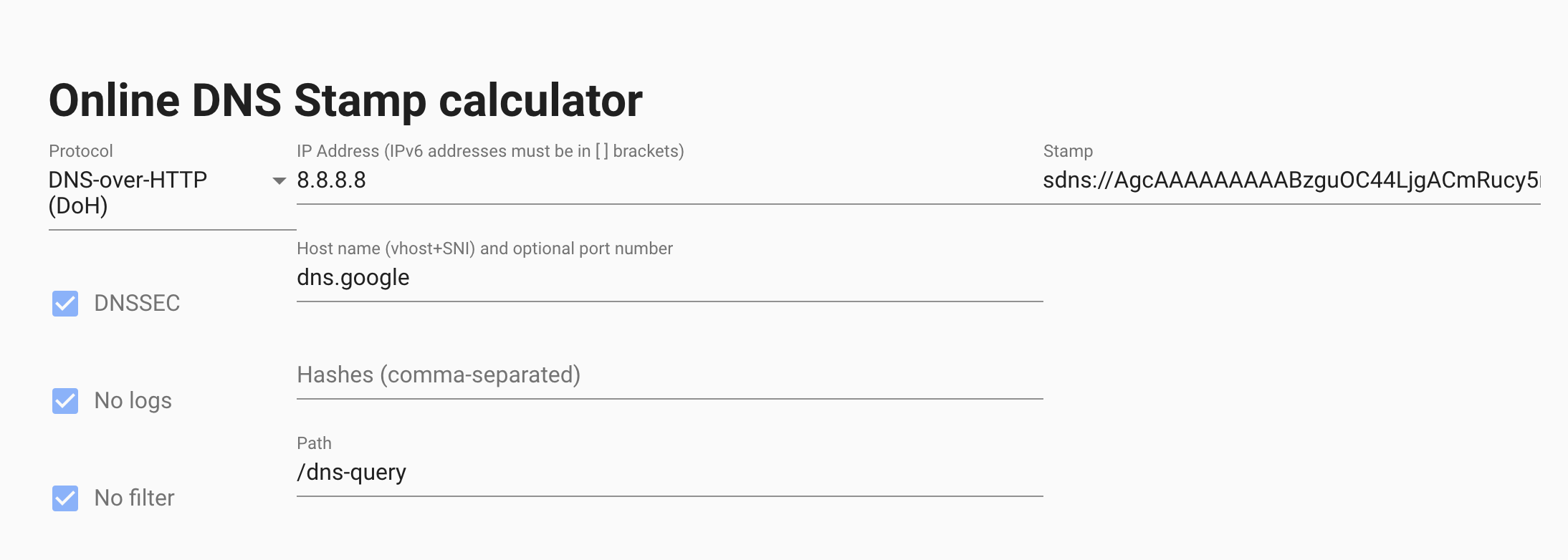
As you can see, I've encoded Google DOH + it's IP address. AdGuard Home knows how to use these stamps so it will use the IP address from the stamp instead of trying to resolve the domain name address.
ameshkov
on 31 Jul 2020
Ah thank you for explaining it.
The original problem was that on my network outgoing unecrypted DNS requests are blocked by the firewall for privacy reasons. AdGuard apparantly doesnt use the upstream DNS server to lookup dns-family.adguard.com which results in the Family protection option not working. So if I could make a suggestion I would like to see all DNS lookups go via the upstream server.
Beside the original reason for this ticket you're suggesting to use DNS stamps so that there is no initial DNS lookup needed when a hostname is used as upstream server. Right?
ronaldvdmeer
on 31 Jul 2020
Beside the original reason for this ticket you're suggesting to use DNS stamps so that there is no initial DNS lookup needed when a hostname is used as upstream server. Right?
Yeah, it's not directly relevant to the issue, but if you want to completely avoid plain DNS queries, you may want to use stamps with IPs. Otherwise, there will be one plain DNS query to resolve your upstream's domain name.
ameshkov
on 31 Jul 2020
Yeah, it's not directly relevant to the issue, but if you want to completely avoid plain DNS queries, you may want to use stamps with IPs. Otherwise, there will be one plain DNS query to resolve your upstream's domain name.
But what is the advantage with DNS Stamps over just using the IP (1.1.1.1, 8.8.8.8 or 9.9.9.9). To me DNS stamps make it more complicated while using the IP address is more straight forward and also completely removes plain DNS queries
ronaldvdmeer
on 31 Jul 2020
None, but not all DNS servers allow using IP addresses without domain names for DOH/DOT.
ameshkov
on 31 Jul 2020
None, but not all DNS servers allow using IP addresses without domain names for DOH/DOT.
Ah yes! The DNS servers i'm using all have the IP as an alternative address in the certificate as well. Didn't know some didn't support it.
ronaldvdmeer
on 31 Jul 2020
Do you need me to create another issue so it can be added to a release or is the discussion above enough?
ronaldvdmeer
on 1 Aug 2020
No need, we're making some changes to the SB service and we'll resolve this issue as a part of that change.
ameshkov
on 3 Aug 2020
705a9d90
szolin
on 17 Aug 2020
Will the dns traffic be encrypted as well?
ronaldvdmeer
on 17 Aug 2020
DNS traffic to/from Family server? Of course.
szolin
on 18 Aug 2020
Related issues
 bestpika
·
48Comments
bestpika
·
48Comments
 Mosney
·
35Comments
Mosney
·
35Comments
 iAYMANi
·
51Comments
iAYMANi
·
51Comments
 rashidjehangir
·
38Comments
ameshkov
·
27Comments
rashidjehangir
·
38Comments
ameshkov
·
27Comments