Adguardhome: how fix error 127.0.0.1:8618
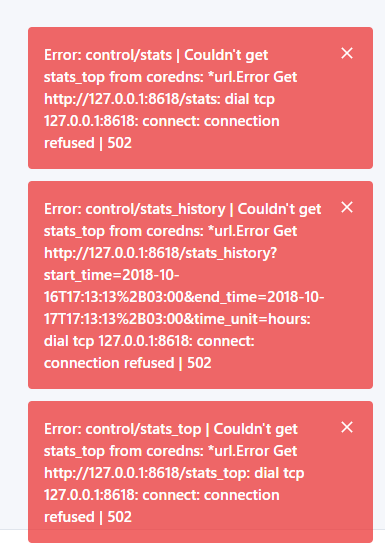
Error: control/stats | Couldn't get stats_top from coredns: *url.Error Get http://127.0.0.1:8618/stats: dial tcp 127.0.0.1:8618: connect: connection refused | 502
 iAYMANi
All 51 comments
Hi! You've forgotten to fill what version of AdGuard Home you're using.
 hmage
on 17 Oct 2018
hmage
on 17 Oct 2018
hi
the version: v0.9
iAYMANi
on 17 Oct 2018
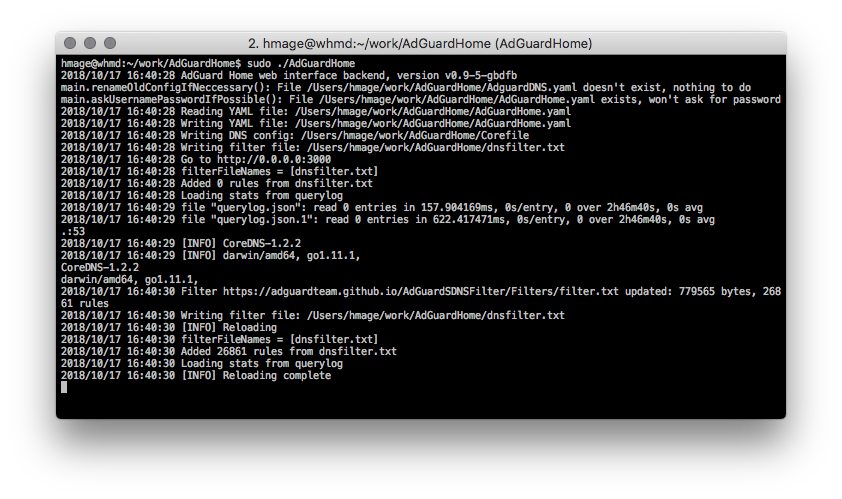
Can you print what AdGuardHome is writing in the terminal during the start?
hmage
on 17 Oct 2018
This is how it should look like:
hmage
on 17 Oct 2018
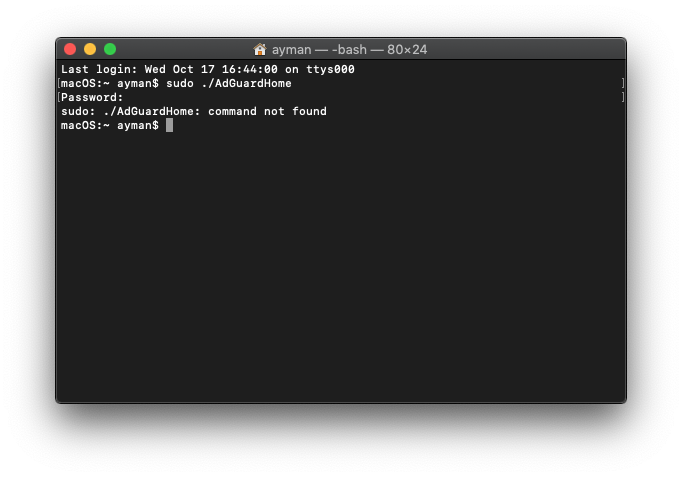
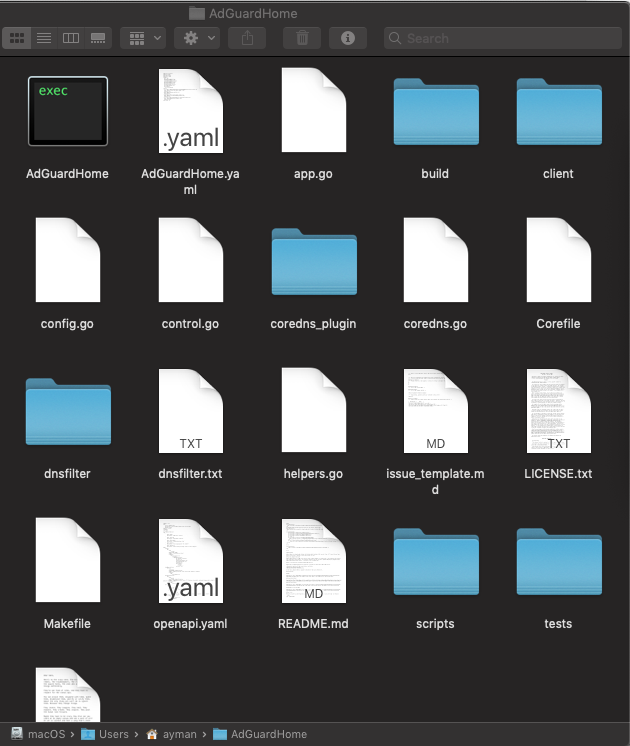
Installation setup
iAYMANi
on 17 Oct 2018
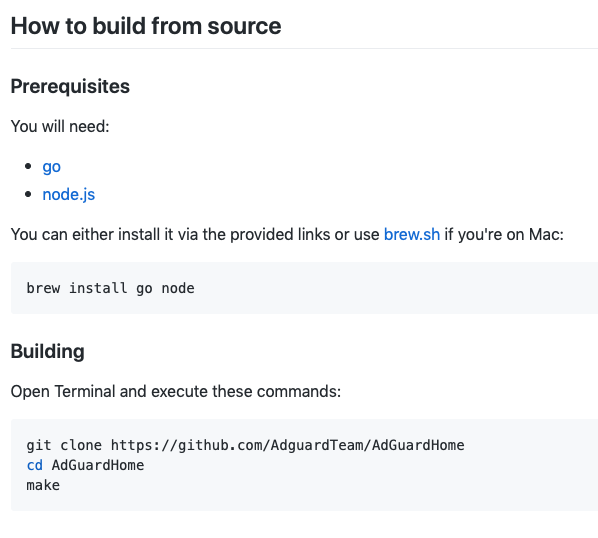
Please download the binary and follow installation instructions.
You don't need source code to run the service.
hmage
on 17 Oct 2018
I also have issue with port 8618 on ARM Linux. v 0.9. I used downloaded binary file.
root@turris:~# ./AdGuardHome/AdGuardHome
2018/10/17 13:51:32 AdGuard Home web interface backend, version v0.9
main.renameOldConfigIfNeccessary(): File /root/AdGuardHome/AdguardDNS.yaml doesn't exist, nothing to do
main.askUsernamePasswordIfPossible(): File /root/AdGuardHome/AdGuardHome.yaml exists, won't ask for password
2018/10/17 13:51:32 Reading YAML file: /root/AdGuardHome/AdGuardHome.yaml
2018/10/17 13:51:32 Writing YAML file: /root/AdGuardHome/AdGuardHome.yaml
2018/10/17 13:51:32 Writing DNS config: /root/AdGuardHome/Corefile
2018/10/17 13:51:32 Writing filter file: /root/AdGuardHome/dnsfilter.txt
2018/10/17 13:51:32 Go to http://127.0.0.1:10080
.:53
2018/10/17 13:51:32 [INFO] CoreDNS-1.2.2
2018/10/17 13:51:32 [INFO] linux/arm, go1.11.1,
CoreDNS-1.2.2
linux/arm, go1.11.1,
2018/10/17 13:51:33 Filter https://adguardteam.github.io/AdGuardSDNSFilter/Filters/filter.txt updated: 779565 bytes, 26861 rules
2018/10/17 13:51:34 Filter https://adaway.org/hosts.txt updated: 13722 bytes, 409 rules
2018/10/17 13:51:34 Writing filter file: /root/AdGuardHome/dnsfilter.txt
2018/10/17 13:51:50 Couldn't get stats_top from coredns: *url.Error Get http://127.0.0.1:8618/stats: dial tcp 127.0.0.1:8618: connect: connection refused

2018/10/17 13:51:50 Couldn't get stats_top from coredns: *url.Error Get http://127.0.0.1:8618/stats_history?start_time=2018-10-16T16:51:50%2B03:00&end_time=2018-10-17T16:51:50%2B03:00&time_unit=hours: dial tcp 127.0.0.1:8618: connect: connection refused

2018/10/17 13:51:51 Couldn't get stats_top from coredns: *url.Error Get http://127.0.0.1:8618/stats_top: dial tcp 127.0.0.1:8618: connect: connection refused
My config
bind_host: 127.0.0.1
bind_port: 10080
auth_name: ""
auth_pass: ""
coredns:
  port: 5353
  protection_enabled: true
  filtering_enabled: true
  safebrowsing_enabled: false
  safesearch_enabled: true
  parental_enabled: false
  parental_sensitivity: 0
  blocked_response_ttl: 10
  querylog_enabled: true
  upstream_dns:
  - tls://1.1.1.1
  - tls://1.0.0.1
filters:
- url: https://adguardteam.github.io/AdGuardSDNSFilter/Filters/filter.txt
  name: AdGuard Simplified Domain Names filter
  enabled: true
- url: https://adaway.org/hosts.txt
  name: AdAway
  enabled: true
- url: https://hosts-file.net/ad_servers.txt
  name: hpHosts - Ad and Tracking servers only
  enabled: false
- url: http://www.malwaredomainlist.com/hostslist/hosts.txt
  name: MalwareDomainList.com Hosts List
  enabled: false
user_rules: []
 avbel
on 17 Oct 2018
avbel
on 17 Oct 2018
Hi @avbel. It seems that your issue is a bit different.
Could you please try deleting the config file and checking if it works with default settings? You can move it away instead of deleting it.
hmage
on 17 Oct 2018
I tried with simple config
coredns:
  port: 5353
Port 53 is busy on my router
Same error
2018/10/17 14:09:26 AdGuard Home web interface backend, version v0.9
main.renameOldConfigIfNeccessary(): File /root/AdGuardHome/AdguardDNS.yaml doesn't exist, nothing to do
main.askUsernamePasswordIfPossible(): File /root/AdGuardHome/AdGuardHome.yaml exists, won't ask for password
2018/10/17 14:09:26 Reading YAML file: /root/AdGuardHome/AdGuardHome.yaml
2018/10/17 14:09:26 Writing YAML file: /root/AdGuardHome/AdGuardHome.yaml
2018/10/17 14:09:26 Writing DNS config: /root/AdGuardHome/Corefile
2018/10/17 14:09:26 Writing filter file: /root/AdGuardHome/dnsfilter.txt
2018/10/17 14:09:26 Go to http://127.0.0.1:3000
.:53
2018/10/17 14:09:26 [INFO] CoreDNS-1.2.2
2018/10/17 14:09:26 [INFO] linux/arm, go1.11.1,
CoreDNS-1.2.2
linux/arm, go1.11.1,
2018/10/17 14:09:28 Filter https://adguardteam.github.io/AdGuardSDNSFilter/Filters/filter.txt updated: 779565 bytes, 26861 rules
2018/10/17 14:09:28 Writing filter file: /root/AdGuardHome/dnsfilter.txt
channel 9: open failed: connect failed: Connection refused
2018/10/17 14:09:47 Couldn't get stats_top from coredns: *url.Error Get http://127.0.0.1:8618/stats: dial tcp 127.0.0.1:8618: connect: connection refused

2018/10/17 14:09:47 Couldn't get stats_top from coredns: *url.Error Get http://127.0.0.1:8618/stats_history?start_time=2018-10-16T17:09:47%2B03:00&end_time=2018-10-17T17:09:47%2B03:00&time_unit=hours: dial tcp 127.0.0.1:8618: connect: connection refused

2018/10/17 14:09:48 Couldn't get stats_top from coredns: *url.Error Get http://127.0.0.1:8618/stats_top: dial tcp 127.0.0.1:8618: connect: connection refused
On browser side:
avbel
on 17 Oct 2018
I tried to run without any config file (I stopped internal DNS server before that) . Same error
root@turris:~# ./AdGuardHome/AdGuardHome
2018/10/17 14:16:46 AdGuard Home web interface backend, version v0.9
main.renameOldConfigIfNeccessary(): File /root/AdGuardHome/AdguardDNS.yaml doesn't exist, nothing to do
Would you like to set user/password for the web interface authentication (yes/no)?
Please type 'yes' or 'no': no
2018/10/17 14:16:52 Reading YAML file: /root/AdGuardHome/AdGuardHome.yaml
2018/10/17 14:16:52 YAML file doesn't exist, skipping: /root/AdGuardHome/AdGuardHome.yaml
2018/10/17 14:16:52 Writing YAML file: /root/AdGuardHome/AdGuardHome.yaml
2018/10/17 14:16:52 Writing DNS config: /root/AdGuardHome/Corefile
2018/10/17 14:16:52 Writing filter file: /root/AdGuardHome/dnsfilter.txt
2018/10/17 14:16:52 Go to http://127.0.0.1:3000
.:53
2018/10/17 14:16:52 [INFO] CoreDNS-1.2.2
2018/10/17 14:16:52 [INFO] linux/arm, go1.11.1,
CoreDNS-1.2.2
linux/arm, go1.11.1,
2018/10/17 14:16:53 Couldn't request filter from URL https://adguardteam.github.io/AdGuardSDNSFilter/Filters/filter.txt, skipping: Get https://adguardteam.github.io/AdGuardSDNSFilter/Filters/filter.txt: dial tcp: lookup adguardteam.github.io on 127.0.0.1:53: no such host
2018/10/17 14:16:53 Failed to update filter https://adguardteam.github.io/AdGuardSDNSFilter/Filters/filter.txt: Get https://adguardteam.github.io/AdGuardSDNSFilter/Filters/filter.txt: dial tcp: lookup adguardteam.github.io on 127.0.0.1:53: no such host
2018/10/17 14:17:03 Couldn't get querylog from coredns: *url.Error Get https://adguardteam.github.io/AdGuardHome/version.json: dial tcp: lookup adguardteam.github.io on 127.0.0.1:53: no such host

2018/10/17 14:17:03 Couldn't get stats_top from coredns: *url.Error Get http://127.0.0.1:8618/stats: dial tcp 127.0.0.1:8618: connect: connection refused

2018/10/17 14:17:03 Couldn't get stats_top from coredns: *url.Error Get http://127.0.0.1:8618/stats_history?start_time=2018-10-16T17:17:03%2B03:00&end_time=2018-10-17T17:17:03%2B03:00&time_unit=hours: dial tcp 127.0.0.1:8618: connect: connection refused

2018/10/17 14:17:03 Couldn't get stats_top from coredns: *url.Error Get http://127.0.0.1:8618/stats_top: dial tcp 127.0.0.1:8618: connect: connection refused
Hmm. It seems that binding to port 8618 silently fails.
Can you give me output of:
sudo netstat -naptu | fgrep :8618
Would greatly appreciate your help in troubleshooting this issue.
hmage
on 17 Oct 2018
I checked already. Port 8618 was free. AdGuardHome doesn't listen to 8618 (with and without config)
root@turris:~# netstat -naptu | fgrep :8618
root@turris:~#
for me
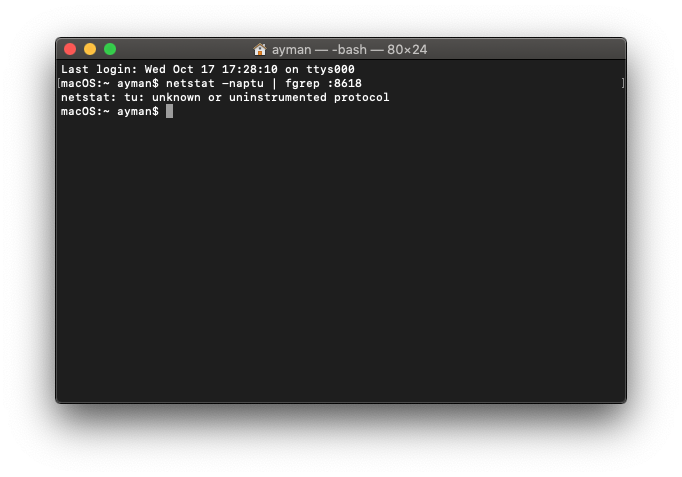
how open port???
iAYMANi
on 17 Oct 2018
@avbel I think I know what's happening.
If you change /etc/resolv.conf to point to a different nameserver (for example 8.8.8.8), does it fix the problem?
If it fixes the issue, use it as a temporary workaround -- later on we'll make that having it point to your own machine shouldn't be problematic.
hmage
on 17 Oct 2018
@iAYMANi that command was for @avbel -- it won't work on Mac.
Did you have any success at downloading
https://github.com/AdguardTeam/AdGuardHome/releases/download/v0.9/AdGuardHome_v0.9_MacOS.zip and running it?
hmage
on 17 Oct 2018
yes
Last login: Wed Oct 17 17:48:15 on console
macOS:~ ayman$ sudo ./AdGuardHome2/AdGuardHome
Password:
2018/10/17 17:50:21 AdGuard Home web interface backend, version v0.9
main.renameOldConfigIfNeccessary(): File /Users/ayman/AdGuardHome2/AdguardDNS.yaml doesn't exist, nothing to do
main.askUsernamePasswordIfPossible(): File /Users/ayman/AdGuardHome2/AdGuardHome.yaml exists, won't ask for password
2018/10/17 17:50:21 Reading YAML file: /Users/ayman/AdGuardHome2/AdGuardHome.yaml
2018/10/17 17:50:21 Writing YAML file: /Users/ayman/AdGuardHome2/AdGuardHome.yaml
2018/10/17 17:50:21 Writing DNS config: /Users/ayman/AdGuardHome2/Corefile
2018/10/17 17:50:21 Writing filter file: /Users/ayman/AdGuardHome2/dnsfilter.txt
2018/10/17 17:50:21 Go to http://127.0.0.1:3000
.:53
2018/10/17 17:50:21 [INFO] CoreDNS-1.2.2
2018/10/17 17:50:21 [INFO] darwin/amd64, go1.11.1,
CoreDNS-1.2.2
darwin/amd64, go1.11.1,
2018/10/17 17:50:24 Filter https://adguardteam.github.io/AdGuardSDNSFilter/Filters/filter.txt updated: 779962 bytes, 26868 rules
2018/10/17 17:50:24 Writing filter file: /Users/ayman/AdGuardHome2/dnsfilter.txt
2018/10/17 17:50:47 Couldn't get stats_top from coredns: *url.Error Get http://127.0.0.1:8618/stats: dial tcp 127.0.0.1:8618: connect: connection refused
2018/10/17 17:50:47 Couldn't get stats_top from coredns: *url.Error Get http://127.0.0.1:8618/stats_history?start_time=2018-10-16T17:50:47%2B03:00&end_time=2018-10-17T17:50:47%2B03:00&time_unit=hours: dial tcp 127.0.0.1:8618: connect: connection refused
2018/10/17 17:50:47 Couldn't get stats_top from coredns: *url.Error Get http://127.0.0.1:8618/stats_top: dial tcp 127.0.0.1:8618: connect: connection refused
iAYMANi
on 17 Oct 2018
@iAYMANi Thanks for sending that.
Your issue seems to be different from @avbel's.
Can you give me output of running this command:
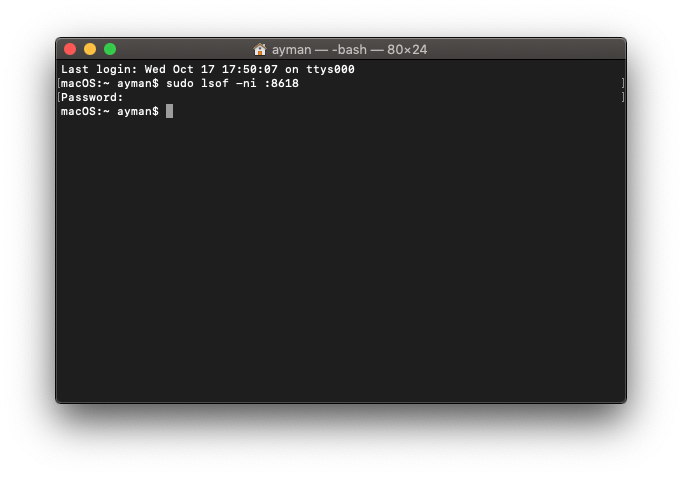
sudo lsof -ni :8618
Would be greatly appreciated. Also don't forget to enclose the output in ``` as per MarkDown syntax.
hmage
on 17 Oct 2018
@iAYMANi Thanks for sending that.
Your issue seems to be different from @avbel's.
Can you give me output of running this command:
sudo lsof -ni :8618Would be greatly appreciated. Also don't forget to enclose the output in ``` as per MarkDown syntax.
iAYMANi
on 17 Oct 2018
@iAYMANi if you ignore these messages and try to use DNS, does it work?
hmage
on 17 Oct 2018
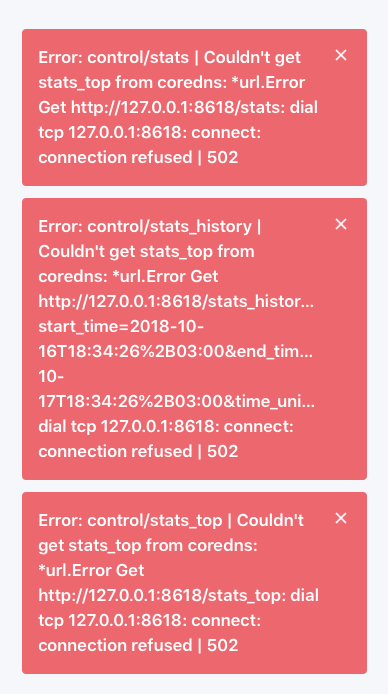
Same problem here:
 karipu
on 17 Oct 2018
karipu
on 17 Oct 2018
Last login: Wed Oct 17 18:20:43 on ttys001
You have mail.
iMac:~ karipu$ sudo lsof -ni :8618
Password:
iMac:~ karipu$
@karipu thanks for reporting.
Could you test if DNS functionality is working anyway? Ignore the error messages for now.
on a Mac you can test this by running:
host google.com 127.0.0.1
This will query the AdGuard Home server and give out result.
If successful, it should give out this output:
Using domain server:
Name: 127.0.0.1
Address: 127.0.0.1#53
Aliases:

google.com has address 64.233.162.139
google.com has address 64.233.162.100
google.com has address 64.233.162.101
google.com has address 64.233.162.102
google.com has address 64.233.162.113
google.com has address 64.233.162.138
google.com has IPv6 address 2a00:1450:4010:c05::71
google.com mail is handled by 40 alt3.aspmx.l.google.com.
google.com mail is handled by 50 alt4.aspmx.l.google.com.
google.com mail is handled by 10 aspmx.l.google.com.
google.com mail is handled by 20 alt1.aspmx.l.google.com.
google.com mail is handled by 30 alt2.aspmx.l.google.com.
This information will help me troubleshoot the main cause of the errors by process of elimination. If DNS itself works fine, the problem will be narrowed down significantly.
hmage
on 17 Oct 2018
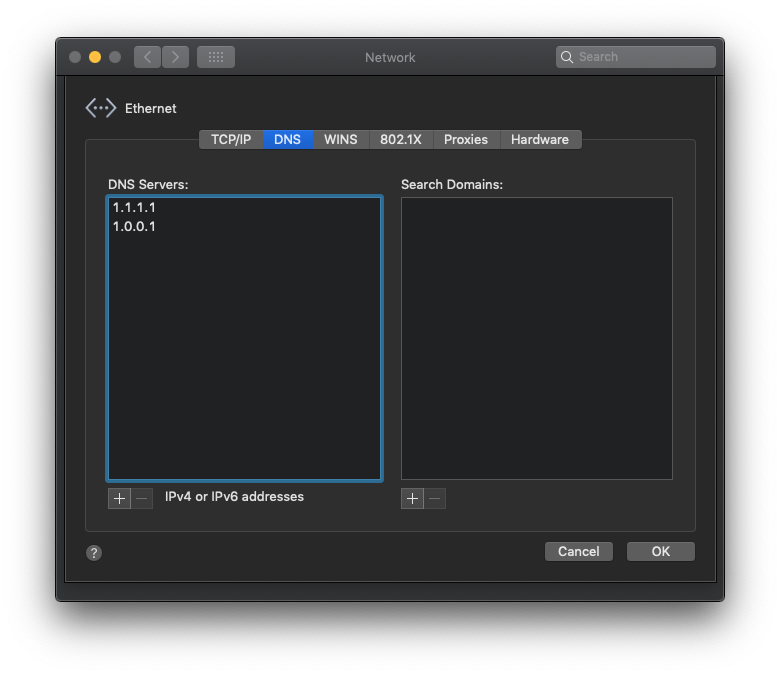
@iAYMANi if you ignore these messages and try to use DNS, does it work?
I put 1.1.1.1 does not work
iAYMANi
on 17 Oct 2018
@iAYMANi You're configuring wrong thing, revert it back to default.
Try host google.com 127.0.0.1 while AdGuardHome is running.
hmage
on 17 Oct 2018
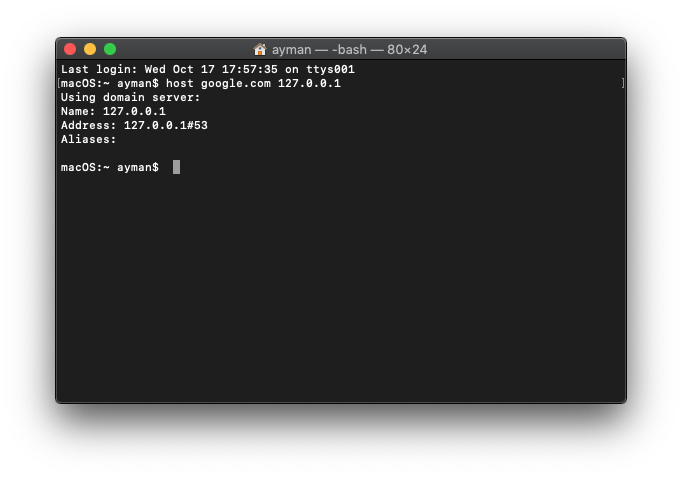
@iAYMANi You're configuring wrong thing, revert it back to default.
Try
host google.com 127.0.0.1while AdGuardHome is running.
iAYMANi
on 17 Oct 2018
@iAYMANi
Alright, this helps narrow it down.
Can you ping 1.1.1.1 or open https://1.1.1.1?
If not, try this:
- Quit
AdGuardHome - Edit
AdGuardHome.yamland replacetls://1.1.1.1andtls://1.0.0.1with8.8.8.8and8.8.4.4without tls://. - Start it again.
If it works, let me know.
hmage
on 17 Oct 2018
@iAYMANi
Alright, this helps narrow it down.
Can you ping 1.1.1.1 or open https://1.1.1.1?
If not, try this:
- Quit
AdGuardHome- Edit
AdGuardHome.yamland replacetls://1.1.1.1andtls://1.0.0.1with8.8.8.8and8.8.4.4_without tls://_.- Start it again.
If it works, let me know.
it does not work
iAYMANi
on 17 Oct 2018
@iAYMANi
what does not work? ping? opening in browser? editing yaml file?
hmage
on 17 Oct 2018
@hmage
Just downloaded the binary on my tinkerboard and same issue
2018/10/17 23:13:26 Couldn't get stats_top from coredns: *url.Error Get http://127.0.0.1:8618/stats: dial tcp 127.0.0.1:8618: connect: connection refused

2018/10/17 23:13:26 Couldn't get stats_top from coredns: *url.Error Get http://127.0.0.1:8618/stats_history?start_time=2018-10-16T23:13:26%2B06:00&end_time=2018-10-17T23:13:26%2B06:00&time_unit=hours: dial tcp 127.0.0.1:8618: connect: connection refused

2018/10/17 23:13:26 Couldn't get stats_top from coredns: *url.Error Get http://127.0.0.1:8618/stats_top: dial tcp 127.0.0.1:8618: connect: connection refused

2018/10/17 23:13:59 Couldn't get stats_top from coredns: *url.Error Get http://127.0.0.1:8618/stats: dial tcp 127.0.0.1:8618: connect: connection refused

2018/10/17 23:13:59 Couldn't get stats_top from coredns: *url.Error Get http://127.0.0.1:8618/stats_history?start_time=2018-10-16T23:13:59%2B06:00&end_time=2018-10-17T23:13:59%2B06:00&time_unit=hours: dial tcp 127.0.0.1:8618: connect: connection refused

2018/10/17 23:13:59 Couldn't get stats_top from coredns: *url.Error Get http://127.0.0.1:8618/stats_top: dial tcp 127.0.0.1:8618: connect: connection refused

2018/10/17 23:15:23 Couldn't get stats_top from coredns: *url.Error Get http://127.0.0.1:8618/stats: dial tcp 127.0.0.1:8618: connect: connection refused

2018/10/17 23:15:23 Couldn't get stats_top from coredns: *url.Error Get http://127.0.0.1:8618/stats_history?start_time=2018-10-16T23:15:23%2B06:00&end_time=2018-10-17T23:15:23%2B06:00&time_unit=hours: dial tcp 127.0.0.1:8618: connect: connection refused

2018/10/17 23:15:23 Couldn't get stats_top from coredns: *url.Error Get http://127.0.0.1:8618/stats_top: dial tcp 127.0.0.1:8618: connect: connection refused
 ibnbd
on 17 Oct 2018
ibnbd
on 17 Oct 2018
@ibnbd hey, thanks for report!
How are you launching ADH? Try to cd into the directory and run it from there. If it helps, let me know.
hmage
on 17 Oct 2018
@hmage haha, thanks mate 👍
ibnbd
on 17 Oct 2018
@ibnbd I take it, this helped and it works now?
hmage
on 17 Oct 2018
@hmage yes, it worked after running from it's directory.
ibnbd
on 17 Oct 2018
@ibnbd 🎉 thanks for feedback! Launching from arbitrary directory will be fixed in next release, but right now this is the workaround, hope it's not too inconvenient.
Let me know if you have any other problems by opening a new issue.
hmage
on 17 Oct 2018
all ping & opening in browser
iAYMANi
on 17 Oct 2018
@iAYMANi
Try this:
- Type this in Terminal:
cd ~/AdGuardHome2 sudo ./AdGuardHome2 - Open in your browser
http://localhost:3000/ - Go to settings page, and change upstream servers to 8.8.8.8 and 8.8.4.4.
This should fix your problem. Let me know if it works or not, we'll continue from there.
hmage
on 17 Oct 2018
@iAYMANi
Try this:
- Type this in Terminal:
cd ~/AdGuardHome2 sudo ./AdGuardHome2- Open in your browser
http://localhost:3000/- Go to settings page, and change upstream servers to 8.8.8.8 and 8.8.4.4.
This should fix your problem. Let me know if it works or not, we'll continue from there.
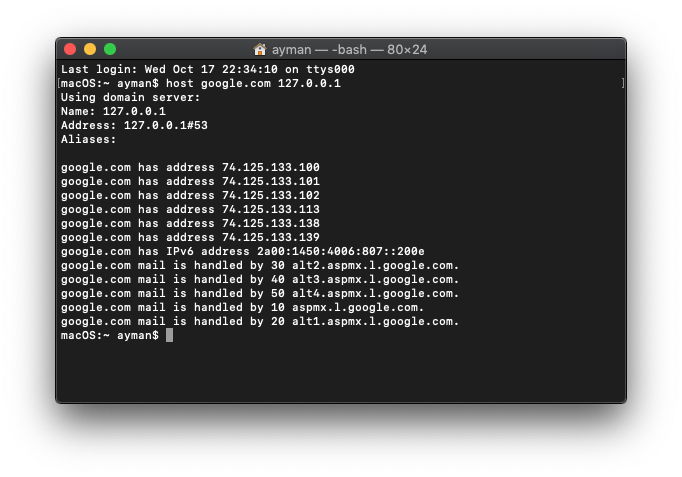
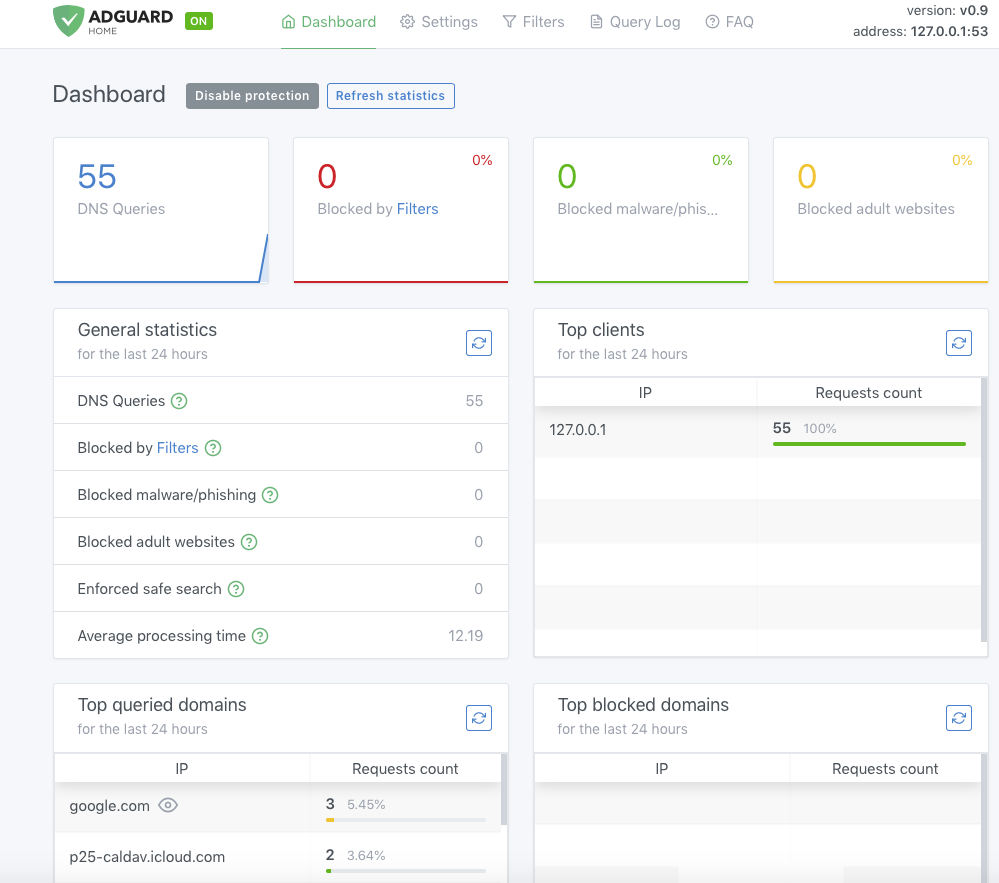
Finally he worked
But the ads are still working
iAYMANi
on 17 Oct 2018
You need to set up your system preferences to use AdGuard Home as a DNS server on macOS:
- Click on Apple icon and go to ’System Preferences.’
- Click on ’Network’
- Select the first connection in your list and click ’Advanced.’
- Select the ’DNS’ tab and add the address of your AdGuard Home.
In your case, since it's running on same machine, it'll be 127.0.0.1.
hmage
on 17 Oct 2018
Hey guys, Google Chrome might be caching DNS responses, try restarting it
 ameshkov
on 17 Oct 2018
ameshkov
on 17 Oct 2018
@hmage if I am not wrong, there is no caching at AdGuard Home. Since CoreDNS has caching plugin, can we use it?
There was a Corefile which I modified for cache. But it keeps rewriting on reboot.
ibnbd
on 18 Oct 2018
I also had the same issue, but is not related with DNS resolving or arbitrary path, it is related with the service file for systemd.
I used first:
[Unit]
Description=AdGuard Home
After=syslog.target
After=network.target

[Service]
Type=simple
User=root
Group=root
WorkingDirectory=/home/pi/AdGuardHome
ExecStart=/home/pi/AdGuardHome/AdGuardHome --host 192.168.10.20
Restart=always

[Install]
WantedBy=multi-user.target
Then I did read a issue posted by @ibksturm where it provide an usable service file, you can view the issue here:
[Unit]
Description=AdGuardHome DNS
#ConditionFileIsExecutable=/etc/AdGuardHome/AduGuardHome

[Service]
StartLimitInterval=5
StartLimitBurst=10
ExecStart=/etc/AdGuardHome/AdGuardHome -c AdGuardHome.yaml

WorkingDirectory=/etc/AdGuardHome

#User=root
#Group=root

#Restart=always
#RestartSec=120
#EnvironmentFile=-/etc/sysconfig/dnscrypt-proxy

[Install]
WantedBy=multi-user.target
So Go language sometimes have issues with systemd directives.
 omata
on 18 Oct 2018
omata
on 18 Oct 2018
@hmage if I am not wrong, there is no caching at AdGuard Home. Since CoreDNS has caching plugin, can we use it?
There was a
Corefilewhich I modified forcache.
@ibnbd AdGuard Home uses CoreDNS caching by default, there's no way to disable it, it is always present in Corefile and it is always rewritten by AdGuard Home on reload and restart.
If you have a spare moment, could you please try to reproduce a situation where a generated Corefile doesn't have cache line?
Thanks in advance.
hmage
on 18 Oct 2018
@omata
So Go language sometimes have issues with systemd directives.
The difference is the location of paths, in first one it's /home/pi/AdGuardHome/AdGuardHome, in second it's /etc/AdGuardHome/AdGuardHome, it doesn't matter what language it is if you're trying to execute a binary that isn't there.
Also I've noticed that you didn't read the guide where the systemd file is from, just copypasted it without adjusting as instructed in the guide.
- You didn't extract AdGuardHome in pi user's home folder.
- You forgot to replace 192.168.10.20 with IP of your host. it's written in big bold letters right after the systemd file:
NOTE: Don't forget to replace 192.168.10.20 with IP of your Pi.
If you've followed the guide correctly, it would've worked flawlessly.
Thanks in advance, if you have any other problems, let me know in a new issue. Please don't clutter this issue.
hmage
on 18 Oct 2018
@hmage if I am not wrong, there is no caching at AdGuard Home. Since CoreDNS has caching plugin, can we use it?
There was aCorefilewhich I modified forcache.@ibnbd AdGuard Home uses CoreDNS caching by default, there's no way to disable it, it is always present in Corefile and it is always rewritten by AdGuard Home on reload and restart.
If you have a spare moment, could you please try to reproduce a situation where a generated Corefile doesn't have
cacheline?Thanks in advance.
I am not trying to disable cache, I am trying to set value for TTL. https://coredns.io/plugins/cache/
ibnbd
on 18 Oct 2018
@ibnbd
Corefile will be overwritten, all changes done to that file will be lost — you're not supposed to modify it.
Also please don't hijack this thread. If your issue isn't about port 8618, it's better if you create new issue.
hmage
on 18 Oct 2018
Since I assume that original creator of this issue is satisfied (judging by 👍 in response to comment
https://github.com/AdguardTeam/AdGuardHome/issues/378#issuecomment-430768556), I am closing this issue as resolved.
hmage
on 18 Oct 2018
@iAYMANi Feel free to reopen if Error: control/stats | Couldn't get stats_top from coredns: *url.Error Get http://127.0.0.1:8618/stats: dial tcp 127.0.0.1:8618: connect: connection refused | 502 still occurs.
hmage
on 18 Oct 2018
@omata
So Go language sometimes have issues with systemd directives.
The difference is the location of paths, in first one it's
/home/pi/AdGuardHome/AdGuardHome, in second it's/etc/AdGuardHome/AdGuardHome, it doesn't matter what language it is if you're trying to execute a binary that isn't there.
I pasted generic versions of these files, I changed the paths to the right ones in my file, so paths wasn't wrong, then the service started, but created the configurations files with the wrong user:group with 501:staff the web interface was erratic and started to show the error notifications reported in this issue post.
Also I've noticed that you didn't read the guide where the systemd file is from, just copypasted it without adjusting as instructed in the guide.
You are right but I just changed the binary path to /opt/AdGuardHome. I remember that using a Prometheus collector I had the same issue with systemd and paths with root:root privileges, I wrote to developer and he figured out that the provided service file for systemd was wrong, I don't remember right now but he changed some directives in the file and all did work flawlessly. Just like the file posted by @ibksturm that solved all the issues for me.
- You didn't extract AdGuardHome in pi user's home folder.
You are right I don't I did use /opt/AdGuardHome
- You forgot to replace 192.168.10.20 with IP of your host. it's written in big bold letters right after the systemd file:
NOTE: Don't forget to replace 192.168.10.20 with IP of your Pi.
Yes, I did this step.
I know that I didn't follow the directions in 100%, but I just change binary paths, so it is fixed by now with the referenced file.
If you've followed the guide correctly, it would've worked flawlessly.
Thanks in advance, if you have any other problems, let me know in a _new_ issue. Please don't clutter this issue.
Thank you for your help!
omata
on 18 Oct 2018
@hmage
Result was this:
Using domain server:
Name: 127.0.0.1
Address: 127.0.0.1#53
Aliases:
No aliases!
karipu
on 18 Oct 2018
@avbel I think I know what's happening.
If you change /etc/resolv.conf to point to a different nameserver (for example 8.8.8.8), does it fix the problem?
If it fixes the issue, use it as a temporary workaround -- later on we'll make that having it point to your own machine shouldn't be problematic.
Yes. With 8.8.8.8 it starts work. Thanks
avbel
on 18 Oct 2018
@karipu try the hotfix release -- v0.9-hotfix1 -- it will help with the issue you're having.
hmage
on 18 Oct 2018
Related issues
 ammnt
·
28Comments
ammnt
·
28Comments
 ronaldvdmeer
·
33Comments
ronaldvdmeer
·
33Comments
 DavidTai780
·
33Comments
DavidTai780
·
33Comments
 rfgamaral
·
27Comments
rfgamaral
·
27Comments
 DandelionSprout
·
51Comments
DandelionSprout
·
51Comments