Addons-frontend: Support blog-style user guides
As part of the Homepage Hero Area project, we need to support static pages that have content that reads more like a blog.
The content will be provided by @devaneymoz, it should be localized, and we don't need it to be managed via admin tools. It should just be static content that is checked into the repo. Those pages will generally link to add-on pages and collections. Design for the pages should be provided by @pwalm soon.
For URLs, I suggest something like /guides/ad-blockers/, /guides/tabs/, etc.
 jvillalobos
All 32 comments
I'd like the team to brainstorm possible solutions. Here's some initial thoughts - I'm sure there's other solutions:
API driven content
- This would require more addons-server bandwidth that we don't really have in Q4.
- Localization is a bit more involved if we go with DB based content and PO driven translations as per the recommendations.
Code-splitting via Webpack
- Use JSX and the same tools as usual for localization. Bundle splitting would move the specific JS with the content to be loaded only when on those specific pages.
- Downside is that lots of copy and markup is a bit painful in JSX e.g. See the FAQ page for an example.
- Not as easy for anyone to edit
Markdown docs
- Use markdown for the english doc.
- Easy to edit via github.
- Explore https://bitbucket.org/tagoh/gettext-markdown to extract into POT/PO files for regular translation.
- same lib can then be re-used to re-assemble into localized content.
- Extraction/Compilation could be done alongside our other l10n processes.
Of all of these I like the markdown option but it would need investigating further. Any other ideas?
/cc @mozilla/addons-service-developers for input
 muffinresearch
on 28 Sep 2018
muffinresearch
on 28 Sep 2018
My vote would be for the Markdown option. It will allow Scott to directly provide the copy including styling.
Question: does "blog style" include images? (3rd party images may come up against CSP or tracking blocking; AMO hosted images on the CDN is more difficult)
 eviljeff
on 4 Oct 2018
eviljeff
on 4 Oct 2018
There are some early drafts of the content in this document. They don't have images, but I would expect that to change in the future, so it'd be good to think of possible solutions for that.
jvillalobos
on 4 Oct 2018
My vote is for markdown too. I am currently looking into this and will hopefully have a POC for this soon so I can start getting feedback.
 rebmullin
on 5 Oct 2018
rebmullin
on 5 Oct 2018
For images, we could replace all image links with links pointing to a proxy like https://github.com/atmos/camo (used by GitHub). It would allow to avoid mixed content and it would be CSP friendly as we would only have one host. Processing the markdown or whatever format would be easy too.
 willdurand
on 5 Oct 2018
willdurand
on 5 Oct 2018
Good point on the images. One idea would be to reference them to images in the tree in the markdown so it looks OK editing via github and then we would need to process the relative links and add the necessary CDN URLs as part of the markdown render step - that would then allow this to work in -dev, stage and prod.
muffinresearch
on 10 Oct 2018
reference them to images in the tree in the markdown so it looks OK editing via github
Can you provide more detail on how this would work? How exactly would they be referenced in the markdown that would allow it to look good while editing?
eviljeff
on 10 Oct 2018
Can you provide more detail on how this would work? How exactly would they be referenced in the markdown that would allow it to look good while editing?
What I'm referring to is something along the lines of this readme https://github.com/muffinresearch/reference-static-theme/blob/master/README.md
The screenshot image is in the repo. So the preview shows the image. FWIW I think it's possible to skip the raw query param.
muffinresearch
on 10 Oct 2018
Another option would by LinguiJS, which can emit PO files (using MessageFormat) and support JSX in translated content: https://lingui.js.org/tutorials/react.html#formatting. It also has a JSX component to include a paragraph of text, instead of having something like i18n.gettext().
Maybe we could look into creating a GetText component that would work with our extraction process.
willdurand
on 10 Oct 2018
Looks like this mock-up is what we need to achieve:
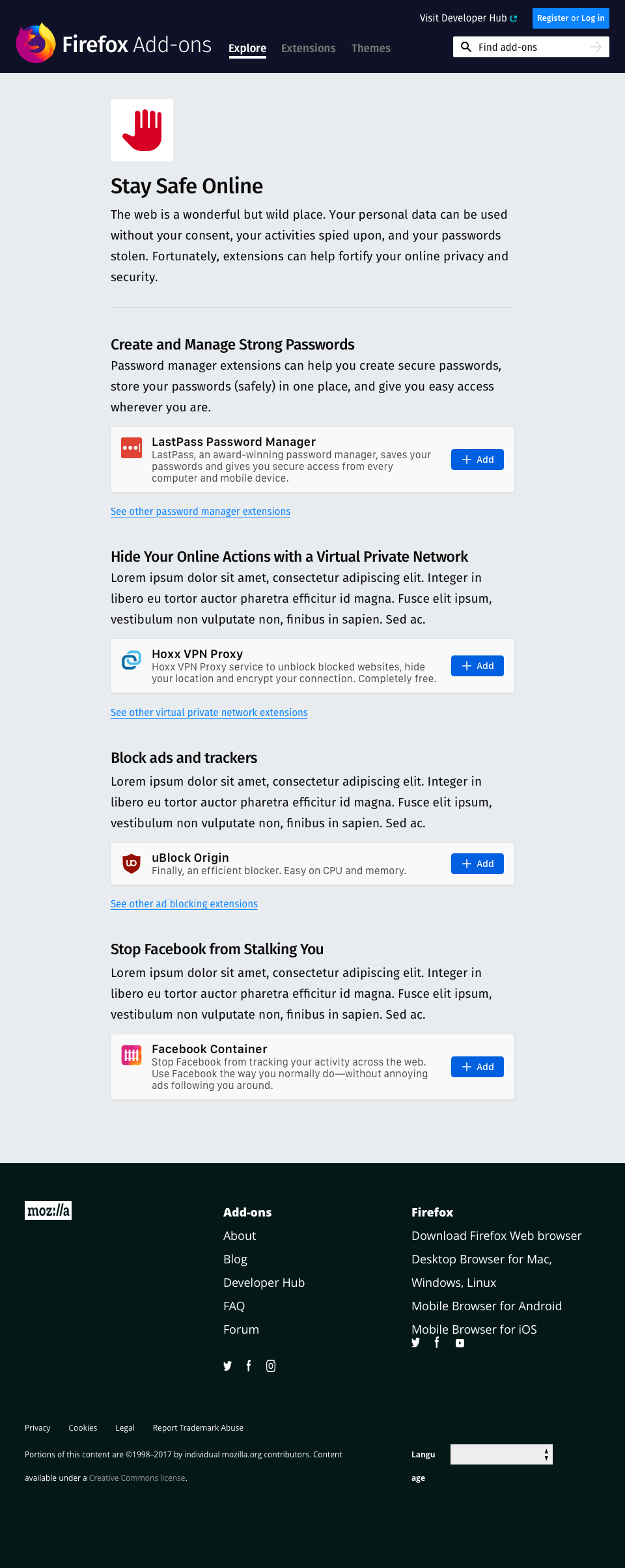
All pages will look the same, the number of add-ons might vary though. Those pages should not change that often (~once a month, once every 2 months) and it is mostly add-ons that would change.
willdurand
on 10 Oct 2018
Another option would by LinguiJS, which can emit PO files (using MessageFormat) and support JSX
JSX seems considerably more difficult to write for a non-engineer though, especially without github's built in preview that you get for Markdown.
eviljeff
on 10 Oct 2018
We have a meeting to discuss this on Friday, but my take on it is that it looks very much like a simple templated system would work, as it's very structured and the structure is apparently unlikely to change.
As I think @willdurand mentioned in the front-end ux meeting today, it sounds like the JSX and/or markdown routes, while offering lots of flexibility, may be unnecessary to meet the requirements of this feature, and will likely be difficult both to implement, and for translators to deal with.
 bobsilverberg
on 10 Oct 2018
bobsilverberg
on 10 Oct 2018
InVision screens are here: https://mozilla.invisionapp.com/d/main/#/projects/prototypes/15640858/screens
 pwalm
on 10 Oct 2018
pwalm
on 10 Oct 2018
Do you think editors would find json files easy to update? So each guide page would look something like this:
eg: privacy
{
  "img": "privacy.png",
  "title": "Privacy heading title",
  "sectionIntro": "Privacy ...",
  "sections": [
    {
      "title": "section 1",
      "content": "section 1 content <a href=\"/about\"> with a link</a> ...",
      "footer link": "<a href=\"/link-to-another-pg\">footer link</a>",
      "addon-guid": "1234567"
    },
    {
      "title": "section 2",
      "content": "section 2 content...",
      "footer link": "<a href=\"/link-to-another-pg\">footer link</a>",
      "addon-guid": "12345678"
    }
  ]
}
we can then import this into the template/component ourselves and wrap each piece with the gettext/sprintf functions. Or does this pose a problem because this is not static text?
I am still try to understand what we can /can't do with translations but would something like that work?
rebmullin
on 10 Oct 2018
What @rebmullin suggested above is something I wanted to build for the homepage content but I did not have the chance to work on it yet (on my free time). I wanted to build a quick&dirty create-react-app that would generate a JSON file that we could then reuse to generate code (we should not be afraid of generating code, and I love doing this), because updating the homepage content is time consuming and error-prone. I know there is a plan to get a real tool for that next year, but in the meantime, I wanted to hack onto something: quick, dirty, useful.
Anyway, I think we could also take this direction for the user guides.
I am not sure editors will contribute code (i.e. creating PRs on GitHub) anyway, so I don't know. I imagine we'll get a Google doc similar to the one for the homepage content, so everything that will help us (developers) to update the content of those pages is better.
willdurand
on 11 Oct 2018
Cool @willdurand...that’s what I was thinking … either a little create-react-app (that works as a headless cms) that can return json or just json files that live in some directory (at least in the shorter term).
Another concern was if there would be any translation issues if all the text was dynamic like this. I vaguely remember that I ran into an issue about this..
rebmullin
on 11 Oct 2018
hey @jvillalobos @devaneymoz, have the guide urls been finalized? We currently have the following pages shown here:
- Stay Safe Online
- Organize Your Tabs
- Enhance Your Media Experience
REF:
https://docs.google.com/document/d/1u1tbRo_ivfEAh_er2XKPciuYLARiNa2N5qXPGC0jfcY/edit#
Can you please advise?
rebmullin
on 23 Oct 2018
@rebmullin No this content is NOT final. I'll have that content/copy finalized this week.
 devaneymoz
on 24 Oct 2018
devaneymoz
on 24 Oct 2018
okay cool, thanks @devaneymoz
rebmullin
on 24 Oct 2018
hey @pwalm, how should we handle these "+ Add" buttons if the user comes across any of these pages on another browser? Should I use the (green) "Only with Firefox—Get Firefox Now" button on each card or is it better to disable these buttons and have one 1 of these green buttons somewhere?
rebmullin
on 25 Oct 2018
Good question. Let me run this by the team.
On Oct 25, 2018, at 3:56 PM, Rebecca Mullin notifications@github.com wrote:
hey @pwalm, how should we handle these "+ Addon" buttons if the user comes across any of these pages on another browser? Should I use the (green) "Only with Firefox—Get Firefox Now" button on each card or is it better to disable these buttons and have one 1 of these green buttons somewhere?
—
You are receiving this because you were mentioned.
Reply to this email directly, view it on GitHub, or mute the thread.
pwalm
on 26 Oct 2018
In collaboration with @MeridelW and @atsay I've finalized content/copy (though I'm sure once we see it in design we'll want to make slight copy teaks).
@pwalm Could you please flow this into your latest designs when you're able?
devaneymoz
on 31 Oct 2018
Updated:

Button copy should read "Get Firefox" and follow the styling from the larger green button on the product page.
pwalm
on 14 Nov 2018
@MeridelW @pwalm Is "Get Firefox" the most explanatory we can be in the space we have?
 atsay
on 15 Nov 2018
atsay
on 15 Nov 2018
i agree it is confusing as-is because the CTA should be about getting the extension, not Firefox. Our longer version "Only with Firefox—Get FIrefox Now." is more helpful but I assume we don't have the room for that? @pwalm How much room do I have? How flexible is the card in this context?
If we are this limited in space, perhaps we can do "Get the extension." The user will then discover on the journey that they need to install Firefox, which is not ideal, but it's better than "Get Firefox" alone.
 MeridelW
on 16 Nov 2018
MeridelW
on 16 Nov 2018
It's less about the card and more about the button:
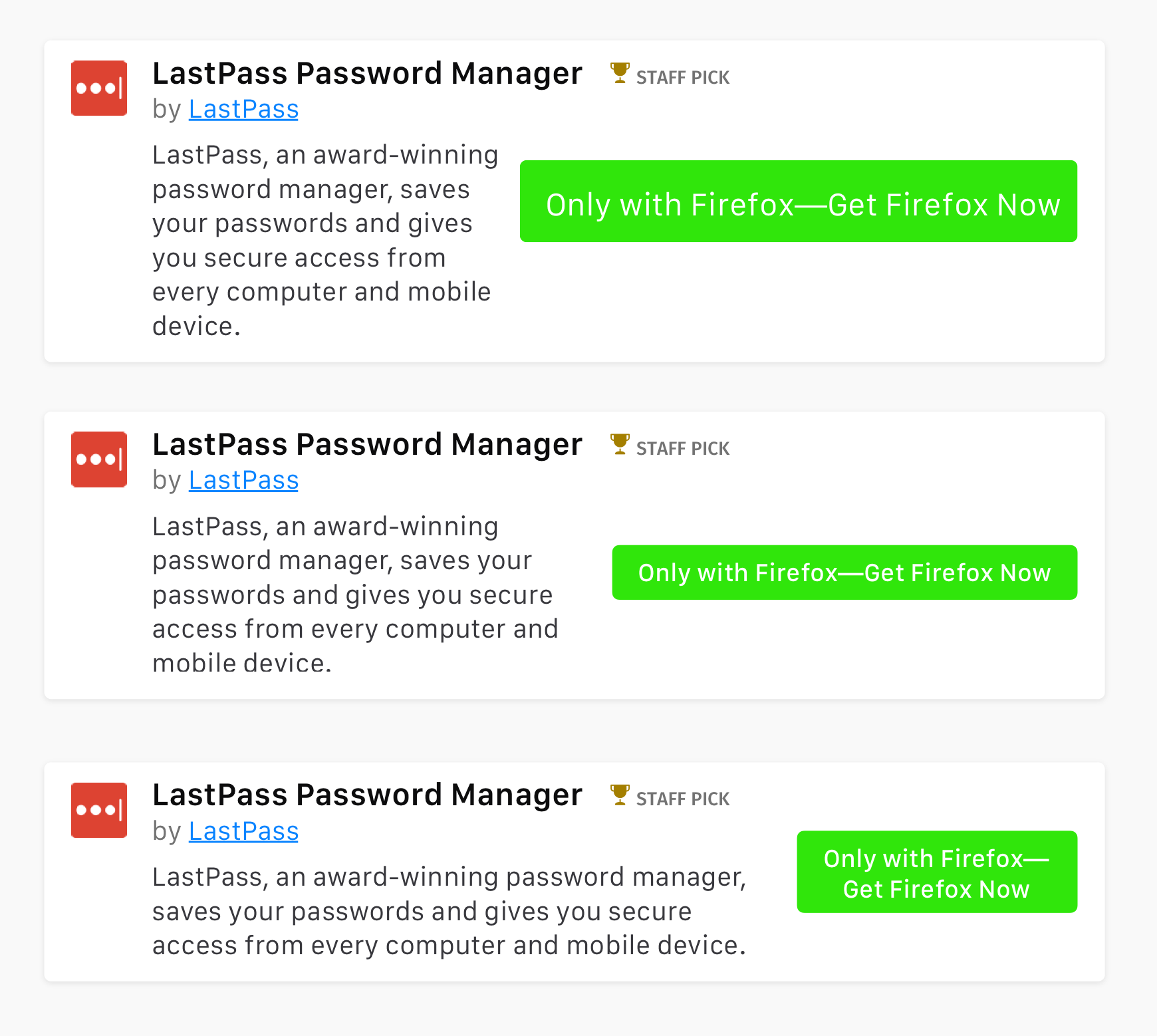
Doesn't look great. Any shorter copy we can use? That, or we do a message bar at the top of the page with the big green CTA and remove the buttons from the cards.
pwalm
on 16 Nov 2018
I like the 3rd version, with the text stacked. Any objection to that one?
atsay
on 16 Nov 2018
"Only with Firefox" implies exclusivity of content, doesn't it? Which wouldn't be accurate.
What about:
"Requires Firefox—
Get Firefox Now"
devaneymoz
on 16 Nov 2018
hey @pwalm @atsay @MeridelW are you okay with what @devaneymoz suggests above or did you still want to discuss this further?
rebmullin
on 20 Nov 2018
Let's stick with the original wording and go with the stacked button (pwalm's 3rd version).
atsay
on 20 Nov 2018
I agree with Amy about using the third, stacked option.
Amy and I went back and forth earlier this year about the button copy and landed on the current text so I think we should stick with that for now. I agree with Scott it sort of implies exclusivity to Firefox but it's the best option for now.
MeridelW
on 28 Nov 2018
the guides have been implemented through various other issues. I am closing this for this reason
rebmullin
on 10 Dec 2018
Related issues
 SeanPrashad
·
6Comments
SeanPrashad
·
6Comments
 AlexandraMoga
·
5Comments
AlexandraMoga
·
6Comments
AlexandraMoga
·
5Comments
AlexandraMoga
·
6Comments
 yoasif
·
4Comments
yoasif
·
4Comments
 ioanarusiczki
·
5Comments
ioanarusiczki
·
5Comments
Most helpful comment
Let's stick with the original wording and go with the stacked button (pwalm's 3rd version).