Zulip-desktop: Organization Avatar not changing
We are unable to change the Organization Logo. It stays with either the Z or an H while in the App.
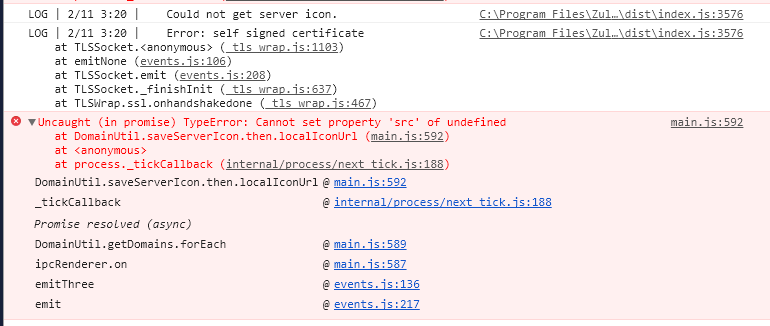
With console up, I do get this every time that I try to upload:
 Mentalone
All 10 comments
This is a desktop app issue; transferring to the appropriate project.
 timabbott
on 12 Mar 2019
timabbott
on 12 Mar 2019
My understanding of why you see a Z or h icon is because of self signed certificates. In case you choose to ignore certificate warnings and proceed in an insecure manner we do not fetch server icon. To fix that you can add the certificate in Settings-> Organization.
Not sure if this is the reason for TypeError.
 abhigyank
on 12 Mar 2019
abhigyank
on 12 Mar 2019
@abhigyank hmm, is this something we can change? If the user decides to ignore the cert warning, we should presumably let them proceed with using that server fully...
timabbott
on 14 Mar 2019
(In any case, the TypeError looks like a definite bug in any case)
timabbott
on 14 Mar 2019
@abhigyank hmm, is this something we can change? If the user decides to ignore the cert warning, we should presumably let them proceed with using that server fully...
Created #684
abhigyank
on 14 Mar 2019
(In any case, the TypeError looks like a definite bug in any case)
Okay, I figured the TypeError cause - There is no server icon display on the left sidebar (due to any issue) and we are using the fallback - show first character of the realm name - and the user updates the server icon in the realm, this causes electron-bridge to try and update the server icon on the left sidebar but since it is not there we get this error of undefined of serverImgs[index].src .
If the user decides to ignore the cert warning, we should presumably let them proceed with using that server fully...
Should be fixed in #685 .
abhigyank
on 17 Mar 2019
@Mentalone can you test now by pulling master? It should be fixed now.
 vsvipul
on 18 Mar 2019
vsvipul
on 18 Mar 2019
@vsvipul Good for us, we setup the certificate so we now show the logo. The bad for the sake of testing, is that we can't test this now. Sorry.
We can now see our logo show up after adding the cert. Thank you for all your help!
Mentalone
on 18 Mar 2019
To solve the TypeError part one will have to create a new element with the new logo in the sidebar.
abhigyank
on 19 Mar 2019
I think this can be closed now. (was a certs problem) . Fixed in #685.
vsvipul
on 9 Apr 2019
Related issues
abhigyank
·
3Comments
abhigyank
·
10Comments
vsvipul
·
11Comments
 LeSeulArtichaut
·
3Comments
LeSeulArtichaut
·
3Comments
 EpicEric
·
6Comments
EpicEric
·
6Comments
Most helpful comment
@vsvipul Good for us, we setup the certificate so we now show the logo. The bad for the sake of testing, is that we can't test this now. Sorry.
We can now see our logo show up after adding the cert. Thank you for all your help!