Zulip-desktop: Zulip app closes unexpectedly on Windows 10
- Operating System:
- [x] Windows
- [ ] Linux/Ubutnu
- [ ] macOS
- Clear steps to reproduce the issue:
Start Zulip app on windows 10, wait some seconds (5-30) and app will be closed without any actions from user. Affects 2 of 4 our computers. - Relevant error messages and/or screenshots:
No error messages from Zulip or Windows.
 winmasta
All 20 comments
@winmasta yeah, I have seen this issue. The main reason behind this is they might have downloaded the v2.3.7-beta which was meant to be a pre/beta-release and not stable (I wrongly uploaded the beta installer in the latest release v2.3.8). Can you tell your folks to uninstall the app they are using and download the latest stable release from here and the problem will go away?
 akashnimare
on 10 Oct 2018
akashnimare
on 10 Oct 2018
Also experiencing on v2.3.8 on Windows 10.
Attempted reinstall earlier this week and product was stable until this morning.
 lisasinclair
on 12 Oct 2018
lisasinclair
on 12 Oct 2018
Same here - Zulip closes itself or crashes unexpectedly after a few seconds.
I can confirm @lisasinclair statement. A reinstall worked until this morning.
Now I fully uninstalled Zulip-Electron and reinstalled it again but it doesn't change anything - Zulip doesn't work.
Windows 10: 1803 Build 17134.345
Zulip-Electron: v2.3.82
 hmr-it-jr
on 12 Oct 2018
hmr-it-jr
on 12 Oct 2018
It seem that there is a problem with the "auto update" of the app.
I had the 2.3.8 installed and the app crashed after a view seconds.
I downloded the version 2.3.82 and replaced the Folder c:\Program Files\Zulip
Now all works fine.
A few days ago, when the Version 2.3.8 was released, the same error occured.
I had the version 2.3.7beta and the app crashed after a few seconds.
 Mattes1000
on 12 Oct 2018
Mattes1000
on 12 Oct 2018
@hmr-it-jr, @lisasinclair, @winmasta please update the app to v2.3.82 manually, it should fix the auto-update issues.
akashnimare
on 12 Oct 2018
I'm already on 2.3.82 and it's still happening :(
lisasinclair
on 12 Oct 2018
@akashnimare as I wrote in my previous post I already use the latest version:
Zulip-Electron: v2.3.82
The problem is still present.
hmr-it-jr
on 12 Oct 2018
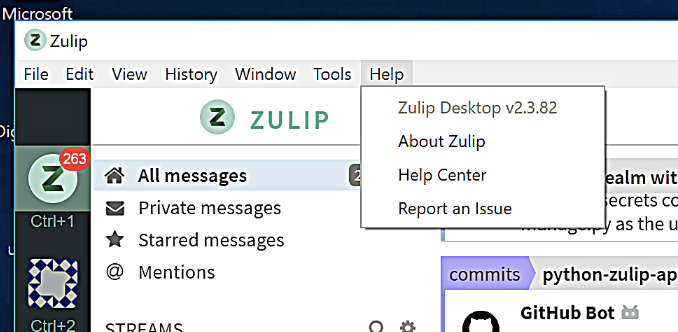
Wierd, I have followed the following steps and the app works fine for me on Windows 10
- Uninstalled Zulip app (I was on v2.3.8)
- Installed the latest version from this link (v2.3.82)
- Started the app and no issues
akashnimare
on 12 Oct 2018
I did the same at the beginning of the week and it worked fine until today. Give it a couple of days and it may fail for you too >.<
Am using zulipchat as the host which may make a difference?
lisasinclair
on 12 Oct 2018
I did the same at the beginning of the week and it worked fine until today
@lisasinclair can you repeat the steps again please since we release the v2.3.82 yesterday only?
Am using zulipchat as the host which may make a difference?
No, I don't think so.
akashnimare
on 12 Oct 2018
Mia Culpa, I got it wrong. Installed 2.3.82 and will see how it goes.
Have a great weekend
lisasinclair
on 12 Oct 2018
Yeah, v2.3.82 (latest stable release) and v2.3.8 are two different versions.
akashnimare
on 12 Oct 2018
Wierd, I have followed the following steps and the app works fine for me on Windows 10
* Uninstalled Zulip app (I was on v2.3.8)

* Installed the latest version from [this](https://github.com/zulip/zulip-electron/releases/download/v2.3.82/Zulip-Web-Setup-2.3.82.exe) link (v2.3.82)

* Started the app and no issues
Works for me, thanks a lot!
hmr-it-jr
on 12 Oct 2018
I had the same problem on Windows 7. I checked the logs, and it looked like the automatic update sub-system was having issues that were taking out the entire VM. So I updated to the latest version manually, and that fixed it for a few days. Then the problem returned, and this time, updating manually did not fix the problem.
However, I did find a workaround: Turn off auto-update: As soon as you open the the Zulip client application (remember, time is of the essence -- you do not have much time before the application will spontaneously close):
- Click on the settings gear icon in the lower right.
- Click on "General" on the Settings page.
- Then de-select "Enable auto updates"
The system then spontaneously closed one more time. But after that, it no longer spontaneously closed.
That fixed it for me. Your mileage may vary.
 jevad
on 12 Oct 2018
jevad
on 12 Oct 2018
@jevad is it possible for you to share the logs so that I can see what's wrong? You can send it on akash[at]zulipchat[dot]com
akashnimare
on 13 Oct 2018
I had this problem back in October 2018 however a reinstall fixed it.
The problem came back today although I was able to turn off Enable Auto Updates after 3 tries and now Zulip is no longer crashing in 3 seconds.
I can send logs if you tell me where they are in Windows 10.
 reimerpeter
on 4 Jan 2019
reimerpeter
on 4 Jan 2019
Echoing reimperter above, Zulip started crashing on me not long after it's started up. Somewhere between 5 to 30 seconds.
 emmanuelflores-sk
on 4 Jan 2019
emmanuelflores-sk
on 4 Jan 2019
@reimerpeter You can access the logs from Tools->Show App Logs and mail it to akash[at]zulipchat[dot]com.
It has something to we with the auto updates, since we had released a new update today. For now we have pull the update down so it should work properly.
 abhigyank
on 4 Jan 2019
abhigyank
on 4 Jan 2019
I found it in Tools, Download App Logs.
I will email it to you.
Thanks!
reimerpeter
on 4 Jan 2019
Closing since not reproduced in a long time and we move repository to address this issue after v2.3.82.
abhigyank
on 2 Jun 2020
Related issues
 zingmars
·
11Comments
zingmars
·
11Comments
 EpicEric
·
6Comments
EpicEric
·
6Comments
 timabbott
·
6Comments
timabbott
·
6Comments
 brainwane
·
9Comments
brainwane
·
9Comments
 vsvipul
·
11Comments
vsvipul
·
11Comments
Most helpful comment
I had the same problem on Windows 7. I checked the logs, and it looked like the automatic update sub-system was having issues that were taking out the entire VM. So I updated to the latest version manually, and that fixed it for a few days. Then the problem returned, and this time, updating manually did not fix the problem.
However, I did find a workaround: Turn off auto-update: As soon as you open the the Zulip client application (remember, time is of the essence -- you do not have much time before the application will spontaneously close):
The system then spontaneously closed one more time. But after that, it no longer spontaneously closed.
That fixed it for me. Your mileage may vary.