Zulip-desktop: Google Login opens in app, not browser (missing existing login, 2fa)
The expected action on authenticating with google (or github, for that matter), is delegating to a browser (and maybe opening a local server to see the callback url). This way, already-logged-in accounts can be used, as well as 2FA devices like the yubikey.
Currently, it opens the google dialog in the app itself, where there's no guarantee that it's the real google or a fake UI, and users have to retype their passwords or use app-passwords.
Would this be an easy change?
- Operating System:
- [ ] Windows
- [x] Linux/Ubutnu
- [ ] macOS
- Clear steps to reproduce the issue:
- Open the app
- Sign in with google
- Relevant error messages and/or screenshots:
 yorickvP
All 19 comments
We should definitely do something about this. I have to see how the callbacks will work if we open the OAuth link into a default browser or maybe in a new browser window.
 akashnimare
on 26 Mar 2018
akashnimare
on 26 Mar 2018
Is this something we can actually change?
 timabbott
on 26 Mar 2018
timabbott
on 26 Mar 2018
It looks like we'll need to create some pages(i.e., login page most importantly) to be rendered offline, am I close?
 devsumanmdn
on 27 Mar 2018
devsumanmdn
on 27 Mar 2018
Currently, it opens the google dialog in the app itself, where there's no guarantee that it's the real google or a fake UI,
@yorickvP it's secure if you know the server owner. @timabbott I dig into this and found out that almost all of the electron apps have the same procedure for oAuth as we have. We can open the oAuth in the default browser but then I'm not sure how to communicate back to the electron once the oAuth is done. If we implement this feature then this means we gotta do heavy refactoring for oAuth in the webapp + electron app and I doubt if it'll be worth the effort.
akashnimare
on 2 Apr 2018
To communicate back: start a server, let the oauth redirect to localhost
(serve a page that closes the window).
The point of oauth is that I don't have to trust the server owner with my
google password. The current flow breaks that, and also has me dig out my
backup google keys because I can't use my yubikey. Seems that all the other
apps are doing it wrong then, as well.
Op ma 2 apr. 2018 om 13:57 schreef Akash Nimare notifications@github.com:
Currently, it opens the google dialog in the app itself, where there's no
guarantee that it's the real google or a fake UI,@yorickvP https://github.com/yorickvP it's secure if you know the
server owner. @timabbott https://github.com/timabbott I dig into this
and found out that almost all of the electron apps have the same procedure
for oAuth as we have. We can open the oAuth in the default browser but then
I'm not sure how to communicate back to the electron once the oAuth is
done. If we implement this feature then this means we gotta do heavy
refactoring for oAuth in the webapp + electron app and I doubt if it'll be
worth the effort.—
You are receiving this because you were mentioned.Reply to this email directly, view it on GitHub
https://github.com/zulip/zulip-electron/issues/464#issuecomment-377915011,
or mute the thread
https://github.com/notifications/unsubscribe-auth/AAnfpDu1ulOXiwbrDCL2jKFoASgb3-Coks5tkhIrgaJpZM4S6H0N
.
yorickvP
on 2 Apr 2018
@yorickvP you don't need to trust the server owner with your google password in the current flow: the Electron app acts exactly like another browser in this context. The only difference from your normal browser is that it's a bit less convenient (because the app doesn't have access to your normal browser's cookies). So if you usually use Chrome, using the Electron app should be like using Firefox for just Zulip; no more or less convenient to login.
Can you explain why you can't use your yubikey with the Electron app? I haven't tried it with one, but it's not obvious to me why that shouldn't work.
timabbott
on 2 Apr 2018
Can you explain why you can't use your yubikey with the Electron app? I haven't tried it with one, but it's not obvious to me why that shouldn't work.
Ping, @yorickvP.
akashnimare
on 4 Apr 2019
@akashnimare https://github.com/electron/electron/issues/3226 closed as wontfix
@timabbott a malicious server owner could edit the zulip server to point to a fake google login page, and you would have no way of knowing. When it opens an external browser, you can see the browser UI (and know it's the real google page) and ideally use your existing google login.
yorickvP
on 20 May 2019
@zulipbot claim
 kanishk98
on 3 Jun 2019
kanishk98
on 3 Jun 2019
@kanishk98 we can get back to this after #752, #744, #527.
akashnimare
on 18 Jun 2019
Sure. Looks like zulipbot was working with the incorrect repo URL when I tried to claim it, so it's all good.
kanishk98
on 18 Jun 2019
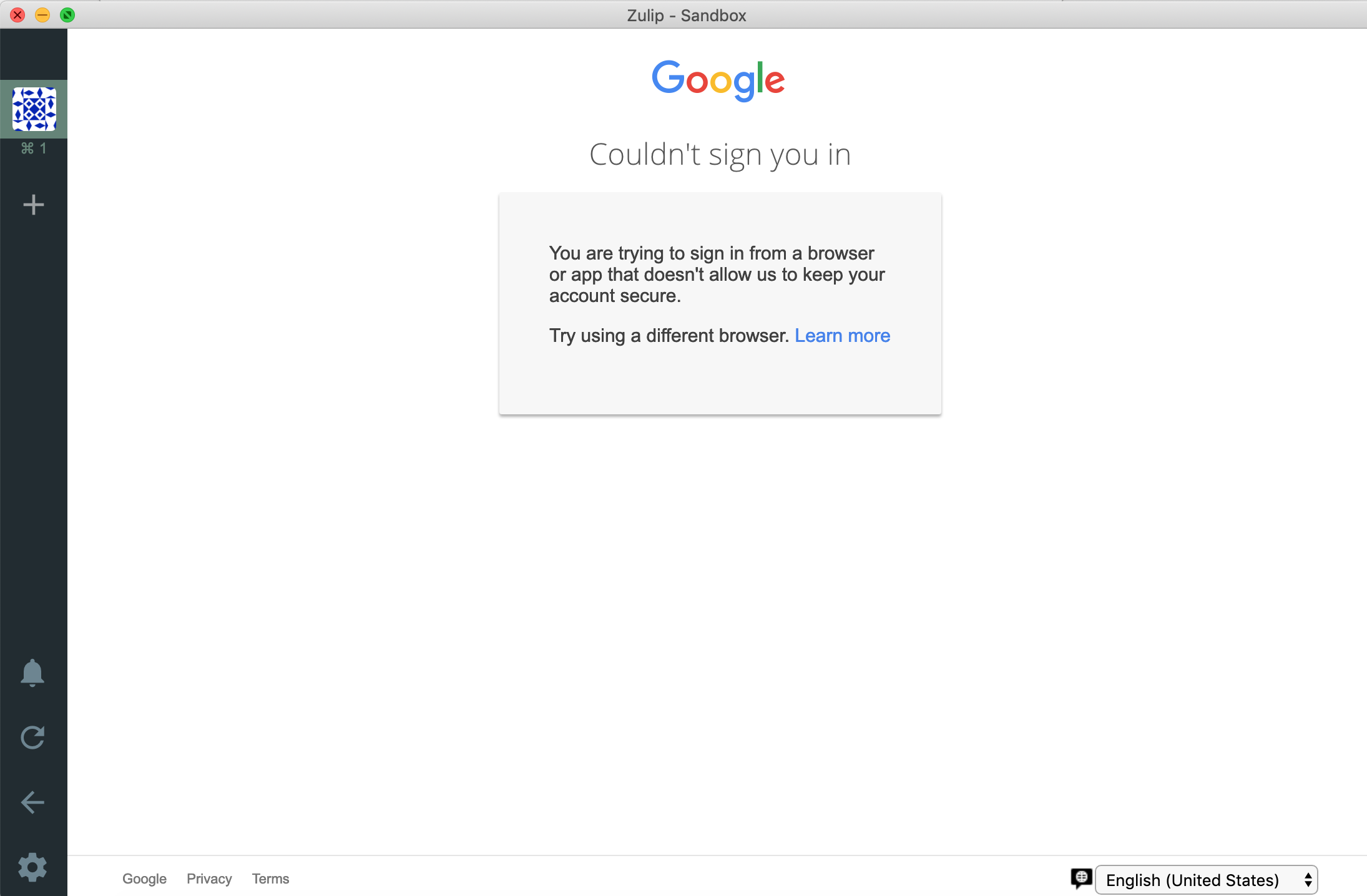
Hi, any news on this? Google published their new policy back in April https://security.googleblog.com/2019/04/better-protection-against-man-in-middle.html
According to this, they are now blocking all embedded browsers resulting in Google auth being broken when done from the desktop app.
For example I'm seeing the following when trying to log in using Google:
 Balint134
on 7 Dec 2019
Balint134
on 7 Dec 2019
@Balint134 thanks for reporting this, I didn't know that Google is blocking it. Let me see what we can do here.
cc @kanishk98
akashnimare
on 7 Dec 2019
@akashnimare this is likely something that requires an Electron upgrade. I think we need to focus on shipping up an Electron upgrade (which probably means making our next release be more or less only upgrading Electron).
timabbott
on 9 Dec 2019
This was fixed in master by #863 and will be part of the next release.
 andersk
on 23 Mar 2020
andersk
on 23 Mar 2020
The fix failed to work in the AppImage for Linux as implemented. Therefore, the security team made a decision to revert it temporarily to avoid blocking the v5.0.0 security release. We’ll be discussing the right way to move forward on this in the coming days.
andersk
on 1 Apr 2020
We've now finished this properly via #943. It requires Zulip Server 2.2 (i.e. master right now, but will be released hopefully soon); the desktop app change will be in our next desktop release (but also isn't required; the part that's required is the server change. The desktop app side change just makes the UX a little nicer).
timabbott
on 6 May 2020
Why not just set the oauth redirect to a temporary server at localhost?!
yorickvP
on 10 May 2020
Running a local webserver has its own security model complications; is there a reason one would prefer that to the implementation we've merged? It's certainly more complexity.
timabbott
on 13 May 2020
Related issues
 abhigyank
·
3Comments
abhigyank
·
3Comments
 skewty
·
9Comments
skewty
·
9Comments
 vsvipul
·
11Comments
vsvipul
·
11Comments
 YJDave
·
6Comments
YJDave
·
6Comments
 swallitsch
·
7Comments
swallitsch
·
7Comments
Most helpful comment
@akashnimare https://github.com/electron/electron/issues/3226 closed as wontfix
@timabbott a malicious server owner could edit the zulip server to point to a fake google login page, and you would have no way of knowing. When it opens an external browser, you can see the browser UI (and know it's the real google page) and ideally use your existing google login.