Zigbee2mqtt: Hue Dimmer Switch: long/short press
Hi,
I use an Hue Dimmer Switch (ioBroker zigbee adapter 0.7.7 / flashed CC2531 on RPi3). In principle it does work. It was easily paired and button presses are recognized.
Previosly, I had it paired with an Hue Bridge 2.1 and used a script with node-hue-api in ioBroker to poll the states. That way it was possible to distinguish between short and long (> ~1s) presses for all 4 buttons.
With zigbee2mqtt it is not possible to detect short and long presses. Rather, the "I" and "O" buttons do only toggle one state and the darker/brighter buttons always create a "button down" followed by a "button released" event. This reduces the flexibility and range of functions of the Dimmer Switch significantly.
I would love to see the same behavior as when using a Hue Bridge. Would this be possible? I already digged into the 'devices.js' and 'fromZigbee.js', but I have no idea what's to do.
Note:
Interestingly, the flashing of the LED on the Dimmer Switch differs from when paired with the Hue Bridge. I guess, this means, that the Hue Bridge sends messages to the Dimmer Switch as well.
 Bearonic
All 55 comments
Hi,
for me the Dimmer Switch produces the following events:
"I" and "O" button: "action":"on" / "action":"off"
Darker/brighter: "action":"down-press" and when pressed long additionally "action":"down-hold" followed by "down-hold-release" (similar for up)
Using zigbee2mqtt 1.8 with a CC2531.
When pressing the "I" or "O" button long the Dimmer Switch flashes red, that's indeed interesting (i don't have a Hue Bridge to test the behavior when connected to it)
 sehraf
on 11 Nov 2018
sehraf
on 11 Nov 2018
I watched the same behavior. Pressing dim buttons short will give a "action":"up-press" / "action":"down-press". Holding the dim buttons I get an "action":"up-hold" event following by an "action":"up-hold-release" event after releasing. This seams to work great.
But holding the I/O buttons doesn't have the same functionality (like mentioned by @Bearonic ). There are only "action":"on" / "action":"off" responses. Would be great if there were pressing responses like dim buttons.
You can configurate this events on the hue bridge via thrid party apps like all4hue or HueEssentials. This would increase the functionality of the dim switch with 2 more actions, which i need in my smart home environment. Therefore I have to stay on hue bridge till this is available on zigbee2mqtt.
 sti0
on 3 Jan 2019
sti0
on 3 Jan 2019
Agree it would be great if this switch can support:
- Single, double, triple and quadruple click
- Long press
- Long press release
This would really open these controllers up for a lot of functions.
e.g.
click off - turn off my beside lamp
double click off - turn off all lamps in room
triple click off - turn off all lamps in house (bed time mode :))
Im currently using the excellent 1st gen xiaomi buttons and they support these combos - albeit only for their single button.
Especially long press and long press release are useful for the on and off buttons since these are not also used for the brightness up/down count.
I guess this needs to be implemented in code with click response counting with timers etc since I'm assuming that the dimmer itself is not sending these events.
 james-fry
on 22 Jan 2019
james-fry
on 22 Jan 2019
The Hue dimmer switch does not provide a key up event, so we cannot detect the time between press and release.
 Koenkk
on 23 Jan 2019
Koenkk
on 23 Jan 2019
Hi @Koenkk
That is weird - it seems to be supported by the dimmer when used with hue hub.
This HA custom component supports it:
https://github.com/robmarkcole/Hue-sensors-HASS
The RWL dimmer remote has a total of 8 possible states, corresponding to the remote having 4 buttons, where each button can be short pressed (clicked) and long pressed (when holding the button for 2 sec you will see the LED blink twice). The ZPG (or Tap) remote has 4 buttons.
Also this article corroborates:
https://www.howtogeek.com/244803/how-to-re-program-the-hue-dimmer-switch-to-do-anything-with-your-lights/
For the Single, double, triple and quadruple click can a timer based implementation work?
james-fry
on 23 Jan 2019
@james-fry you can add some logging here https://github.com/Koenkk/zigbee-shepherd/blob/master/lib/components/af.js#L689 to check if some commands are ignored. (console.log(msg.zclMsg.cmdId))
I doubt about the timer thing as this is very timing critical. When there is a little lag on the network a double presses could easily be missed. After the first click you have to wait for X time to check if another click is received, this will also decrease the responsiveness for the single click. But of course you can try.
Koenkk
on 23 Jan 2019
On hue bridge and custom HA component by @robmarkcole you can't use double tab, triple tab etc. But you can detect hold and release events for the on and off button like you can for the dimming buttons.
sti0
on 25 Jan 2019
@Koenkk I have added the suggested console.log(..) entry in af.js. But there are no other states published.
The same model of my hue dimmer switch connected to the hue bridge fires continuesly events when holding on button (i think because the green light continuously blinks. With zigbee2mqtt continously holding the on button results in a red light.
In another thread somebody suggested that the remote has a possibility to bind directly to lights:
https://github.com/Koenkk/zigbee2mqtt/issues/36
Could that be the trick? How can i help?
 St0Ma
on 12 Feb 2019
St0Ma
on 12 Feb 2019
@St0Ma binding will probably give a much better experience. This is explained in #782
Koenkk
on 13 Feb 2019
I wonder if the coordinator that the dimmer is paired with can change how it operates. It is possible that an end device can do that? Would the sequence of interactions during pairing allow that?
james-fry
on 13 Feb 2019
@james-fry yes, every device can set this up for a different device, it just has to send the commands to the device (which I haven't seen in practice yet).
Koenkk
on 13 Feb 2019
@Koenkk
I don´t get it. THe Hue Switch can be paired to a device / bulb with a long press. But how can that change the behaviour?
Maybe it´s only a Software Thing in the Hue Bridge, that the next pressed ok button is assigned to a different scene?
Is there a way to sniff another zigbee network with the cc2530 and to find out which zigbee messages are send with the hue bridge and hue dimmer switch?
St0Ma
on 13 Feb 2019
@St0Ma sniffing Hue traffic is possible, see https://www.zigbee2mqtt.io/how_tos/how_to_sniff_zigbee_traffic.html (be sure to search for The Hue bridge uses a different Trust Center link key on that page)
Koenkk
on 13 Feb 2019
Hi @Koenkk,
Did you get sniffed network traffic about philips hue dimmer pairing and long-pressing on/off buttons?
I found remote binding after pairing on 0xfc00 cluster.

 ugrug
on 22 Feb 2019
ugrug
on 22 Feb 2019
@ugrug no, I don't have the hue dimmer/hue bridge. Can you check what is send when you long press the dimmer switch?
Koenkk
on 23 Feb 2019
@Koenkk
The messages paired with philips bridge:

All message as on the screenshot: cluster 0xfc00, dst endpoint 65, manufacturer-specific, manufacturer-code: 0x100b, command, 0x00, the 8 data bytes are different:
1. ON button:
- Click: 01 00 00 30 00 21 00 00
- Hold (800ms after click message and in every 800ms):
(1st) 01 00 00 30 01 21 08 00
(2nd) 01 00 00 30 01 21 10 00
(3rd) 01 00 00 30 01 21 18 00
(4th) 01 00 00 30 01 21 20 00
...
- Release: 01 00 00 30 03 21 23 00
- UP button:
- Click: 02 00 00 30 00 21 00 00
- Hold (800ms after click message and in every 800ms):
(1st) 02 00 00 30 01 21 08 00
(2nd) 02 00 00 30 01 21 10 00
... Release: 02 00 00 30 03 21 24 00
DOWN button:
- Click: 03 00 00 30 00 21 00 00
- Hold (800ms after click message and in every 800ms):
(1st) 03 00 00 30 01 21 08 00
(2nd) 03 00 00 30 01 21 10 00
... Release: 03 00 00 30 03 21 21 00
OFF button:
- Click: 04 00 00 30 00 21 00 00
- Hold (800ms after click message and in every 800ms):
(1st) 04 00 00 30 01 21 08 00
(2nd) 04 00 00 30 01 21 10 00
(3rd) 04 00 00 30 01 21 18 00
... - Release: 04 00 00 30 03 21 2b 00
The pairing process:
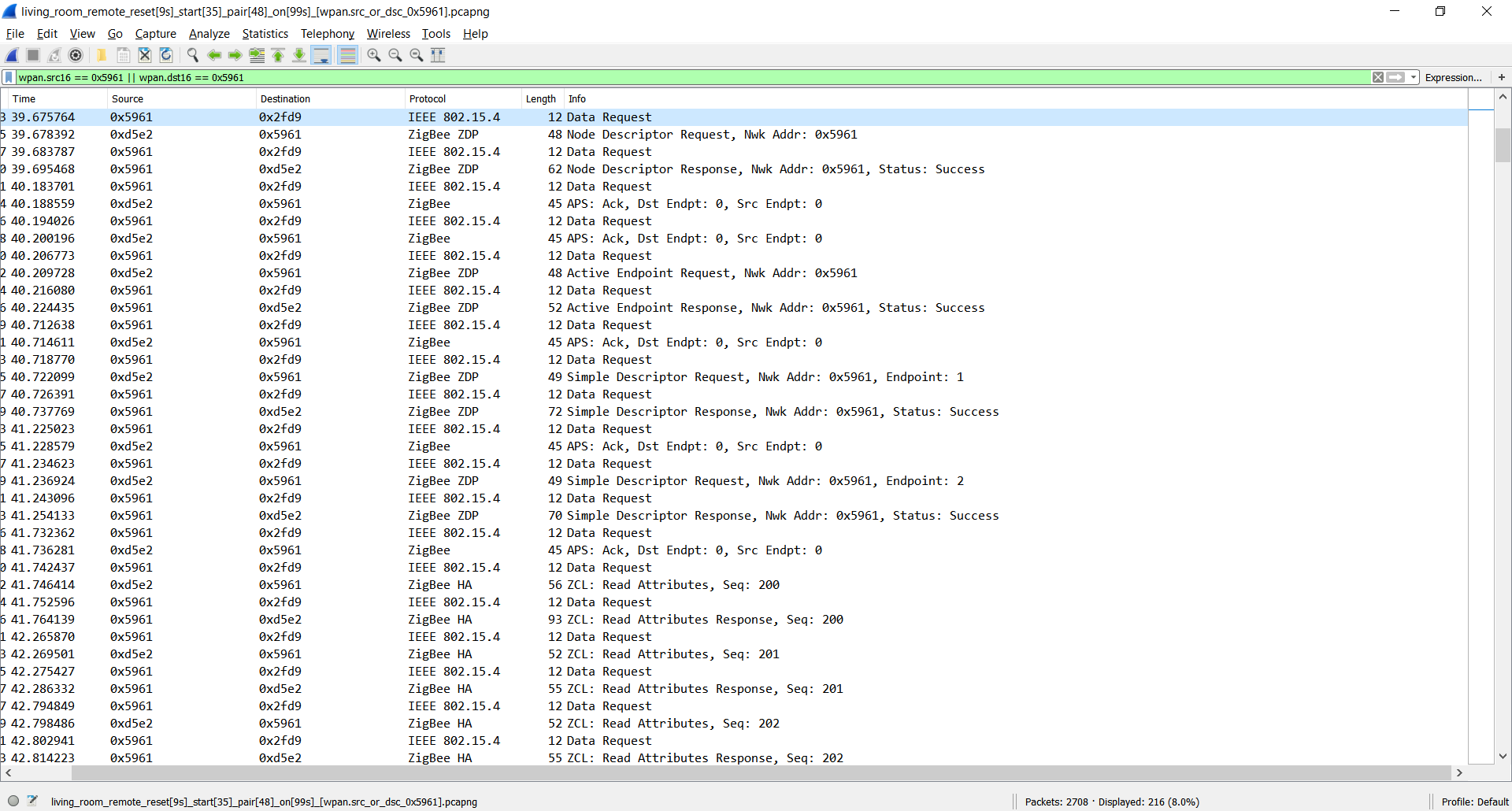
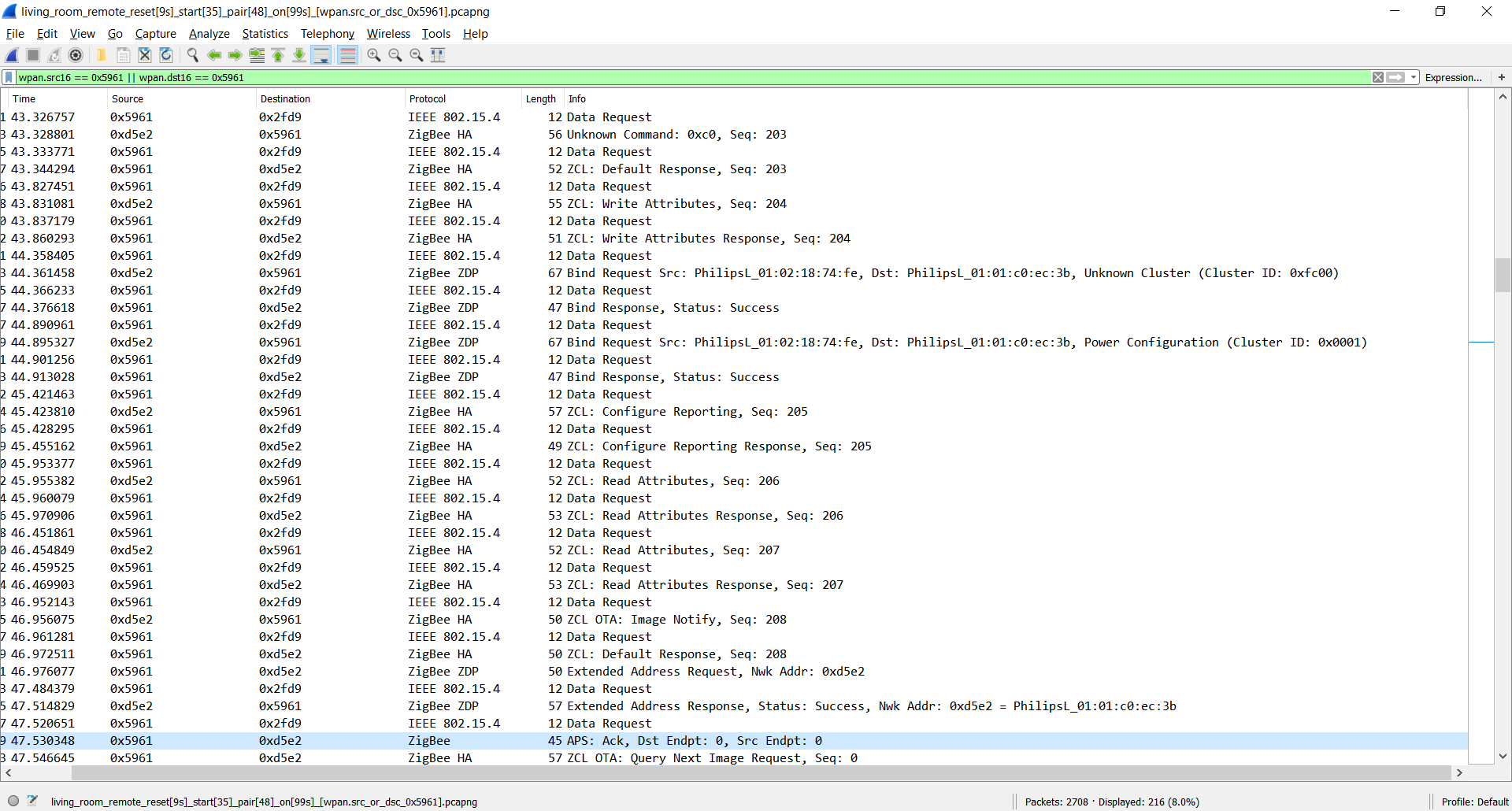
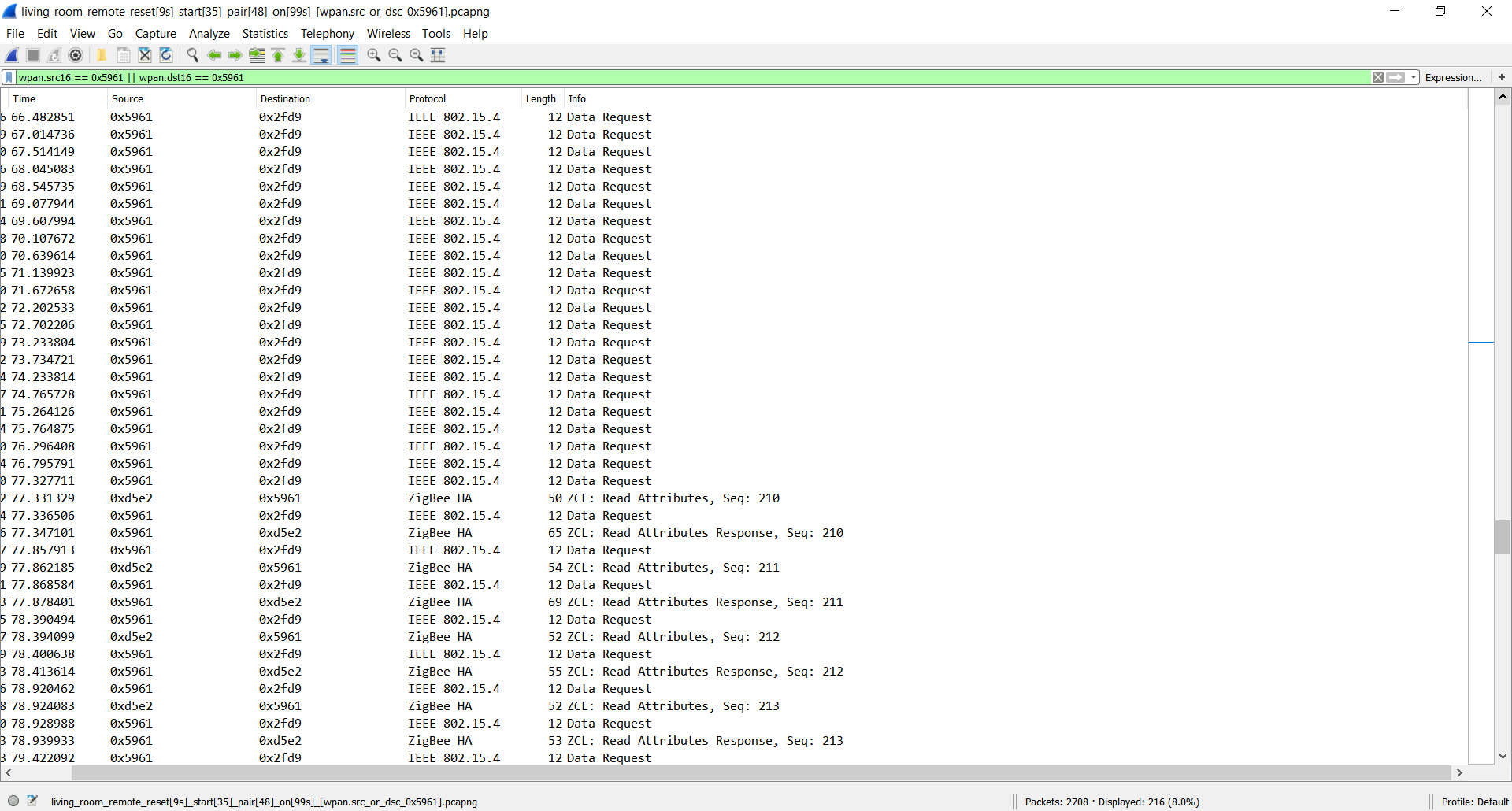
I'm currently on master branch.
I checked, on and off message working currently for on/off button,
press and hold message for up/down button on zigbee2mqtt.
I missing hold for on/off button but unfortunatelly there is red light on hue dimmer this case with zigbee2mqtt currently.
For me this writing request was interesting also
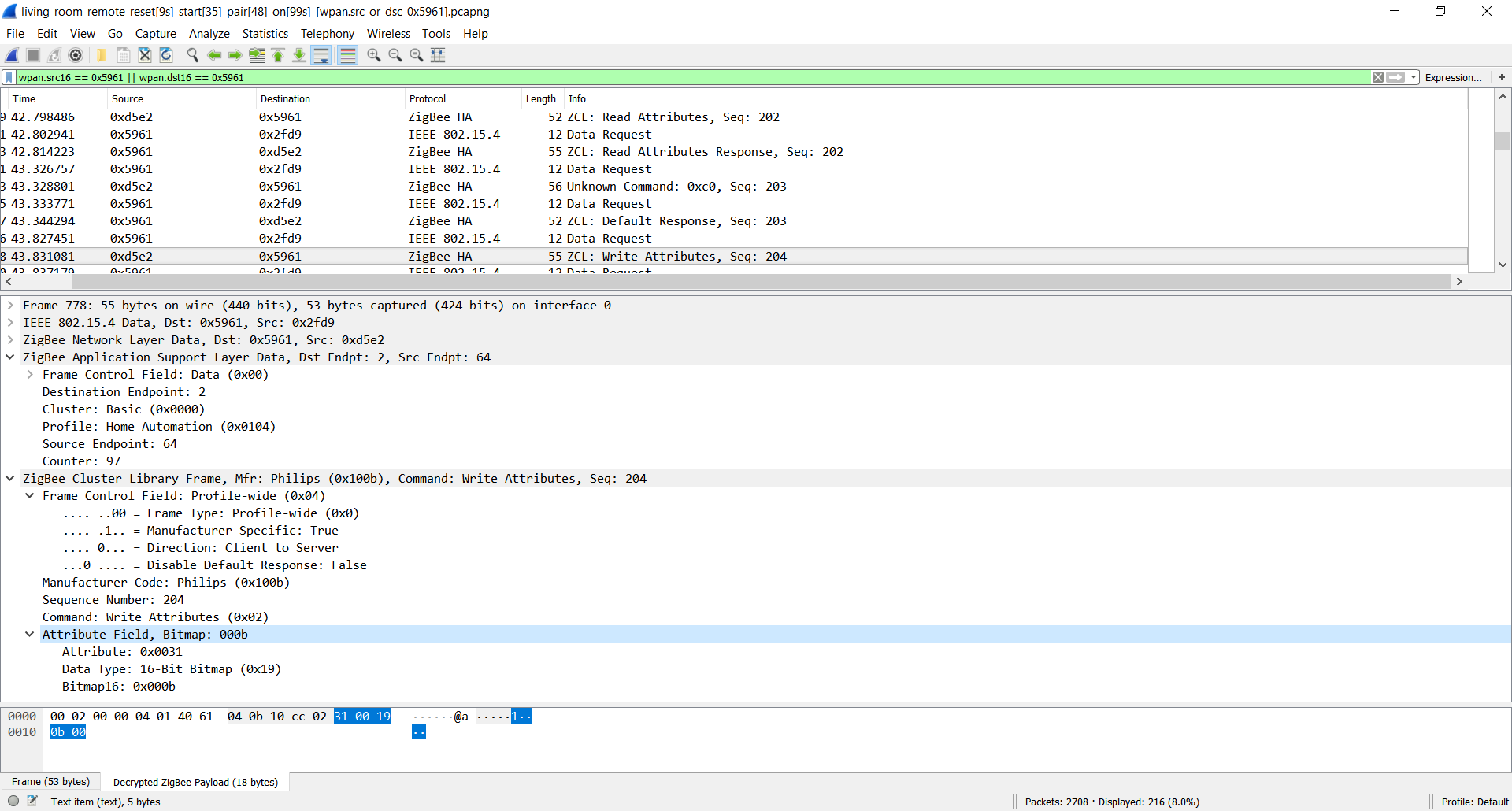
I was playing with bind to 0xfc00 cluster, tried to put missing unknown manufacturer write foundation after pairing with no success.
It should be also nice to implement release message also.
ugrug
on 24 Feb 2019
Thanks for this investigation! I hope it can lead to more comprehensive support for these dimmers.
james-fry
on 24 Feb 2019
@ugrug can you add console.log('HELLO WORLD', msg.zclMsg.cmdId) here https://github.com/Koenkk/zigbee-shepherd/blob/master/lib/components/af.js#L693 and trigger the long press? We probably need to add the missing cmdids here: https://github.com/Koenkk/zigbee-shepherd/blob/master/lib/components/af.js#L689
Koenkk
on 24 Feb 2019
@Koenkk
I tried your suggestion, added
console.log('ugrug_log_cmdId ', msg.zclMsg.cmdId); at (https://github.com/Koenkk/zigbee-shepherd/blob/master/lib/components/af.js#L693)
console.log('ugrug_log_dispatchIncomingMsg dispatchIncomingMsg(): type: ', type, ', msg: ', JSON.stringify(msg)); at (https://github.com/Koenkk/zigbee-shepherd/blob/3c5d7b4a3048eed19f71f618b7cc70bb866a2818/lib/components/af.js#L591)
unfortunatelly with no luck. I uploaded a video about the test: https://drive.google.com/file/d/1Wp4_vp-5ubdOLMyrYtTfSDjxNtirgh91/view?usp=sharing
I still have the guess the remote does not send any zigbee message as there could be some missing cluster bind, but probably I'm wrong. Without binding all button press causes lighting the red led.
Do you have any suggestion to check?
ugrug
on 25 Feb 2019
Could you add the missing binds here: https://github.com/Koenkk/zigbee-shepherd-converters/blob/master/devices.js#L828 ?
Example of adding a missing cluster definition: https://github.com/Koenkk/zcl-id/commit/9c123fa4c4d48b8e87d27d9dd52a5048f79191f1
Koenkk
on 25 Feb 2019
@Koenkk
Great news: Added cluster definiton, modified device configuration and finally long-click working now.
I have to dig what cause exception now, but at least the dimmer send long press ON and OFF also.
This data received from the 0xfc00 philips manufacturer specific cluster:
Feb 25 21:31:16 cubie npm[32673]: 2019-02-25T20:31:16.418Z zigbee-shepherd:af dispatchIncomingMsg(): type: incomingMsg, msg: {"groupid":0,"clusterid":64512,"srcaddr":1096,"srcendpoint":2,"dstendpoint":1,"wasbroadcast":0,"linkquality":65,"securityuse":0,"timestamp":2925319,"transseqnumber":0,"len":13,"data":{"type":"Buffer","data":[29,11,16,131,0,1,0,0,48,0,33,0,0]}}
Feb 25 21:31:16 cubie npm[32673]: /usr/lib/zigbee2mqtt/node_modules/zcl-packet/lib/functional.js:33
Feb 25 21:31:16 cubie npm[32673]: throw new Error('Unrecognized command');
Feb 25 21:31:16 cubie npm[32673]: ^
Feb 25 21:31:16 cubie npm[32673]: Error: Unrecognized command
Feb 25 21:31:16 cubie npm[32673]: at new FuncPayload (/usr/lib/zigbee2mqtt/node_modules/zcl-packet/lib/functional.js:33:15)
Feb 25 21:31:16 cubie npm[32673]: at /usr/lib/zigbee2mqtt/node_modules/zcl-packet/lib/zcl.js:33:22
Feb 25 21:31:16 cubie npm[32673]: at Dissolve.<anonymous> (/usr/lib/zigbee2mqtt/node_modules/zcl-packet/lib/zcl.js:121:9)
Feb 25 21:31:16 cubie npm[32673]: at Object.onceWrapper (events.js:315:30)
Feb 25 21:31:16 cubie npm[32673]: at emitOne (events.js:116:13)
Feb 25 21:31:16 cubie npm[32673]: at Dissolve.emit (events.js:211:7)
Feb 25 21:31:16 cubie npm[32673]: at Dissolve.<anonymous> (/usr/lib/zigbee2mqtt/node_modules/dissolve-chunks/index.js:73:29)
Feb 25 21:31:16 cubie npm[32673]: at emitNone (events.js:106:13)
Feb 25 21:31:16 cubie npm[32673]: at Dissolve.emit (events.js:208:7)
Feb 25 21:31:16 cubie npm[32673]: at emitReadable_ (/usr/lib/zigbee2mqtt/node_modules/dissolve/node_modules/readable-stream/lib/_stream_readable.js:456:10)
Nice!
Would this be a breaking change for existing devices?
(I actually didnt pair mine up yet, so not a prob for me :) )
james-fry
on 26 Feb 2019
@ugrug Great! In addition to changing zcl-id, you also need to make a similar update to zcl-packet, see https://github.com/Koenkk/zcl-packet/commit/09daf830a481bc20ef001da6181fe83464aa618b for an example.
Koenkk
on 26 Feb 2019
Guys, I don't have lots of time for all this smart home stuff at the moment, but that sounds great! Seems like I can finally abandon the Hue Bridge soon. :)
Great work so far, thanks for digging into this!
Bearonic
on 26 Feb 2019
@Koenkk
I fixed now the cluster and message definition, so getting the messages fine now.
I added logging debug(ugrug_log_dispatchIncomingMsg: type: ${type}, msg: ${JSON.stringify(msg)}); at (https://github.com/Koenkk/zigbee-shepherd/blob/3c5d7b4a3048eed19f71f618b7cc70bb866a2818/lib/components/af.js#L590)
The issue now comparing to standard up/down messages received as zclIncomingMsg type, this messages received as incomingMsgtype so not handled now.
Feb 26 19:03:36 cubie npm[813]: 2019-02-26T18:03:36.228Z zigbee-shepherd:af ugrug_log_dispatchIncomingMsg: type: incomingMsg, msg: {"groupid":0,"clusterid":64512,"srcaddr":1096,"srcendpoint":2,"dstendpoint":1,"wasbroadcast":0,"linkquality":65,"securityuse":0,"timestamp":14425051,"transseqnumber":0,"len":13,"data":{"type":"Buffer","data":[29,11,16,61,0,3,0,0,48,0,33,0,0]}}
Feb 26 19:03:36 cubie npm[813]: 2019-02-26T18:03:36.229Z zigbee-shepherd:af ugrug_log_dispatchIncomingMsg: return6
Feb 26 19:03:36 cubie npm[813]: 2019-02-26T18:03:36.237Z zigbee-shepherd:msgHdlr IND <-- AF:incomingMsg, transId: 0
Feb 26 19:03:36 cubie npm[813]: 2019-02-26T18:03:36.240Z zigbee-shepherd:af ugrug_log_dispatchIncomingMsg: type: zclIncomingMsg, msg: {"groupid":0,"clusterid":8,"srcaddr":1096,"srcendpoint":1,"dstendpoint":1,"wasbroadcast":0,"linkquality":65,"securityuse":0,"timestamp":14425033,"transseqnumber":0,"len":7,"data":{"0":1,"1":60,"2":2,"3":1,"4":30,"5":9,"6":0},"zclMsg":{"frameCntl":{"frameType":1,"manufSpec":0,"direction":0,"disDefaultRsp":0},"manufCode":0,"seqNum":60,"cmdId":"step","payload":{"stepmode":1,"stepsize":30,"transtime":9}}}
Could you help me how to solve this?
ugrug
on 26 Feb 2019
Could you post the debug log of ONLY the long click?
Koenkk
on 26 Feb 2019
@Koenkk
Sure, here are the messages:
ON button click:
Feb 27 17:25:23 cubie npm[12270]: 2019-02-27T16:25:23.251Z zigbee-shepherd:af ugrug_log_dispatchIncomingMsg: type: incomingMsg, msg: {"groupid":0,"clusterid":64512,"srcaddr":1096,"srcendpoint":2,"dstendpoint":1,"wasbroadcast":0,"linkquality":76,"securityuse":0,"timestamp":15341478,"transseqnumber":0,"len":13,"data":{"type":"Buffer","data":[29,11,16,95,0,1,0,0,48,0,33,0,0]}}
ON button hold:
Feb 27 17:25:24 cubie npm[12270]: 2019-02-27T16:25:24.043Z zigbee-shepherd:af ugrug_log_dispatchIncomingMsg: type: incomingMsg, msg: {"groupid":0,"clusterid":64512,"srcaddr":1096,"srcendpoint":2,"dstendpoint":1,"wasbroadcast":0,"linkquality":76,"securityuse":0,"timestamp":15343980,"transseqnumber":0,"len":13,"data":{"type":"Buffer","data":[29,11,16,97,0,1,0,0,48,1,33,8,0]}}
Feb 27 17:25:27 cubie npm[12270]: 2019-02-27T16:25:27.271Z zigbee-shepherd:af ugrug_log_dispatchIncomingMsg: type: incomingMsg, msg: {"groupid":0,"clusterid":64512,"srcaddr":1096,"srcendpoint":2,"dstendpoint":1,"wasbroadcast":0,"linkquality":73,"securityuse":0,"timestamp":15353988,"transseqnumber":0,"len":13,"data":{"type":"Buffer","data":[29,11,16,100,0,1,0,0,48,1,33,32,0]}}
Feb 27 17:25:27 cubie npm[12270]: 2019-02-27T16:25:27.280Z zigbee-shepherd:af ugrug_log_dispatchIncomingMsg: type: incomingMsg, msg: {"groupid":0,"clusterid":64512,"srcaddr":1096,"srcendpoint":2,"dstendpoint":1,"wasbroadcast":0,"linkquality":73,"securityuse":0,"timestamp":15354010,"transseqnumber":0,"len":13,"data":{"type":"Buffer","data":[29,11,16,101,0,1,0,0,48,1,33,40,0]}}
Feb 27 17:25:28 cubie npm[12270]: 2019-02-27T16:25:28.049Z zigbee-shepherd:af ugrug_log_dispatchIncomingMsg: type: incomingMsg, msg: {"groupid":0,"clusterid":64512,"srcaddr":1096,"srcendpoint":2,"dstendpoint":1,"wasbroadcast":0,"linkquality":73,"securityuse":0,"timestamp":15356487,"transseqnumber":0,"len":13,"data":{"type":"Buffer","data":[29,11,16,102,0,1,0,0,48,1,33,48,0]}}
Feb 27 17:25:28 cubie npm[12270]: 2019-02-27T16:25:28.886Z zigbee-shepherd:af ugrug_log_dispatchIncomingMsg: type: incomingMsg, msg: {"groupid":0,"clusterid":64512,"srcaddr":1096,"srcendpoint":2,"dstendpoint":1,"wasbroadcast":0,"linkquality":76,"securityuse":0,"timestamp":15359017,"transseqnumber":0,"len":13,"data":{"type":"Buffer","data":[29,11,16,103,0,1,0,0,48,1,33,56,0]}}
Feb 27 17:25:29 cubie npm[12270]: 2019-02-27T16:25:29.644Z zigbee-shepherd:af ugrug_log_dispatchIncomingMsg: type: incomingMsg, msg: {"groupid":0,"clusterid":64512,"srcaddr":1096,"srcendpoint":2,"dstendpoint":1,"wasbroadcast":0,"linkquality":73,"securityuse":0,"timestamp":15361486,"transseqnumber":0,"len":13,"data":{"type":"Buffer","data":[29,11,16,104,0,1,0,0,48,1,33,64,0]}}
ON release:
Feb 27 17:25:29 cubie npm[12270]: 2019-02-27T16:25:29.973Z zigbee-shepherd:af ugrug_log_dispatchIncomingMsg: type: incomingMsg, msg: {"groupid":0,"clusterid":64512,"srcaddr":1096,"srcendpoint":2,"dstendpoint":1,"wasbroadcast":0,"linkquality":76,"securityuse":0,"timestamp":15362513,"transseqnumber":0,"len":13,"data":{"type":"Buffer","data":[29,11,16,105,0,1,0,0,48,3,33,67,0]}}
UP button click:
Feb 27 17:30:46 cubie npm[12270]: 2019-02-27T16:30:46.802Z zigbee-shepherd:af ugrug_log_dispatchIncomingMsg: type: incomingMsg, msg: {"groupid":0,"clusterid":64512,"srcaddr":1096,"srcendpoint":2,"dstendpoint":1,"wasbroadcast":0,"linkquality":89,"securityuse":0,"timestamp":16352455,"transseqnumber":0,"len":13,"data":{"type":"Buffer","data":[29,11,16,107,0,2,0,0,48,0,33,0,0]}}
UP button hold:
Feb 27 17:30:47 cubie npm[12270]: 2019-02-27T16:30:47.566Z zigbee-shepherd:af ugrug_log_dispatchIncomingMsg: type: incomingMsg, msg: {"groupid":0,"clusterid":64512,"srcaddr":1096,"srcendpoint":2,"dstendpoint":1,"wasbroadcast":0,"linkquality":89,"securityuse":0,"timestamp":16354955,"transseqnumber":0,"len":13,"data":{"type":"Buffer","data":[29,11,16,109,0,2,0,0,48,1,33,8,0]}}
Feb 27 17:30:48 cubie npm[12270]: 2019-02-27T16:30:48.367Z zigbee-shepherd:af ugrug_log_dispatchIncomingMsg: type: incomingMsg, msg: {"groupid":0,"clusterid":64512,"srcaddr":1096,"srcendpoint":2,"dstendpoint":1,"wasbroadcast":0,"linkquality":86,"securityuse":0,"timestamp":16357457,"transseqnumber":0,"len":13,"data":{"type":"Buffer","data":[29,11,16,111,0,2,0,0,48,1,33,16,0]}}
UP button release:
Feb 27 17:30:48 cubie npm[12270]: 2019-02-27T16:30:48.921Z zigbee-shepherd:af ugrug_log_dispatchIncomingMsg: type: incomingMsg, msg: {"groupid":0,"clusterid":64512,"srcaddr":1096,"srcendpoint":2,"dstendpoint":1,"wasbroadcast":0,"linkquality":89,"securityuse":0,"timestamp":16359114,"transseqnumber":0,"len":13,"data":{"type":"Buffer","data":[29,11,16,113,0,2,0,0,48,3,33,21,0]}}
DOWN button click:
Feb 27 17:33:55 cubie npm[12270]: 2019-02-27T16:33:55.363Z zigbee-shepherd:af ugrug_log_dispatchIncomingMsg: type: incomingMsg, msg: {"groupid":0,"clusterid":64512,"srcaddr":1096,"srcendpoint":2,"dstendpoint":1,"wasbroadcast":0,"linkquality":86,"securityuse":0,"timestamp":230117,"transseqnumber":0,"len":13,"data":{"type":"Buffer","data":[29,11,16,115,0,3,0,0,48,0,33,0,0]}}
DOWN button hold:
Feb 27 17:33:56 cubie npm[12270]: 2019-02-27T16:33:56.176Z zigbee-shepherd:af ugrug_log_dispatchIncomingMsg: type: incomingMsg, msg: {"groupid":0,"clusterid":64512,"srcaddr":1096,"srcendpoint":2,"dstendpoint":1,"wasbroadcast":0,"linkquality":86,"securityuse":0,"timestamp":232618,"transseqnumber":0,"len":13,"data":{"type":"Buffer","data":[29,11,16,117,0,3,0,0,48,1,33,8,0]}}
Feb 27 17:33:56 cubie npm[12270]: 2019-02-27T16:33:56.949Z zigbee-shepherd:af ugrug_log_dispatchIncomingMsg: type: incomingMsg, msg: {"groupid":0,"clusterid":64512,"srcaddr":1096,"srcendpoint":2,"dstendpoint":1,"wasbroadcast":0,"linkquality":89,"securityuse":0,"timestamp":235120,"transseqnumber":0,"len":13,"data":{"type":"Buffer","data":[29,11,16,119,0,3,0,0,48,1,33,16,0]}}
DOWN button release:
Feb 27 17:33:57 cubie npm[12270]: 2019-02-27T16:33:57.300Z zigbee-shepherd:af ugrug_log_dispatchIncomingMsg: type: incomingMsg, msg: {"groupid":0,"clusterid":64512,"srcaddr":1096,"srcendpoint":2,"dstendpoint":1,"wasbroadcast":0,"linkquality":84,"securityuse":0,"timestamp":236159,"transseqnumber":0,"len":13,"data":{"type":"Buffer","data":[29,11,16,121,0,3,0,0,48,3,33,19,0]}}
OFF button click:
Feb 27 17:00:15 cubie npm[12270]: 2019-02-27T16:00:15.502Z zigbee-shepherd:af ugrug_log_dispatchIncomingMsg: type: incomingMsg, msg: {"groupid":0,"clusterid":64512,"srcaddr":1096,"srcendpoint":2,"dstendpoint":1,"wasbroadcast":0,"linkquality":68,"securityuse":0,"timestamp":10629645,"transseqnumber":0,"len":13,"data":{"type":"Buffer","data":[29,11,16,87,0,4,0,0,48,0,33,0,0]}}
OFF button hold:
Feb 27 17:00:16 cubie npm[12270]: 2019-02-27T16:00:16.298Z zigbee-shepherd:af ugrug_log_dispatchIncomingMsg: type: incomingMsg, msg: {"groupid":0,"clusterid":64512,"srcaddr":1096,"srcendpoint":2,"dstendpoint":1,"wasbroadcast":0,"linkquality":68,"securityuse":0,"timestamp":10632144,"transseqnumber":0,"len":13,"data":{"type":"Buffer","data":[29,11,16,89,0,4,0,0,48,1,33,8,0]}}
Feb 27 17:00:17 cubie npm[12270]: 2019-02-27T16:00:17.135Z zigbee-shepherd:af ugrug_log_dispatchIncomingMsg: type: incomingMsg, msg: {"groupid":0,"clusterid":64512,"srcaddr":1096,"srcendpoint":2,"dstendpoint":1,"wasbroadcast":0,"linkquality":68,"securityuse":0,"timestamp":10634645,"transseqnumber":0,"len":13,"data":{"type":"Buffer","data":[29,11,16,90,0,4,0,0,48,1,33,16,0]}}
Feb 27 17:00:17 cubie npm[12270]: 2019-02-27T16:00:17.903Z zigbee-shepherd:af ugrug_log_dispatchIncomingMsg: type: incomingMsg, msg: {"groupid":0,"clusterid":64512,"srcaddr":1096,"srcendpoint":2,"dstendpoint":1,"wasbroadcast":0,"linkquality":70,"securityuse":0,"timestamp":10637144,"transseqnumber":0,"len":13,"data":{"type":"Buffer","data":[29,11,16,91,0,4,0,0,48,1,33,24,0]}}
OFF button release:
Feb 27 17:00:18 cubie npm[12270]: 2019-02-27T16:00:18.581Z zigbee-shepherd:af ugrug_log_dispatchIncomingMsg: type: incomingMsg, msg: {"groupid":0,"clusterid":64512,"srcaddr":1096,"srcendpoint":2,"dstendpoint":1,"wasbroadcast":0,"linkquality":70,"securityuse":0,"timestamp":10639267,"transseqnumber":0,"len":13,"data":{"type":"Buffer","data":[29,11,16,92,0,4,0,0,48,3,33,30,0]}}
Correlated to the previously sniffed values just add (29,11,16,92,0 zigbee header):
OFF Click: 04 00 00 30 00 21 00 00 -> dec: 4, 0, 0, 48, 0, 33, 0, 0
OFF Hold
(1st) 04 00 00 30 01 21 08 00 -> dec: 4, 0, 0, 48, 1, 33, 8, 0
(2nd) 04 00 00 30 01 21 10 00 -> dec 4, 0, 0, 48, 1, 33, 16, 0
(3rd) 04 00 00 30 01 21 18 00 -> dec 4, 0, 0, 48, 1, 33, 24, 0
OFF Release: 04 00 00 30 03 21 2b 00 -> dec 4, 0, 0, 48, 3, 33, 43, 0
So it seems that bytes related to events that way [29,11,16,92,0,4,0,0,48,3,33,30,0]:
header: [29,11,16,92,0]
button: [4] (1: ON, 2: UP, 3: DOWN, 4: OFF]
unknown: [0, 0, 48]
type: [0] (0: press, 1: hold, 3: release
unknown: [33]
time from press [0]
unknown: [0]
There is also an interesting issue on holding ON button longer than 2 sec it will try to re-pair with the zigbee2mqtt and will be refused by zigbee2mqtt as already paired. The hold events still sending during that request.
(The dimmer can be paired with holding ON button longer as not joined to HUE bridge, I tried with one and two Philips Lights this working.)
ugrug
on 27 Feb 2019
Can you replace what you add to zcl-packet with (fill in the params):
"MYCOMMAND":{
"params":[
{"value":"uint16"}
],
"dir":1},
@Koenkk
Great. The message decoded now. 👍
Mar 1 18:35:44 cubie npm[31235]: 2019-03-01T17:35:44.370Z zigbee-shepherd:af ugrug_log_dispatchIncomingMsg: type: zclIncomingMsg, msg: {"groupid":0,"clusterid":64512,"srcaddr":1096,"srcendpoint":2,"dstendpoint":1,"wasbroadcast":0,"linkquality":86,"securityuse":0,"timestamp":4159004,"transseqnumber":0,"len":13,"data":{"0":29,"1":11,"2":16,"3":25,"4":0,"5":4,"6":0,"7":0,"8":48,"9":3,"10":33,"11":18,"12":0},"zclMsg":{"frameCntl":{"frameType":1,"manufSpec":1,"direction":1,"disDefaultRsp":1},"manufCode":4107,"seqNum":25,"cmdId":"eventNotification","payload":{"button":4,"unknown1":3145728,"type":3,"unknown2":0,"time":18}}}
Mar 1 18:35:44 cubie npm[31235]: 2019-03-01T17:35:44.374Z zigbee-shepherd:af ugrug_log_dispatchfinal: msg.zclMsg: {"frameCntl":{"frameType":1,"manufSpec":1,"direction":1,"disDefaultRsp":1},"manufCode":4107,"seqNum":25,"cmdId":"eventNotification","payload":{"button":4,"unknown1":3145728,"type":3,"unknown2":0,"time":18}
Created pull requests for zcl-id (https://github.com/Koenkk/zcl-id/pull/6), zcl-packet (https://github.com/Koenkk/zcl-packet/pull/10) and zigbee-shepherd-converters (https://github.com/Koenkk/zigbee-shepherd-converters/pull/311).
Last one has to modified, I just thinking about the fromZigbee converter how to implement and not to break the previous behaviour.
ugrug
on 1 Mar 2019
@Koenkk
The converter implemented now, the previous PR updated.
Everython working now on my configuration.
Also added the new command to zigbee-shepherd (https://github.com/Koenkk/zigbee-shepherd/pull/15).
The breaking change is only sending now 'on-press' and 'off-press' instead of 'on' and 'off'.
Added 'on-hold', 'on-hold-release', 'off-hold', 'off-hold-release' actions, and also includes duration attribute contains hold duration in seconds.
Mar  1 22:44:05 cubie npm[26173]: #033[32m  zigbee2mqtt:info#033[39m 2019-3-1 22:44:05 MQTT publish: topic 'zigbee2mqtt/hue_remote_living_room', payload '{"battery":100,"linkquality":52,"last_seen":"2019-03-01T21:44:05.116Z","device":{"ieeeAddr":"0x00178801021874fe","friendlyName":"hue_remote_living_room","type":"EndDevice","nwkAddr":1096,"manufId":4107,"manufName":"Philips","powerSource":"Battery","modelId":"RWL021","status":"offline"},"action":"on-press","duration":0}'
Mar  1 22:44:06 cubie npm[26173]: #033[32m  zigbee2mqtt:info#033[39m 2019-3-1 22:44:06 MQTT publish: topic 'zigbee2mqtt/hue_remote_living_room', payload '{"battery":100,"linkquality":70,"last_seen":"2019-03-01T21:44:06.283Z","device":{"ieeeAddr":"0x00178801021874fe","friendlyName":"hue_remote_living_room","type":"EndDevice","nwkAddr":1096,"manufId":4107,"manufName":"Philips","powerSource":"Battery","modelId":"RWL021","status":"offline"},"action":"up-press","duration":0,"brightness":255}'
Mar  1 22:44:09 cubie npm[26173]: #033[32m  zigbee2mqtt:info#033[39m 2019-3-1 22:44:09 MQTT publish: topic 'zigbee2mqtt/hue_remote_living_room', payload '{"battery":100,"linkquality":73,"last_seen":"2019-03-01T21:44:09.164Z","device":{"ieeeAddr":"0x00178801021874fe","friendlyName":"hue_remote_living_room","type":"EndDevice","nwkAddr":1096,"manufId":4107,"manufName":"Philips","powerSource":"Battery","modelId":"RWL021","status":"offline"},"action":"down-press","duration":0,"brightness":205}'
Mar  1 22:44:10 cubie npm[26173]: #033[32m  zigbee2mqtt:info#033[39m 2019-3-1 22:44:10 MQTT publish: topic 'zigbee2mqtt/hue_remote_living_room', payload '{"battery":100,"linkquality":70,"last_seen":"2019-03-01T21:44:10.890Z","device":{"ieeeAddr":"0x00178801021874fe","friendlyName":"hue_remote_living_room","type":"EndDevice","nwkAddr":1096,"manufId":4107,"manufName":"Philips","powerSource":"Battery","modelId":"RWL021","status":"offline"},"action":"off-press","duration":0}'
Mar  1 22:44:13 cubie npm[26173]: #033[32m  zigbee2mqtt:info#033[39m 2019-3-1 22:44:13 MQTT publish: topic 'zigbee2mqtt/hue_remote_living_room', payload '{"battery":100,"linkquality":68,"last_seen":"2019-03-01T21:44:13.812Z","device":{"ieeeAddr":"0x00178801021874fe","friendlyName":"hue_remote_living_room","type":"EndDevice","nwkAddr":1096,"manufId":4107,"manufName":"Philips","powerSource":"Battery","modelId":"RWL021","status":"offline"},"action":"down-hold","duration":0.682,"brightness":155}'
Mar  1 22:44:14 cubie npm[26173]: #033[32m  zigbee2mqtt:info#033[39m 2019-3-1 22:44:14 MQTT publish: topic 'zigbee2mqtt/hue_remote_living_room', payload '{"battery":100,"linkquality":65,"last_seen":"2019-03-01T21:44:14.604Z","device":{"ieeeAddr":"0x00178801021874fe","friendlyName":"hue_remote_living_room","type":"EndDevice","nwkAddr":1096,"manufId":4107,"manufName":"Philips","powerSource":"Battery","modelId":"RWL021","status":"offline"},"action":"down-hold","duration":1.474,"brightness":75.8}'
Mar  1 22:44:14 cubie npm[26173]: #033[32m  zigbee2mqtt:info#033[39m 2019-3-1 22:44:14 MQTT publish: topic 'zigbee2mqtt/hue_remote_living_room', payload '{"battery":100,"linkquality":65,"last_seen":"2019-03-01T21:44:14.855Z","device":{"ieeeAddr":"0x00178801021874fe","friendlyName":"hue_remote_living_room","type":"EndDevice","nwkAddr":1096,"manufId":4107,"manufName":"Philips","powerSource":"Battery","modelId":"RWL021","status":"offline"},"action":"down-hold-release","duration":1.726,"brightness":75.8}'
Mar  1 22:44:17 cubie npm[26173]: #033[32m  zigbee2mqtt:info#033[39m 2019-3-1 22:44:17 MQTT publish: topic 'zigbee2mqtt/hue_remote_living_room', payload '{"battery":100,"linkquality":68,"last_seen":"2019-03-01T21:44:17.647Z","device":{"ieeeAddr":"0x00178801021874fe","friendlyName":"hue_remote_living_room","type":"EndDevice","nwkAddr":1096,"manufId":4107,"manufName":"Philips","powerSource":"Battery","modelId":"RWL021","status":"offline"},"action":"off-hold","duration":0.888}'
Mar  1 22:44:18 cubie npm[26173]: #033[32m  zigbee2mqtt:info#033[39m 2019-3-1 22:44:18 MQTT publish: topic 'zigbee2mqtt/hue_remote_living_room', payload '{"battery":100,"linkquality":68,"last_seen":"2019-03-01T21:44:18.357Z","device":{"ieeeAddr":"0x00178801021874fe","friendlyName":"hue_remote_living_room","type":"EndDevice","nwkAddr":1096,"manufId":4107,"manufName":"Philips","powerSource":"Battery","modelId":"RWL021","status":"offline"},"action":"off-hold","duration":1.598}'
Mar  1 22:44:19 cubie npm[26173]: #033[32m  zigbee2mqtt:info#033[39m 2019-3-1 22:44:19 MQTT publish: topic 'zigbee2mqtt/hue_remote_living_room', payload '{"battery":100,"linkquality":70,"last_seen":"2019-03-01T21:44:19.150Z","device":{"ieeeAddr":"0x00178801021874fe","friendlyName":"hue_remote_living_room","type":"EndDevice","nwkAddr":1096,"manufId":4107,"manufName":"Philips","powerSource":"Battery","modelId":"RWL021","status":"offline"},"action":"off-hold","duration":2.391}'
Mar  1 22:44:19 cubie npm[26173]: #033[32m  zigbee2mqtt:info#033[39m 2019-3-1 22:44:19 MQTT publish: topic 'zigbee2mqtt/hue_remote_living_room', payload '{"battery":100,"linkquality":68,"last_seen":"2019-03-01T21:44:19.267Z","device":{"ieeeAddr":"0x00178801021874fe","friendlyName":"hue_remote_living_room","type":"EndDevice","nwkAddr":1096,"manufId":4107,"manufName":"Philips","powerSource":"Battery","modelId":"RWL021","status":"offline"},"action":"off-hold-release","duration":2.508}'
Mar  1 22:44:21 cubie npm[26173]: #033[32m  zigbee2mqtt:info#033[39m 2019-3-1 22:44:21 MQTT publish: topic 'zigbee2mqtt/hue_remote_living_room', payload '{"battery":100,"linkquality":68,"last_seen":"2019-03-01T21:44:21.351Z","device":{"ieeeAddr":"0x00178801021874fe","friendlyName":"hue_remote_living_room","type":"EndDevice","nwkAddr":1096,"manufId":4107,"manufName":"Philips","powerSource":"Battery","modelId":"RWL021","status":"offline"},"action":"on-hold","duration":0.794}'
Mar  1 22:44:24 cubie npm[26173]: #033[32m  zigbee2mqtt:info#033[39m 2019-3-1 22:44:24 MQTT publish: topic 'zigbee2mqtt/hue_remote_living_room', payload '{"battery":100,"linkquality":70,"last_seen":"2019-03-01T21:44:24.495Z","device":{"ieeeAddr":"0x00178801021874fe","friendlyName":"hue_remote_living_room","type":"EndDevice","nwkAddr":1096,"manufId":4107,"manufName":"Philips","powerSource":"Battery","modelId":"RWL021","status":"offline"},"action":"on-hold-release","duration":3.938}'
Brightness sent by default, can be disabled with send_brightess: false device configuration.
Its ready to merge and test. :)
The only issue is the long-press ON, dimmer try to pair also.
ugrug
on 1 Mar 2019
Great job! Hopefully this will make it into the edge hassio addon soon :)
james-fry
on 1 Mar 2019
Merged everything, will be available in edge in an hour.
Koenkk
on 2 Mar 2019
Great, thanks!
ugrug
on 2 Mar 2019
@ugrug I updated to the latest dev and now all my dimmer does is create errors in the log.
No converter available for '324131092621' with cid 'genOnOff', type 'cmdOn' and data '{"cid":"genOnOff","data":{}}
Same for type cmdStep and cmdOffWithEffect
I see that you removed those in your PR. Is there something else I need to do to make them work again? I already tried resetting and pairing again with both my Hue Dimmers.
 Evildime
on 3 Mar 2019
Evildime
on 3 Mar 2019
@ugrug I updated to the latest dev and now all my dimmer does is create errors in the log.
No converter available for '324131092621' with cid 'genOnOff', type 'cmdOn' and data '{"cid":"genOnOff","data":{}}
Same issue as referenced here: https://github.com/Koenkk/zigbee2mqtt/issues/531#issuecomment-470407639_
 thehaxxa
on 7 Mar 2019
thehaxxa
on 7 Mar 2019
@ugrug perhaps we should readd the old converters and only use the manuSpecificPhilips cluster for the long presses, would this be a solution?
Koenkk
on 7 Mar 2019
@Koenkk
1.
My fault to remove converters. Seems to be the current initialisation makes the dimmer only operate with binding to genOnOff and genLevelCtrl clusters. (https://github.com/Koenkk/zigbee-shepherd-converters/pull/322)
This way the dimmer works from clean installing the zigbee2mqtt, so hopefully will fine for everyone.
2.
But I still looking for the similar solution as the dimmer works with the hue network:
To be able to remove binds to genOnOff genLevelCtrl clusters, probably has to implement command at the dimmer initialisation, possibly causing that the dimmer messages not sent.
Could you help me how to send this message at the initialisasion to the dimmer?
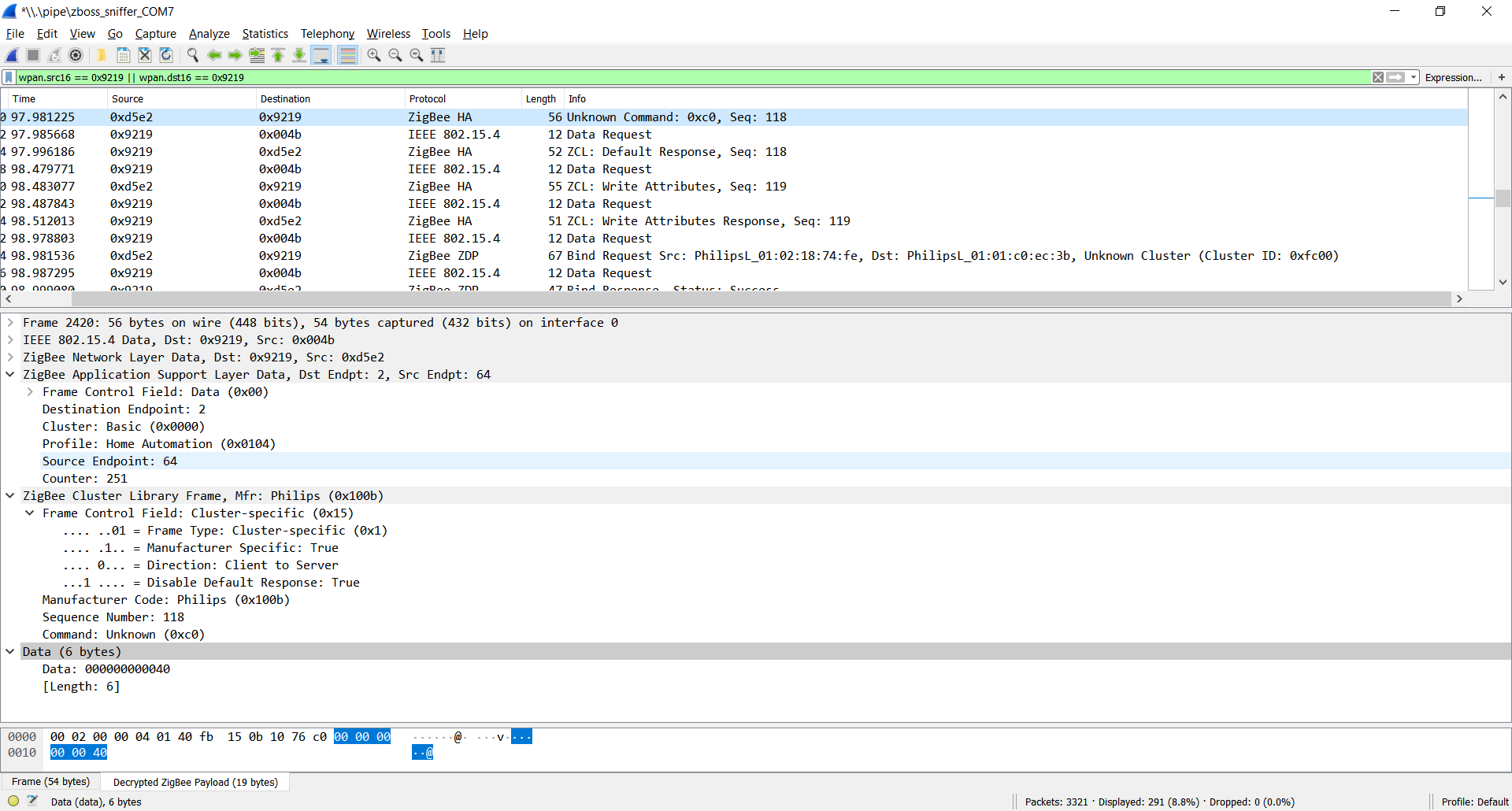
After this, followed by a write attribute command:
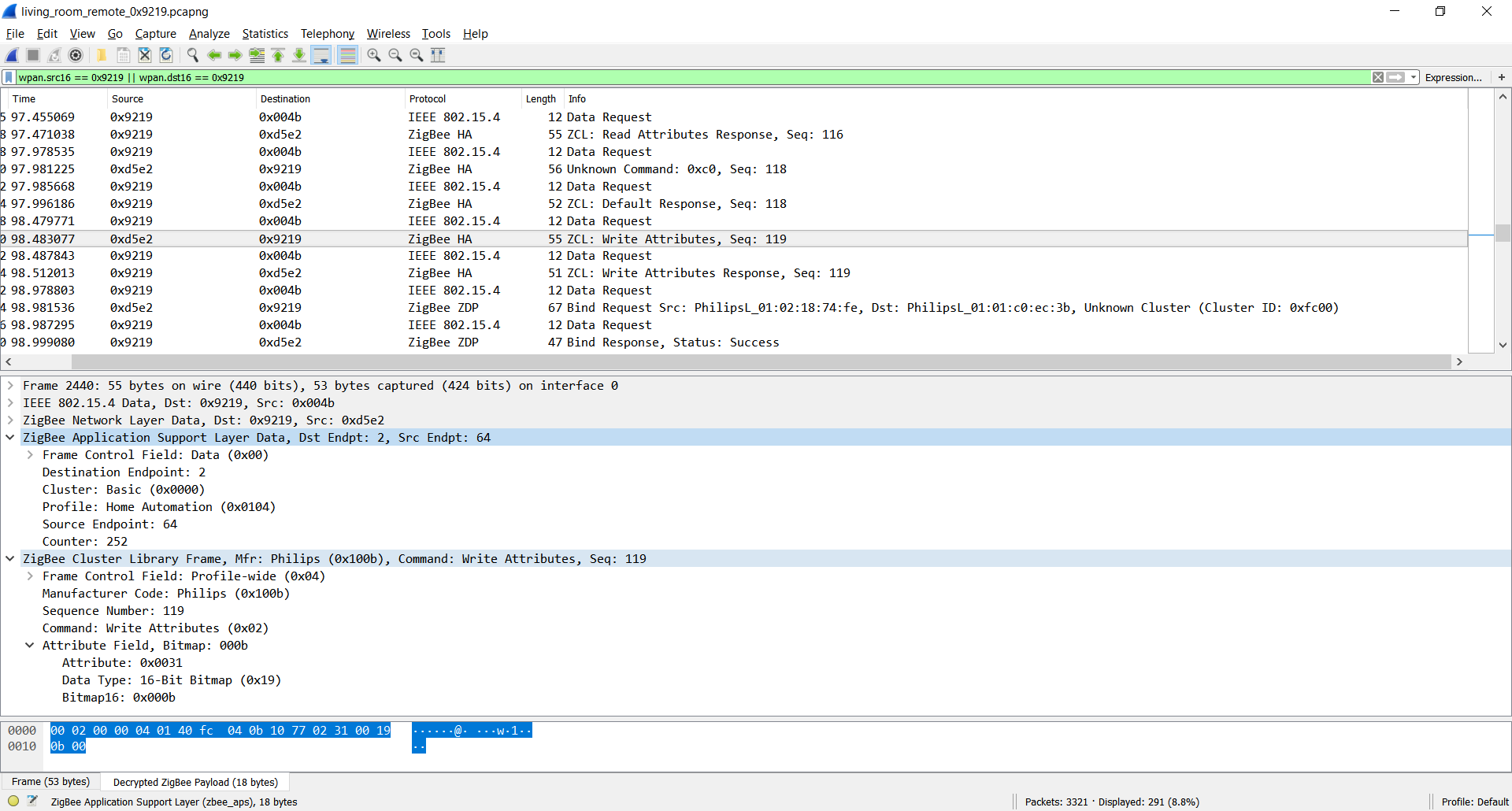
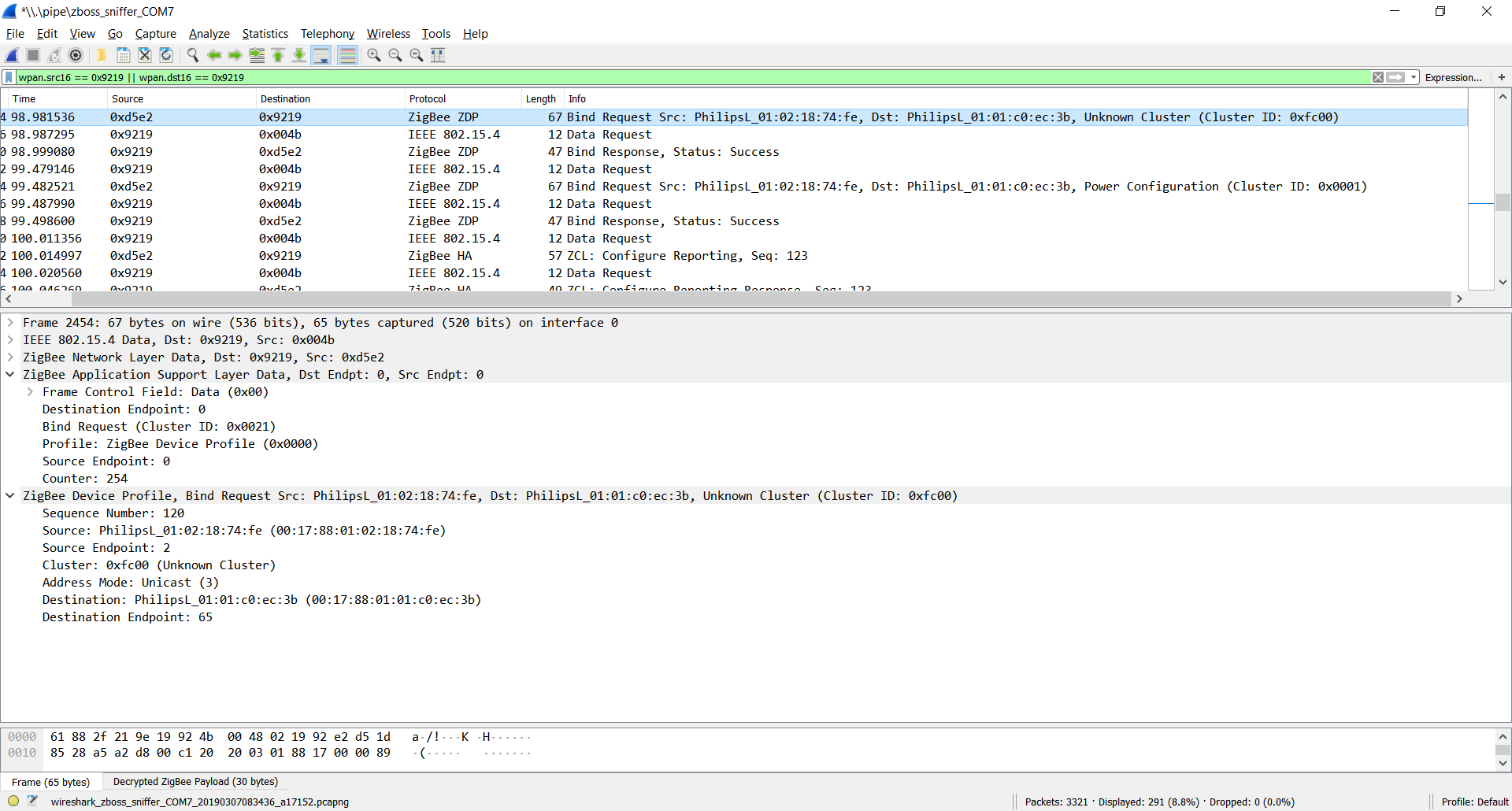
And finally there is 2 bind command to the cluster 0xfc00 and 0x0001

ugrug
on 7 Mar 2019
- I don't know about the first one, this is not a ZCL command
- Could you expand the application support layer data (need to see the cluster)
3/4. these seems to be bind request from the remote to the coordinator.
Question: why do we need this? What's not working currently?
Koenkk
on 7 Mar 2019
This is the different behaviour paired with hue and zigbee2mqtt:
- Hue: (https://drive.google.com/file/d/1_RpMoLkbaXEsYo8wBDy-N-LNPFVK_SJn/view?usp=sharing)
- Zigbee2mqtt: (https://drive.google.com/file/d/1LB0AZ9Cfg5jOlzFqpw4nz88v51eOqmh1/view?usp=sharing)
All button works including long-press, just holding on after about 2 sec dimmer starts to re-pair.
This not happens with hue.
ps.
I checked out the dev branch again, does it possible that the converters does not updates?
ugrug
on 7 Mar 2019
I missed your comment about expanding the application support layer data. I replaced the screenshot now.
ugrug
on 7 Mar 2019
Converters are not automatically updated, I have to bump the zigbee-shepherd-converters version zigbee2mqtt is using.
For the write, please try with:
(cb) => ep2.foundation('genBasic', 'write', [{attrId: 0x0031, dataType: 0x19, attrData: 0x000B}], {manufSpec: 1, disDefaultRsp: 1, manufCode: 0x100B}, cb),
Great! This fixed the repairing issue I showed on the video.
I also implemented now multiple clicks (double, triple etc.)
Should I make new PR for this?
ugrug
on 8 Mar 2019
Great! Yes please, then I can work on the zigbee2mqtt 1.2 release :)
What is the procedure for existing users? Do they need to re-pair?
Koenkk
on 8 Mar 2019
Finally the existing binding kept, just the new bind and the write request necessary to add.
I think repairing not required just the dimmer has to be awake for configuration.
From the previously used messages 'on' and 'off' modified to 'on-press' and 'off-press' to be consistent.
PR: https://github.com/Koenkk/zigbee-shepherd-converters/pull/323
ugrug
on 8 Mar 2019
Integrated everything, can this be closed?
Koenkk
on 8 Mar 2019
Sorry to comment on this after it was closed, but I can't see multiple clicks either in the Zigbee logs or on Home Assistant.
HA: 0.89.1
Zigbee2mqtt: 1.2.1
Firmware: 20190223
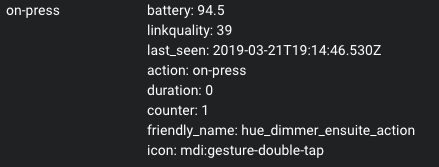
Single presses show action as 'on-press', and holding works with 'on-hold' and 'on-hold-release', but double or triple clicks just show 'on-press'.
I thought perhaps the 'counter' attribute would count the clicks, but I can't reliable get it to detect 2, let alone 3 click.
Here the logs shows me pressing twice in quick succession, but no double click detected:
Mar 21 19:13:07 raspberrypi npm[7766]:   zigbee2mqtt:info 3/21/2019, 7:13:07 PM MQTT publish: topic 'zigbee2mqtt/hue_dimmer_ensuite', payload '{"battery":94.5,"linkquality":42,"last_seen":"2019-03-21T19:13:07.070Z","action":"on-press","duration":0,"counter":1}'
Mar 21 19:13:07 raspberrypi npm[7766]:   zigbee2mqtt:info 3/21/2019, 7:13:07 PM MQTT publish: topic 'zigbee2mqtt/hue_dimmer_ensuite', payload '{"battery":94.5,"linkquality":42,"last_seen":"2019-03-21T19:13:07.329Z","action":"on-press","duration":0,"counter":1}'
HA State shows the following:
 jarrah31
on 21 Mar 2019
jarrah31
on 21 Mar 2019
@jarrah31
The default timeout is 0.25 (means 250 ms), what requires really fast clicking.
In my instance its working right, ok for 2-3 clicks, if you are quick.
Please try to increase multiple_press_timeout.
Note: the event is always XX-press (on-press, up-press etc.) this case, and the counter attribute will be the number of multiple-clicks (1, 2, 3 etc.)
ugrug
on 22 Mar 2019
@ugrug ah thanks!
Where would I set multiple_press_timeout as searching for this option in this repo and googling it with zigbee2mqtt or home assistant gives no answers?
jarrah31
on 22 Mar 2019
@jarrah31
can be configured in device settings:
/usr/lib/zigbee2mqtt/data/configuration.yaml
devices:
  '0x00xxxxxxxxxxxxxx':
    friendly_name: yyyyyyyyyyy
    multiple_press_timeout: 1
    retain: true
IMO 250ms is just perfect.
I have also the old round xiaomi buttons and the hue feels like them for multi-click.
I also have the new square xiaomi buttons and they have a longer double-click period and it feels wrong.
james-fry
on 23 Mar 2019
Thank you @ugrug
jarrah31
on 23 Mar 2019
Just noticed that the device support docs is out of date for this dimmer now.
It says
324131092621 | Philips Hue dimmer switch (on/off)
Should be updated to indicate it supports also long click, long click release, and count of clicks, as well as brightness value.
james-fry
on 8 Apr 2019
@james-fry that can be done by updating: https://github.com/Koenkk/zigbee-shepherd-converters/blob/master/devices.js#L898
Koenkk
on 8 Apr 2019
How does one update that?
 hgelpke
on 3 May 2019
hgelpke
on 3 May 2019
@hgelpke by making a pull request.
I've updated the description, will be updated in the docs once zigbee2mqtt 1.4 is released.
Koenkk
on 5 May 2019
Related issues
 jerrychong25
·
4Comments
Koenkk
·
3Comments
jerrychong25
·
4Comments
Koenkk
·
3Comments
 pepp86
·
4Comments
pepp86
·
4Comments
 tb-killa
·
3Comments
tb-killa
·
3Comments
 z4rn0x
·
3Comments
z4rn0x
·
3Comments
Most helpful comment
@Koenkk
The converter implemented now, the previous PR updated.
Everython working now on my configuration.
Also added the new command to zigbee-shepherd (https://github.com/Koenkk/zigbee-shepherd/pull/15).
The breaking change is only sending now 'on-press' and 'off-press' instead of 'on' and 'off'.
Added 'on-hold', 'on-hold-release', 'off-hold', 'off-hold-release' actions, and also includes duration attribute contains hold duration in seconds.
Brightness sent by default, can be disabled with send_brightess: false device configuration.
Its ready to merge and test. :)
The only issue is the long-press ON, dimmer try to pair also.