Zigbee2mqtt: Xiaomi Wireless Switch WXKG11LM and Vibration Sensor DJT11LM are not updating states on Lovelace Front End
Bug Report
What happened
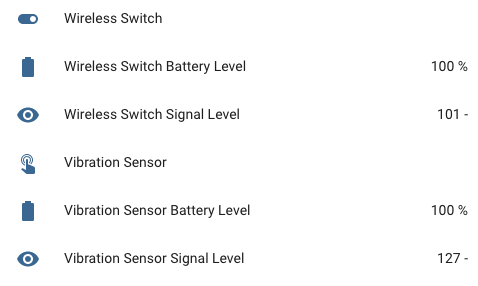
Xiaomi Wireless Switch WXKG11LM and Vibration Sensor DJT11LM are not updating states on Lovelace Front End. Previously is working well, but now no longer working for unknown reason.
Weird part is that battery and linkquality are working without any issues.
Screenshot:
What did you expect to happen
Both sensors displays states correctly on Lovelace Front End.
How to reproduce it (minimal and precise)
- Install firmware on GBAN GB2530 Coordinator.
- Install Hass.io zigbee2mqtt plugin.
- Connect GBAN GB2530 Coordinator to Raspberry Pi.
- Turn on all devices.
- Connect these sensors by pairing them.
- State of sensors are not updated in Lovelace Front End.
Debug Info
zigbee2mqtt version: 1.4.0 (Hass.io add on)
CC253X firmware version: CC2530_CC2591_20190515 as per https://github.com/Koenkk/Z-Stack-firmware/tree/master/coordinator/Z-Stack_Home_1.2/bin
Debug Log
Wireless Switch WXKG11LM
  zigbee2mqtt:info 5/29/2019, 12:56:28 PM MQTT publish: topic 'zigbee2mqtt/0x00158d00023dc1fb', payload '{"battery":100,"voltage":3045,"linkquality":96,"click":"single","device":{"ieeeAddr":"0x00158d00023dc1fb","friendlyName":"0x00158d00023dc1fb","type":"EndDevice","nwkAddr":3760,"manufId":4151,"manufName":"LUMI","powerSource":"Battery","modelId":"lumi.sensor_switch.aq2","hwVersion":"unknown","swBuildId":"unknown","dateCode":"unknown","status":"online"}}'
  zigbee2mqtt:info 5/29/2019, 12:56:28 PM MQTT publish: topic 'zigbee2mqtt/0x00158d00023dc1fb', payload '{"battery":100,"voltage":3045,"linkquality":96,"click":"","device":{"ieeeAddr":"0x00158d00023dc1fb","friendlyName":"0x00158d00023dc1fb","type":"EndDevice","nwkAddr":3760,"manufId":4151,"manufName":"LUMI","powerSource":"Battery","modelId":"lumi.sensor_switch.aq2","hwVersion":"unknown","swBuildId":"unknown","dateCode":"unknown","status":"online"}}'
Vibration Sensor DJT11LM
  zigbee2mqtt:info 5/29/2019, 12:57:30 PM MQTT publish: topic 'zigbee2mqtt/0x00158d0002a23402', payload '{"battery":100,"voltage":3025,"linkquality":83,"angle":177,"angle_x":1,"angle_y":1,"angle_z":89,"angle_x_absolute":89,"angle_y_absolute":89,"action":"drop","device":{"ieeeAddr":"0x00158d0002a23402","friendlyName":"0x00158d0002a23402","type":"EndDevice","nwkAddr":36657,"manufId":4151,"manufName":"LUMI","powerSource":"Battery","modelId":"lumi.vibration.aq1","hwVersion":"unknown","swBuildId":"unknown","dateCode":"unknown","status":"online"}}'
  zigbee2mqtt:info 5/29/2019, 12:57:30 PM MQTT publish: topic 'zigbee2mqtt/0x00158d0002a23402', payload '{"battery":100,"voltage":3025,"linkquality":83,"angle":177,"angle_x":1,"angle_y":1,"angle_z":89,"angle_x_absolute":89,"angle_y_absolute":89,"action":"","device":{"ieeeAddr":"0x00158d0002a23402","friendlyName":"0x00158d0002a23402","type":"EndDevice","nwkAddr":36657,"manufId":4151,"manufName":"LUMI","powerSource":"Battery","modelId":"lumi.vibration.aq1","hwVersion":"unknown","swBuildId":"unknown","dateCode":"unknown","status":"online"}}'
Thanks.
 jerrychong25
All 4 comments
With zigbee2mqtt 1.4, after a click, immediately an empty message is report. This is to make Home Assistant automation via entity possible. http://www.zigbee2mqtt.io/integration/home_assistant.html#via-home-assistant-entity
 Koenkk
on 29 May 2019
Koenkk
on 29 May 2019
With zigbee2mqtt 1.4, after a
click, immediately an empty message is report. This is to make Home Assistant automation via entity possible. http://www.zigbee2mqtt.io/integration/home_assistant.html#via-home-assistant-entity
Noted and thanks.
Is there any other ways to let empty message is report delay one second by default?
Because would like to confirm states of sensor is function properly in hardware itself before settings any automation.
Currently it is hard to visualize on this state.
jerrychong25
on 29 May 2019
Can't this already be done by showing the history of the sensor?
Koenkk
on 29 May 2019
Can't this already be done by showing the history of the sensor?
Of yes, can achieve the same via history.
I am thinking of viewing in real time =D
Thanks.
jerrychong25
on 29 May 2019
Related issues
 alwashe
·
4Comments
alwashe
·
4Comments
 andreasbrett
·
4Comments
andreasbrett
·
4Comments
 Underknowledge
·
4Comments
Underknowledge
·
4Comments
 z4rn0x
·
3Comments
z4rn0x
·
3Comments
 jeroenterheerdt
·
3Comments
jeroenterheerdt
·
3Comments
Most helpful comment
With zigbee2mqtt 1.4, after a
click, immediately an empty message is report. This is to make Home Assistant automation via entity possible. http://www.zigbee2mqtt.io/integration/home_assistant.html#via-home-assistant-entity