Zigbee2mqtt: Got exception while adding Aqara Cube(MFKZQ01LM)
Hi,
Firstly,Thank you so much for this project.
I have encountered issue after Aqara Cube was connected.
Below is the log I found, and I am using Hassio add-on.so I am not sure how to get npm log
Please free contact me if you need any information.
2018-5-25 21:11:43 INFO New device with address 0x00158d0002310c34 connected!
/app/node_modules/yaml-js/lib/parser.js:553
throw new exports.ParserError('while parsing a flow mapping', this.marks.slice(-1)[0], "expected ',' or '}', but got " + token.id, token.start_mark);
^
while parsing a flow mapping
on line 3, column 25
expected ',' or '}', but got :
on line 4, column 23
at ParserError.YAMLError [as constructor] (/app/node_modules/yaml-js/lib/errors.js:70:46)
at ParserError.MarkedYAMLError [as constructor] (/app/node_modules/yaml-js/lib/errors.js:90:45)
at new ParserError (/app/node_modules/yaml-js/lib/parser.js:17:48)
at Loader.__dirname.Parser.Parser.parse_flow_mapping_key (/app/node_modules/yaml-js/lib/parser.js:553:19)
at Loader.__dirname.Parser.Parser.check_event (/app/node_modules/yaml-js/lib/parser.js:61:48)
at Loader.__dirname.Composer.Composer.compose_mapping_node (/app/node_modules/yaml-js/lib/composer.js:248:20)
at Loader.__dirname.Composer.Composer.compose_node (/app/node_modules/yaml-js/lib/composer.js:160:21)
at Loader.__dirname.Composer.Composer.compose_mapping_node (/app/node_modules/yaml-js/lib/composer.js:250:27)
at Loader.__dirname.Composer.Composer.compose_node (/app/node_modules/yaml-js/lib/composer.js:160:21)
at Loader.__dirname.Composer.Composer.compose_mapping_node (/app/node_modules/yaml-js/lib/composer.js:250:27)
npm ERR! code ELIFECYCLE
npm ERR! errno 1
npm ERR! [email protected] start: node index.js
npm ERR! Exit status 1
npm ERR!
npm ERR! Failed at the [email protected] start script.
npm ERR! This is probably not a problem with npm. There is likely additional logging output above.
npm ERR! A complete log of this run can be found in:
npm ERR! /root/.npm/_logs/2018-05-25T13_11_43_987Z-debug.log
REFRESH
 toraidl
All 10 comments
Seems there is some syntax error in your .yaml file. What does it look like?
 Koenkk
on 25 May 2018
Koenkk
on 25 May 2018
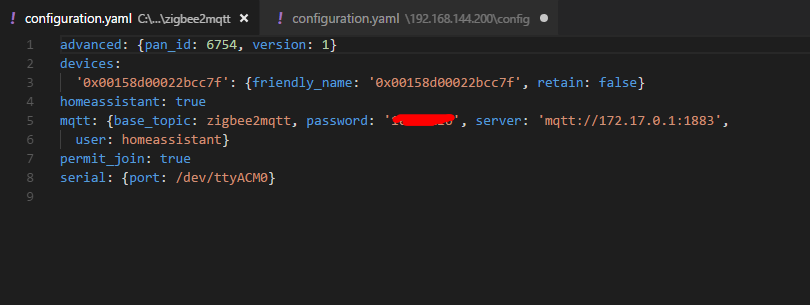
Here is the configuration.yaml file found in /usr/share/hassio/share/zigbee2mqtt/configuration.yaml
advanced: {pan_id: 6754, version: 1}
devices:
'0x00158d00022bcc7f': {friendly_name: '0x00158d00022bcc7f', retain: false}
homeassistant: true
mqtt: {base_topic: zigbee2mqtt, password: '*', server: 'mqtt://172.17.0.1:1883',
user: homeassistant}
permit_join: true
serial: {port: /dev/ttyACM0}
toraidl
on 25 May 2018
Your yaml is in a not so common format, { } instead of tabs and newlines. Currently zigbee2mqtt uses an yaml parser which allows for comment persistence in the yaml file. I'm planning to switch to a better yaml parsers which should be able to handle this.
Koenkk
on 25 May 2018
I think the format is because he is using https://github.com/danielwelch/hassio-zigbee2mqtt . @danielwelch is it possible to use a different converter?
Update: I think the problem is because it's using PyYAML with safe_dump. As state in their documentation here: https://pyyaml.org/wiki/PyYAMLDocumentation you will get collections formatted like this (their 1st FAQ). To get around this documentation states: If you want collections to be always serialized in the block style, set the parameter default_flow_style of dump() to False.
 ciotlosm
on 25 May 2018
ciotlosm
on 25 May 2018
Thanks @Koenkk @ciotlosm
toraidl
on 25 May 2018
Per @ciotlosm's recommendation, I've added the default_flow_style=False parameter and the configuration is now written out in block style rather than flow style, which I think is a better choice. Thanks for the heads up.
 danielwelch
on 25 May 2018
danielwelch
on 25 May 2018
@x01673 fixed now?
Koenkk
on 25 May 2018
@Koenkk, it works now,thanks
toraidl
on 25 May 2018
@x01673 can you please close the issue if it's fixed?
ciotlosm
on 25 May 2018
With the original gateway from xiaomi I have problems with the new aqara cube in hassio. Does she work correctly with zigbee2mqtt?
 1981nick1982
on 25 May 2018
1981nick1982
on 25 May 2018
Related issues
 ophilips
·
4Comments
ophilips
·
4Comments
 jeroenterheerdt
·
3Comments
jeroenterheerdt
·
3Comments
 mpuff
·
3Comments
mpuff
·
3Comments
 alwashe
·
4Comments
alwashe
·
4Comments
 pepp86
·
4Comments
pepp86
·
4Comments
Most helpful comment
Per @ciotlosm's recommendation, I've added the
default_flow_style=Falseparameter and the configuration is now written out in block style rather than flow style, which I think is a better choice. Thanks for the heads up.