Zettlr: Feature: add ctrl + (shift +) enter, to open new lines
this is a thing I really enjoy from Visual Studio Code.
I can press Ctrl + Enter and it opens a new line below and put the cursor at the first position
Ctrl + shift + Enter adds the new line ~after~ above the cursor.
Usage cases:
- writing bullet points, correcting something mid-line and then jumping straight into new line for next bullet
 penCsharpener
All 8 comments
Sounds reasonable! While I understand the supposed functionality of Ctrl+Enter and really see the use-case, I'm not quite sure what exactly Ctrl+Shift+Enter should be doing …?
 nathanlesage
on 14 Feb 2019
nathanlesage
on 14 Feb 2019
Oh, thanks for pointing that out.
Ctrl + shift + enter would open a new line above (not after) the current line.
I use both ways of opening new lines a lot; for example because some markdown formatting only works with empty lines being present.
penCsharpener
on 14 Feb 2019
Alright, so just that I get it right: When inserting new lines above or below, you do _not_ want to have the list type indicator added, even when you're in a list …?
nathanlesage
on 14 Feb 2019
erm, kinda hard to say. I think easiest would be to copy the behaviour of VS Code. What editor/IDE are you using for Zettlr? I'd say no to keep it simple. The other advantage of opening new lines this way is when having text selected. It doesn't delete the selection. It just jumps to the new line.
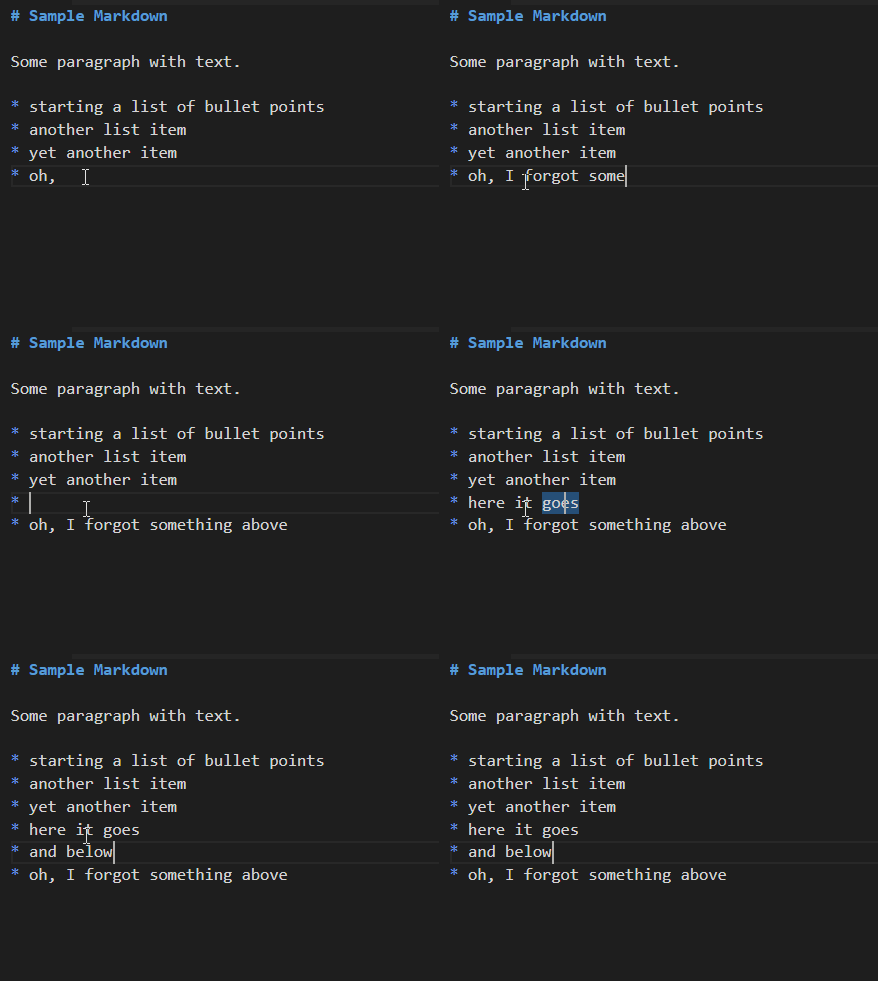
The above is in VS Code. The second time I pressed Ctrl + Enter and it did add a list type indicator (if you mean the *) because I was already in the list.
I hope this helps
penCsharpener
on 14 Feb 2019
Ah, yes it does and I understand what you're doing. Underneath, Zettlr makes use of CodeMirror — so it has exactly the same options available as VSCode, as VSCode also uses CodeMirror as the main editor.
I think implementing this behaviour will take no longer than about 30 minutes, so just keep waiting, it'll come!
nathanlesage
on 14 Feb 2019
btw I think VS Code uses Monaco as code editor and not CodeMirror.
penCsharpener
on 14 Feb 2019
Oh, here we go again, Microsoft. Doing their own stuff instead of sticking to the market standard 🙄
So I correct myself: Zettlr has much more possibilities than VSCode
nathanlesage
on 14 Feb 2019
Here you go, it'll come in 1.2!
nathanlesage
on 18 Feb 2019
Related issues
 tupio
·
3Comments
tupio
·
3Comments
 Jos512
·
5Comments
Jos512
·
5Comments
 rafedramzi
·
4Comments
rafedramzi
·
4Comments
 bit-hug
·
4Comments
bit-hug
·
4Comments
 manisabri
·
4Comments
manisabri
·
4Comments
Most helpful comment
Ah, yes it does and I understand what you're doing. Underneath, Zettlr makes use of CodeMirror — so it has exactly the same options available as VSCode, as VSCode also uses CodeMirror as the main editor.
I think implementing this behaviour will take no longer than about 30 minutes, so just keep waiting, it'll come!