Xlpagertabstrip: Programmatically moving to new tab leaves previous tab title bolded
I'm using a ButtonBarPagerTabStrip with 4 tabs. The first view controller is a collection view with cells that link to the subsequent tabs. I'm programmatically switching tabs with the following code, where tabIndex is the new tab index:
self.buttonBarView.moveTo(index: tabIndex, animated: true, swipeDirection: .none, pagerScroll: .yes)
self.moveToViewController(at: tabIndex, animated: false)
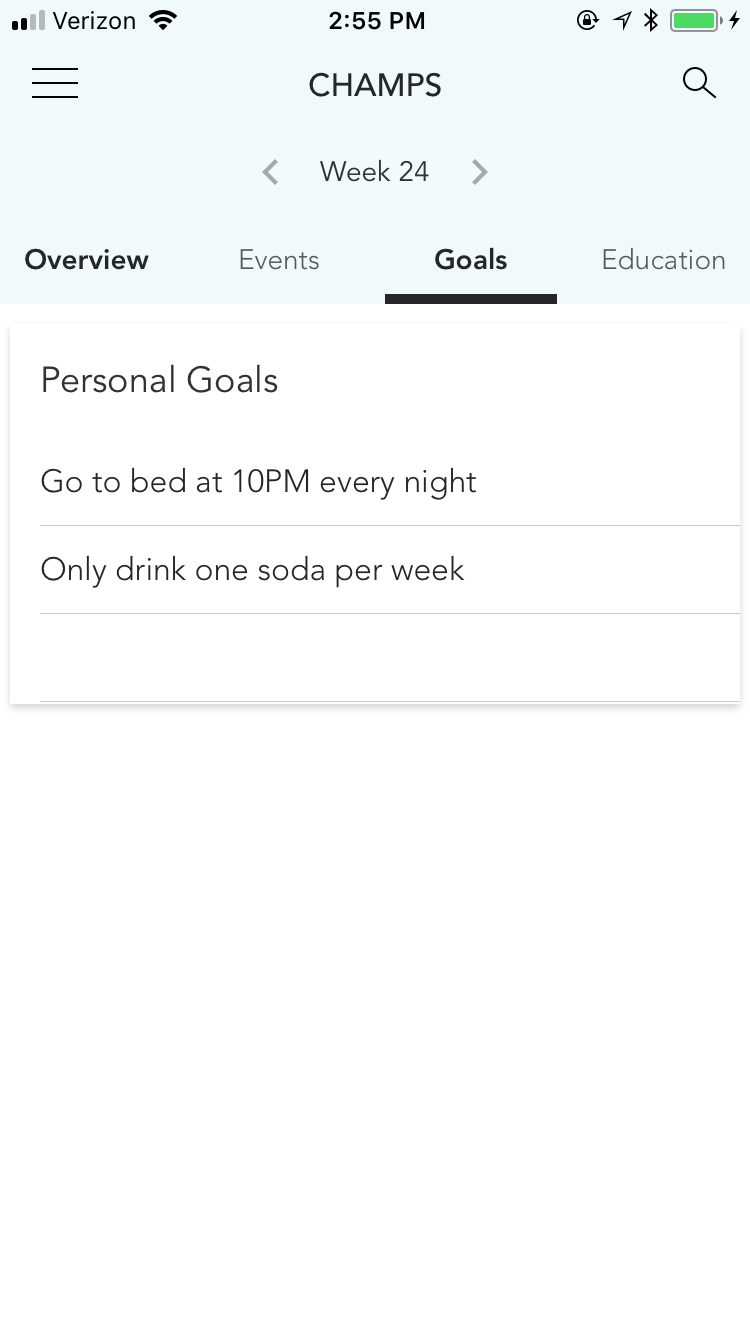
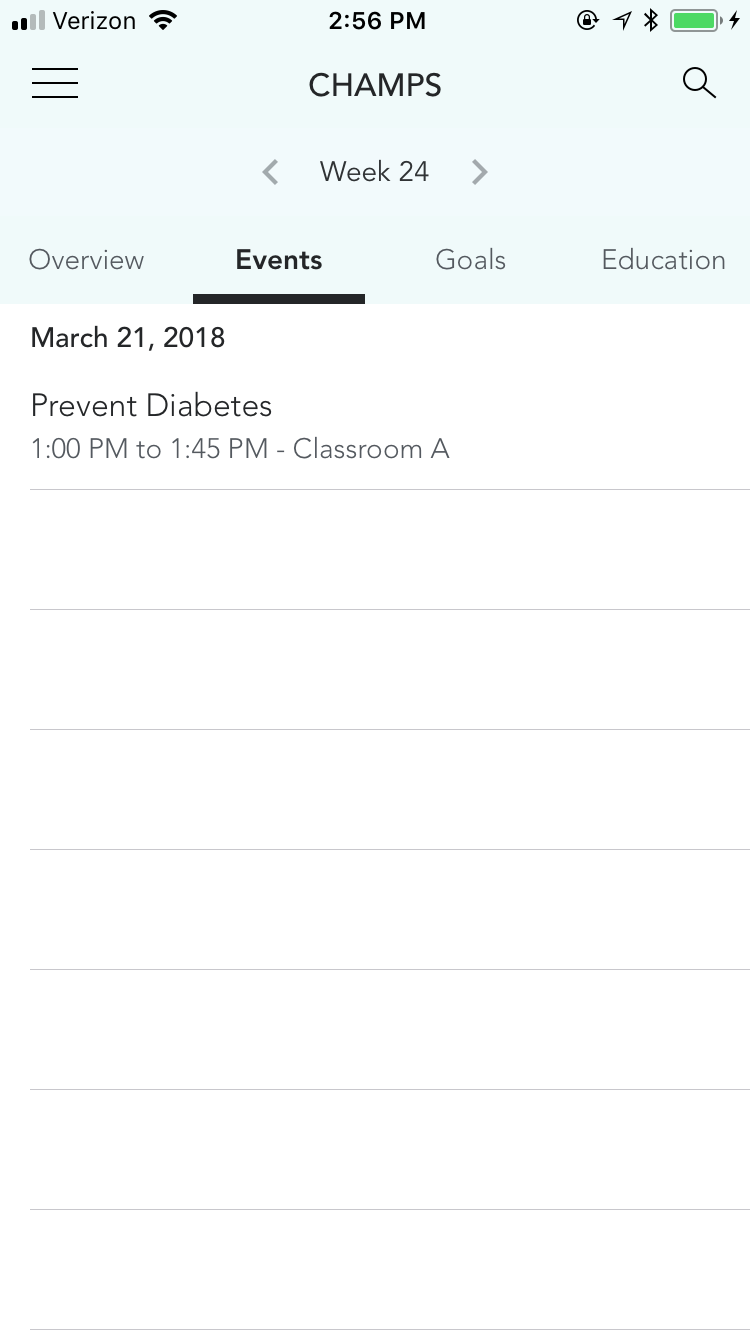
It works as anticipated when moving to the second tab, but when it moves to the third or fourth tab the first tab title remains bolded.
Screenshot of buggy behavior:
Screenshot of anticipated behavior:
Anyone else seen this bug? Is there a workaround?
Thanks!
 miranda-elliott
All 11 comments
Was wondering if there may have been any movement on this issue? We're running into the same problem when moving to tabs over the index 2/3.
 djneely
on 29 Mar 2018
djneely
on 29 Mar 2018
@miranda-elliott @djneely Any workaround for this issue?
 rehannali
on 23 Apr 2018
rehannali
on 23 Apr 2018
@rehannali unfortunately not for us. what we wound up doing is having to disable programmatic navigation to the different tabs for now as it was a glaring bug but without a fix for now. so while the app isn't as functional as we'd like there isn't a bug atm.
hoping we hear something back soon from the devs with regards to either a fix on our side or if they've patched this.
djneely
on 23 Apr 2018
Hi, @miranda-elliott , @djneely I haven't the proper solution for it.but following code snippet works for me.Its bit hack solution for this issue.
Simple paste following line after your code.
if let cell = strongSelf.buttonBarView.cellForItem(at: IndexPath(item: 0, section: 0)) as? XLButtonBarViewCell {
            cell.label.textColor = UIColor.black.withAlphaComponent(0.40)
          }
Your new code will be
self.buttonBarView.moveTo(index: tabIndex, animated: true, swipeDirection: .none, pagerScroll: .yes)

self.moveToViewController(at: tabIndex, animated: false)

if let cell = self.buttonBarView.cellForItem(at: IndexPath(item: 0, section: 0)) as? XLButtonBarViewCell {
            cell.label.textColor = UIColor.black.withAlphaComponent(0.40)
          }
 kevadiyaVishal
on 24 Apr 2018
kevadiyaVishal
on 24 Apr 2018
Thanks @kevadiyaVishal I'll give that a shot and see how it fairs for us.
djneely
on 24 Apr 2018
@kevadiyaVishal this does not appear to work. I'm seeing: 'Use of undeclared type XLButtonBarViewCell'.
When looking at what self.buttonBarView.cellForItem(...) returns it appears its returning a UICollectionViewCell?
I haven't dug much deeper into pulling out and parsing through all those subviews as of yet but will come back to it at another time.
djneely
on 17 May 2018
Sorry. Simple fix. Its now ButtonBarViewCell.
djneely
on 17 May 2018
@kevadiyaVishal thanks again for your help. Definitely got us going on the right direction. I wound up fixing it by doing this:
if let cell = self.buttonBarView.cellForItem(at: IndexPath(item: 0, section: 0)) as? ButtonBarViewCell {
// cell.label.textColor = UIColor.black.withAlphaComponent(0.40)
cell.label.font = UIFont(name: "Avenir-Light", size: 14)!
}
Setting the label's font back to the font we're using per the setting:
self.settings.style.buttonBarItemFont = UIFont(name: "Avenir-Light", size: 14)!
Did the trick for us. Using just the alpha component still let the font Bold but made it gray-ish to match the other tabs.
djneely
on 17 May 2018
Thanks, Working.. @kevadiyaVishal
 dasSoumen
on 20 Jun 2018
dasSoumen
on 20 Jun 2018
@dasSoumen welcome brother :)
kevadiyaVishal
on 21 Jun 2018
Thanks, It's working @kevadiyaVishal
 ravi-dhorajiya
on 21 Jun 2018
ravi-dhorajiya
on 21 Jun 2018
Related issues
 bars395
·
14Comments
bars395
·
14Comments
 rkittinger
·
15Comments
rkittinger
·
15Comments
 BasantAshraf
·
13Comments
BasantAshraf
·
13Comments
 jhkersul
·
15Comments
jhkersul
·
15Comments
 platoputhur
·
9Comments
platoputhur
·
9Comments
Most helpful comment
Hi, @miranda-elliott , @djneely I haven't the proper solution for it.but following code snippet works for me.Its bit hack solution for this issue.
Simple paste following line after your code.
if let cell = strongSelf.buttonBarView.cellForItem(at: IndexPath(item: 0, section: 0)) as? XLButtonBarViewCell {
            cell.label.textColor = UIColor.black.withAlphaComponent(0.40)
          }
Your new code will be