Xlpagertabstrip: I've made the class of BaseButtonBarPagerTabStripViewController, connected containerview and buttonbarview outlets and receive this error:
2016-06-13 18:24:36.765 PotSpot[1872:35255] Unknown class _TtC7PotSpot14MenuController in Interface Builder file.
2016-06-13 18:24:36.777 PotSpot[1872:35255] ** Terminating app due to uncaught exception 'NSUnknownKeyException', reason: '[
*
(
0 CoreFoundation 0x0000000106f2cd85 __exceptionPreprocess + 165
1 libobjc.A.dylib 0x0000000108f11deb objc_exception_throw + 48
2 CoreFoundation 0x0000000106f2c9c9 -[NSException raise] + 9
3 Foundation 0x00000001072fe19b -[NSObject(NSKeyValueCoding) setValue:forKey:] + 288
4 UIKit 0x0000000107b28d0c -[UIViewController setValue:forKey:] + 88
5 UIKit 0x0000000107d5f7fb -[UIRuntimeOutletConnection connect] + 109
6 CoreFoundation 0x0000000106e66890 -[NSArray makeObjectsPerformSelector:] + 224
7 UIKit 0x0000000107d5e1de -[UINib instantiateWithOwner:options:] + 1864
8 UIKit 0x0000000107b2f8d6 -[UIViewController _loadViewFromNibNamed:bundle:] + 381
9 UIKit 0x0000000107b30202 -[UIViewController loadView] + 178
10 UIKit 0x0000000107b30560 -[UIViewController loadViewIfRequired] + 138
11 UIKit 0x0000000107b30cd3 -[UIViewController view] + 27
12 UIKit 0x0000000107b8320c -[UINavigationController preferredContentSize] + 194
13 UIKit 0x0000000107b07712 -[UIPresentationController preferredContentSizeDidChangeForChildContentContainer:] + 59
14 UIKit 0x0000000107b03aa0 __56-[UIPresentationController runTransitionForCurrentState]_block_invoke + 95
15 UIKit 0x00000001079a1f62 _runAfterCACommitDeferredBlocks + 317
16 UIKit 0x00000001079b5e4c _cleanUpAfterCAFlushAndRunDeferredBlocks + 95
17 UIKit 0x00000001079c2147 _afterCACommitHandler + 90
18 CoreFoundation 0x0000000106e51c37 __CFRUNLOOP_IS_CALLING_OUT_TO_AN_OBSERVER_CALLBACK_FUNCTION__ + 23
19 CoreFoundation 0x0000000106e51ba7 __CFRunLoopDoObservers + 391
20 CoreFoundation 0x0000000106e477fb __CFRunLoopRun + 1147
21 CoreFoundation 0x0000000106e470f8 CFRunLoopRunSpecific + 488
22 GraphicsServices 0x000000010c660ad2 GSEventRunModal + 161
23 UIKit 0x0000000107995f09 UIApplicationMain + 171
24 PotSpot 0x0000000106b10a22 main + 114
25 libdyld.dylib 0x000000010ae2592d start + 1
26 ??? 0x0000000000000001 0x0 + 1
)
libc++abi.dylib: terminating with uncaught exception of type NSException
 bars395
All 14 comments
Hi bars395,
Try using "ButtonBarPagerTabStripViewController" instead of "BaseButtonBarPagerTabStripViewController". This worked for me.
and connect the outlets to this class.
buttonBarView to collectionView, and
containerView to ScrollView
 kansaraprateek
on 13 Jul 2016
kansaraprateek
on 13 Jul 2016
@kansaraprateek This may seem like an obvious question, but how did you connect the containerView Outlet to the ScrollView????
 richardblakeneywilliams
on 29 Sep 2016
richardblakeneywilliams
on 29 Sep 2016
@richardblakeneywilliams : I had the same issue. Found it on some thread here.
Create the class with ButtonBarPagerTabStripViewController and connect the outlet in storyboard. Then change the class type to BaseButtonBarPagerTabStripViewController.
If you are using custom cells for collection view, you need to call this within app delegate to avoid the crash.
let _ = yourBaseButtonBarPagerClassName(nibName: nil, bundle: nil)
kansaraprateek
on 29 Sep 2016
Thanks for the help mate. So I've been able to hook up the outlets now. But still getting the same error as this issue. Surely there is something we are both doing wrong here with this library.
How come you have to declare that in the App Delegate?
richardblakeneywilliams
on 29 Sep 2016
The App delegate declaration is to avoid the outlet crash. Worked for me.
Due to some reason the Base classes need to be pre initialised.
kansaraprateek
on 29 Sep 2016
Where in the App Delegate are you calling that?
richardblakeneywilliams
on 29 Sep 2016
@richardblakeneywilliams in didFinishLaunchingWithOptions.
kansaraprateek
on 29 Sep 2016
Thank you soooooo god dam much, I had the same issue and was blocked on this point since a full day.
Thanks to my Google/Github search skills I found you and your amazing answer/help.
Thanks!
 VivienGiraud
on 7 Oct 2016
VivienGiraud
on 7 Oct 2016
Hi everyone, I have the same issue here, but in my case, I need to subclass the BaseButtonBarPagerTabStripViewController with a specific type because I'm using a custom cell, thank you.
 namine92
on 2 Mar 2017
namine92
on 2 Mar 2017
Hi, what's the main reason? Why should I have a ugly init in the AppDelegate?
 ghost
on 13 Mar 2017
ghost
on 13 Mar 2017
Because BaseButtonBarPagerTabStripViewController uses generics, the storyboard isn't able to find it in the objC runtime when trying to instantiate it.
As a workaround you can load it to the runtime before the Storyboard needs the class via ViewController.load() or _ = ViewController(nibName: nil, bundle: nil).
Cheers
 santiagofm
on 17 May 2017
santiagofm
on 17 May 2017
My AppDelegate is in objective-c. What should I do?
 neobie
on 22 Apr 2018
neobie
on 22 Apr 2018
@neobie There are lots of library to deal with the issue ,you should choose other solutions as the project perhaps stopped to maintain now.
 MarcSteven
on 9 Aug 2018
MarcSteven
on 9 Aug 2018
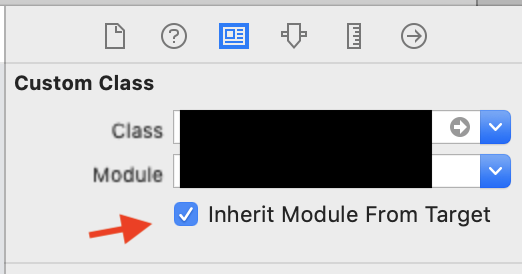
Im not sure why, but after i check "Inherit Module From Target" and everything's fine
 daoseng33
on 23 Apr 2019
daoseng33
on 23 Apr 2019
Related issues
 pramodshukla1011
·
3Comments
pramodshukla1011
·
3Comments
 Emasoft
·
5Comments
Emasoft
·
5Comments
 junweimah
·
3Comments
junweimah
·
3Comments
 dowhilenet
·
4Comments
dowhilenet
·
4Comments
 JorgeAGomez
·
4Comments
JorgeAGomez
·
4Comments
Most helpful comment
@richardblakeneywilliams : I had the same issue. Found it on some thread here.
Create the class with ButtonBarPagerTabStripViewController and connect the outlet in storyboard. Then change the class type to BaseButtonBarPagerTabStripViewController.
If you are using custom cells for collection view, you need to call this within app delegate to avoid the crash.
let _ = yourBaseButtonBarPagerClassName(nibName: nil, bundle: nil)