Xiaomi-pro-hackintosh: 偶尔睡眠时间过长导致外屏紫屏
偶尔睡眠时间过长导致外屏紫屏, 不确定因素, EFI最新和以前一直存在问题. HDMI口 1080p外屏
 Innei
Innei
All 21 comments
以及睡醒AlcFix进程假死, 无法正常切换耳机通道, 进程也无法强行结束
Innei
on 3 May 2019
@Innei , ALCPlug 可以用 sudo killall -9 ALCPlugFix强行结束, 你可以试下 log stream | grep -i ALCPlug 然后 插拔耳机看下有没有修复(没输出就是没用).
 Menchen
on 3 May 2019
Menchen
on 3 May 2019
我用过进程管理器的强行结束, 是不可行的. 我忘了是否用过htop 中的 F9 发送 killall .下次试试. 不过希望不大
Innei
on 3 May 2019
@Innei 要 sudo 因为是用 root 身份启动的.
Menchen
on 3 May 2019
@Innei 外屏紫屏问题可以尝试修改管道为18来解决。
- 打开
config.plist - 查找
<key>framebuffer-con1-pipe</key>
<data>CgAAAA==</data>
- 替换成
<key>framebuffer-con1-pipe</key>
<data>EgAAAA==</data>
ALCPlugFix 推荐生成日志来帮助追踪问题,可见#96的步骤来添加日志输出路径。如果有兴趣的话可以自行修改编译https://github.com/Menchen/ALCPlugFix
仓库里的新ALCPlugfix在我的机子上运行十分稳定,可能给不了相关建议。
 stevezhengshiqi
on 3 May 2019
stevezhengshiqi
on 3 May 2019
Can we please use English? Then the rest of the globe can learn from you guys too! :)
 bliekp
on 3 May 2019
bliekp
on 3 May 2019
@Innei 要 sudo 因为是用 root 身份启动的.
刚刚试了下, sudo killall -9 ALCPlugFix 也是杀不掉进程, 即便是程序没有假死
Innei
on 3 May 2019
我已经更换了, 过几天再来反馈~
Innei
on 4 May 2019
@Innei 外屏紫屏问题可以尝试修改管道为18来解决。
- 打开
config.plist- 查找
<key>framebuffer-con1-pipe</key>
<data>CgAAAA==</data>
- 替换成
<key>framebuffer-con1-pipe</key>
<data>EgAAAA==</data>
ALCPlugFix 推荐生成日志来帮助追踪问题,可见#96的步骤来添加日志输出路径。如果有兴趣的话可以自行修改编译https://github.com/Menchen/ALCPlugFix
仓库里的新ALCPlugfix在我的机子上运行十分稳定,可能给不了相关建议。
不幸的是, 修改后仍然紫屏. 求解.
Innei
on 6 May 2019
那就不清楚了,我的外接屏幕从没遇到过这类问题,可以尝试注入EDID。
stevezhengshiqi
on 6 May 2019
那就不清楚了,我的外接屏幕从没遇到过这类问题,可以尝试注入EDID。
你有遇到过,有时开盖,内屏不亮,只亮外屏的情况吗
Innei
on 6 May 2019
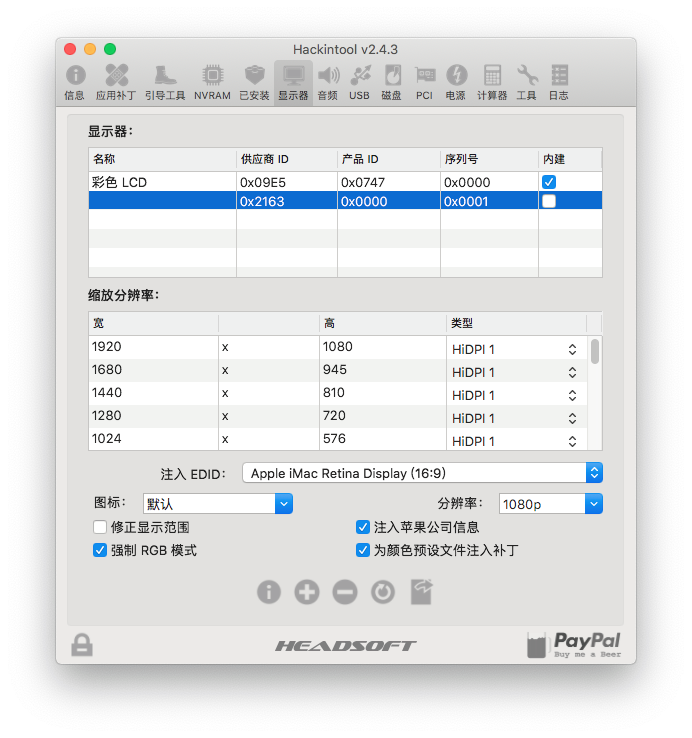
也没有,我的是TCL显示器 HDMI 4k 30hz。外接不稳定的话可以尝试按照黑果小兵部落阁里的注入edid教程操作。
stevezhengshiqi
on 6 May 2019
注入iMac还是.
Innei
on 6 May 2019
嗯 取决于外界屏幕分辨率长宽比
stevezhengshiqi
on 6 May 2019
我把生成的 DisplayEDID-2163-0.kext 放入 Other 中然后重启, 现在与原来没有什么不同, 过几天看看效果.
只要把生成的 DisplayEDID-2163-0.kext 放入 Other 就行了是吗.
Innei
on 6 May 2019
No, il mio monitor TCL è HDMI 4k 30hz. Se la connessione è instabile, puoi provare a seguire le istruzioni nel tutorial di edid nel Black Fruit Pavilion.
My 4K TVs are not recognized, via HDMI I can only use 1080p resolution ... how come?
 ZambraDesigner
on 6 May 2019
ZambraDesigner
on 6 May 2019
@ZambraDesigner If you are using MX150 version, please see https://github.com/daliansky/XiaoMi-Pro/wiki/Set-DVMT-to-64mb
stevezhengshiqi
on 6 May 2019
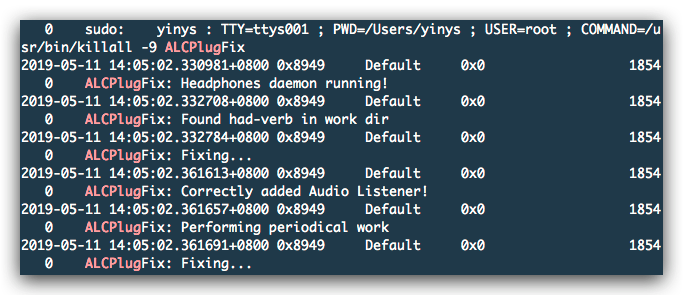
@Menchen sudo killall -9 ALCPlugFix无法关闭,log stream | grep -i ALCPlug没有输出,疑似假死.
但是在sudo killall -9 ALCPlugFix后,有一段日志
Innei
on 11 May 2019
我把生成的
DisplayEDID-2163-0.kext放入Other中然后重启, 现在与原来没有什么不同, 过几天看看效果.
只要把生成的DisplayEDID-2163-0.kext放入Other就行了是吗.
@stevezhengshiqi 我按照这种方式注入EDID,仍然紫屏,是我方式错了吗
Innei
on 11 May 2019
@ZambraDesigner Se si utilizza la versione MX150, consultare https://github.com/daliansky/XiaoMi-Pro/wiki/Set-DVMT-to-64mb
Perfect! Also works on BIOS A07
But now I have connected my monitor via HDMI and it no longer works my USB Wifi (https://amzn.to/2GUuBKX).
They advised me to see with Clovewr Configurator if there is "high current in the usb", how do you do it?
ZambraDesigner
on 14 May 2019
By the way, just to clarify, in PR above I only fixed the problem that caused alcplugfix fake freeze(along with some small bugfix). The another problem that is related to hdmi display I couldn't tested because I don't have an extra monitor and pretty sure thats not related to ALCplugfix, feel free to open a new one or reopen if you still have the problem.
Menchen
on 4 Aug 2019
Related issues
 orhan-drsn
·
7Comments
orhan-drsn
·
7Comments
 BASSA89
·
7Comments
BASSA89
·
7Comments
 johnnync13
·
4Comments
johnnync13
·
4Comments
 ghondar
·
8Comments
ghondar
·
8Comments
 larryare
·
8Comments
larryare
·
8Comments
Most helpful comment
Can we please use English? Then the rest of the globe can learn from you guys too! :)