Xiaomi-pro-hackintosh: [Question] Any DSDT\kext patches to fully disable Intel WiFi&Bluetooth?
Hello there! I'm still waiting my notebook, but even now dreaming about hackintosh setup. My question is - how can i fully disable internal Intel 8265? I want to install DW1560 or DW1830 with adapter (didn't know exactly which, because i don't know which connectors and how much of them on original antenas), but i guess it will conflict with existing Intel BT hardware. Also - which patches i need to apply to get one of this cards (advice which is better please) working?
 ghost
ghost
All 14 comments
You'll have to disable it in by removing the definition for the usb port responsible for the bluetooth module within the injector. To find the correct port, check your IOReg.
 kvn1351
on 8 Mar 2018
kvn1351
on 8 Mar 2018
Thanks for reply! Okay, i understood that part. What about new WiFi card? What i will need to do to make this thing work? Even on physical side - i'm not sure that our Tri-Band wifi have 3 antennas which i can connect to DW1830. I know it's not really related to this topic, but it would be very helpful for me if you will answer this questions.
ghost
on 8 Mar 2018
It seems like Intel WiFI is consuming power though it is not working. From the IORegExplorer, the RP08 device(Intel Wireless 8265 for Xiaomi-Pro)'s CurrentPowerState is 0x2, and we want 0x0 to fully disable it. Also, what we expect is that the PXSX device of RP08 should not exist, just like RP01(Discrete Graphics Card).
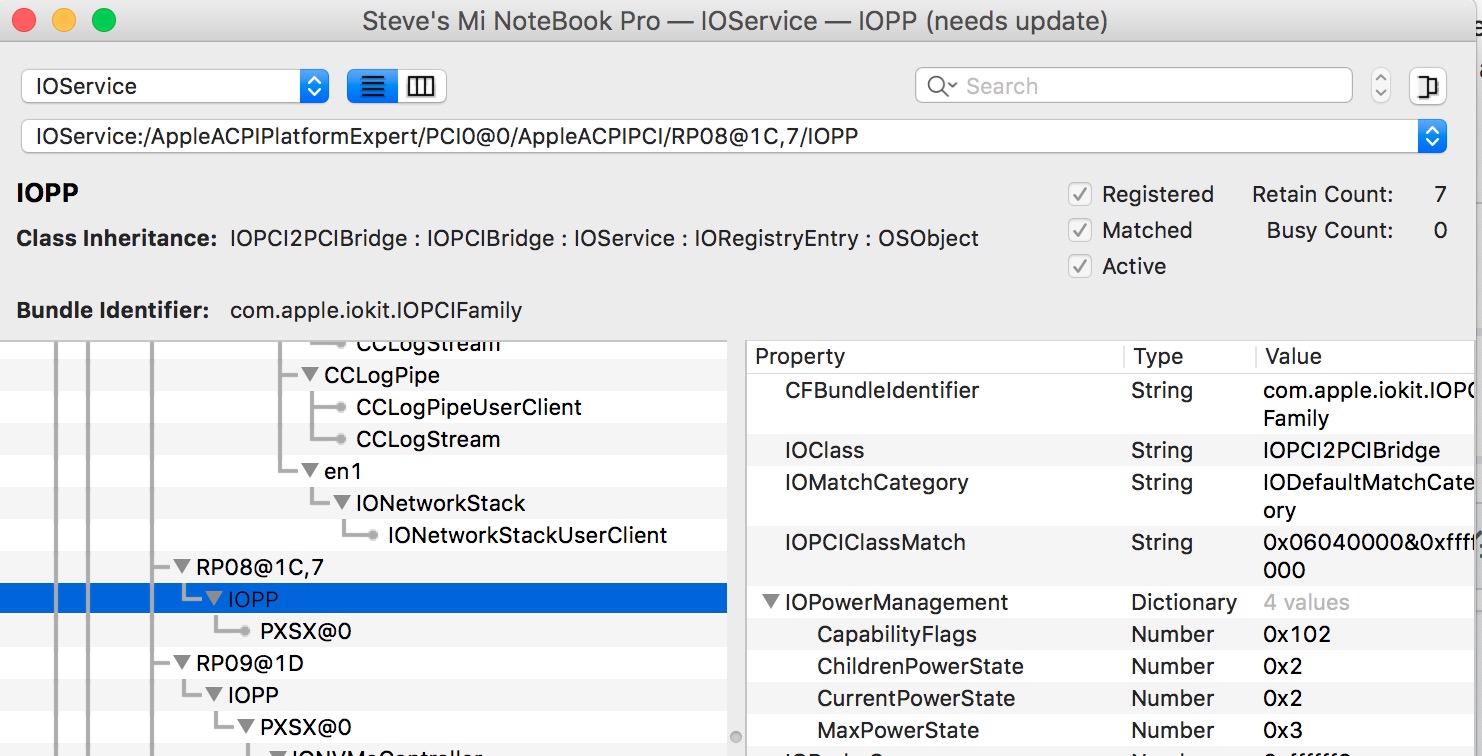
There are two ways to disable the wireless device.
The first method is to call _OFF method in DSDT. However, the _OFF method for RP08.PXSX is empty, and it's too hard for me to complete.
The second method is to patch through kernel extensions. For example, in WhateverGreen project, https://github.com/acidanthera/WhateverGreen/commit/b2e7cd4c3147088093af7f1992a0fd7395d623ef disables all external GPUs in I/O side.
Both methods take time, and I may not capable of finishing my thoughts. Hope someday Intel Wifi macOS driver is released, then we won't have this problem.
 stevezhengshiqi
on 22 May 2019
stevezhengshiqi
on 22 May 2019
There's a third method, disable internal wifi in bios, the downside I think is that you won't be able to use intel wifi in windows(dual boot). But it's fine if you got an extra wifi card in the m.2 slot...
Dumped bios
VarStore def:
0x1438ED    VarStore: VarStoreId: 0x1234 [A04A27F4-DF00-4D42-B552-39511302113D], Size: 0x708, Name: SystemConfig {24 23 F4 27 4A A0 00 DF 42 4D B5 52 39 51 13 02 11 3D 34 12 08 07 53 79 73 74 65 6D 43 6F 6E 66 69 67 00}
0x143910    VarStore: VarStoreId: 0x1233 [A04A27F4-DF00-4D42-B552-39511302113D], Size: 0x8, Name: AdvanceConfig {24 24 F4 27 4A A0 00 DF 42 4D B5 52 39 51 13 02 11 3D 33 12 08 00 41 64 76 61 6E 63 65 43 6F 6E 66 69 67 00}
Searching wifi:
0x161CA9                Text: Statement.Prompt: WRDS Package, TextTwo:  {03 08 6D 0F 6D 0F 00 00}
0x161CB1                One Of: WiFi SAR, VarStoreInfo (VarOffset/VarName): 0x5A1, VarStore: 0x1234, QuestionId: 0xA8F, Size: 1, Min: 0x0, Max 0x1, Step: 0x0 {05 91 6E 0F 6F 0F 8F 0A 34 12 A1 05 10 10 00 01 00}
0x161CC2                    One Of Option: Disabled, Value (8 bit): 0x0 {09 07 04 00 00 00 00}
0x161CC9                    One Of Option: Enabled, Value (8 bit): 0x1 (default) {09 07 03 00 30 00 01}
0x161CD0                End One Of {29 02}
As it's stored in the default VarStore(the one that contains wifi variable is 0x1234, at address 0x5A1, and there's two varStore with the same GUID, so maybe a litter confusing is grub as it only lists the first varStore and only print GUID.), we can try to modify it with grub setVar or H2OUVE like another bios mods we had.
 Menchen
on 15 Jun 2019
Menchen
on 15 Jun 2019
@Menchen Hi, based on daliansky's OC-liittle, I made an SSDT designed for disabling the internal WiFi. Could you help me test it?
SSDT-DRP08.aml.zip
stevezhengshiqi
on 12 Dec 2019
@stevezhengshiqi Sorry for the late response, I got an exam tomorrow, but I can test it at the weekend.
Menchen
on 12 Dec 2019
@stevezhengshiqi After installing that SSDT and rebooting, my intel Bluetooth still works, so It seems still using power.....
But the weird thing is I got 4.5~5 hours of battery life estimation! (Still need more real-life test), almost 1.5 hours more without the patch! (I just used yesterday and battery life estimation was 3 hours and 30minute.)
I have the following settings:
- MSR 0xe2 unlock and HWP enabled(with some tune)(20~30m battery gain, but much better thermal)
- Disabled EGPU https://github.com/daliansky/XiaoMi-Pro-Hackintosh/issues/224#issuecomment-559897974(almost an hour gain)
- TDP change and CPU Undervolting (-110mah, far better thermal and battery life)(half-hour gain I think)
- SSDT-DRP08 patch you just posted. (almost 1.5 hours gain)
- An external keyboard and wireless mouse dongle
About 10~12W saved with all the above optimization.
So in conclusion, I think intel Bluetooth must have a separated power line(maybe by USB) or the SSDT disabled wifi only and not the entire Wifi module (I think in Linux it's possible). But in either case, this patch is awesome.
Thank you for this great patch!
Menchen
on 13 Dec 2019
@Menchen Happy to hear that! Could you post an ioreg file of your device after patching SSDT-DRP08? We can see more detail from the ioreg file.
stevezhengshiqi
on 13 Dec 2019
@stevezhengshiqi
AFTERPATCH.ioreg.zip
Menchen
on 13 Dec 2019
@Menchen From your ioreg, the PXSX device of RP08 is gone, which may represent that the wireless device is disabled. I will post the patch to the repository.
stevezhengshiqi
on 14 Dec 2019
@stevezhengshiqi Tried this patch, seems no effect on GTX version
 buliaoyin
on 14 Dec 2019
buliaoyin
on 14 Dec 2019
@buliaoyin Please attach the ioreg file for closer look.
stevezhengshiqi
on 14 Dec 2019
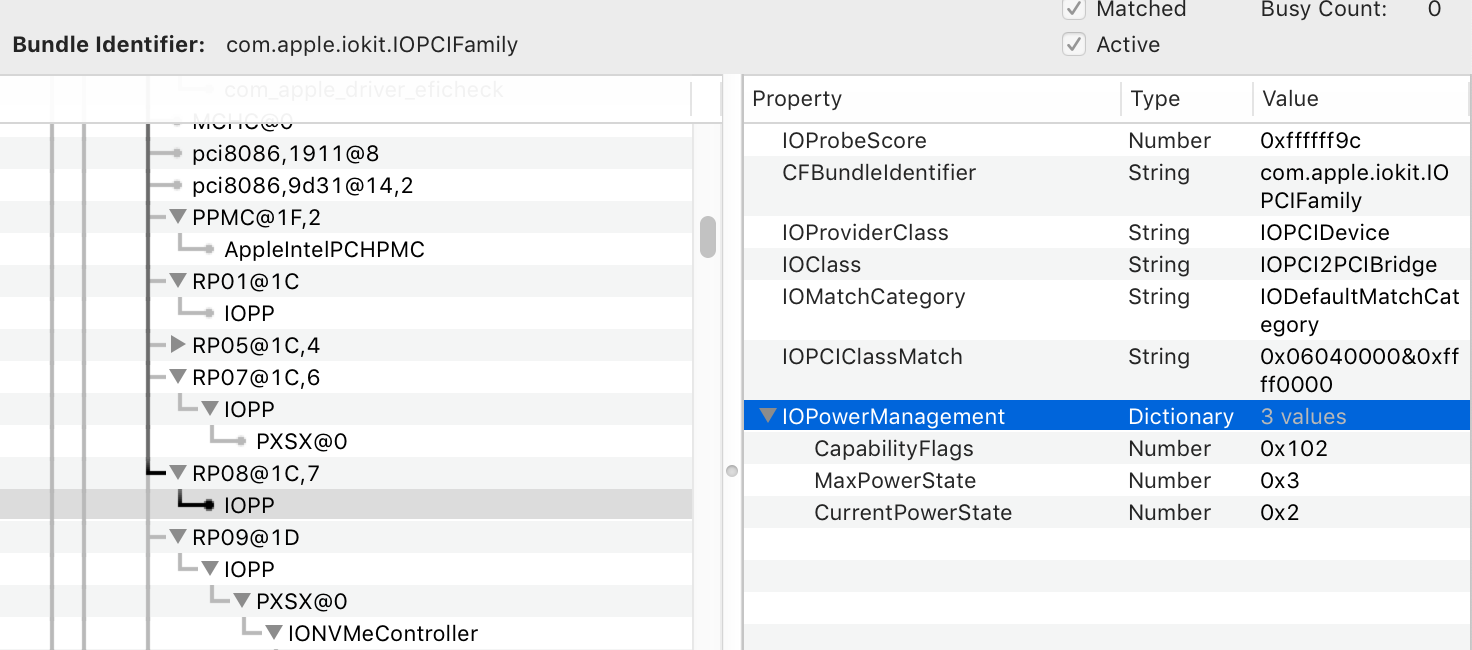
@stevezhengshiqi The PXSX device of RP08 was gone after patch (shown as below screenshot), but the power consumption is exactly the same as before.
buliaoyin
on 14 Dec 2019
That’s nice if PXSX device is gone. If you check RP01, which is the disabled discrete graphic card, you will find that it has the same power state as that of RP08 or any other RP device. In my opinion, the PowerState values don't completely represent the power consumption of the device.
I will add this patch by the way, and it should bring better power consumption.
stevezhengshiqi
on 14 Dec 2019
Related issues
 Remmed96
·
8Comments
Remmed96
·
8Comments
 Mateo1234454545
·
5Comments
Mateo1234454545
·
5Comments
 fang0814
·
6Comments
fang0814
·
6Comments
 bnznamco
·
8Comments
bnznamco
·
8Comments
 P0SlX
·
4Comments
P0SlX
·
4Comments
Most helpful comment
@Menchen Hi, based on daliansky's OC-liittle, I made an SSDT designed for disabling the internal WiFi. Could you help me test it?
SSDT-DRP08.aml.zip