Xiaomi-pro-hackintosh: Blacklist original SSD
Hi, I'm currently on Linux and I'm planning to do a dual boot w/ macOS however I have those drives
This one has Linux on it
Disk /dev/nvme1n1: 894,26 GiB, 960197124096 bytes, 1875385008 sectors
Disk model: Force MP510
And this one has Win10
Disk /dev/nvme0n1: 238,49 GiB, 256060514304 bytes, 500118192 sectors
Disk model: SAMSUNG MZVLB256HAHQ-00000
I know from previous tests that if I have the original SSD (SAMSUNG) plugged in, macOS will KP randomly...
So I wonder if there is a method to blacklist the original SSD on macOS so I will have only access to the 1st one and therefore prevent macOS from kernel panic because I want to keep Linux / macOS on the first SSD and Win10 on the Samsung's one.
 P0SlX
P0SlX
All 4 comments
To disable disk on the origin PCI slot:
SSDT-DRP09.aml.zip
To disable disk on the second PCI slot:
SSDT-DRP05.aml.zip
 stevezhengshiqi
on 13 Jul 2020
stevezhengshiqi
on 13 Jul 2020
@P0SlX are you using Clover or OC ? I switched to OC recently and this doesn't work for me anymore, do I need to do something else?
 paajake
on 23 Jul 2020
paajake
on 23 Jul 2020
@P0SlX are you using Clover or OC ? I switched to OC recently and this doesn't work for me anymore, do I need to do something else?
You need to add it manually into the config.plist file, in ACPI -> Add. Mine looks like this:
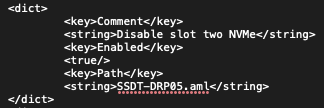
and replace the string with your SSDT patch's name.
P0SlX
on 23 Jul 2020
@P0SlX Thanks, it worked!
paajake
on 23 Jul 2020
Related issues
 rajibxo
·
7Comments
rajibxo
·
7Comments
 bnznamco
·
8Comments
bnznamco
·
8Comments
 larryare
·
8Comments
paajake
·
8Comments
larryare
·
8Comments
paajake
·
8Comments
 Raphencoder
·
6Comments
Raphencoder
·
6Comments
Most helpful comment
To disable disk on the origin PCI slot:
SSDT-DRP09.aml.zip
To disable disk on the second PCI slot:
SSDT-DRP05.aml.zip