Xdrip: Android 9 - xDrip+ - Miaomiao - BT disconnecting
Hello,
I did the update on my OnePlus6 to Android 9, since that, i hat oftan Bluetooth disconnection to my Miaomiao.
Since Android 9 i realy need to have GPS also active (my GPS problem under Android 8 are now wie 9 mutch less than before - but I don't have any option to change the GPS settings)
Bluethooth connection to Miaomia ofer xDrip+ is working fine,
BUT when i sit longer (I don't knwo how long 10-30 minutes +++) xDrip is loosing the connection to Miaomiao, and is not able to connet again (also not when he is deactivating and activation bluethooth) I need to go to Bluethooth scan on xdrip - klick Miaomiao and in 70% the connection is working again (the other 30% i need to go some steps with the smartphone, or do the task x tipes)
When i driving with the car, or make a walk, or play with the smartphone - I don't have the problems.
that are my bluetooth settings under xdrip (under Android is is showable for everyone)
(i need to translate back from German to English, so i hole i you know what i mean):
Bluetooth activation - ON
Bluetooth-Watchdog - ON
G5 ... - OFF
Closing GATT in not connection - ON
Use Scanning - ON
Trust Auto-Connect - ON
rest is OFF
Hopefully some of you can help me. - br Alexander
 Denksi
All 50 comments
try turning "use scanning" and "trust auto connect" off i dont have them on and havnt had issues for awhile
 Mr-Enigma
on 16 Oct 2018
Mr-Enigma
on 16 Oct 2018
i deaktivated it now, but i think i did it already....
i think the problem is not only by bluetooth, also by GPS, like i wrote, when the smartphone is not used he is loosing the connection.
I will inform how the status is tomorrw latest
Denksi
on 16 Oct 2018
when you have issue, could you please look in system status and check connection status? is it connected?
I am fighting with a bug now ans would like to know if other people see same issue. it seems xdrip thinks itnis connected but in fact not.
otherwise GATT close should be better oFF.
 gregorybel
on 18 Oct 2018
gregorybel
on 18 Oct 2018
Did you try locking the xDrip+ app in Recents? Test with that. I have the same setup except on Oreo 8.1 on Mi Max 3. Miui is very aggressive with Oreo on killing apps so you have to autostart them in app info settings and keep the important ones including magisk (for root) locked.
 opasha
on 24 Oct 2018
opasha
on 24 Oct 2018
Hello sorry for not informing long time, but i got a child :)
@ gregorybel:
under Android i don't see if Miaomiao is connectet, i just see Miaomiao under xDrip,
also when xDrip gets no data, and i click to Bluetooth surch, i see there my Miaomiao, and some secounds later all other Bluetooth devices, so it looks like that he is connected but in a sleep mode....
I will test the GATT - OFF, the next days and inform you.
@ opasha:
what you meen with locking xDrip in recents? xDrip has all Android Option for Battery Saving deactivated, and all possible permissions what xDrip can get.
xDrip is every Time open, when he is not getting the data .
Denksi
on 11 Jan 2019
This is happening to me too, seems similar to OP except I can go for many hours w/out a disconnect, seems to happen once every day or two?
- Android 9, patch level April 5, 2019
- Pixel 3 phone, Hardware vMP1.0
- xDrip v 14fecb8-2019.01.10
- Miaomiao (not sure how to check version info?)
Symptoms - able to connect and things seem fine, then after some time will show 'disconnect' in system status. Aggressive reconnect is on, so I see it trying to reconnect on it's own but it continues to fail. If I then 'Bluethooth Scan' and manually tap, it will sometimes start working again, although other times it takes a few times for this to work.
I"m a new user to all this so I don't have too many data points. Overall this isn't too big a deal during the day as I've been able to restart it, but it's very frustrating after I got to sleep as I'll then not get any data for that night.
 gooliegoogoo
on 4 Apr 2019
gooliegoogoo
on 4 Apr 2019
I just had this same problem for today after an Android 9 upgrade caused me to disconnect all day.
I fixed by doing:
xDrip+ -> Settings -> Less common settings -> Bluetooth settings -> Disable Trust Android Auto Connect -- Perhaps xDrip+ should query the android version and set this to disabled if it detects android 9.x?
 renegadeandy
on 21 Apr 2019
renegadeandy
on 21 Apr 2019
I did the same as @renegadeandy and my miaomiao reconnected within a few seconds.
_I upgraded my One Plus 3 to android 9 yesterday and was disconnected all night unknowingly._
 ahaverty
on 8 May 2019
ahaverty
on 8 May 2019
I was wrong, it's still disconnecting most nights and sometimes is very temperamental when trying to reconnect it.
ahaverty
on 14 May 2019
Hi, i exactly have the same issue with my oneplus5...
 JosephLaMule
on 14 May 2019
JosephLaMule
on 14 May 2019
I also try to analyse the Bluetooth-situation (on my oneplus 5 with 9.0.5, with blueReader and sweetreader), as I facing the same problems. Only way to safe reconnect the transmitters is to delete the the ram for the Bluetooth-App.
What i fear is, that Google Android has changed more than visible in the Bluetooth handling. The code is also not easy to examine, as it is spread in several classes.
Did someone try what happened under LineageOS 16 for the OnePlus-Devices? Maybe they have made the Bluetooth stuff more stable. If I did not find something what can do whithin xDrip, then I will try to switch to Lineage...
 MasterPlexus
on 14 May 2019
MasterPlexus
on 14 May 2019
@MasterPlexus Interesting. If it wasn't for @gooliegoogoo, I would have guessed that this is more of an OxygenOS Android 9 Beta problem.
Maybe we should start a list of devices, problems and workaround?
I've made a public form here (answers are public, but your email address is not recorded) https://forms.gle/hp3pbnzURAd4mgmv6
I've filled out my answer to get us started
ahaverty
on 14 May 2019
My questions about the bluetooth settings are taken from this helper doc https://github.com/NightscoutFoundation/xDrip/blob/master/Documentation/libre-fix-bt-connection-issues.md
I'm currently experimenting with solution 2, as I found solution 1 didn't fix my problems.
ahaverty
on 14 May 2019
Unfortunately I'm getting the same issues for solution #2.
I've noticed my miaomiao disconnects about an hour after I fall asleep and doesn't reconnect until I turn off and Bluetooth and turn it back on in the morning and then run a scan in xdrip.
Perhaps there's some kind of deep sleep mode in Android 9 that's knocking off Bluetooth connections?
ahaverty
on 16 May 2019
I just discovered this conversation, am having the exact same issue with Dexcom G6 on a Galaxy Note 9 after updating to Android 9. the "trust" BT option was turned on in my config, so I turned it off, will see what happens and report back.
 dwallersv
on 25 May 2019
dwallersv
on 25 May 2019
Well, that didn't take long.
Fail.
dwallersv
on 25 May 2019
https://github.com/NightscoutFoundation/xDrip/issues/891
See my post here. It will help you.
opasha
on 25 May 2019
@opasha I don't follow your post, which settings fixed the bluetooth issues for you?
ahaverty
on 28 May 2019
@ahaverty, my reference was for dexcom and android 9 issues, sorry for not being clear.
For miaomiao, make sure the following are ON:
1) Less common settings: aggressive service restarts
2) Less common settings/bluetooth settings: turn Bluetooth on, bluetooth watchdog, allow blucon unbonding
3) Less common settings/other misc options: run collector in foreground, battery optimization prompt, Samsung workarounds
Don't ask me why. Xdrip is buggy, but it works when you play around with random settings. Android 9 is a weird one, so leaving Samsung workarounds might be beneficial even if not using a Samsung device. I have a Xiaomi Mi Max 3 with android pie 9 AOSIP rom. Try these and report back.
Trust auto connect must always be off for any android 9 device. I've tested this countless times with different pie roms and GSIs.
opasha
on 28 May 2019
Thanks @opasha for clarifying, unfortunately I am currently on those exact settings for about a week and I'm still disconnecting every night. I've documented all the combinations I've tried in the form above. Glad to hear you've fixed your issues though.
ahaverty
on 28 May 2019
@ahaverty, the only thing I can think of is one plus phones changing their settings automatically when they charge due to their famous dash charging protocol. Not sure what gets optimized though. Maybe dive into xda and look for that? I'll look for you later today.
opasha
on 28 May 2019
One point I could say for the moment is: let run the oneplus 5 longer then one day without a reeboot then the disconnect issues start. For now, after a reeboot, and a fresh bound the readings are sufficient for one day... So maybe under pie the background jobs become upsed...
MasterPlexus
on 28 May 2019
Followup to my April 4th help post.
I've been able to get it reliably working on my Pixel 3 / Android 9 system (no resets or lost connections for the last 6 days+nights) by doing the following (some of which should have no effect on system stability but I include here to be complete):
- Android build is now at PQ3A.190505.002
Android security patch level: May 5th, 2019
Hard reset of the Miaomiao
- Using Rocktape to attach Miaomiao+sensor unit to my arm (Tagaderm worked as well)
- Stop Sensor / Start sensor for new sensors - Just once, for each new sensor.
- System Status > bluetooth pairing disabled
- Less Common Settings > Bluetooth
-- "Turn Bluetooth On" is the ONLY setting on - Less Common Settings > All Other Settings
-- Display Bridge Battery - ON
-- Store Sensor location... - ON
-- All other settings here - OFF
gooliegoogoo
on 28 May 2019
It looks like the people in this thread with non-oneplus phones no longer have issues. Perhaps this is a OnePlus Android 9 issue only.
@opasha I don't actually charge my phone overnight when the disconnecting occurs
ahaverty
on 29 May 2019
We do have issues with a Xiaomi Mi A2 for my wife.
We'll try the settings from two comments above and see what happens!
I've enabled Bluetooth connection logging in android dev options. I'll let you know if I find something.
 droyop
on 30 May 2019
droyop
on 30 May 2019
@droyop any rhythm to when it disconnects? I'm finding that it's about an hour and a half after I head to bed. I might test charging my phone overnight to see if it's some kind of secret power saver mode in Android 9.
ahaverty
on 30 May 2019
Thanks for the pointer... I've implemented the changes, and it seems to be working so far for the last few hours -- a big change.
Thank you so much!
Dave
On Thursday, May 30, 2019, 2:02:03 PM PDT, Alan Haverty notifications@github.com wrote:
@droyop any rhythm to when it disconnects? I'm finding that it's about an hour and a half after I head to bed. I might test charging my phone overnight to see if it's some kind of secret power saver mode in Android 9.
—
You are receiving this because you commented.
Reply to this email directly, view it on GitHub, or mute the thread.
dwallersv
on 1 Jun 2019
Hi! Due to the upgrade of phones to Android 9 (Huawei Honor 10 or Huawei Honor 9 (EMUI 9.0 + Android 9)) my xDrip does`t connect Bluetooth to Blucon. The main error – incorrectly entered password, while using LinkDluCon or Gimp connection with Blucon occurs. It is – incorrectly entered password. I can't even make the first Blucon/ xDrip connection. When I try on other mobile phone (Huawei with Android 7/8), everything works.
I performed all operations according to #486, etc..., but reconfiguration of Bluetooth parameters does not exclude an error. Of course reinstalling to the old xDrip app does not help.
Had the problem even after I set a new sensor and new battery in Blucon.
Please help in configuring the phones or xDrip+
 Artchu
on 6 Jun 2019
Artchu
on 6 Jun 2019
@Artchu , just try to delete the Cache and App-ram of the Bluetooth app. in xdrip delete the transmitter under status. then go to Android-settings, then Apps. Click on all Apps, upper right the three dots, activate system apps. go to the App "Bluetooth" and click it, then Ram and then delete ram. After that retry the connection.
under Android pie the bluetooth stack is very unstable in my eyes, and if it was sucked up, then the only way to refresh is to delete the app-ram and cache to bring it back to work...
MasterPlexus
on 6 Jun 2019
Hi all, I have consistently proven on my OnePlus 3 that disconnects don't happen overnight when the phone is plugged into a charger.
I'm still getting disconnects about an hour after I set the phone down on the bedside table and stop using it, without it charging.
Android 9 (at least on one plus) must have some new change in Bluetooth management for phones when they're not in use and not charging.
ahaverty
on 10 Jun 2019
Hi ahaverty,
I recently got a OnePlus 7 and use it with my G6 and xDrip+. I also experience the nightly dropouts after ~1 hour. When a wake up the display, the values come flying in. Could you find a solution?
 loop2016
on 1 Aug 2019
loop2016
on 1 Aug 2019
Glad you asked, because I believe I've recently found the cause, and forgot to post here!
Settings > apps and notifications > special app access > battery optimisation > (burger bar top right) advanced optimisation
Now you should see two options.
I had deep optimisation disabled, which I believe most people here already had too.
But.. "sleep standby optimisation" was enabled for me. Since disabling, I've not had the overnight disconnects!!
If you read the description for that toggle, it makes total sense. I just don't understand how OnePlus can sneak that in, in such a hard to find menu, without telling people 🤦♂️
Let me know if it works for you, we could probably add it to the device suggestions readme here if so.
ahaverty
on 2 Aug 2019
Thank you for your quick and kind response.
After I researched this topic for the last couple of days, I had already found this secret "sleep standby optimisation" setting. But the night after deactivating it, I still got the infamous dropout. Completely frustrated I started switching every button and pulling every string related to bluetooth, xDrip+ and the google location service I could find. And boom the nightly dropout disappeared. One of the things I did, can be found in Settings > System > Developers options > "Standby apps"
Another thing I changed, can be found here. It's a complicated way to change the hidden setting ".Settings$HighPowerApplicationsActivity" for certain apps and services. I defined exemptions for Bluetooth, Location Service and xDrip+.
Unfortunately, after changing so much at once, it's hard for me to tell which setting made the big difference. Afterwards I can only confirm that re-activating the mentioned "sleep standby optimisation" will instantly produce dropouts with the screen turned off. So it is indeed crucial for the functionality of xDrip+. So please add this the the readme.
Thank you for your help and I hope this discussion will benefit other OnePlus diabetics.
loop2016
on 3 Aug 2019
@loop2016 since my comments, I've been having disconnects during the day, every few hours. I tried your steps, but found xDrip was greyed out in standby apps for some reason. What exactly did you enable in standby apps?
ahaverty
on 10 Aug 2019
This is 90% of the reason I use my phone. I might just start shopping for a different brand, as this is so frustrating.
ahaverty
on 10 Aug 2019
Hi,
Thats what i did .
I bought a cheap Xiaomi on Amazon .
He works 24/7
Laurent
Le sam. 10 août 2019 à 09:43, Alan Haverty notifications@github.com a
écrit :
This is 90% of the reason I use my phone. I might just start shopping for
a different brand, as this is so frustrating.—
You are receiving this because you commented.
Reply to this email directly, view it on GitHub
https://github.com/NightscoutFoundation/xDrip/issues/628?email_source=notifications&email_token=AK6JC4YLMPOELF4V7PRPKBTQDZWQ5A5CNFSM4F3XNEJ2YY3PNVWWK3TUL52HS4DFVREXG43VMVBW63LNMVXHJKTDN5WW2ZLOORPWSZGOD4AIHMY#issuecomment-520127411,
or mute the thread
https://github.com/notifications/unsubscribe-auth/AK6JC44S6B5ZBFPBL4CRRBLQDZWQ5ANCNFSM4F3XNEJQ
.
JosephLaMule
on 10 Aug 2019
@ahaverty
I am guessing the "standby apps" setting isn't doing much. I checked my phone again and my settings are also greyed out. Sorry for misleading you.
But I am pretty sure that the ".Settings$HighPowerApplicationsActivity" setting and the easier to find "sleep standby optimisation" in the battery settings as well as the normal "battery optimisation" in the battery settings (xDrip+ set to "Don't optimise") are the three important ones. This trinity is keeping my Bluetooth running very night and when my display is off longer than sixty minutes.
@JosephLaMule
I prefer not to carry another device with me. I hope our discoveries will help you with your OnePlus.
loop2016
on 16 Aug 2019
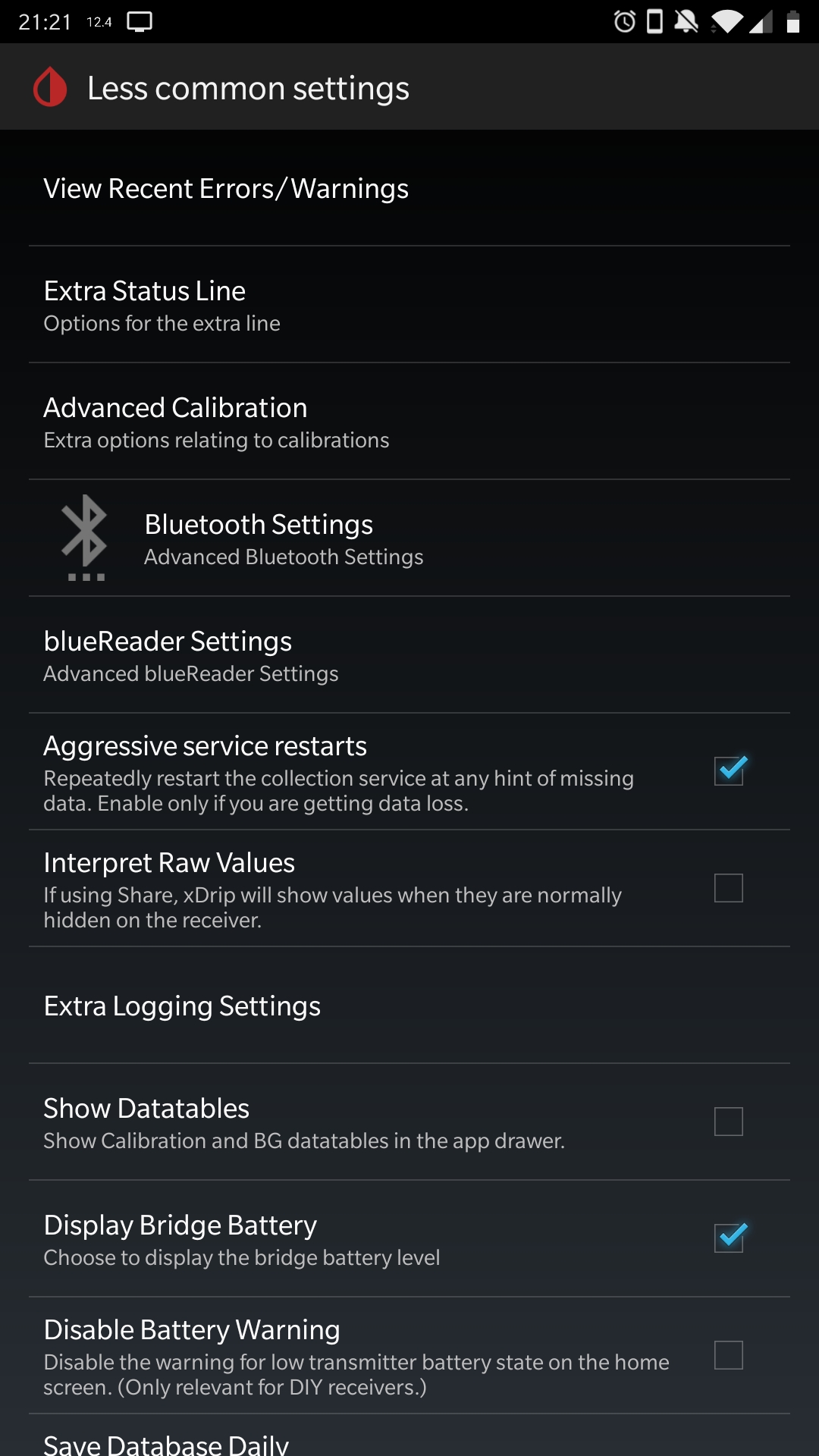
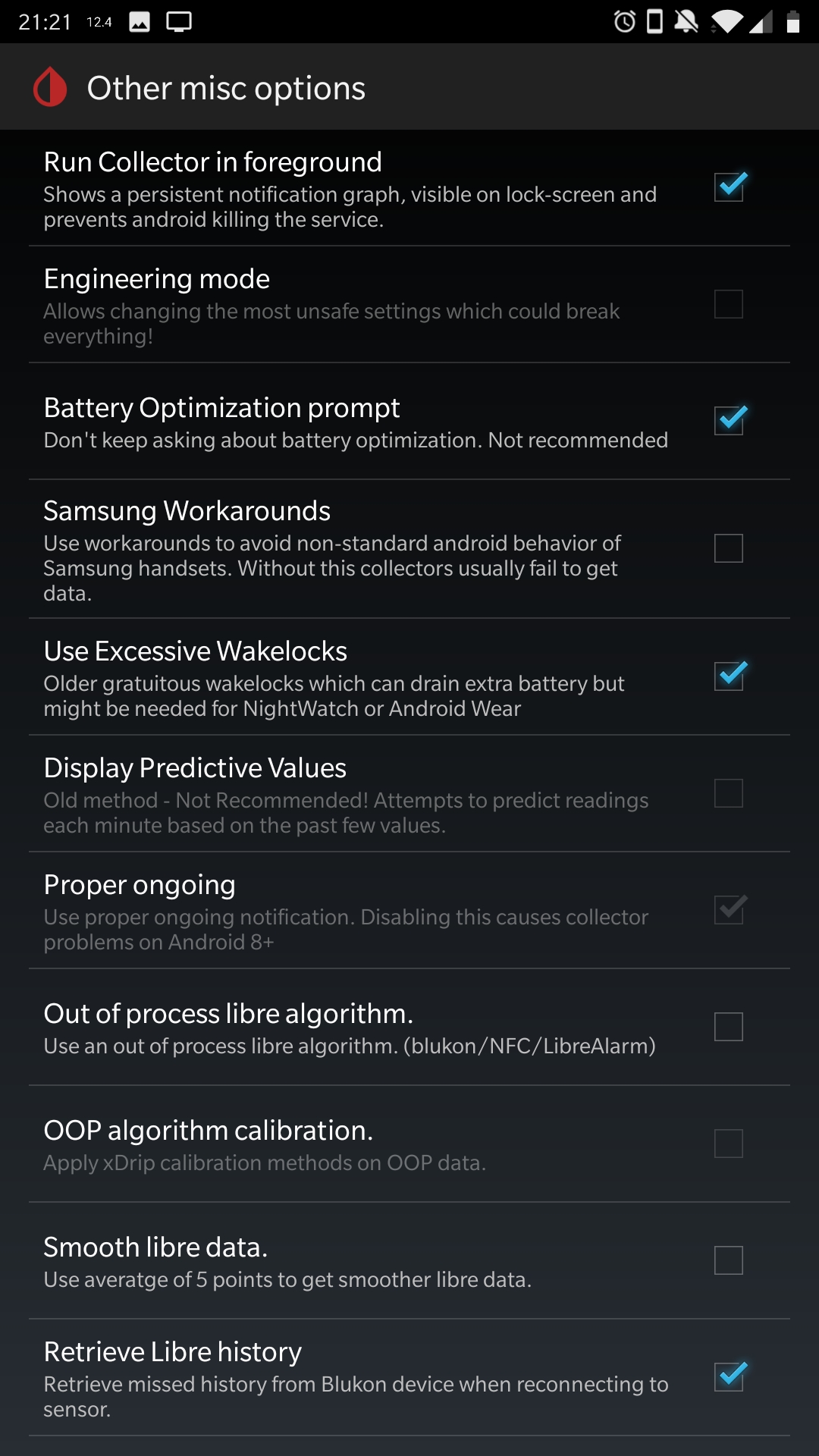
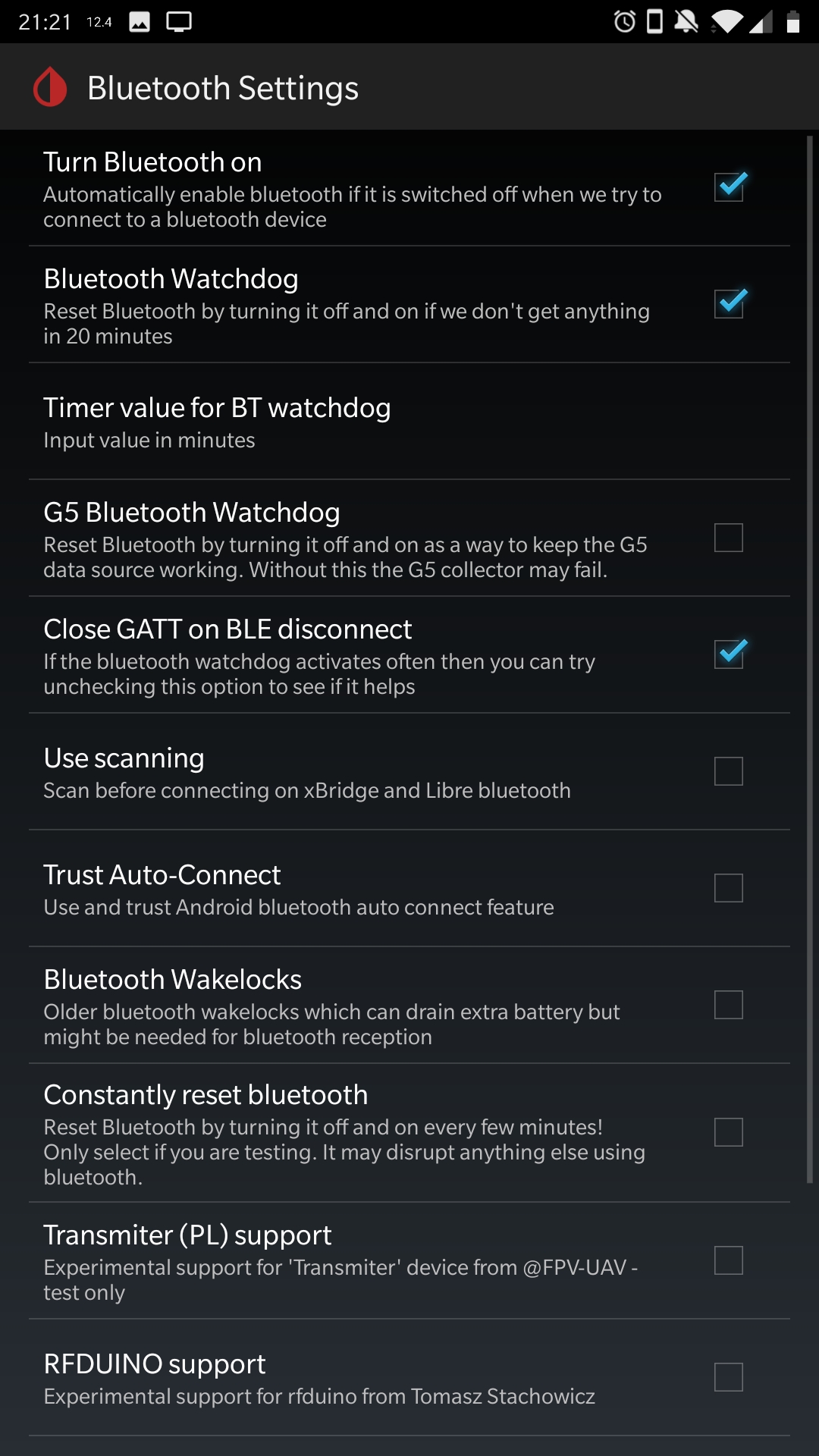
Hi all,
I applied @loop2016 suggestions, but still had the issues. But I've since
changed some settings in xDrip, and have been running smoothly for about a
week now. I think it's a combination of all of those suggestions + the
changes I made to xDrip (@loop2016 perhaps you could compare your settings
with mine to find the common denominator).

ahaverty
on 17 Aug 2019
@ahaverty
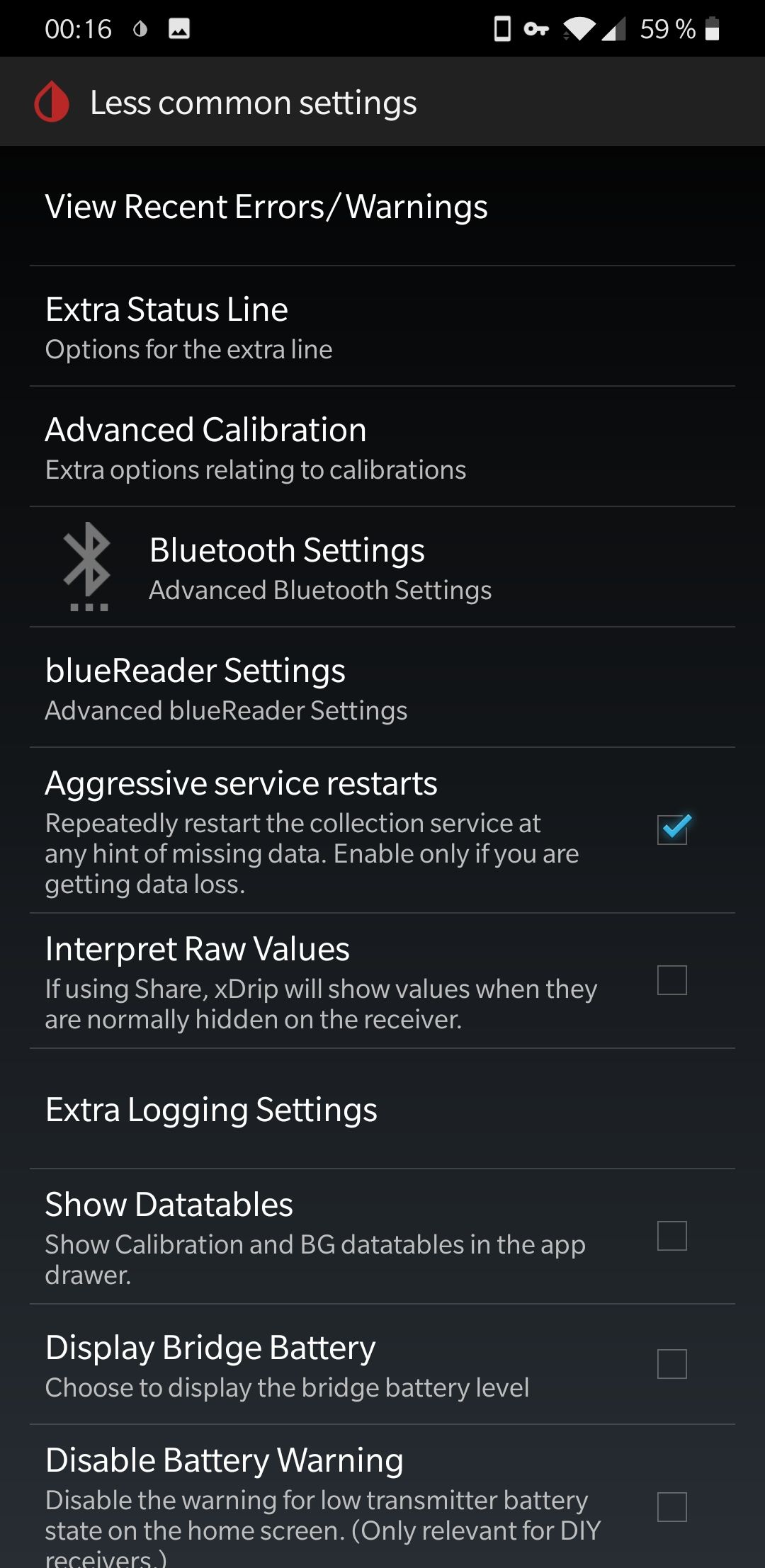
yes, xDrip+ also needs some tweaking.
In the "Other misc options" I use the "Samsung Workaround" and don't use "Excessive Wakelocks". My "Bluetooth Settings" look like yours, but I have "Close GATT on BLE disconnect" disabled.
I assume, these options are therefore unrelated to our problem.
Perhaps the "Bluetooth Watchdog" alone does the trick.
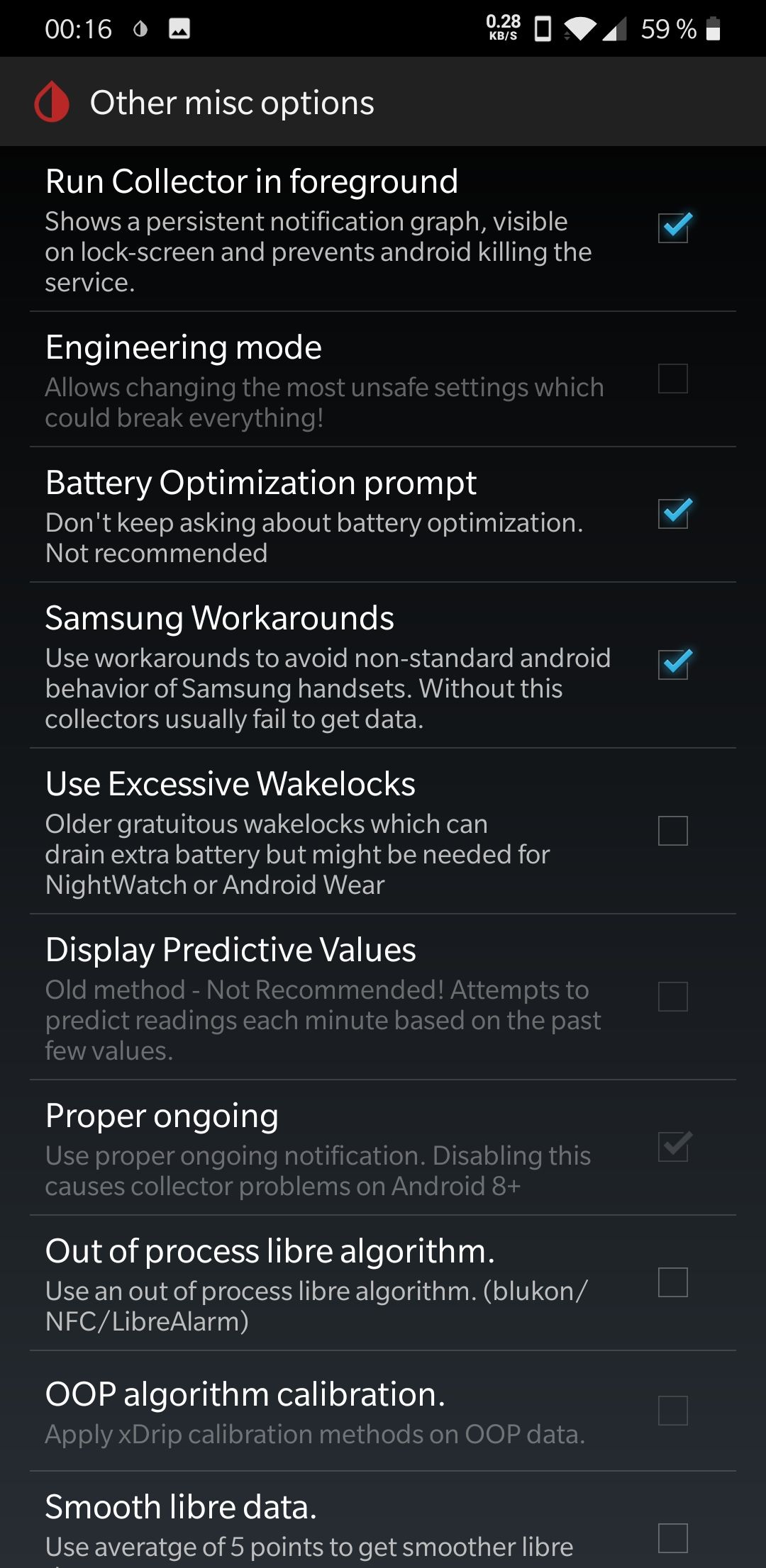
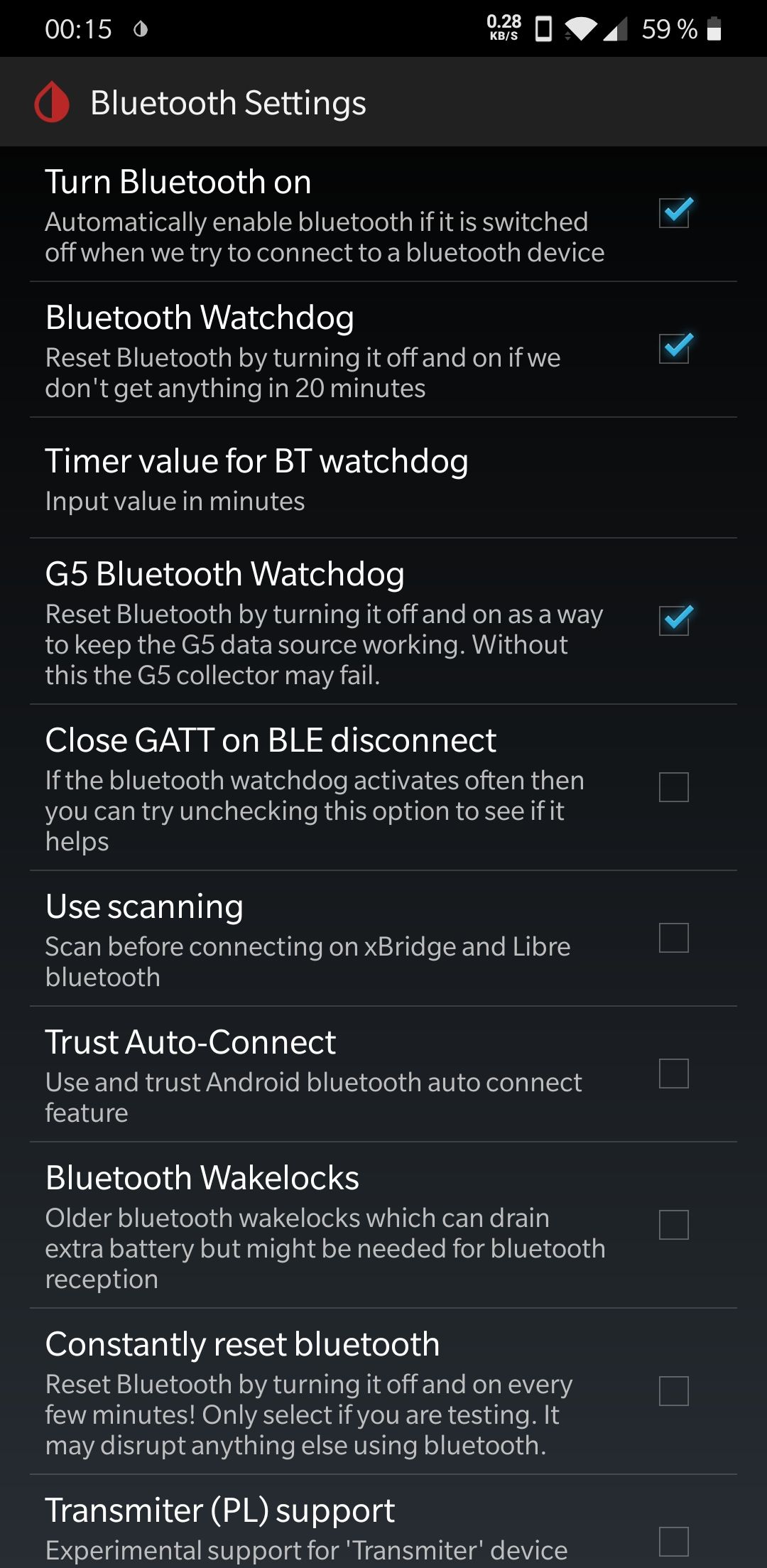
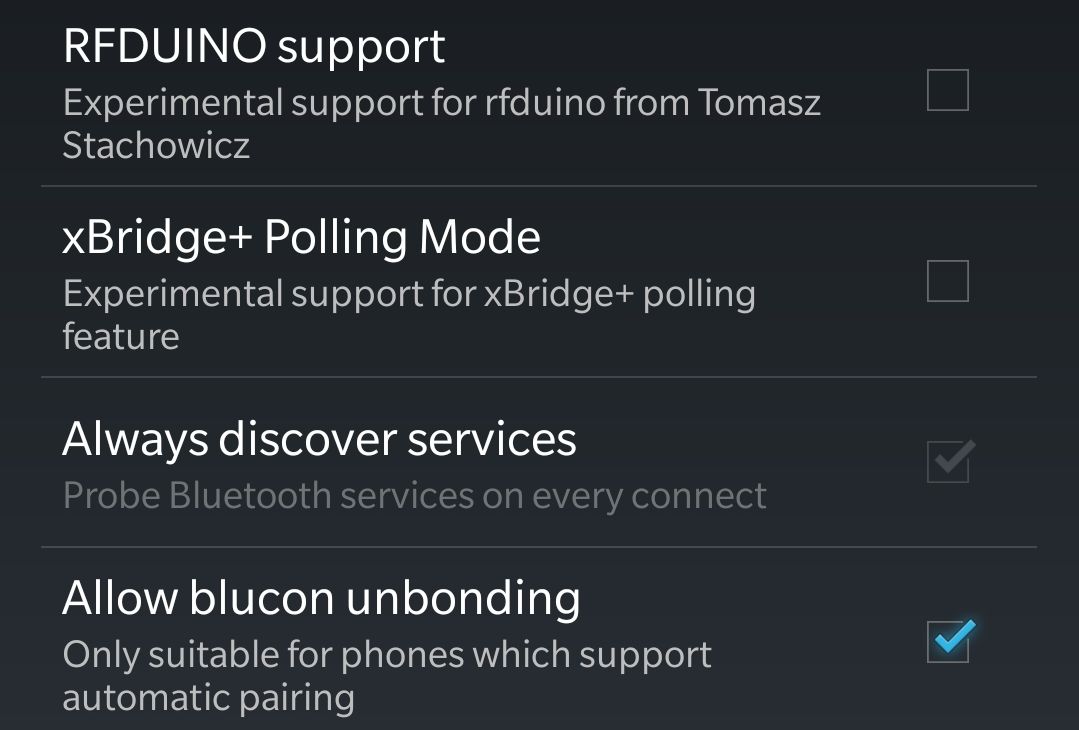
loop2016
on 18 Aug 2019
I too had issues until i copied @ahaverty settings above. Great to have screenshots to easily copy.
No more issues :). Awesome!
Thank you, and thanks to @loop2016 for supplying this initially.
 lucajettmitchell
on 25 Aug 2019
lucajettmitchell
on 25 Aug 2019
Greetings. I wanted to add, that using the latest nightly version of xdrip+ is mandatory to avoid the nightly dropouts. I recently reset my phone and forgot to change the update settings accordingly: The dropouts reappeared.
Another discovery: The dropouts can only occur, if you keep your phone away from the charger. While charging the infamous "bluetooth sleep" is not engaged. An essential information for valid testing.
loop2016
on 30 Oct 2019
Other smartphone manufacturers seem to move in the same direction as OnePlus.
I stumbled upon this website, It identifies the problems that occur when phones are too ambitious to save energy, ranks the blamable manufacturers and shows workarounds.
loop2016
on 21 Nov 2019
Sorry for taking over this thread, but I am still quite involved in this issue and made a pleasant discovery.
I still use the latest Android 9 on my OnePlus 7. Latest xDrip+ nightly (22nd Dec 2019).
Several weeks ago my nightly dropouts reappeared. They occur 60 minutes after not using the phone, only when the phone is not being charged. I deactivated all the battery saving options I could find (more information here). I used the xDrip+ settings recommended for Dexcom G6 devices on the AndroidAPS Website. I also tried the xDrip+ settings from @ahaverty, but they also didn't prevent the dropouts.
I experimented with logcat and recorded a log during the night. After one hour screen off time the phone stops receiving glucose values and drops the following status:
D/OHPD (1207): receiver ACTION_DEVICE_IDLE_MODE_CHANGED
D/OHPD (1207): Welcome to device idle
D/BtGatt.ScanManager (3459): Restrict to BLEscan in device idle
With this status message in mind, I found this related thread. @jamorham recommended to activate "Minimize scanning" in the G5/G6 Debug Settings. This did the trick!
Happy holidays.
loop2016
on 23 Dec 2019
Hi! I've got the same problem with a OP6, Android 10.. it somehow disconnet from miaomiao and can't connect back again.. I need to always clear the cache of the Bluetooth app, switch on GPS, forget the device and reconnect it again.. and sometimes this doesn't work neither.. the version I'm using..
I tried pretty much all possible setting variations.. but nothing!!!
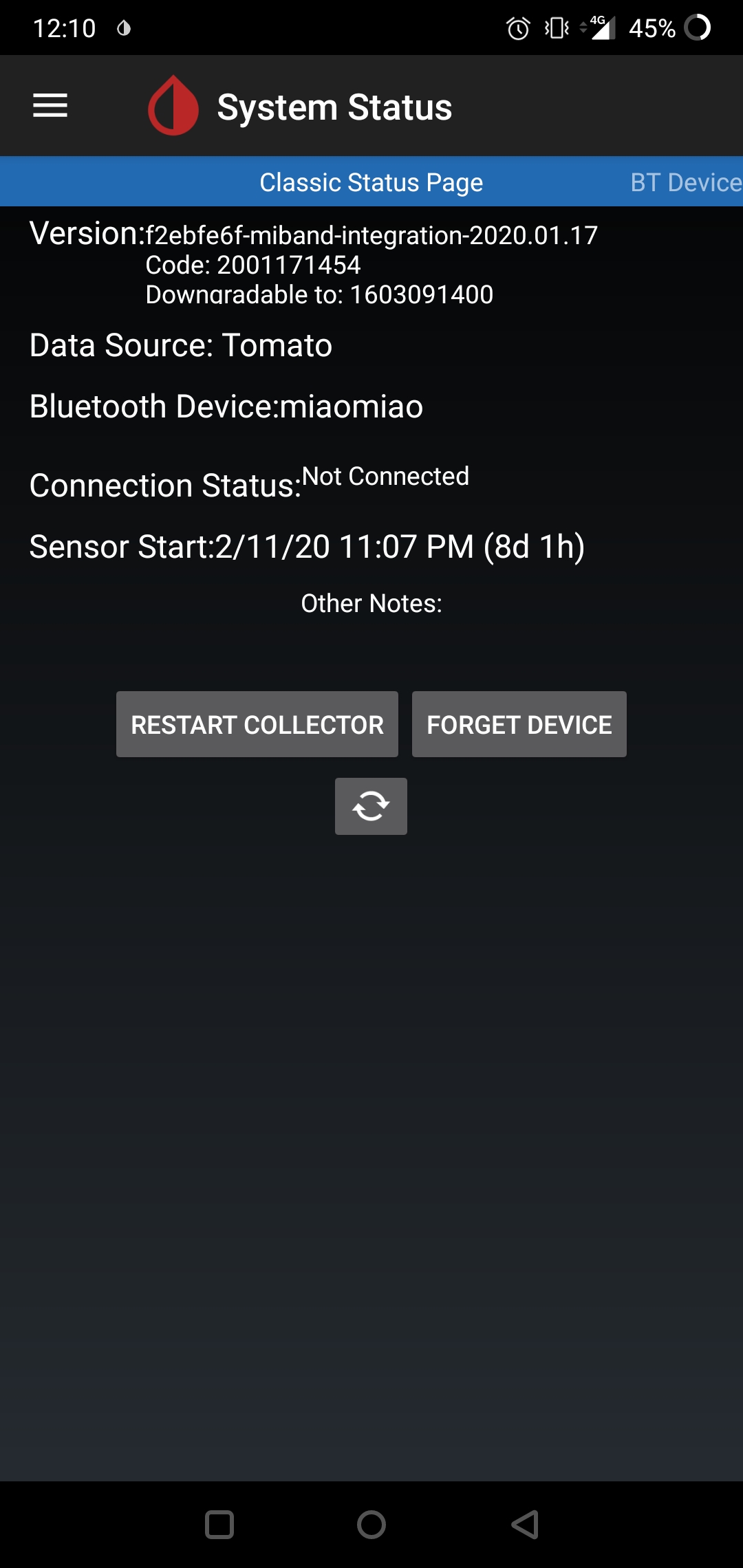
 Liknus
on 20 Feb 2020
Liknus
on 20 Feb 2020
Hi! I've got the same problem with a OP6, Android 10.. it somehow disconnet from miaomiao and can't connect back again.. I need to always clear the cache of the Bluetooth app, switch on GPS, forget the device and reconnect it again.. and sometimes this doesn't work neither.. the version I'm using..
I tried pretty much all possible setting variations.. but nothing!!!
Any luck yet? Facing similar issues (new user)
 hokavs
on 11 Mar 2020
hokavs
on 11 Mar 2020
No! Still disconnecting.. xDrip+ is no more usefull for me if BT connection goes down continuously!
Liknus
on 25 May 2020
Ich kann zwar nicht sicher sagen, dass es hilft.
Nach meinem Android 10 Update musste ich xdrip und bluetooth aus dem energiesparen entfernen und für xdrip und Bluetooth " hintergrunddaten aktivieren
" in den app einstellungen um wieder ein stabiles werteauslesen zu erhalten.vielleicht hilft dies auch hier
 mk886714
on 25 May 2020
mk886714
on 25 May 2020
Ich kann zwar nicht sicher sagen, dass es hilft.
Nach meinem Android 10 Update musste ich xdrip und bluetooth aus dem energiesparen entfernen und für xdrip und Bluetooth " hintergrunddaten aktivieren
" in den app einstellungen um wieder ein stabiles werteauslesen zu erhalten.vielleicht hilft dies auch hier
English pls!
My german is high school grade. :)
How did you activate those settings? Within xdrip or in Android settings?
Liknus
on 25 May 2020
I can't say for sure that it helps.
After my Android 10 update I had to remove xdrip and bluetooth from energy saving and activate background data for xdrip and bluetooth
"in the app settings to get a stable readout of values again. Maybe this helps here too
Al settings in Android
mk886714
on 25 May 2020
Solved - on my Oneplus 6 that drops the Bluetooth connection. After all the battery optimization and background check settings above (and thanks to the Xdrip screenshots from @ahaverty) settings/less common settings/Bluetooth/ turning off the Bluetooth watchdog worked for me.
 RS-Spoilers
on 26 Aug 2020
RS-Spoilers
on 26 Aug 2020
Related issues
 malloy139
·
6Comments
malloy139
·
6Comments
 TecMunky
·
12Comments
TecMunky
·
12Comments
 dideldum
·
7Comments
opasha
·
9Comments
dideldum
·
7Comments
opasha
·
9Comments
 anjalileah
·
4Comments
anjalileah
·
4Comments
Most helpful comment
I just had this same problem for today after an Android 9 upgrade caused me to disconnect all day.
I fixed by doing:
xDrip+ -> Settings -> Less common settings -> Bluetooth settings -> Disable Trust Android Auto Connect -- Perhaps xDrip+ should query the android version and set this to disabled if it detects android 9.x?