Xdrip: 10.28.2018 Nightly Wear OS Null Null Complication problem
SOLVED: See my last post. JUST ADD A CALIBRATION on your phone app.
Current setup: Mi Max 3 (phone) + Ticwatch Pro, Ticwatch E (Wear OS watches) + MiaoMiao (cgm bluetooth transmitter) + xDrip+ (app)
Currently on 10.28.2018 nightly. Before this update, Ticwatch Pro (Wear OS 2.1) and Mi Max 3 (Oreo 8.1) had zero issues with the complications refreshing properly. The xDrip+ app watchfaces sync and work correctly. I use Pear Modular and A/D watch faces with no problems when adding the xDrip+ complication in previous versions. However, on this nightly, there's the famous null null issue. As you know, you can't rewind the wear OS xDrip+ download. Whenever I update the xDrip+ app on my phone, it's done with the internal updater of the xDrip+ app. Then, we get the toast to update our xDrip+ Wear OS app, so we un-install and re-install the latest wear version. I think the problem is with the latest wear version? Any advice is helpful. Thank you.
I've rebooted both watch and phone. I've installed the previous 10.23.2018 (this causes mismatch with the wear app), thus the app update toast returns. Nothing works to rectify the Null Null Complication problem.
 opasha
All 9 comments
Just tested my Ticwatch E (Wear OS 2.1), which has the older wear 10.23.2018 xDrip+ app installed (it's telling me to update to 10.28.2018 version), but it's showing the correct complication data for xDrip+ on Pear Modular watch face (still have 10.28.2018 on phone). I'm connected to both watches currently. So, I know for a fact that it's the 10.28.2018 xDrip+ Wear OS app. Please update. Thank you.
opasha
on 29 Oct 2018
Nothing has changed in the wear component between 23rd - 28th Oct and other changes were extremely minimal and I doubt very much would be related.
 jamorham
on 30 Oct 2018
jamorham
on 30 Oct 2018
Well, it caused an issue. I've read through all the old null null threads. Someone referred it to accidental reversion of code (it happens). Would you mind uploading the previous wear OS apk of xdrip so I can test? I'd appreciate it.
opasha
on 30 Oct 2018
All the code is available simply by clicking the Code tab on github, you can review the changes made between versions. The APK files are generated directly from the github commits with automatic continuous integration. I very much doubt anything unexpected has happened.
jamorham
on 30 Oct 2018
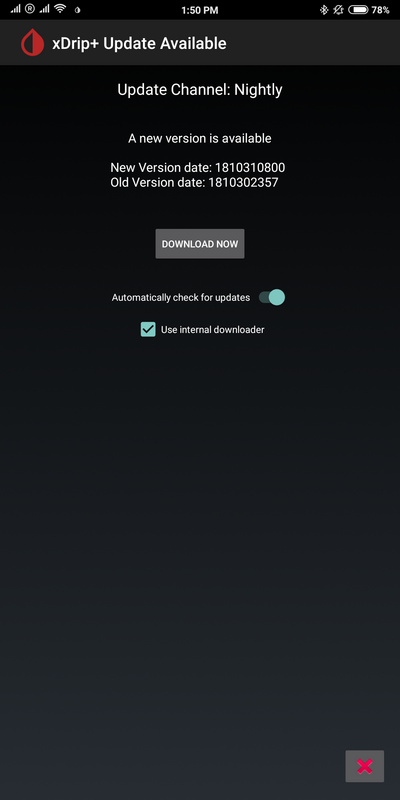
Your update even says 10.31 within the updater but the file downloaded every time says 10.30. Not that it matters, but it also fools the internal updater thinking 10.30 is older even though it's the same file unless you didn't upload it correctly. I'd appreciate if we could get this figured out together 😊👊🏼.


opasha
on 31 Oct 2018
Just an update. Seems the latest version (10.30) as seen above on my two watches fixed the complication issue with a new sensor. I'll update if anything changes. Thank you.
opasha
on 31 Oct 2018
I figured it out! 😄😄😄. Updated to latest November 2 nightly and null null Complication issue returned on both watches. Xdrip watch faces as before had no issues.
The SIMPLE FIX is to ADD a single CALIBRATION (the same reasoning as starting a new sensor where you are forced to add 2 calibrations). Please mention this fix to everyone on Android Wear. 👍🏼
opasha
on 4 Nov 2018
I added this solution here: https://github.com/gregorybel/xDrip/blob/gregorybel-update-docu/Documentation/WatchGuide.md
thanks!
 gregorybel
on 6 Nov 2018
gregorybel
on 6 Nov 2018
Hi,
I'm running into this same null complication issue on my Fossil Gen 5, running xDrip+ version e14bae1-2020.07.13, watch face "Next Gen Digital" and using the xDrip complication. xDrip+ is using my Nightscout website as a data source. When I try to enter a calibration to work around this issue, I get the "impossible slope" error message. Any ideas?
 daniel2887
on 17 Oct 2020
daniel2887
on 17 Oct 2020
Related issues
 opalex84
·
14Comments
opalex84
·
14Comments
 arsinn
·
10Comments
arsinn
·
10Comments
 TecMunky
·
12Comments
TecMunky
·
12Comments
 malloy139
·
6Comments
malloy139
·
6Comments
 xannasavin
·
10Comments
xannasavin
·
10Comments
Most helpful comment
I added this solution here: https://github.com/gregorybel/xDrip/blob/gregorybel-update-docu/Documentation/WatchGuide.md
thanks!