Xaringan: Customizing output R code chunk
I'm trying to customize a css file but I'm not able to customize the output of an R chunk. I'm not an expert of CSS but I don't find the right target class to customize it.
In my css file there is:
.remark-code{
  margin: 0 2px;
  padding: 0 5px;
  white-space: nowrap;
  border: 0.5px solid rgba(160, 160, 160, 0.534);
  border-radius: 3px;
  font-size: 16px;
}
but with an R chunk I obtain:
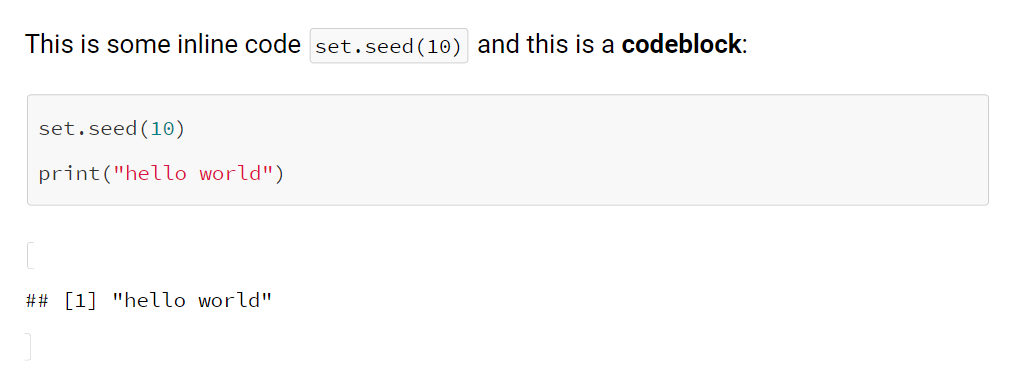
I would like to customize the output in a similar way.
Thanks!
 filippogambarota
All 7 comments
What do you want to customize? This does not become really clear from your question.
The [1] "hello world" ?
In your preferred browser, use the "developer tools" and you will be able to find the respective CSS class.
(Also you might want to ask such questions on SO in the future, since more people are watching the questions than in the Github repo. If so, try always to include a reproducible example in the post so that others can help you more easily.)
 pat-s
on 5 Jan 2020
pat-s
on 5 Jan 2020
Sorry for have not been clear. I would like to customize the output of the R chunk so:
## [1] "hello world"
With the css snippet that I've reported you should be able to reproduce the code appearance. In my xaringan html file I see the markdown code so for this reason, I'm not able to find the tag for customizing the output.
filippogambarota
on 5 Jan 2020
I still do not know what you want to do.
Also you posted a screenshot which is not a reprex that one can copy/paste. It is exactly about not having to retype code ;) In your case a small .Rmd with an additional screenshot would have helped.
remark-code is the class for code appearance and .hljs-github .hljs is responsible for code highlighting and the background color.
.hljs-github .hljs {
display: block;
overflow-x: auto;
padding: .5em;
color: #333;
background: #f8f8f8;
}
code output is not highlighted - besides this, all code parts inherit from remark-code.
pat-s
on 6 Jan 2020
Sorry, maybe it's my bad English but in my mind is very clear :)
I've posted a css snippet that I've used for my xaringan presentation (the screenshot). This snippet is related to the code block background as in the image. Usually, in Rmarkdown document even the output of the r chunk has a background color similar to the code block itself. I would simply customize the background of the chunk result but I don't know the correct class to do it.
filippogambarota
on 6 Jan 2020
@filippogambarota: What stops you from providing the full content of both, your CSS and your Rmd files in a copy/pasteable fashion? Maybe the way you (try to) load your CSS is wrong and it has no effect at all, maybe you think you re-define a class but leave out a line but instead of overwriting it, you expand it, practically leaving it unmodified.
And did you check your resulting presentation in your browser using development tools as suggested before? If so? What do you get there? What would you have expected instead?
If you are uncertain about your written communication in English, provide as many details as you can in another language you might be more familiar with: code. :wink:
 mschilli87
on 6 Jan 2020
mschilli87
on 6 Jan 2020
````r
title: "Presentation Ninja"
subtitle: "⚔
with xaringan"
author: "Yihui Xie"
institute: "RStudio, Inc."
date: "2016/12/12 (updated: r Sys.Date())"
output:
xaringan::moon_reader:
css: my-css.css
lib_dir: libs
nature:
highlightStyle: github
highlightLines: true
countIncrementalSlides: false
```{r setup, include=FALSE}
options(htmltools.dir.version = FALSE)
# R Code

```{r comment='#'}
print("hello world")
````
CSS (my-css.css)
.remark-code {
  display: block;
  overflow-x: auto;
  padding: .5em;
  color: #333;
  background: #f8f8f8;
}
Output

pat-s
on 6 Jan 2020
Thank for your time! Sorry, the next time I will be more clear. I thought that the provided information was enough for understanding my problem.
filippogambarota
on 6 Jan 2020
Related issues
 richardohrvall
·
3Comments
richardohrvall
·
3Comments
 emitanaka
·
3Comments
emitanaka
·
3Comments
 DavisVaughan
·
3Comments
DavisVaughan
·
3Comments
 slowkow
·
3Comments
slowkow
·
3Comments
 vcannataro
·
4Comments
vcannataro
·
4Comments
Most helpful comment
````r
title: "Presentation Ninja"
subtitle: "⚔
with xaringan"
author: "Yihui Xie"
institute: "RStudio, Inc."
date: "2016/12/12 (updated:
r Sys.Date())"output:
xaringan::moon_reader:
css: my-css.css
lib_dir: libs
nature:
highlightStyle: github
highlightLines: true
countIncrementalSlides: false
```{r setup, include=FALSE}
options(htmltools.dir.version = FALSE)
````
CSS (my-css.css)
Output