Problem
The rendered presentation has errors:
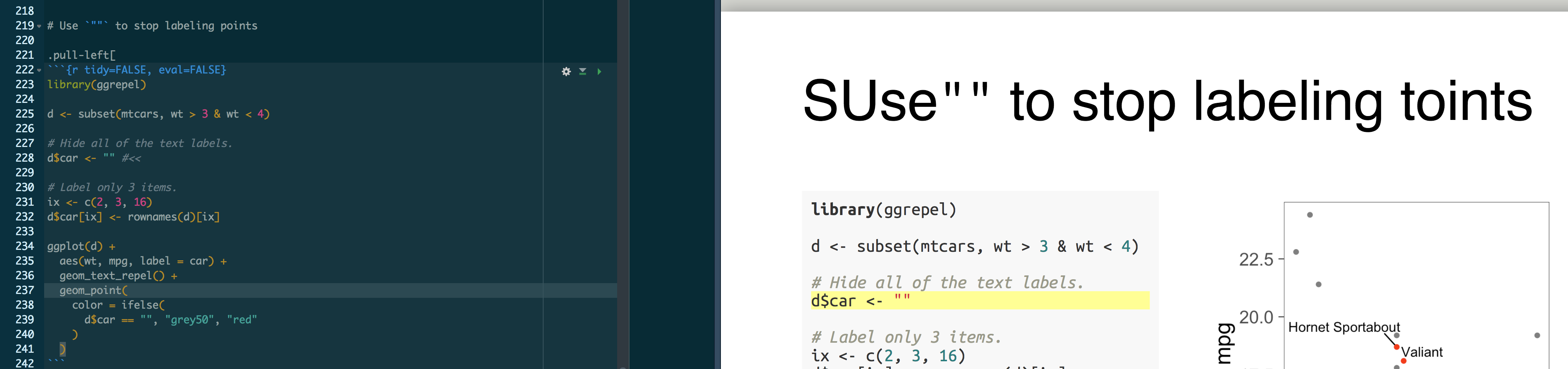
It says SUse instead of Use and toints instead of points.
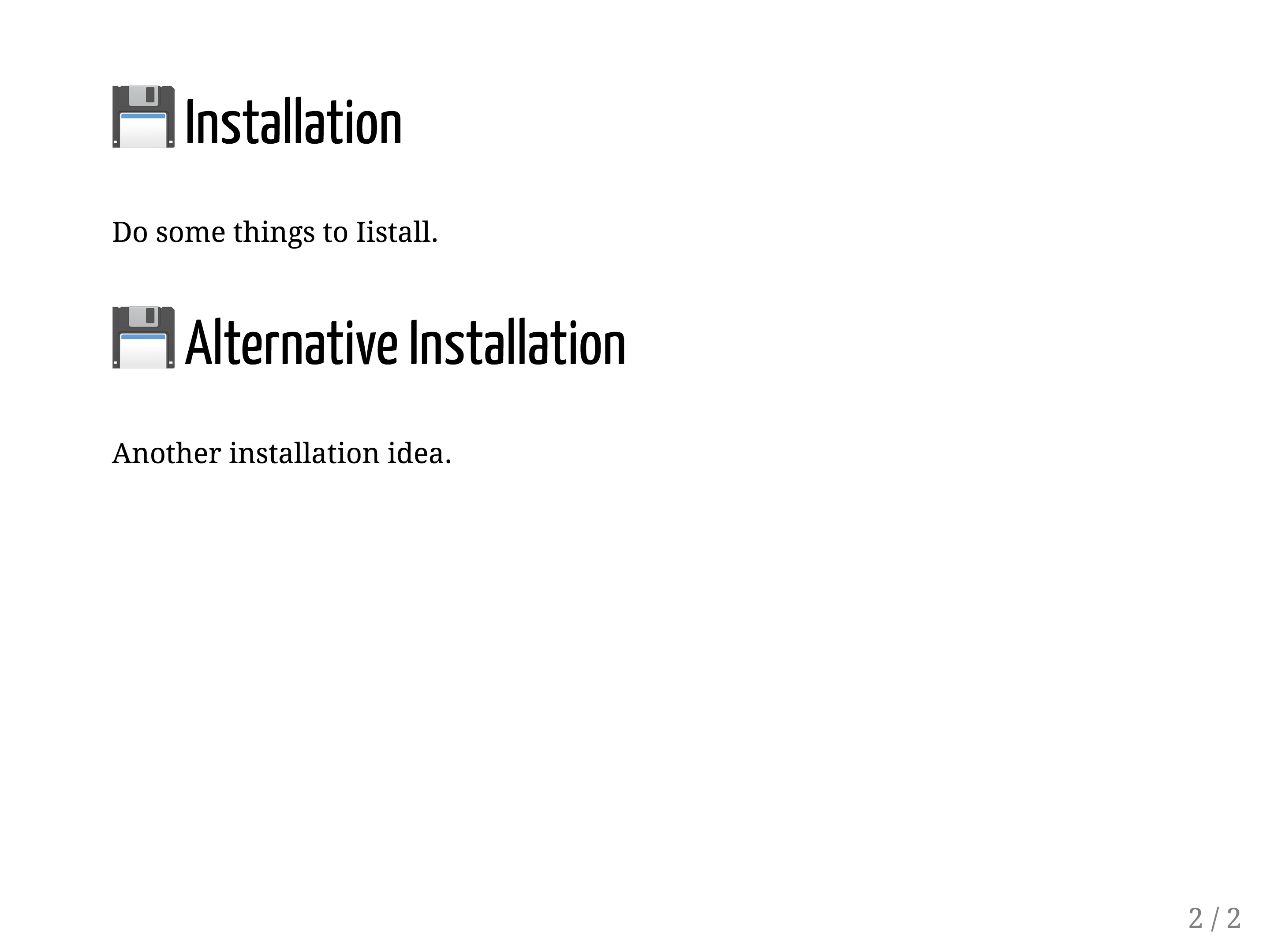
Another example:

The 💾 emoji is not placed in the correct location.
This error is due to pasting emoji into my presentation. However, after I delete the emoji, the error persists. This leads me to believe that there is a cache that keeps the error even after fixing the text.
I am now stuck with a broken presentation, and I can't find any way to fix it, even after deleting large chunks of text and typing them again manually.
I think [this issue] is probably the same as the one I'm encountering in xaringan, but I can't be sure. I don't know how to debug this, so any tips would be very much appreciated.
In the future, I'll have to remember to never paste emoji into a presentation.
Questions
Is there a cache that I can delete? Maybe this will fix it?
Is there a "safe" way to use emoji in the presentation? Without breaking the rendering?
Session info -------------
 setting  value
 version  R version 3.5.1 (2018-07-02)
 system   x86_64, darwin17.6.0
 ui       RStudio (1.2.774)
 language (EN)
 collate  en_US.UTF-8
 tz       America/New_York
 date     2018-07-17

Packages -------------------
 package    * version    date       source
 animation  * 2.5        2017-03-30 CRAN (R 3.5.0)
 assertthat   0.2.0      2017-04-11 CRAN (R 3.5.0)
 backports    1.1.2      2017-12-13 CRAN (R 3.5.0)
 base       * 3.5.1      2018-07-04 local
 bindr        0.1.1      2018-03-13 CRAN (R 3.5.0)
 bindrcpp     0.2.2      2018-03-29 CRAN (R 3.5.0)
 colorout   * 1.2-0      2018-04-26 Github (jalvesaq/colorout@c42088d)
 colorspace   1.3-2      2016-12-14 CRAN (R 3.5.0)
 compiler     3.5.1      2018-07-04 local
 cranlogs     2.1.0      2015-12-07 CRAN (R 3.5.1)
 crayon       1.3.4      2017-09-16 CRAN (R 3.5.0)
 curl         3.2        2018-03-28 CRAN (R 3.5.0)
 datasets   * 3.5.1      2018-07-04 local
 devtools   * 1.13.5     2018-02-18 CRAN (R 3.5.0)
 digest       0.6.15     2018-01-28 CRAN (R 3.5.0)
 dplyr        0.7.5      2018-05-19 cran (@0.7.5)
 evaluate     0.10.1     2017-06-24 CRAN (R 3.5.0)
 ggplot2    * 2.2.1.9000 2018-06-19 Github (tidyverse/ggplot2@1c09bae)
 ggrepel    * 0.8.0.9000 2018-07-16 local
 git2r        0.21.0     2018-01-04 CRAN (R 3.5.0)
 glue         1.3.0      2018-07-17 Github (tidyverse/glue@66de125)
 graphics   * 3.5.1      2018-07-04 local
 grDevices  * 3.5.1      2018-07-04 local
 grid         3.5.1      2018-07-04 local
 gridExtra  * 2.3        2017-09-09 CRAN (R 3.5.0)
 gtable       0.2.0      2016-02-26 CRAN (R 3.5.0)
 htmltools    0.3.6      2017-04-28 CRAN (R 3.5.0)
 httr         1.3.1      2017-08-20 CRAN (R 3.5.0)
 jsonlite     1.5        2017-06-01 CRAN (R 3.5.0)
 knitr        1.20       2018-02-20 CRAN (R 3.5.0)
 labeling     0.3        2014-08-23 CRAN (R 3.5.0)
 lazyeval     0.2.1      2017-10-29 CRAN (R 3.5.0)
 magrittr     1.5        2014-11-22 CRAN (R 3.5.0)
 memoise      1.1.0      2017-04-21 CRAN (R 3.5.0)
 methods    * 3.5.1      2018-07-04 local
 munsell      0.5.0      2018-06-12 cran (@0.5.0)
 pillar       1.2.3      2018-05-25 CRAN (R 3.5.0)
 pkgconfig    2.0.1      2017-03-21 CRAN (R 3.5.0)
 plyr         1.8.4      2016-06-08 CRAN (R 3.5.0)
 purrr        0.2.5      2018-05-29 cran (@0.2.5)
 R6           2.2.2      2017-06-17 CRAN (R 3.5.0)
 Rcpp         0.12.17    2018-05-18 cran (@0.12.17)
 remedy       0.0.0.9600 2018-05-22 Github (ThinkR-open/remedy@4e9aa66)
 rlang        0.2.1      2018-05-30 CRAN (R 3.5.0)
 rmarkdown    1.10       2018-06-11 cran (@1.10)
 rprojroot    1.3-2      2018-01-03 CRAN (R 3.5.0)
 rstudioapi   0.7        2017-09-07 CRAN (R 3.5.0)
 scales     * 0.5.0.9000 2018-06-19 Github (hadley/scales@80fe94c)
 sitools    * 1.4        2012-08-22 CRAN (R 3.5.1)
 stats      * 3.5.1      2018-07-04 local
 stringi      1.2.2      2018-05-02 cran (@1.2.2)
 stringr      1.3.1      2018-05-10 cran (@1.3.1)
 tibble       1.4.2      2018-01-22 CRAN (R 3.5.0)
 tidyselect   0.2.4      2018-02-26 CRAN (R 3.5.0)
 tools        3.5.1      2018-07-04 local
 utils      * 3.5.1      2018-07-04 local
 withr        2.1.2      2018-03-15 CRAN (R 3.5.0)
 xaringan     0.7.1      2018-07-16 Github (yihui/xaringan@ab9f05b)
 xfun         0.3        2018-07-06 cran (@0.3)
 yaml         2.1.19     2018-05-01 cran (@2.1.19)
 slowkow
All 3 comments
I was able to salvage my document by removing all emojis with this Python script:
#!/usr/bin/env python
# Remove emoji from a text file and print it to stdout.
import re
import sys
def remove_emoji(string):
emoji_pattern = re.compile("["
u"\U0001F600-\U0001F64F" # emoticons
u"\U0001F300-\U0001F5FF" # symbols & pictographs
u"\U0001F680-\U0001F6FF" # transport & map symbols
u"\U0001F1E0-\U0001F1FF" # flags (iOS)
u"\U00002702-\U000027B0"
u"\U000024C2-\U0001F251"
"]+", flags=re.UNICODE)
return emoji_pattern.sub(r'', string)
if __name__ == '__main__':
text = open(sys.argv[1]).read()
text = remove_emoji(text)
print(text)
Save the script into a file called remove-emoji.py and then run:
python remove-emoji.py your-file.Rmd > your-fixed-file.Rmd
Thanks to [this answer] on stackoverflow for saving the day!
slowkow
on 17 Jul 2018
I've also seen similar issues when trying to use emoji directly in the source code (see the word "install" under first heading below).
In general, it's best to use the HTML Unicode expression rather than the emoji character itself. In this case, the Unicode representation is \U1F4BE and in HTML it's 💾.
I made an RStudio Addin called ermoji specifically because I ran into these issues and didn't have an easy way to lookup the Unicode representation. To get to HTML, replace \U with &#x and add the semicolon at the end.
## 💾 Installation

Do some things to install.

## 💾 Alternative Installation

Another installation idea.
Edit: forgot to link to addin https://github.com/gadenbuie/ermoji
 gadenbuie
on 17 Jul 2018
gadenbuie
on 17 Jul 2018
@slowkow I used @hadley's emo R package to insert emojis. They worked beautifully with Xaringan.
E.g., r emo::ji("smiley")
 jananiravi
on 26 Jul 2018
jananiravi
on 26 Jul 2018
Related issues
 grawil
·
4Comments
grawil
·
4Comments
 bnicenboim
·
5Comments
bnicenboim
·
5Comments
 tcgriffith
·
4Comments
tcgriffith
·
4Comments
 vcannataro
·
4Comments
vcannataro
·
4Comments
 ndphillips
·
3Comments
ndphillips
·
3Comments
Most helpful comment
I've also seen similar issues when trying to use emoji directly in the source code (see the word "install" under first heading below).
In general, it's best to use the HTML Unicode expression rather than the emoji character itself. In this case, the Unicode representation is
\U1F4BEand in HTML it's💾.I made an RStudio Addin called ermoji specifically because I ran into these issues and didn't have an easy way to lookup the Unicode representation. To get to HTML, replace
\Uwith
nd add the semicolon at the end.Edit: forgot to link to addin https://github.com/gadenbuie/ermoji